US10025864B2 - Systems and methods for tethering devices - Google Patents
Systems and methods for tethering devicesDownload PDFInfo
- Publication number
- US10025864B2 US10025864B2US14/696,011US201514696011AUS10025864B2US 10025864 B2US10025864 B2US 10025864B2US 201514696011 AUS201514696011 AUS 201514696011AUS 10025864 B2US10025864 B2US 10025864B2
- Authority
- US
- United States
- Prior art keywords
- mobile device
- user equipment
- option
- user
- content
- Prior art date
- Legal status (The legal status is an assumption and is not a legal conclusion. Google has not performed a legal analysis and makes no representation as to the accuracy of the status listed.)
- Active
Links
Images



Classifications
- G06F17/30867—
- G—PHYSICS
- G06—COMPUTING OR CALCULATING; COUNTING
- G06F—ELECTRIC DIGITAL DATA PROCESSING
- G06F16/00—Information retrieval; Database structures therefor; File system structures therefor
- G06F16/90—Details of database functions independent of the retrieved data types
- G06F16/95—Retrieval from the web
- G06F16/953—Querying, e.g. by the use of web search engines
- G06F16/9535—Search customisation based on user profiles and personalisation
- G—PHYSICS
- G06—COMPUTING OR CALCULATING; COUNTING
- G06F—ELECTRIC DIGITAL DATA PROCESSING
- G06F16/00—Information retrieval; Database structures therefor; File system structures therefor
- G06F16/40—Information retrieval; Database structures therefor; File system structures therefor of multimedia data, e.g. slideshows comprising image and additional audio data
- G06F16/43—Querying
- G06F16/435—Filtering based on additional data, e.g. user or group profiles
- G06F17/30029—
- G—PHYSICS
- G06—COMPUTING OR CALCULATING; COUNTING
- G06F—ELECTRIC DIGITAL DATA PROCESSING
- G06F3/00—Input arrangements for transferring data to be processed into a form capable of being handled by the computer; Output arrangements for transferring data from processing unit to output unit, e.g. interface arrangements
- G06F3/01—Input arrangements or combined input and output arrangements for interaction between user and computer
- G06F3/048—Interaction techniques based on graphical user interfaces [GUI]
- G06F3/0481—Interaction techniques based on graphical user interfaces [GUI] based on specific properties of the displayed interaction object or a metaphor-based environment, e.g. interaction with desktop elements like windows or icons, or assisted by a cursor's changing behaviour or appearance
- G06F3/04817—Interaction techniques based on graphical user interfaces [GUI] based on specific properties of the displayed interaction object or a metaphor-based environment, e.g. interaction with desktop elements like windows or icons, or assisted by a cursor's changing behaviour or appearance using icons
- G—PHYSICS
- G06—COMPUTING OR CALCULATING; COUNTING
- G06F—ELECTRIC DIGITAL DATA PROCESSING
- G06F3/00—Input arrangements for transferring data to be processed into a form capable of being handled by the computer; Output arrangements for transferring data from processing unit to output unit, e.g. interface arrangements
- G06F3/01—Input arrangements or combined input and output arrangements for interaction between user and computer
- G06F3/048—Interaction techniques based on graphical user interfaces [GUI]
- G06F3/0481—Interaction techniques based on graphical user interfaces [GUI] based on specific properties of the displayed interaction object or a metaphor-based environment, e.g. interaction with desktop elements like windows or icons, or assisted by a cursor's changing behaviour or appearance
- G06F3/0482—Interaction with lists of selectable items, e.g. menus
- G—PHYSICS
- G06—COMPUTING OR CALCULATING; COUNTING
- G06N—COMPUTING ARRANGEMENTS BASED ON SPECIFIC COMPUTATIONAL MODELS
- G06N5/00—Computing arrangements using knowledge-based models
- G06N5/04—Inference or reasoning models
- G—PHYSICS
- G06—COMPUTING OR CALCULATING; COUNTING
- G06Q—INFORMATION AND COMMUNICATION TECHNOLOGY [ICT] SPECIALLY ADAPTED FOR ADMINISTRATIVE, COMMERCIAL, FINANCIAL, MANAGERIAL OR SUPERVISORY PURPOSES; SYSTEMS OR METHODS SPECIALLY ADAPTED FOR ADMINISTRATIVE, COMMERCIAL, FINANCIAL, MANAGERIAL OR SUPERVISORY PURPOSES, NOT OTHERWISE PROVIDED FOR
- G06Q30/00—Commerce
- G—PHYSICS
- G06—COMPUTING OR CALCULATING; COUNTING
- G06Q—INFORMATION AND COMMUNICATION TECHNOLOGY [ICT] SPECIALLY ADAPTED FOR ADMINISTRATIVE, COMMERCIAL, FINANCIAL, MANAGERIAL OR SUPERVISORY PURPOSES; SYSTEMS OR METHODS SPECIALLY ADAPTED FOR ADMINISTRATIVE, COMMERCIAL, FINANCIAL, MANAGERIAL OR SUPERVISORY PURPOSES, NOT OTHERWISE PROVIDED FOR
- G06Q30/00—Commerce
- G06Q30/02—Marketing; Price estimation or determination; Fundraising
- G06Q30/0241—Advertisements
- G—PHYSICS
- G06—COMPUTING OR CALCULATING; COUNTING
- G06Q—INFORMATION AND COMMUNICATION TECHNOLOGY [ICT] SPECIALLY ADAPTED FOR ADMINISTRATIVE, COMMERCIAL, FINANCIAL, MANAGERIAL OR SUPERVISORY PURPOSES; SYSTEMS OR METHODS SPECIALLY ADAPTED FOR ADMINISTRATIVE, COMMERCIAL, FINANCIAL, MANAGERIAL OR SUPERVISORY PURPOSES, NOT OTHERWISE PROVIDED FOR
- G06Q50/00—Information and communication technology [ICT] specially adapted for implementation of business processes of specific business sectors, e.g. utilities or tourism
- G06Q50/01—Social networking
- H—ELECTRICITY
- H04—ELECTRIC COMMUNICATION TECHNIQUE
- H04M—TELEPHONIC COMMUNICATION
- H04M1/00—Substation equipment, e.g. for use by subscribers
- H04M1/72—Mobile telephones; Cordless telephones, i.e. devices for establishing wireless links to base stations without route selection
- H04M1/724—User interfaces specially adapted for cordless or mobile telephones
- H04M1/72403—User interfaces specially adapted for cordless or mobile telephones with means for local support of applications that increase the functionality
- H04M1/72409—User interfaces specially adapted for cordless or mobile telephones with means for local support of applications that increase the functionality by interfacing with external accessories
- H04M1/72412—User interfaces specially adapted for cordless or mobile telephones with means for local support of applications that increase the functionality by interfacing with external accessories using two-way short-range wireless interfaces
- H—ELECTRICITY
- H04—ELECTRIC COMMUNICATION TECHNIQUE
- H04M—TELEPHONIC COMMUNICATION
- H04M1/00—Substation equipment, e.g. for use by subscribers
- H04M1/72—Mobile telephones; Cordless telephones, i.e. devices for establishing wireless links to base stations without route selection
- H04M1/724—User interfaces specially adapted for cordless or mobile telephones
- H04M1/72448—User interfaces specially adapted for cordless or mobile telephones with means for adapting the functionality of the device according to specific conditions
- H—ELECTRICITY
- H04—ELECTRIC COMMUNICATION TECHNIQUE
- H04M—TELEPHONIC COMMUNICATION
- H04M1/00—Substation equipment, e.g. for use by subscribers
- H04M1/72—Mobile telephones; Cordless telephones, i.e. devices for establishing wireless links to base stations without route selection
- H04M1/724—User interfaces specially adapted for cordless or mobile telephones
- H04M1/72469—User interfaces specially adapted for cordless or mobile telephones for operating the device by selecting functions from two or more displayed items, e.g. menus or icons
- H04M1/7253—
- H04M1/72563—
- H04M1/72583—
Definitions
- a usermay command a smartphone via voice control by interacting with a personal assistant or knowledge navigator, and may like to command other electronic user equipment in a similar way.
- existing user equipment systemssuch as a television connected to a set-top box have limited hardware support for accepting voice commands or receiving Internet data.
- Some modifications to these existing user equipment systemsmay allow an exterior microphone to be connected. However, such modifications tend to be inefficient and often require the users to have extensive technical knowledge.
- systems and methodsare described herein for controlling a first device using a second device. More specifically, systems and methods are described herein for extending input/output (“I/O”) option functionality from a first device to a second device.
- I/Oinput/output
- a first devicemay access the voice recognition system of a second device and that that voice recognition system to receive commands from a user.
- a user equipment devicemay detect that a mobile device is within a predetermined proximity. For example, the user equipment device may detect the presence of a user who ordinarily carries the mobile device. In another example, the user equipment device may utilize local or global positioning mechanisms to triangulate the position of the mobile device and compare it with the known position of the user equipment device itself. In yet another example, the user equipment device may detect the mobile device in response to establishing a bi-directional communication between the user equipment device and the mobile device.
- the user equipment devicemay determine an input/output (I/O) option of the mobile device in response to detecting the mobile device, in which the I/O option of the mobile device is associated with a functionality of the mobile device.
- the microphone I/O option of the mobile devicemay be associated with a verbal input functionality of the mobile device.
- the user equipment devicemay then generate for display an icon corresponding to the I/O option, in which the icon is selectable to extend a functionality of the user equipment device with the I/O option. For example, in response to determining that a mobile device has a microphone, the user equipment device may generate an on-screen prompt to a user to use the microphone to issue commands to the user equipment device.
- An individual iconmay be generated for display for each I/O option of the mobile device, or a generic icon may be generated for display for all I/O options that exist on the mobile device.
- the iconmay indicate the type, the functionality, the availability, or the accessibility of the I/O option of the mobile device.
- the user equipmentmay then receive a user selection of the icon generated for display that corresponds to the I/O option of the mobile device.
- the user equipment devicemay communicate data with the selected I/O option, for example, to control the selected I/O option of the mobile device in a master-slave architecture.
- the user devicemay determine a mobile device offers a plurality of I/O options (e.g., a microphone, a camera, a speaker, a cellular modem, a Bluetooth transceiver, an accelerometer, a gyroscope, or any other sensors or actuators that are available onboard the mobile device) and access one or more of the I/O options.
- the I/O option of the mobile devicemay be determined by extracting a device profile from the mobile device, i.e., without active user input or intervention.
- the user equipmentmay use various techniques to determine I/O options and/or whether or not the options are available to the user equipment device. For example, the user equipment device may determine what I/O options are available on a mobile device and/or whether or not the user equipment device may access these options by requesting information associated with the I/O option from the user (e.g., a type of the I/O option). Alternatively, the user equipment device may query the mobile device without requesting any user input and automatically determine what I/O options are available on a mobile device and/or whether or not the user equipment device may access these options.
- information associated with the I/O option from the usere.g., a type of the I/O option.
- the user equipment devicemay query the mobile device without requesting any user input and automatically determine what I/O options are available on a mobile device and/or whether or not the user equipment device may access these options.
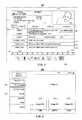
- FIG. 1shows an illustrative example of a display screen for use in accessing media content in accordance with some embodiments of the disclosure
- FIG. 2shows another illustrative example of a display screen used access media content in accordance with some embodiments of the disclosure
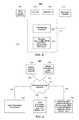
- FIG. 3is a block diagram of an illustrative user equipment device in accordance with some embodiments of the disclosure.
- FIG. 4is a block diagram of an illustrative media system in accordance with some embodiments of the disclosure.
- FIG. 5shows an illustrative system architecture including user equipment and a mobile device in accordance with some embodiments of the disclosure
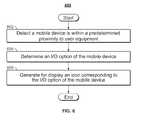
- FIG. 6is a flowchart of illustrative steps for controlling mobile devices with user equipment in accordance with some embodiments of the disclosure.
- FIG. 7is another flowchart of illustrative steps for controlling mobile devices with user equipment in accordance with some embodiments of the disclosure.
- references to “mobile device” and “user equipment (device)”are made in the present disclosure for simplicity.
- the inventive concept and embodiments disclosed hereinare applicable to any first device and any second device without departing from the scope of the present disclosure, where the first and second device can be mobile devices, user equipment devices, portable electronic devices, or any other computing devices.
- a “mobile device”may be any portable or handheld computing devices that host a plurality of input/output functionalities or options.
- a smartphone, a smart tablet, and a personal digital assistantare all examples of a mobile device as used herein.
- An “input/output (I/O) option” of a mobile devicemay be any dedicated input/output, networking, communications, and sensor-actuator modules onboard the mobile device that perform specific functions. These dedicated modules may be implemented in hardware, software, firmware, or any combination thereof.
- One device being within a “proximity” of another devicemay refer to a physical or a logical proximity. For example, a mobile device may be physically located near the user equipment to be in the proximity of the user equipment. As another example, the mobile device may be in communication with the user equipment via a direct communication link, rather than by multiple links spanning across switches and routing components. The mobile device in direct communication with the user equipment may be considered to be in logical proximity with the user equipment.
- the amount of content available to users in any given content delivery systemcan be substantial. Consequently, many users desire a form of media guidance through an interface that allows users to efficiently navigate content selections and easily identify content that they may desire.
- An application that provides such guidanceis referred to herein as an interactive media guidance application or, sometimes, a media guidance application or a guidance application.
- Interactive media guidance applicationsmay take various forms depending on the content for which they provide guidance.
- One typical type of media guidance applicationis an interactive television program guide.
- Interactive television program guides(sometimes referred to as electronic program guides) are well-known guidance applications that, among other things, allow users to navigate among and locate many types of content or media assets.
- Interactive media guidance applicationsmay generate graphical user interface screens that enable a user to navigate among, locate and select content.
- the terms “media asset” and “content”should be understood to mean an electronically consumable user asset, such as television programming, as well as pay-per-view programs, on-demand programs (as in video-on-demand (VOD) systems), Internet content (e.g., streaming content, downloadable content, Webcasts, etc.), video clips, audio, content information, pictures, rotating images, text documents, playlists, websites, articles, books, electronic books, blogs, advertisements, chat sessions, social media, applications, games, and/or any other media or multimedia and/or combination of the same.
- Guidance applicationsalso allow users to navigate among and locate content.
- multimediashould be understood to mean content that utilizes at least two different content forms described above, for example, text, audio, images, video, or interactivity content forms. Content may be recorded, played, displayed or accessed by user equipment devices, but can also be part of a live performance.
- Computer readable mediaincludes any media capable of storing data.
- the computer readable mediamay be transitory, including, but not limited to, propagating electrical or electromagnetic signals, or may be non-transitory including, but not limited to, volatile and non-volatile computer memory or storage devices such as a hard disk, floppy disk, USB drive, DVD, CD, media cards, register memory, processor caches, Random Access Memory (“RAM”), etc.
- the phrase “user equipment device,” “user equipment,” “user device,” “electronic device,” “electronic equipment,” “media equipment device,” or “media device”should be understood to mean any device for accessing the content described above, such as a television, a Smart TV, a set-top box, an integrated receiver decoder (IRD) for handling satellite television, a digital storage device, a digital media receiver (DMR), a digital media adapter (DMA), a streaming media device, a DVD player, a DVD recorder, a connected DVD, a local media server, a BLU-RAY player, a BLU-RAY recorder, a personal computer (PC), a laptop computer, a tablet computer, a WebTV box, a personal computer television (PC/TV), a PC media server, a PC media center, a hand-held computer, a stationary telephone
- the user equipment devicemay have a front facing screen and a rear facing screen, multiple front screens, or multiple angled screens.
- the user equipment devicemay have a front facing camera and/or a rear facing camera.
- usersmay be able to navigate among and locate the same content available through a television. Consequently, media guidance may be available on these devices, as well.
- the guidance providedmay be for content available only through a television, for content available only through one or more of other types of user equipment devices, or for content available both through a television and one or more of the other types of user equipment devices.
- the media guidance applicationsmay be provided as on-line applications (i.e., provided on a web-site), or as stand-alone applications or clients on user equipment devices.
- Various devices and platforms that may implement media guidance applicationsare described in more detail below.
- the phrase “media guidance data” or “guidance data”should be understood to mean any data related to content or data used in operating the guidance application.
- the guidance datamay include program information, guidance application settings, user preferences, user profile information, media listings, media-related information (e.g., broadcast times, broadcast channels, titles, descriptions, ratings information (e.g., parental control ratings, critic's ratings, etc.), genre or category information, actor information, logo data for broadcasters' or providers' logos, etc.), media format (e.g., standard definition, high definition, 3D, etc.), advertisement information (e.g., text, images, media clips, etc.), on-demand information, blogs, websites, and any other type of guidance data that is helpful for a user to navigate among and locate desired content selections.
- media-related informatione.g., broadcast times, broadcast channels, titles, descriptions, ratings information (e.g., parental control ratings, critic's ratings, etc.), genre or category information, actor information, logo data for broadcasters' or providers' logos, etc
- FIGS. 1-2show illustrative display screens that may be used to provide media guidance data and media assets.
- the display screens shown in FIGS. 1-2may be implemented on any suitable user equipment device or platform. While the displays of FIGS. 1-2 are illustrated as full screen displays, they may also be fully or partially overlaid over content being displayed.
- a usermay indicate a desire to access content information by selecting a selectable option provided in a display screen (e.g., a menu option, a listings option, an icon, a hyperlink, etc.) or pressing a dedicated button (e.g., a GUIDE button) on a remote control or other user input interface or device.
- a selectable optionprovided in a display screen
- a dedicated buttone.g., a GUIDE button
- the media guidance applicationmay provide a display screen with media guidance data organized in one of several ways, such as by time and channel in a grid, by time, by channel, by source, by content type, by category (e.g., movies, sports, news, children, or other categories of programming), or other predefined, user-defined, or other organization criterion.
- wayssuch as by time and channel in a grid, by time, by channel, by source, by content type, by category (e.g., movies, sports, news, children, or other categories of programming), or other predefined, user-defined, or other organization criterion.
- FIG. 1shows illustrative grid program listings display 100 arranged by time and channel that also enables access to different types of content in a single display.
- Display 100may include grid 102 with: (1) a column of channel/content type identifiers 104 , where each channel/content type identifier (which is a cell in the column) identifies a different channel or content type available; and (2) a row of time identifiers 106 , where each time identifier (which is a cell in the row) identifies a time block of programming.
- Grid 102also includes cells of program listings, such as program listing 108 , where each listing provides the title of the program provided on the listing's associated channel and time.
- a usercan select program listings by moving highlight region 110 .
- Information relating to the program listing selected by highlight region 110may be provided in program information region 112 .
- Region 112may include, for example, the program title, the program description, the time the program is provided (if applicable), the channel the program is on (if applicable), the program's rating, and other desired information.
- Non-linear programmingmay include content from different content sources including on-demand content (e.g., VOD), Internet content (e.g., streaming media, downloadable media, etc.), locally stored content (e.g., content stored on any user equipment device described above or other storage device), or other time-independent content.
- on-demand contente.g., VOD
- Internet contente.g., streaming media, downloadable media, etc.
- locally stored contente.g., content stored on any user equipment device described above or other storage device
- On-demand contentmay include movies or any other content provided by a particular content provider (e.g., HBO On Demand providing “The Sopranos” and “Curb Your Enthusiasm”).
- HBO ON DEMANDis a service mark owned by Time Warner Company L.P. et al. and THE SOPRANOS and CURB YOUR ENTHUSIASM are trademarks owned by the Home Box Office, Inc.
- Internet contentmay include web events, such as a chat session or Webcast, or content available on-demand as streaming content or downloadable content through an Internet web site or other Internet access (e.g. FTP).
- Grid 102may provide media guidance data for non-linear programming including on-demand listing 114 , recorded content listing 116 , and Internet content listing 118 .
- a display combining media guidance data for content from different types of content sourcesis sometimes referred to as a “mixed-media” display.
- Various permutations of the types of media guidance data that may be displayed that are different than display 100may be based on user selection or guidance application definition (e.g., a display of only recorded and broadcast listings, only on-demand and broadcast listings, etc.).
- listings 114 , 116 , and 118are shown as spanning the entire time block displayed in grid 102 to indicate that selection of these listings may provide access to a display dedicated to on-demand listings, recorded listings, or Internet listings, respectively.
- listings for these content typesmay be included directly in grid 102 .
- Additional media guidance datamay be displayed in response to the user selecting one of the navigational icons 120 . (Pressing an arrow key on a user input device may affect the display in a similar manner as selecting navigational icons 120 .)
- Display 100may also include video region 122 , advertisement 124 , and options region 126 .
- Video region 122may allow the user to view and/or preview programs that are currently available, will be available, or were available to the user.
- the content of video region 122may correspond to, or be independent from, one of the listings displayed in grid 102 .
- Grid displays including a video regionare sometimes referred to as picture-in-guide (PIG) displays.
- PIG displays and their functionalitiesare described in greater detail in Satterfield et al. U.S. Pat. No. 6,564,378, issued May 13, 2003 and Yuen et al. U.S. Pat. No. 6,239,794, issued May 29, 2001, which are hereby incorporated by reference herein in their entireties.
- PIG displaysmay be included in other media guidance application display screens of the embodiments described herein.
- Advertisement 124may provide an advertisement for content that, depending on a viewer's access rights (e.g., for subscription programming), is currently available for viewing, will be available for viewing in the future, or may never become available for viewing, and may correspond to or be unrelated to one or more of the content listings in grid 102 . Advertisement 124 may also be for products or services related or unrelated to the content displayed in grid 102 . Advertisement 124 may be selectable and provide further information about content, provide information about a product or a service, enable purchasing of content, a product, or a service, provide content relating to the advertisement, etc. Advertisement 124 may be targeted based on a user's profile/preferences, monitored user activity, the type of display provided, or on other suitable targeted advertisement bases.
- Advertisement 124may be targeted based on a user's profile/preferences, monitored user activity, the type of display provided, or on other suitable targeted advertisement bases.
- advertisement 124is shown as rectangular or banner shaped, advertisements may be provided in any suitable size, shape, and location in a guidance application display.
- advertisement 124may be provided as a rectangular shape that is horizontally adjacent to grid 102 . This is sometimes referred to as a panel advertisement.
- advertisementsmay be overlaid over content or a guidance application display or embedded within a display. Advertisements may also include text, images, rotating images, video clips, or other types of content described above. Advertisements may be stored in a user equipment device having a guidance application, in a database connected to the user equipment, in a remote location (including streaming media servers), or on other storage means, or a combination of these locations.
- Options region 126may allow the user to access different types of content, media guidance application displays, and/or media guidance application features. Options region 126 may be part of display 100 (and other display screens described herein), or may be invoked by a user by selecting an on-screen option or pressing a dedicated or assignable button on a user input device. The selectable options within options region 126 may concern features related to program listings in grid 102 or may include options available from a main menu display. Features related to program listings may include searching for other air times or ways of receiving a program, recording a program, enabling series recording of a program, setting program and/or channel as a favorite, purchasing a program, or other features.
- Options available from a main menu displaymay include search options, VOD options, parental control options, Internet options, cloud-based options, device synchronization options, second screen device options, options to access various types of media guidance data displays, options to subscribe to a premium service, options to edit a user's profile, options to access a browse overlay, or other options.
- the media guidance applicationmay be personalized based on a user's preferences.
- a personalized media guidance applicationallows a user to customize displays and features to create a personalized “experience” with the media guidance application. This personalized experience may be created by allowing a user to input these customizations and/or by the media guidance application monitoring user activity to determine various user preferences. Users may access their personalized guidance application by logging in or otherwise identifying themselves to the guidance application. Customization of the media guidance application may be made in accordance with a user profile.
- the customizationsmay include varying presentation schemes (e.g., color scheme of displays, font size of text, etc.), aspects of content listings displayed (e.g., only HDTV or only 3D programming, user-specified broadcast channels based on favorite channel selections, re-ordering the display of channels, recommended content, etc.), desired recording features (e.g., recording or series recordings for particular users, recording quality, etc.), parental control settings, customized presentation of Internet content (e.g., presentation of social media content, e-mail, electronically delivered articles, etc.) and other desired customizations.
- presentation schemese.g., color scheme of displays, font size of text, etc.
- aspects of content listings displayede.g., only HDTV or only 3D programming, user-specified broadcast channels based on favorite channel selections, re-ordering the display of channels, recommended content, etc.
- desired recording featurese.g., recording or series recordings for particular users, recording quality, etc.
- parental control settingse.g., customized presentation of Internet content (
- the media guidance applicationmay allow a user to provide user profile information or may automatically compile user profile information.
- the media guidance applicationmay, for example, monitor the content the user accesses and/or other interactions the user may have with the guidance application. Additionally, the media guidance application may obtain all or part of other user profiles that are related to a particular user (e.g., from other web sites on the Internet the user accesses, such as www.allrovi.com, from other media guidance applications the user accesses, from other interactive applications the user accesses, from another user equipment device of the user, etc.), and/or obtain information about the user from other sources that the media guidance application may access.
- a usercan be provided with a unified guidance application experience across the user's different user equipment devices.
- Video mosaic display 200includes selectable options 202 for content information organized based on content type, genre, and/or other organization criterion.
- television listings option 204is selected, thus providing listings 206 , 208 , 210 , and 212 as broadcast program listings.
- the listingsmay provide graphical images including cover art, still images from the content, video clip previews, live video from the content, or other types of content that indicate to a user the content being described by the media guidance data in the listing.
- Each of the graphical listingsmay also be accompanied by text to provide further information about the content associated with the listing.
- listing 208may include more than one portion, including media portion 214 and text portion 216 .
- Media portion 214 and/or text portion 216may be selectable to view content in full-screen or to view information related to the content displayed in media portion 214 (e.g., to view listings for the channel that the video is displayed on).
- the listings in display 200are of different sizes (i.e., listing 206 is larger than listings 208 , 210 , and 212 ), but if desired, all the listings may be the same size.
- Listingsmay be of different sizes or graphically accentuated to indicate degrees of interest to the user or to emphasize certain content, as desired by the content provider or based on user preferences.
- Various systems and methods for graphically accentuating content listingsare discussed in, for example, Yates, U.S. Patent Application Publication No. 2010/0153885, filed Nov. 12, 2009, which is hereby incorporated by reference herein in its entirety.
- FIG. 3shows a generalized embodiment of illustrative user equipment device 300 . More specific implementations of user equipment devices are discussed below in connection with FIG. 4 .
- User equipment device 300may receive content and data via input/output (hereinafter “I/O”) path 302 .
- I/O path 302may provide content (e.g., broadcast programming, on-demand programming, Internet content, content available over a local area network (LAN) or wide area network (WAN), and/or other content) and data to control circuitry 304 , which includes processing circuitry 306 and storage 308 .
- contente.g., broadcast programming, on-demand programming, Internet content, content available over a local area network (LAN) or wide area network (WAN), and/or other content
- Control circuitry 304may be used to send and receive commands, requests, and other suitable data using I/O path 302 .
- I/O path 302may connect control circuitry 304 (and specifically processing circuitry 306 ) to one or more communications paths (described below). I/O functions may be provided by one or more of these communications paths, but are shown as a single path in FIG. 3 to avoid overcomplicating the drawing.
- Control circuitry 304may be based on any suitable processing circuitry such as processing circuitry 306 .
- processing circuitryshould be understood to mean circuitry based on one or more microprocessors, microcontrollers, digital signal processors, programmable logic devices, field-programmable gate arrays (FPGAs), application-specific integrated circuits (ASICs), etc., and may include a multi-core processor (e.g., dual-core, quad-core, hexa-core, or any suitable number of cores) or supercomputer.
- processing circuitrymay be distributed across multiple separate processors or processing units, for example, multiple of the same type of processing units (e.g., two Intel Core i7 processors) or multiple different processors (e.g., an Intel Core i5 processor and an Intel Core i7 processor).
- the control circuitry 304executes instructions for a media guidance application stored in memory (i.e., storage 308 ). Specifically, control circuitry 304 may be instructed by the media guidance application to perform the functions discussed above and below. For example, the media guidance application may provide instructions to control circuitry 304 to generate the media guidance displays. In some implementations, any action performed by control circuitry 304 may be based on instructions received from the media guidance application.
- control circuitry 304may include communications circuitry suitable for communicating with a guidance application server or other networks or servers.
- the instructions for carrying out the above mentioned functionalitymay be stored on the guidance application server.
- Communications circuitrymay include a cable modem, an integrated services digital network (ISDN) modem, a digital subscriber line (DSL) modem, a telephone modem, Ethernet card, or a wireless modem for communications with other equipment, or any other suitable communications circuitry.
- Such communicationsmay involve the Internet or any other suitable communications networks or paths (which is described in more detail in connection with FIG. 4 ).
- communications circuitrymay include circuitry that enables peer-to-peer communication of user equipment devices, or communication of user equipment devices in locations remote from each other (described in more detail below).
- Memorymay be an electronic storage device provided as storage 308 that is part of control circuitry 304 .
- the phrase “electronic storage device” or “storage device”should be understood to mean any device for storing electronic data, computer software, or firmware, such as random-access memory, read-only memory, hard drives, optical drives, digital video disc (DVD) recorders, compact disc (CD) recorders, BLU-RAY disc (BD) recorders, BLU-RAY 3D disc recorders, digital video recorders (DVR, sometimes called a personal video recorder, or PVR), solid state devices, quantum storage devices, gaming consoles, gaming media, or any other suitable fixed or removable storage devices, and/or any combination of the same.
- Storage 308may be used to store various types of content described herein as well as media guidance data described above.
- Nonvolatile memorymay also be used (e.g., to launch a boot-up routine and other instructions).
- Cloud-based storagedescribed in relation to FIG. 4 , may be used to supplement storage 308 or instead of storage 308 .
- Control circuitry 304may include video generating circuitry and tuning circuitry, such as one or more analog tuners, one or more MPEG-2 decoders or other digital decoding circuitry, high-definition tuners, or any other suitable tuning or video circuits or combinations of such circuits. Encoding circuitry (e.g., for converting over-the-air, analog, or digital signals to MPEG signals for storage) may also be provided. Control circuitry 304 may also include scaler circuitry for upconverting and downconverting content into the preferred output format of the user equipment 300 . Circuitry 304 may also include digital-to-analog converter circuitry and analog-to-digital converter circuitry for converting between digital and analog signals.
- the tuning and encoding circuitrymay be used by the user equipment device to receive and to display, to play, or to record content.
- the tuning and encoding circuitrymay also be used to receive guidance data.
- the circuitry described herein, including for example, the tuning, video generating, encoding, decoding, encrypting, decrypting, scaler, and analog/digital circuitrymay be implemented using software running on one or more general purpose or specialized processors. Multiple tuners may be provided to handle simultaneous tuning functions (e.g., watch and record functions, picture-in-picture (PIP) functions, multiple-tuner recording, etc.). If storage 308 is provided as a separate device from user equipment 300 , the tuning and encoding circuitry (including multiple tuners) may be associated with storage 308 .
- PIPpicture-in-picture
- a usermay send instructions to control circuitry 304 using user input interface 310 .
- User input interface 310may be any suitable user interface, such as a remote control, mouse, trackball, keypad, keyboard, touch screen, touchpad, stylus input, joystick, voice recognition interface, or other user input interfaces.
- Display 312may be provided as a stand-alone device or integrated with other elements of user equipment device 300 .
- display 312may be a touchscreen or touch-sensitive display. In such circumstances, user input interface 312 may be integrated with or combined with display 312 .
- Display 312may be one or more of a monitor, a television, a liquid crystal display (LCD) for a mobile device, amorphous silicon display, low temperature poly silicon display, electronic ink display, electrophoretic display, active matrix display, electro-wetting display, electrofluidic display, cathode ray tube display, light-emitting diode display, electroluminescent display, plasma display panel, high-performance addressing display, thin-film transistor display, organic light-emitting diode display, surface-conduction electron-emitter display (SED), laser television, carbon nanotubes, quantum dot display, interferometric modulator display, or any other suitable equipment for displaying visual images.
- display 312may be HDTV-capable.
- display 312may be a 3D display, and the interactive media guidance application and any suitable content may be displayed in 3D.
- a video card or graphics cardmay generate the output to the display 312 .
- the video cardmay offer various functions such as accelerated rendering of 3D scenes and 2D graphics, MPEG-2/MPEG-4 decoding, TV output, or the ability to connect multiple monitors.
- the video cardmay be any processing circuitry described above in relation to control circuitry 304 .
- the video cardmay be integrated with the control circuitry 304 .
- Speakers 314may be provided as integrated with other elements of user equipment device 300 or may be stand-alone units.
- the audio component of videos and other content displayed on display 312may be played through speakers 314 .
- the audiomay be distributed to a receiver (not shown), which processes and outputs the audio via speakers 314 .
- the guidance applicationmay be implemented using any suitable architecture. For example, it may be a stand-alone application wholly implemented on user equipment device 300 . In such an approach, instructions of the application are stored locally (e.g., in storage 308 ), and data for use by the application is downloaded on a periodic basis (e.g., from an out-of-band feed, from an Internet resource, or using another suitable approach). Control circuitry 304 may retrieve instructions of the application from storage 308 and process the instructions to generate any of the displays discussed herein. Based on the processed instructions, control circuitry 304 may determine what action to perform when input is received from input interface 310 . For example, movement of a cursor on a display up/down may be indicated by the processed instructions when input interface 310 indicates that an up/down button was selected.
- the media guidance applicationis a client-server based application.
- Data for use by a thick or thin client implemented on user equipment device 300is retrieved on-demand by issuing requests to a server remote to the user equipment device 300 .
- control circuitry 304runs a web browser that interprets web pages provided by a remote server.
- the remote servermay store the instructions for the application in a storage device.
- the remote servermay process the stored instructions using circuitry (e.g., control circuitry 304 ) and generate the displays discussed above and below.
- the client devicemay receive the displays generated by the remote server and may display the content of the displays locally on equipment device 300 .
- Equipment device 300may receive inputs from the user via input interface 310 and transmit those inputs to the remote server for processing and generating the corresponding displays. For example, equipment device 300 may transmit a communication to the remote server indicating that an up/down button was selected via input interface 310 .
- the remote servermay process instructions in accordance with that input and generate a display of the application corresponding to the input (e.g., a display that moves a cursor up/down). The generated display is then transmitted to equipment device 300 for presentation to the user.
- the media guidance applicationis downloaded and interpreted or otherwise run by an interpreter or virtual machine (run by control circuitry 304 ).
- the guidance applicationmay be encoded in the ETV Binary Interchange Format (EBIF), received by control circuitry 304 as part of a suitable feed, and interpreted by a user agent running on control circuitry 304 .
- EBIFETV Binary Interchange Format
- the guidance applicationmay be an EBIF application.
- the guidance applicationmay be defined by a series of JAVA-based files that are received and run by a local virtual machine or other suitable middleware executed by control circuitry 304 .
- the guidance applicationmay be, for example, encoded and transmitted in an MPEG-2 object carousel with the MPEG audio and video packets of a program.
- User equipment device 300 of FIG. 3can be implemented in system 400 of FIG. 4 as user television equipment 402 , user computer equipment 404 , wireless user communications device 406 , or any other type of user equipment suitable for accessing content, such as a non-portable gaming machine.
- these devicesmay be referred to herein collectively as user equipment or user equipment devices, and may be substantially similar to user equipment devices described above.
- User equipment devices, on which a media guidance application may be implementedmay function as a standalone device or may be part of a network of devices.
- Various network configurations of devicesmay be implemented and are discussed in more detail below.
- a user equipment device utilizing at least some of the system features described above in connection with FIG. 3may not be classified solely as user television equipment 402 , user computer equipment 404 , or a wireless user communications device 406 .
- user television equipment 402may, like some user computer equipment 404 , be Internet-enabled allowing for access to Internet content
- user computer equipment 404may, like some television equipment 402 , include a tuner allowing for access to television programming.
- the media guidance applicationmay have the same layout on various different types of user equipment or may be tailored to the display capabilities of the user equipment.
- the guidance applicationmay be provided as a web site accessed by a web browser.
- the guidance applicationmay be scaled down for wireless user communications devices 406 .
- system 400there is typically more than one of each type of user equipment device but only one of each is shown in FIG. 4 to avoid overcomplicating the drawing.
- each usermay utilize more than one type of user equipment device and also more than one of each type of user equipment device.
- a user equipment devicemay be referred to as a “second screen device.”
- a second screen devicemay supplement content presented on a first user equipment device.
- the content presented on the second screen devicemay be any suitable content that supplements the content presented on the first device.
- the second screen deviceprovides an interface for adjusting settings and display preferences of the first device.
- the second screen deviceis configured for interacting with other second screen devices or for interacting with a social network.
- the second screen devicecan be located in the same room as the first device, a different room from the first device but in the same house or building, or in a different building from the first device.
- the usermay also set various settings to maintain consistent media guidance application settings across in-home devices and remote devices.
- Settingsinclude those described herein, as well as channel and program favorites, programming preferences that the guidance application utilizes to make programming recommendations, display preferences, and other desirable guidance settings. For example, if a user sets a channel as a favorite on, for example, the web site www.allrovi.com on their personal computer at their office, the same channel would appear as a favorite on the user's in-home devices (e.g., user television equipment and user computer equipment) as well as the user's mobile devices, if desired. Therefore, changes made on one user equipment device can change the guidance experience on another user equipment device, regardless of whether they are the same or a different type of user equipment device. In addition, the changes made may be based on settings input by a user, as well as user activity monitored by the guidance application.
- the user equipment devicesmay be coupled to communications network 414 .
- user television equipment 402 , user computer equipment 404 , and wireless user communications device 406are coupled to communications network 414 via communications paths 408 , 410 , and 412 , respectively.
- Communications network 414may be one or more networks including the Internet, a mobile phone network, mobile voice or data network (e.g., a 4G or LTE network), cable network, public switched telephone network, or other types of communications network or combinations of communications networks.
- Paths 408 , 410 , and 412may separately or together include one or more communications paths, such as, a satellite path, a fiber-optic path, a cable path, a path that supports Internet communications (e.g., IPTV), free-space connections (e.g., for broadcast or other wireless signals), or any other suitable wired or wireless communications path or combination of such paths.
- Path 412is drawn with dotted lines to indicate that in the exemplary embodiment shown in FIG. 4 it is a wireless path and paths 408 and 410 are drawn as solid lines to indicate they are wired paths (although these paths may be wireless paths, if desired). Communications with the user equipment devices may be provided by one or more of these communications paths, but are shown as a single path in FIG. 4 to avoid overcomplicating the drawing.
- communications pathsare not drawn between user equipment devices, these devices may communicate directly with each other via communication paths, such as those described above in connection with paths 408 , 410 , and 412 , as well as other short-range point-to-point communication paths, such as USB cables, IEEE 1394 cables, wireless paths (e.g., Bluetooth, infrared, IEEE 802-11x, etc.), or other short-range communication via wired or wireless paths.
- BLUETOOTHis a certification mark owned by Bluetooth SIG, INC.
- the user equipment devicesmay also communicate with each other directly through an indirect path via communications network 414 .
- System 400includes content source 416 and media guidance data source 418 coupled to communications network 414 via communication paths 420 and 422 , respectively.
- Paths 420 and 422may include any of the communication paths described above in connection with paths 408 , 410 , and 412 .
- Communications with the content source 416 and media guidance data source 418may be exchanged over one or more communications paths, but are shown as a single path in FIG. 4 to avoid overcomplicating the drawing.
- there may be more than one of each of content source 416 and media guidance data source 418but only one of each is shown in FIG. 4 to avoid overcomplicating the drawing. (The different types of each of these sources are discussed below.)
- content source 416 and media guidance data source 418may be integrated as one source device.
- sources 416 and 418may communicate directly with user equipment devices 402 , 404 , and 406 via communication paths (not shown) such as those described above in connection with paths 408 , 410 , and 412 .
- Content source 416may include one or more types of content distribution equipment including a television distribution facility, cable system headend, satellite distribution facility, programming sources (e.g., television broadcasters, such as NBC, ABC, HBO, etc.), intermediate distribution facilities and/or servers, Internet providers, on-demand media servers, and other content providers.
- programming sourcese.g., television broadcasters, such as NBC, ABC, HBO, etc.
- intermediate distribution facilities and/or serversInternet providers, on-demand media servers, and other content providers.
- NBCis a trademark owned by the National Broadcasting Company, Inc.
- ABCis a trademark owned by the American Broadcasting Company, Inc.
- HBOis a trademark owned by the Home Box Office, Inc.
- Content source 416may be the originator of content (e.g., a television broadcaster, a Webcast provider, etc.) or may not be the originator of content (e.g., an on-demand content provider, an Internet provider of content of broadcast programs for downloading, etc.).
- Content source 416may include cable sources, satellite providers, on-demand providers, Internet providers, over-the-top content providers, or other providers of content.
- Content source 416may also include a remote media server used to store different types of content (including video content selected by a user), in a location remote from any of the user equipment devices.
- Media guidance data source 418may provide media guidance data, such as the media guidance data described above.
- Media guidance datamay be provided to the user equipment devices using any suitable approach.
- the guidance applicationmay be a stand-alone interactive television program guide that receives program guide data via a data feed (e.g., a continuous feed or trickle feed).
- Program schedule data and other guidance datamay be provided to the user equipment on a television channel sideband, using an in-band digital signal, using an out-of-band digital signal, or by any other suitable data transmission technique.
- Program schedule data and other media guidance datamay be provided to user equipment on multiple analog or digital television channels.
- guidance data from media guidance data source 418may be provided to users' equipment using a client-server approach.
- a user equipment devicemay pull media guidance data from a server, or a server may push media guidance data to a user equipment device.
- a guidance application client residing on the user's equipmentmay initiate sessions with source 418 to obtain guidance data when needed, e.g., when the guidance data is out of date or when the user equipment device receives a request from the user to receive data.
- Media guidancemay be provided to the user equipment with any suitable frequency (e.g., continuously, daily, a user-specified period of time, a system-specified period of time, in response to a request from user equipment, etc.).
- Media guidance data source 418may provide user equipment devices 402 , 404 , and 406 the media guidance application itself or software updates for the media guidance application.
- the media guidance datamay include viewer data.
- the viewer datamay include current and/or historical user activity information (e.g., what content the user typically watches, what times of day the user watches content, whether the user interacts with a social network, at what times the user interacts with a social network to post information, what types of content the user typically watches (e.g., pay TV or free TV), mood, brain activity information, etc.).
- the media guidance datamay also include subscription data.
- the subscription datamay identify to which sources or services a given user subscribes and/or to which sources or services the given user has previously subscribed but later terminated access (e.g., whether the user subscribes to premium channels, whether the user has added a premium level of services, whether the user has increased Internet speed).
- the viewer data and/or the subscription datamay identify patterns of a given user for a period of more than one year.
- the media guidance datamay include a model (e.g., a survivor model) used for generating a score that indicates a likelihood a given user will terminate access to a service/source.
- the media guidance applicationmay process the viewer data with the subscription data using the model to generate a value or score that indicates a likelihood of whether the given user will terminate access to a particular service or source.
- a higher scoremay indicate a higher level of confidence that the user will terminate access to a particular service or source.
- the media guidance applicationmay generate promotions and advertisements that entice the user to keep the particular service or source indicated by the score as one to which the user will likely terminate access.
- Media guidance applicationsmay be, for example, stand-alone applications implemented on user equipment devices.
- the media guidance applicationmay be implemented as software or a set of executable instructions which may be stored in storage 308 , and executed by control circuitry 304 of a user equipment device 300 .
- media guidance applicationsmay be client-server applications where only a client application resides on the user equipment device, and server application resides on a remote server.
- media guidance applicationsmay be implemented partially as a client application on control circuitry 304 of user equipment device 300 and partially on a remote server as a server application (e.g., media guidance data source 418 ) running on control circuitry of the remote server.
- the media guidance applicationWhen executed by control circuitry of the remote server (such as media guidance data source 418 ), the media guidance application may instruct the control circuitry to generate the guidance application displays and transmit the generated displays to the user equipment devices.
- the server applicationmay instruct the control circuitry of the media guidance data source 418 to transmit data for storage on the user equipment.
- the client applicationmay instruct control circuitry of the receiving user equipment to generate the guidance application displays.
- Content and/or media guidance data delivered to user equipment devices 402 , 404 , and 406may be over-the-top (OTT) content.
- OTT content deliveryallows Internet-enabled user devices, including any user equipment device described above, to receive content that is transferred over the Internet, including any content described above, in addition to content received over cable or satellite connections.
- OTT contentis delivered via an Internet connection provided by an Internet service provider (ISP), but a third party distributes the content.
- ISPInternet service provider
- the ISPmay not be responsible for the viewing abilities, copyrights, or redistribution of the content, and may only transfer IP packets provided by the OTT content provider.
- Examples of OTT content providersinclude YOUTUBE, NETFLIX, and HULU, which provide audio and video via IP packets.
- OTT content providersmay additionally or alternatively provide media guidance data described above.
- providers of OTT contentcan distribute media guidance applications (e.g., web-based applications or cloud-based applications), or the content can be displayed by media guidance applications stored on the user equipment device.
- Media guidance system 400is intended to illustrate a number of approaches, or network configurations, by which user equipment devices and sources of content and guidance data may communicate with each other for the purpose of accessing content and providing media guidance.
- the embodiments described hereinmay be applied in any one or a subset of these approaches, or in a system employing other approaches for delivering content and providing media guidance.
- the following four approachesprovide specific illustrations of the generalized example of FIG. 4 .
- user equipment devicesmay communicate with each other within a home network.
- User equipment devicescan communicate with each other directly via short-range point-to-point communication schemes described above, via indirect paths through a hub or other similar device provided on a home network, or via communications network 414 .
- Each of the multiple individuals in a single homemay operate different user equipment devices on the home network.
- Different types of user equipment devices in a home networkmay also communicate with each other to transmit content. For example, a user may transmit content from user computer equipment to a portable video player or portable music player.
- usersmay have multiple types of user equipment by which they access content and obtain media guidance.
- some usersmay have home networks that are accessed by in-home and mobile devices.
- Usersmay control in-home devices via a media guidance application implemented on a remote device.
- usersmay access an online media guidance application on a website via a personal computer at their office, or a mobile device such as a PDA or web-enabled mobile telephone.
- the usermay set various settings (e.g., recordings, reminders, or other settings) on the online guidance application to control the user's in-home equipment.
- the online guidemay control the user's equipment directly, or by communicating with a media guidance application on the user's in-home equipment.
- users of user equipment devices inside and outside a homecan use their media guidance application to communicate directly with content source 416 to access content.
- users of user television equipment 402 and user computer equipment 404may access the media guidance application to navigate among and locate desirable content.
- Usersmay also access the media guidance application outside of the home using wireless user communications devices 406 to navigate among and locate desirable content.
- user equipment devicesmay operate in a cloud computing environment to access cloud services.
- cloud computing environmentvarious types of computing services for content sharing, storage or distribution (e.g., video sharing sites or social networking sites) are provided by a collection of network-accessible computing and storage resources, referred to as “the cloud.”
- the cloudcan include a collection of server computing devices, which may be located centrally or at distributed locations, that provide cloud-based services to various types of users and devices connected via a network such as the Internet via communications network 414 .
- These cloud resourcesmay include one or more content sources 416 and one or more media guidance data sources 418 .
- the remote computing sitesmay include other user equipment devices, such as user television equipment 402 , user computer equipment 404 , and wireless user communications device 406 .
- the other user equipment devicesmay provide access to a stored copy of a video or a streamed video.
- user equipment devicesmay operate in a peer-to-peer manner without communicating with a central server.
- the cloudprovides access to services, such as content storage, content sharing, or social networking services, among other examples, as well as access to any content described above, for user equipment devices.
- Servicescan be provided in the cloud through cloud computing service providers, or through other providers of online services.
- the cloud-based servicescan include a content storage service, a content sharing site, a social networking site, or other services via which user-sourced content is distributed for viewing by others on connected devices. These cloud-based services may allow a user equipment device to store content to the cloud and to receive content from the cloud rather than storing content locally and accessing locally-stored content.
- a usermay use various content capture devices, such as camcorders, digital cameras with video mode, audio recorders, mobile phones, and handheld computing devices, to record content.
- the usercan upload content to a content storage service on the cloud either directly, for example, from user computer equipment 404 or wireless user communications device 406 having content capture feature.
- the usercan first transfer the content to a user equipment device, such as user computer equipment 404 .
- the user equipment device storing the contentuploads the content to the cloud using a data transmission service on communications network 414 .
- the user equipment deviceitself is a cloud resource, and other user equipment devices can access the content directly from the user equipment device on which the user stored the content.
- Cloud resourcesmay be accessed by a user equipment device using, for example, a web browser, a media guidance application, a desktop application, a mobile application, and/or any combination of access applications of the same.
- the user equipment devicemay be a cloud client that relies on cloud computing for application delivery, or the user equipment device may have some functionality without access to cloud resources.
- some applications running on the user equipment devicemay be cloud applications, i.e., applications delivered as a service over the Internet, while other applications may be stored and run on the user equipment device.
- a user devicemay receive content from multiple cloud resources simultaneously. For example, a user device can stream audio from one cloud resource while downloading content from a second cloud resource. Or a user device can download content from multiple cloud resources for more efficient downloading.
- user equipment devicescan use cloud resources for processing operations such as the processing operations performed by processing circuitry described in relation to FIG. 3 .
- FIG. 5shows an illustrative system architecture including user equipment and a mobile device in accordance with some embodiments of the disclosure.
- System architecture 500may include user equipment 510 and mobile device 520 .
- system architecture 500may optionally include routing component 530 and remote control 540 .
- User equipment 510is shown to be a user television equipment, such as user television equipment 402 . It is understood that user equipment 510 may be any other types of user equipment as described in relation to FIG. 4 , such as user computer equipment 404 and wireless user communications device 406 .
- User equipment 510may be controlled by a user using remote control 540 via communication link 540 , or may be controlled by the user directly.
- user equipment 510displays icons 512 , 514 , and 516 . Instead of displaying the icons directly, user equipment 510 may alternatively generate these icons for display in another display device.
- user equipment 510may host a wireless chipset for communicating with routing component 530 using communication link 552 .
- User equipment 510may also host other hardware, firmware, or software for communicating with other devices using other communication protocols, such as infrared, as described in relation to FIG. 4 and represented by communication link 551 of FIG. 5 .
- System architecture 500also includes mobile device 520 .
- Mobile device 520may host a number of I/O options, such as microphone 522 , camera 524 , and cellular modem 526 . It is understood that mobile device 520 may host additional I/O options not shown in system architecture 500 , such as a wireless chipset (under one of IEEE 802.11 standards) for communicating with routing component 530 using communication link 553 .
- I/O optionssuch as microphone 522 , camera 524 , and cellular modem 526 .
- additional I/O optionsnot shown in system architecture 500 , such as a wireless chipset (under one of IEEE 802.11 standards) for communicating with routing component 530 using communication link 553 .
- control circuitrymay provide the user interface as shown on user equipment 510 , which includes icons 512 , 514 , and 516 .
- the control circuitry 304may detect that mobile device 520 is within a predetermined proximity within user equipment 510 and establish a bi-directional communication between mobile device 520 and user equipment 510 , for example, via communication link 551 .
- the control circuitry 304may additionally determine an I/O option of the mobile device, such as microphone 522 .
- the control circuitry 304may generate for display microphone icon 512 , corresponding to the determined I/O option (i.e., microphone 522 ), on user equipment 510 .
- the control circuitry 304may generate for display camera icon 514 and internet icon 516 corresponding to the I/O options camera 522 and cellular modem 524 , respectively.
- control circuitry 304may generate for display some icons in a different manner than the other icons, based on the type, the functionality, the accessibility, or the availability of the corresponding I/O options of the icons.
- icon 514may be generated for display in dotted lines to indicate that camera 524 of mobile device 520 is currently inaccessible or unavailable.
- Icons 512 and 516may be generated for display in solid lines to indicate that microphone 522 and cellular modem 526 are accessible or available on mobile device 520 .
- the icons generated for displaymay include labels that indicate the type of their corresponding I/O options (not shown in FIG. 5 ).
- icon 516 that corresponds to cellular modem 526may be generated for display with a label indicating that it is a communications I/O option
- icon 512 corresponding to microphone 522may be generated for display with a label indicating that it is an input I/O option.
- Other manners of differentiating the iconsexist, such as graying-out an icon corresponding to an unavailable I/O option of the mobile device, and such other manners of differentiation are well within the scope of the present disclosure.
- control circuitry 304may cause user equipment 510 to communicate with mobile device 520 directly via communication link 551 .
- the control circuitry 304may direct user equipment 510 to communicate with mobile device 520 via routing component 530 , such that both user equipment 510 and mobile device 520 are connected to a local network established by routing component 530 .
- mobile device 520is directly communicating with user equipment 510 via communication link 551
- mobile device 520is said to be within a logical proximity of user equipment 510
- mobile deviceis indirectly communicating with user equipment 510 by way of routing component 530
- the mobile deviceis said to be not within a logical proximity of user equipment 510 .
- the mobile device 520is physically located within a predetermined radius of the user equipment, the mobile device 520 is said to be within a predetermined physical proximity of the user equipment.
- the determination of proximity as described in the above embodimentscan be implemented using a threshold function.
- the threshold functionis predetermined by the user or by system default.
- the user equipmentmay set the predetermined radius within which a mobile device is considered to be within a proximity of the user equipment.
- the predetermined radiusis a threshold that can be set by a user of the user equipment.
- the user equipmentmay use a maximum number of communication relays, beyond which a mobile device is no longer considered to be within a proximity of the user equipment.
- the maximum number of communication relaysis a threshold that can also be set by the user of the user equipment.
- whether a mobile device is within proximity of the user equipmentcan be determined by considering a combination of physical proximity and logical proximity.
- control circuitry 304may receive user input from remote control 540 .
- a usermay enter, using remote control 540 , the I/O options that exist on mobile device 520 .
- a usermay also select an icon from icons 512 , 514 , and 516 using remote control 540 .
- a usermay bypass remote control 540 and, instead, make selection or enter information on user equipment 510 using a touch-screen display that displays the associated information.
- the control circuitry 304 of user equipmentmay automatically communicate data with the I/O option(s) corresponding to the selected icon(s) (hereinafter the “selected I/O option(s)”).
- the user equipmentmay control the selected I/O option(s) in a master-slave architecture, whereby the control circuitry 304 of the user equipment controls the selected I/O option(s) to extend the functionality of the user equipment. For instance, if microphone icon 512 is selected by the user, the control circuitry 304 of the user equipment may request access to or control the corresponding microphone I/O option 522 .
- the user equipmentis able to implement functionalities that require a microphone, such as accepting voice commands from the user.
- the control circuitry 304 of the user equipmentmay start sending data to and receiving data from the mobile device.
- the data received by the control circuitry 304is processed locally, such as by a locally-implemented dictionary.
- a user's television equipmentmay act as a master device to control the microphone of the user's smartphone.
- the voice commandmay be relayed to the television equipment and processed locally, e.g., by comparing it against a television-control-command dictionary that includes “volume up”, “volume down”, “tune to XX channel”, etc.
- the data received by the control circuitry 304is forwarded to a cloud-based server, in accordance with the description of FIG. 4 , and processed by the cloud-based server.
- the television equipmentmay not have a locally-implemented dictionary for voice commands and may choose to forward the “volume up” voice command to a cloud-based server.
- the cloud-based servermay host a larger dictionary for interpreting the received voice command and hence provide more accurate result.
- the user equipmentis simplified because no local dictionary is needed.
- the control circuitry 304 of the user equipmentmay further translate the processed result to a command and perform the command.
- the television equipmentmay translate “volume up” to an actual command (e.g., a machine-readable binary code) that controls the volume of the television equipment, and as a result, increases the speaker volume accordingly.
- FIG. 6is a flowchart of illustrative steps for controlling mobile devices with user equipment in accordance with some embodiments of the disclosure.
- Flowchart 600includes detecting that a mobile device is within a predetermined proximity to user equipment at 602 , determining an input/output (I/O) option of the mobile device in response to detecting the mobile device at 604 , and generating for display an icon corresponding to the I/O option of the mobile device at 606 .
- process 600 or any steps thereofcould be performed on, or provided by, any of the devices or combination of devices shown in FIGS. 3 and 4 .
- process 600may be executed by control circuitry 304 ( FIG. 3 ) as instructed by control circuitry implemented on user equipment 402 , 404 , and/or 406 ( FIG. 4 ).
- one or more steps of process 600may be incorporated into or combined with one or more steps of any other process or embodiments.
- the control circuitry 304may detect a mobile device within a predetermined proximity to user equipment. For example, the control circuitry 304 may establish a bi-directional communication with the mobile device in order to detect the mobile device. The detection may be performed by the control circuitry 304 by pinging the mobile device and calculating a response time of the ping. The response time may substantially correspond to the proximity of the mobile device.
- the control circuitry 304may also request information on the current location of the mobile device using a local or global positioning system. The current location of the mobile device may then be compared at the control circuitry 304 against known location of the user equipment to deduce a relative proximity between the mobile device an the user equipment.
- the control circuitry 304may also use other sensors available on the user equipment, such as an infrared emitter-sensor or a LIDAR to detect its proximity to the mobile device. In some embodiments, the control circuitry 304 may detect the proximity by requesting proximity information from a user.
- sensors available on the user equipmentsuch as an infrared emitter-sensor or a LIDAR to detect its proximity to the mobile device.
- the control circuitry 304may detect the proximity by requesting proximity information from a user.
- the control circuitry 304determines an I/O option of the mobile device in response to detecting the mobile device at 602 .
- the I/O optionmay be determined by extracting a device profile from the mobile device via the established bi-directional communication.
- the control circuitry 304may determine the I/O option by requesting information from a user associated with the mobile device. For example, the user may complete a survey on the user equipment while setting up the user equipment to detect and access the mobile device. The survey may include information on the I/O options that exist on the mobile device.
- the control circuitry 304may also determine whether the existing I/O options on the mobile device are accessible or available.
- the control circuitry 304may determine that an I/O option is accessible by pinging the I/O option. If a response is received, the I/O option is determined to be accessible. The control circuitry 304 may also determine whether the I/O option is available by requesting the mobile device to provide information on the current operating status of the I/O option. If the I/O option is currently idle, the control circuitry 304 may determine that the I/O option is available. Conversely, if the I/O option is busy, the control circuitry 304 may determine that the I/O option is unavailable.
- the control circuitry 304may generate for display an icon corresponding to the I/O option.
- an iconmay be displayed to represent each I/O option that exist on the mobile device.
- a generic iconmay be displayed to represent all I/O options on the mobile device.
- the generic iconmay be selectable to produce a sub-menu that enumerates specific I/O options that exist on the mobile device.
- the iconsmay be displayed to indicate accessibility and/or availability of the I/O options. For instance, an icon may be colored, shaded, represented in a different font or font size, or displayed in any other distinguishable manner to indicate that the corresponding I/O option of the icon is unavailable or inaccessible.
- FIG. 6may be used with any other embodiment of this disclosure.
- the steps and descriptions described in relation to FIG. 6may be done in alternative orders or in parallel to further the purposes of this disclosure.
- each of these stepsmay be performed in any order or in parallel or substantially simultaneously to reduce lag or increase the speed of the system or method.
- any of the devices or equipment discussed in relation to FIGS. 3-5could be used to perform one or more of the steps in FIG. 6 .
- FIG. 7depicts flowchart of illustrative steps for controlling mobile devices with user equipment in accordance with some embodiments of the disclosure.
- Flowchart 700includes attempting to establish a bi-directional communication between a mobile device and user equipment at 702 , determining whether a mobile device is within a predetermined proximity to the user equipment at 704 , extracting device profile or requesting device information from a user at 706 , determining I/O option(s) that exist on the mobile device at 708 , determining whether any I/O option is available and accessible at 710 , displaying a notification in response to determining that no I/O option is available and accessible at 712 , generating for display icon(s) corresponding to the existing I/O option(s) at 714 , receiving user selection at 716 , and communicating data to and from the selected I/O option of the mobile device at 718 .
- process 700or any step thereof could be performed on, or provided by, any of the devices or combination of devices shown in FIGS. 3 and 4 .
- process 700may be executed by control circuitry 304 ( FIG. 3 ) as instructed by control circuitry 304 implemented on user equipment 402 , 404 , and/or 406 ( FIG. 4 ).
- control circuitry 304FIG. 3
- control circuitry 304implemented on user equipment 402 , 404 , and/or 406 ( FIG. 4 ).
- one or more steps of process 700may be incorporated into or combined with one or more steps of any other process or embodiments.
- the control circuitry 304may attempt to establish bi-directional communication between a mobile device and user equipment.
- the bi-directional communicationmay be used by the user equipment to ping the mobile device, extract device profile from the mobile device, and request other information from the mobile device.
- the control circuitry 304may determine whether a mobile device is within a proximity to the user equipment. As discussed before, the proximity to the user equipment may be physical or logical proximity. In some embodiments, the determination is based on the above-described bi-directional communication between the user equipment and the mobile device. The determination may be based on a threshold. For example, the mobile device may be determined to be in proximity with the user equipment if the mobile device is within a threshold physical distance from the user equipment, or if the mobile device is within a threshold number of communication relays to be within a logical proximity of the user equipment. If a particular mobile device is determined not to be in proximity with the user equipment, the control circuitry 304 may attempt to establish other bi-directional communication with other mobile devices, at 702 .
- the control circuitrymay extract device profile from the mobile device or request device information from a user at 706 .
- the device profilemay be extracted using the established bi-directional communication, or a local network established by a routing component, such as routing component 530 as depicted in FIG. 5 .
- the control circuitry 304may determine a list of existing I/O option(s) of the mobile device in response to determining that the mobile device is within a predetermined proximity.
- the list of existing I/O option(s)may be provided by a user of the mobile device and saved onto storage of the user equipment, such as storage 308 .
- the list of existing I/O option(s)is obtained from the extracted device profile.
- the control circuitry 304determines whether any I/O option is available and accessible from the list of existing I/O option(s). In response to determining that no I/O option is available or accessible, the control circuitry 304 may generate for display a notification to the user indicating that none of the I/O options is available or accessible, at 712 .
- the notificationmay be generated for display as a pop-up window, a dialog box, an icon, or any other suitable format.
- the entire list of existing I/O option(s) on the mobile devicemay be generated for display on the user equipment, with any available and/or accessible I/O option(s) displayed differently from the I/O option(s) that are not available and/or accessible, at 714 .
- the control circuitry 304receives a user selection of an icon corresponding to an I/O option. If no user selection is received, the control circuitry 304 continues to wait for a user selection. In some embodiments, the control circuitry 304 waits for a user selection of an icon until a time-out threshold is reached. If a user selection is received, the control circuitry 304 begins data communication with the I/O option corresponding to the selected icon. In some embodiments, the data communication may take place in a master-slave architecture. In some embodiments, the data communication may involve data processing either locally on the user equipment or on a cloud-based server, as described above in relation to FIG. 5 .
- FIG. 7may be used with any other embodiment of this disclosure.
- the steps and descriptions described in relation to FIG. 7may be done in alternative orders or in parallel to further the purposes of this disclosure.
- each of these stepsmay be performed in any order or in parallel or substantially simultaneously to reduce lag or increase the speed of the system or method.
- any of the devices or equipment discussed in relation to FIGS. 3-5could be used to perform one or more of the steps in FIG. 7 .
- a computer program productthat includes a computer-usable and/or readable medium.
- a computer-usable mediummay consist of a read-only memory device, such as a CD-ROM disk or conventional ROM devices, or a random access memory, such as a hard drive device or a computer diskette, having a computer-readable program code stored thereon.
- methods, techniques, and processes involved in the present inventionmay be executed using processing circuitry. For instance, updating links between keywords associated with a trending topic may be performed by processing circuitry, e.g., by processing circuitry 306 of FIG. 3 .
- the processing circuitrymay be a general purpose processor, a customized integrated circuit (e.g., an ASIC), or a field-programmable gate array (FPGA) within user equipment 300 , media content source 416 , or media guidance data source 418 .
- a customized integrated circuite.g., an ASIC
- FPGAfield-programmable gate array
- the strength of association between keywords as described hereinmay be stored in, and retrieved from, storage 308 of FIG. 3 , or media guidance data source 418 of FIG. 4 .
- processing circuitry, or a computer programmay update settings associated with a user, such as user profile preferences, updating the information stored within storage 308 of FIG. 3 or media guidance data source 418 of FIG. 4 .
Landscapes
- Engineering & Computer Science (AREA)
- Theoretical Computer Science (AREA)
- General Physics & Mathematics (AREA)
- Physics & Mathematics (AREA)
- Business, Economics & Management (AREA)
- General Engineering & Computer Science (AREA)
- Databases & Information Systems (AREA)
- Human Computer Interaction (AREA)
- Strategic Management (AREA)
- Finance (AREA)
- General Business, Economics & Management (AREA)
- Marketing (AREA)
- Economics (AREA)
- Development Economics (AREA)
- Accounting & Taxation (AREA)
- Data Mining & Analysis (AREA)
- Computer Networks & Wireless Communication (AREA)
- Signal Processing (AREA)
- Computing Systems (AREA)
- Tourism & Hospitality (AREA)
- Entrepreneurship & Innovation (AREA)
- Game Theory and Decision Science (AREA)
- Primary Health Care (AREA)
- Health & Medical Sciences (AREA)
- General Health & Medical Sciences (AREA)
- Human Resources & Organizations (AREA)
- Multimedia (AREA)
- Mathematical Physics (AREA)
- Software Systems (AREA)
- Computational Linguistics (AREA)
- Evolutionary Computation (AREA)
- Artificial Intelligence (AREA)
- Two-Way Televisions, Distribution Of Moving Picture Or The Like (AREA)
- Information Transfer Between Computers (AREA)
- Information Retrieval, Db Structures And Fs Structures Therefor (AREA)
Abstract
Description
Claims (16)
Priority Applications (4)
| Application Number | Priority Date | Filing Date | Title |
|---|---|---|---|
| US14/696,011US10025864B2 (en) | 2014-12-30 | 2015-04-24 | Systems and methods for tethering devices |
| US16/008,987US11023547B2 (en) | 2014-12-30 | 2018-06-14 | Systems and methods for tethering devices |
| US17/245,697US11983229B2 (en) | 2014-12-30 | 2021-04-30 | Systems and methods for tethering devices |
| US18/633,305US20240346097A1 (en) | 2014-12-30 | 2024-04-11 | Systems and methods for tethering devices |
Applications Claiming Priority (2)
| Application Number | Priority Date | Filing Date | Title |
|---|---|---|---|
| US201462098077P | 2014-12-30 | 2014-12-30 | |
| US14/696,011US10025864B2 (en) | 2014-12-30 | 2015-04-24 | Systems and methods for tethering devices |
Related Child Applications (1)
| Application Number | Title | Priority Date | Filing Date |
|---|---|---|---|
| US16/008,987ContinuationUS11023547B2 (en) | 2014-12-30 | 2018-06-14 | Systems and methods for tethering devices |
Publications (2)
| Publication Number | Publication Date |
|---|---|
| US20160191688A1 US20160191688A1 (en) | 2016-06-30 |
| US10025864B2true US10025864B2 (en) | 2018-07-17 |
Family
ID=56164450
Family Applications (10)
| Application Number | Title | Priority Date | Filing Date |
|---|---|---|---|
| US14/673,393Active2036-09-30US11023541B2 (en) | 2014-12-30 | 2015-03-30 | Methods and systems for providing media recommendations based on user location |
| US14/673,730Active2036-04-04US10068023B2 (en) | 2014-12-30 | 2015-03-30 | Systems and methods for updating links between keywords associated with a trending topic |
| US14/696,011ActiveUS10025864B2 (en) | 2014-12-30 | 2015-04-24 | Systems and methods for tethering devices |
| US16/008,987ActiveUS11023547B2 (en) | 2014-12-30 | 2018-06-14 | Systems and methods for tethering devices |
| US16/119,796Active2035-07-30US11379544B2 (en) | 2014-12-30 | 2018-08-31 | Systems and methods for updating links between keywords associated with a trending topic |
| US17/239,008ActiveUS12153639B2 (en) | 2014-12-30 | 2021-04-23 | Methods and systems for providing media recommendations based on user location |
| US17/245,697Active2035-10-03US11983229B2 (en) | 2014-12-30 | 2021-04-30 | Systems and methods for tethering devices |
| US17/829,966ActiveUS12158918B2 (en) | 2014-12-30 | 2022-06-01 | Systems and methods for updating links between keywords associated with a trending topic |
| US18/633,305PendingUS20240346097A1 (en) | 2014-12-30 | 2024-04-11 | Systems and methods for tethering devices |
| US18/922,124PendingUS20250156490A1 (en) | 2014-12-30 | 2024-10-21 | Systems and methods for updating links between keywords associated with a trending topic |
Family Applications Before (2)
| Application Number | Title | Priority Date | Filing Date |
|---|---|---|---|
| US14/673,393Active2036-09-30US11023541B2 (en) | 2014-12-30 | 2015-03-30 | Methods and systems for providing media recommendations based on user location |
| US14/673,730Active2036-04-04US10068023B2 (en) | 2014-12-30 | 2015-03-30 | Systems and methods for updating links between keywords associated with a trending topic |
Family Applications After (7)
| Application Number | Title | Priority Date | Filing Date |
|---|---|---|---|
| US16/008,987ActiveUS11023547B2 (en) | 2014-12-30 | 2018-06-14 | Systems and methods for tethering devices |
| US16/119,796Active2035-07-30US11379544B2 (en) | 2014-12-30 | 2018-08-31 | Systems and methods for updating links between keywords associated with a trending topic |
| US17/239,008ActiveUS12153639B2 (en) | 2014-12-30 | 2021-04-23 | Methods and systems for providing media recommendations based on user location |
| US17/245,697Active2035-10-03US11983229B2 (en) | 2014-12-30 | 2021-04-30 | Systems and methods for tethering devices |
| US17/829,966ActiveUS12158918B2 (en) | 2014-12-30 | 2022-06-01 | Systems and methods for updating links between keywords associated with a trending topic |
| US18/633,305PendingUS20240346097A1 (en) | 2014-12-30 | 2024-04-11 | Systems and methods for tethering devices |
| US18/922,124PendingUS20250156490A1 (en) | 2014-12-30 | 2024-10-21 | Systems and methods for updating links between keywords associated with a trending topic |
Country Status (1)
| Country | Link |
|---|---|
| US (10) | US11023541B2 (en) |
Cited By (1)
| Publication number | Priority date | Publication date | Assignee | Title |
|---|---|---|---|---|
| US10587743B2 (en)* | 2014-09-22 | 2020-03-10 | Samsung Electronics Co., Ltd | Electronic device control system, and method for operating electronic device control system |
Families Citing this family (29)
| Publication number | Priority date | Publication date | Assignee | Title |
|---|---|---|---|---|
| US10540660B1 (en)* | 2010-05-19 | 2020-01-21 | Adobe Inc. | Keyword analysis using social media data |
| US10798193B2 (en) | 2015-06-03 | 2020-10-06 | Oath Inc. | System and method for automatic storyline construction based on determined breaking news |
| US9952889B2 (en)* | 2015-11-11 | 2018-04-24 | Nutanix, Inc. | Connection management |
| US10127115B2 (en)* | 2016-03-18 | 2018-11-13 | Microsoft Technology Licensing, Llc | Generation and management of social graph |
| US10733221B2 (en)* | 2016-03-30 | 2020-08-04 | Microsoft Technology Licensing, Llc | Scalable mining of trending insights from text |
| US10380169B2 (en)* | 2016-07-29 | 2019-08-13 | Rovi Guides, Inc. | Systems and methods for determining an execution path for a natural language query |
| US11159932B1 (en)* | 2016-09-16 | 2021-10-26 | Apple Inc. | Electronic devices with intuitive sharing capabilities |
| US10798043B2 (en)* | 2016-09-26 | 2020-10-06 | Facebook, Inc. | Indicating live videos for trending topics on online social networks |
| PT3533022T (en)* | 2016-10-31 | 2024-05-10 | Rovi Guides Inc | Systems and methods for flexibly using trending topics as parameters for recommending media assets that are related to a viewed media asset |
| WO2018084854A1 (en)* | 2016-11-04 | 2018-05-11 | Rovi Guides, Inc. | Methods and systems for recommending content restrictions |
| US10298706B2 (en) | 2017-02-20 | 2019-05-21 | At&T Intellectual Property I, L.P. | Social media and location-based informed entertainment recommendations |
| US11488033B2 (en) | 2017-03-23 | 2022-11-01 | ROVl GUIDES, INC. | Systems and methods for calculating a predicted time when a user will be exposed to a spoiler of a media asset |
| KR102428911B1 (en) | 2017-05-24 | 2022-08-03 | 로비 가이드스, 인크. | Method and system for correcting input generated using automatic speech recognition based on speech |
| US20190102620A1 (en)* | 2017-09-29 | 2019-04-04 | Rovi Guides, Inc. | Systems and methods for detecting semantics of columns from tabular data |
| CA3084663A1 (en)* | 2017-12-14 | 2019-06-20 | Rovi Guides, Inc. | Systems and methods for aggregating related media content based on tagged content |
| US11238087B2 (en)* | 2017-12-21 | 2022-02-01 | Microsoft Technology Licensing, Llc | Social analytics based on viral mentions and threading |
| CN108197253B (en)* | 2017-12-29 | 2021-01-15 | 方正璞华软件(武汉)股份有限公司 | Equipment query method, device and equipment of cloud monitoring platform |
| US11301513B2 (en)* | 2018-07-06 | 2022-04-12 | Spotify Ab | Personalizing explainable recommendations with bandits |
| US10911552B1 (en)* | 2018-07-31 | 2021-02-02 | Apple Inc. | Shared access to computing resources using wireless communications |
| CN111083277A (en)* | 2018-10-19 | 2020-04-28 | 成都鼎桥通信技术有限公司 | Information acquisition method and device in voice call |
| US11138833B2 (en) | 2019-10-01 | 2021-10-05 | Igt | Gaming system and method for offering social media activity in association with wagering |
| US11868395B1 (en) | 2019-11-26 | 2024-01-09 | ShotSpotz LLC | Systems and methods for linking geographic segmented areas to tokens using artwork |
| US11816146B1 (en) | 2019-11-26 | 2023-11-14 | ShotSpotz LLC | Systems and methods for processing media to provide notifications |
| US11496678B1 (en) | 2019-11-26 | 2022-11-08 | ShotSpotz LLC | Systems and methods for processing photos with geographical segmentation |
| US11436290B1 (en) | 2019-11-26 | 2022-09-06 | ShotSpotz LLC | Systems and methods for processing media with geographical segmentation |
| CN113905130B (en)* | 2020-06-22 | 2025-08-01 | 中兴通讯股份有限公司 | File distribution method, control method, management platform, CRBT platform and medium |
| CN115221397A (en)* | 2021-04-21 | 2022-10-21 | 腾讯科技(深圳)有限公司 | Recommended method, device, electronic device and storage medium for media information |
| CN113645496B (en)* | 2021-08-12 | 2024-04-09 | 北京字跳网络技术有限公司 | Video processing method, device, equipment and storage medium |
| CN115835216A (en)* | 2021-09-17 | 2023-03-21 | 华为技术有限公司 | Method, device, readable storage medium and program product for sharing cellular capabilities |
Citations (18)
| Publication number | Priority date | Publication date | Assignee | Title |
|---|---|---|---|---|
| US6239794B1 (en) | 1994-08-31 | 2001-05-29 | E Guide, Inc. | Method and system for simultaneously displaying a television program and information about the program |
| US6388714B1 (en) | 1995-10-02 | 2002-05-14 | Starsight Telecast Inc | Interactive computer system for providing television schedule information |
| US20020174430A1 (en) | 2001-02-21 | 2002-11-21 | Ellis Michael D. | Systems and methods for interactive program guides with personal video recording features |
| US6564378B1 (en) | 1997-12-08 | 2003-05-13 | United Video Properties, Inc. | Program guide system with browsing display |
| US20030110499A1 (en) | 1998-03-04 | 2003-06-12 | United Video Properties, Inc. | Program guide system with targeted advertising |
| US6756997B1 (en) | 1996-12-19 | 2004-06-29 | Gemstar Development Corporation | Systems and methods for displaying and recording control interface with television programs, video, advertising information and program scheduling information |
| US20050090242A1 (en)* | 2003-10-24 | 2005-04-28 | Kotzin Michael D. | Method and apparatus for reducing communication latency in a wirless group call |
| US20050251827A1 (en) | 1998-07-17 | 2005-11-10 | United Video Properties, Inc. | Interactive television program guide system having multiple devices within a household |
| US7165098B1 (en) | 1998-11-10 | 2007-01-16 | United Video Properties, Inc. | On-line schedule system with personalization features |
| US20080005764A1 (en)* | 2001-07-13 | 2008-01-03 | Universal Electronics Inc. | System and method for presenting program guide information in an electronic portable device |
| US20090100478A1 (en)* | 2007-10-12 | 2009-04-16 | Guideworks, Llc | Storage management of a recording device in a multi-user system |
| US20100153885A1 (en) | 2005-12-29 | 2010-06-17 | Rovi Technologies Corporation | Systems and methods for interacting with advanced displays provided by an interactive media guidance application |
| US7761892B2 (en) | 1998-07-14 | 2010-07-20 | United Video Properties, Inc. | Client server based interactive television program guide system with remote server recording |
| US20100201891A1 (en)* | 2009-02-12 | 2010-08-12 | Qualcomm Incorporated | Methods and apparatus for a universal device controller using peer to peer communication |
| US8046801B2 (en) | 1998-07-17 | 2011-10-25 | United Video Properties, Inc. | Interactive television program guide with remote access |
| US8660847B2 (en) | 2011-09-02 | 2014-02-25 | Microsoft Corporation | Integrated local and cloud based speech recognition |
| US20140169795A1 (en) | 2009-01-30 | 2014-06-19 | Altorr Corporation | Smartphone control of electrical devices |
| US20160037332A1 (en)* | 2014-07-29 | 2016-02-04 | Cellco Partnership D/B/A Verizon Wireless | Method and apparatus for controlling home appliances over lte |
Family Cites Families (48)
| Publication number | Priority date | Publication date | Assignee | Title |
|---|---|---|---|---|
| US6564379B1 (en)* | 1998-04-30 | 2003-05-13 | United Video Properties, Inc. | Program guide system with flip and browse advertisements |
| US8171514B2 (en)* | 2002-08-21 | 2012-05-01 | Bernier Nicklas P | Managing favorite channels |
| TWI334703B (en)* | 2004-09-02 | 2010-12-11 | Inventec Multimedia & Telecom | Voice-activated remote control system |
| US7774341B2 (en) | 2006-03-06 | 2010-08-10 | Veveo, Inc. | Methods and systems for selecting and presenting content based on dynamically identifying microgenres associated with the content |
| KR20080010786A (en)* | 2006-07-28 | 2008-01-31 | 삼성전자주식회사 | Missed reception method of mobile communication terminal using near field communication |
| US7698302B2 (en)* | 2006-10-13 | 2010-04-13 | Sony Ericsson Mobile Communications Ab | Mobile phone content-based recommendation of new media |
| US8832290B2 (en)* | 2007-02-23 | 2014-09-09 | Microsoft Corporation | Smart pre-fetching for peer assisted on-demand media |
| US7644075B2 (en) | 2007-06-01 | 2010-01-05 | Microsoft Corporation | Keyword usage score based on frequency impulse and frequency weight |
| US9026639B2 (en)* | 2007-07-13 | 2015-05-05 | Pure Networks Llc | Home network optimizing system |
| US8818272B2 (en)* | 2007-07-18 | 2014-08-26 | Broadcom Corporation | System and method for remotely controlling bluetooth enabled electronic equipment |
| US20090165049A1 (en)* | 2007-12-19 | 2009-06-25 | United Video Properties, Inc. | Methods and devices for presenting and interactive media guidance application |
| US8542323B2 (en)* | 2007-12-21 | 2013-09-24 | Sony Corporation | Touch sensitive wireless navigation device for remote control |
| US10867133B2 (en) | 2008-05-01 | 2020-12-15 | Primal Fusion Inc. | System and method for using a knowledge representation to provide information based on environmental inputs |
| US8510247B1 (en) | 2009-06-30 | 2013-08-13 | Amazon Technologies, Inc. | Recommendation of media content items based on geolocation and venue |
| US9014546B2 (en)* | 2009-09-23 | 2015-04-21 | Rovi Guides, Inc. | Systems and methods for automatically detecting users within detection regions of media devices |
| US8301168B2 (en)* | 2009-10-16 | 2012-10-30 | At&T Mobility Ii Llc | Devices and methods for selectively filtering message content |
| US20130304818A1 (en) | 2009-12-01 | 2013-11-14 | Topsy Labs, Inc. | Systems and methods for discovery of related terms for social media content collection over social networks |
| US9569549B1 (en)* | 2010-05-25 | 2017-02-14 | Amazon Technologies, Inc. | Location based recommendation and tagging of media content items |
| US8682725B2 (en) | 2010-09-14 | 2014-03-25 | Google Inc. | Regional location-based advertising |
| US8762326B1 (en) | 2010-09-23 | 2014-06-24 | Google Inc. | Personalized hot topics |
| EP2434793B1 (en)* | 2010-09-23 | 2014-03-12 | BlackBerry Limited | Mobile wireless communications device establishing wireless communication links based upon near field communication and related methods |
| CN103329151B (en) | 2010-12-01 | 2016-09-28 | 谷歌公司 | Recommendation based on topic clustering |
| US20150317398A1 (en)* | 2010-12-30 | 2015-11-05 | Google Inc. | Presenting non-suggested content items to a user of a social network account |
| US20120221687A1 (en)* | 2011-02-27 | 2012-08-30 | Broadcastr, Inc. | Systems, Methods and Apparatus for Providing a Geotagged Media Experience |
| JP5810455B2 (en)* | 2011-03-08 | 2015-11-11 | ティヴォ インク | Multi-source and multi-destination media discovery and management platform |
| WO2013023344A1 (en)* | 2011-08-12 | 2013-02-21 | Motorola Mobility, Inc. | Methods and apparatuses for media property or characteristic control in a media system |
| US10776431B2 (en) | 2011-10-26 | 2020-09-15 | Oath Inc. | System and method for recommending content based on search history and trending topics |
| US9135211B2 (en) | 2011-12-20 | 2015-09-15 | Bitly, Inc. | Systems and methods for trending and relevance of phrases for a user |
| US20130246432A1 (en)* | 2012-03-15 | 2013-09-19 | Ronnie Paskin | Providing content based on online topical trends |
| BR112014028657A2 (en)* | 2012-05-18 | 2017-06-27 | Unify Gmbh & Co Kg | method, device, and system to reduce bandwidth usage during a communication session |
| US20140025734A1 (en) | 2012-07-18 | 2014-01-23 | Cisco Technology, Inc. | Dynamic Community Generation Based Upon Determined Trends Within a Social Software Environment |
| US8856100B2 (en)* | 2012-07-31 | 2014-10-07 | International Business Machines Corporation | Displaying browse sequence with search results |
| WO2014062565A1 (en)* | 2012-10-15 | 2014-04-24 | Beanco Technology L.L.C. | Remote invocation of mobile phone functionality in an automobile environment |
| US9843607B2 (en)* | 2012-11-01 | 2017-12-12 | Blackberry Limited | System and method of transferring control of media playback between electronic devices |
| CN105210048B (en) | 2013-01-15 | 2019-07-19 | 盖帝图像(美国)有限公司 | Content Recognition Methods Based on Social Media |
| US9495455B2 (en) | 2013-02-11 | 2016-11-15 | Google Inc. | Programming a dynamic digital media queue |
| US20150019432A1 (en)* | 2013-07-12 | 2015-01-15 | Qualcomm Incorporated | Mobile payments using proximity-based peer-to-peer communication and an intent-to-pay gesture |
| US20150074131A1 (en)* | 2013-09-09 | 2015-03-12 | Mobitv, Inc. | Leveraging social trends to identify relevant content |
| US9326026B2 (en)* | 2013-10-31 | 2016-04-26 | At&T Intellectual Property I, Lp | Method and apparatus for content distribution over a network |
| US9552395B2 (en)* | 2013-11-13 | 2017-01-24 | Google Inc. | Methods, systems, and media for presenting recommended media content items |
| US9785661B2 (en)* | 2014-02-07 | 2017-10-10 | Microsoft Technology Licensing, Llc | Trend response management |
| US20150245081A1 (en)* | 2014-02-27 | 2015-08-27 | United Video Properties, Inc. | Methods and systems for presenting supplemental content in response to detecting a second device |
| US9642340B2 (en)* | 2014-07-16 | 2017-05-09 | Elwha Llc | Remote pet monitoring systems and methods |
| US9721564B2 (en) | 2014-07-31 | 2017-08-01 | Rovi Guides, Inc. | Systems and methods for performing ASR in the presence of heterographs |
| US20160085866A1 (en)* | 2014-09-23 | 2016-03-24 | Minetta Brook Inc. | System for performing text mining and topic discovery for anticipatory identification of emerging trends |
| US20160094889A1 (en) | 2014-09-29 | 2016-03-31 | Rovi Guides, Inc. | Systems and methods for determining whether to merge search queries based on contextual information |
| US9830321B2 (en) | 2014-09-30 | 2017-11-28 | Rovi Guides, Inc. | Systems and methods for searching for a media asset |
| US10628473B1 (en)* | 2014-12-10 | 2020-04-21 | Facebook, Inc. | Systems and methods for providing relevant content on trending topics |
- 2015
- 2015-03-30USUS14/673,393patent/US11023541B2/enactiveActive
- 2015-03-30USUS14/673,730patent/US10068023B2/enactiveActive
- 2015-04-24USUS14/696,011patent/US10025864B2/enactiveActive
- 2018
- 2018-06-14USUS16/008,987patent/US11023547B2/enactiveActive
- 2018-08-31USUS16/119,796patent/US11379544B2/enactiveActive
- 2021
- 2021-04-23USUS17/239,008patent/US12153639B2/enactiveActive
- 2021-04-30USUS17/245,697patent/US11983229B2/enactiveActive
- 2022
- 2022-06-01USUS17/829,966patent/US12158918B2/enactiveActive
- 2024
- 2024-04-11USUS18/633,305patent/US20240346097A1/enactivePending
- 2024-10-21USUS18/922,124patent/US20250156490A1/enactivePending
Patent Citations (18)
| Publication number | Priority date | Publication date | Assignee | Title |
|---|---|---|---|---|
| US6239794B1 (en) | 1994-08-31 | 2001-05-29 | E Guide, Inc. | Method and system for simultaneously displaying a television program and information about the program |
| US6388714B1 (en) | 1995-10-02 | 2002-05-14 | Starsight Telecast Inc | Interactive computer system for providing television schedule information |
| US6756997B1 (en) | 1996-12-19 | 2004-06-29 | Gemstar Development Corporation | Systems and methods for displaying and recording control interface with television programs, video, advertising information and program scheduling information |
| US6564378B1 (en) | 1997-12-08 | 2003-05-13 | United Video Properties, Inc. | Program guide system with browsing display |
| US20030110499A1 (en) | 1998-03-04 | 2003-06-12 | United Video Properties, Inc. | Program guide system with targeted advertising |
| US7761892B2 (en) | 1998-07-14 | 2010-07-20 | United Video Properties, Inc. | Client server based interactive television program guide system with remote server recording |
| US20050251827A1 (en) | 1998-07-17 | 2005-11-10 | United Video Properties, Inc. | Interactive television program guide system having multiple devices within a household |
| US8046801B2 (en) | 1998-07-17 | 2011-10-25 | United Video Properties, Inc. | Interactive television program guide with remote access |
| US7165098B1 (en) | 1998-11-10 | 2007-01-16 | United Video Properties, Inc. | On-line schedule system with personalization features |
| US20020174430A1 (en) | 2001-02-21 | 2002-11-21 | Ellis Michael D. | Systems and methods for interactive program guides with personal video recording features |
| US20080005764A1 (en)* | 2001-07-13 | 2008-01-03 | Universal Electronics Inc. | System and method for presenting program guide information in an electronic portable device |
| US20050090242A1 (en)* | 2003-10-24 | 2005-04-28 | Kotzin Michael D. | Method and apparatus for reducing communication latency in a wirless group call |
| US20100153885A1 (en) | 2005-12-29 | 2010-06-17 | Rovi Technologies Corporation | Systems and methods for interacting with advanced displays provided by an interactive media guidance application |
| US20090100478A1 (en)* | 2007-10-12 | 2009-04-16 | Guideworks, Llc | Storage management of a recording device in a multi-user system |
| US20140169795A1 (en) | 2009-01-30 | 2014-06-19 | Altorr Corporation | Smartphone control of electrical devices |
| US20100201891A1 (en)* | 2009-02-12 | 2010-08-12 | Qualcomm Incorporated | Methods and apparatus for a universal device controller using peer to peer communication |
| US8660847B2 (en) | 2011-09-02 | 2014-02-25 | Microsoft Corporation | Integrated local and cloud based speech recognition |
| US20160037332A1 (en)* | 2014-07-29 | 2016-02-04 | Cellco Partnership D/B/A Verizon Wireless | Method and apparatus for controlling home appliances over lte |
Cited By (1)
| Publication number | Priority date | Publication date | Assignee | Title |
|---|---|---|---|---|
| US10587743B2 (en)* | 2014-09-22 | 2020-03-10 | Samsung Electronics Co., Ltd | Electronic device control system, and method for operating electronic device control system |
Also Published As
| Publication number | Publication date |
|---|---|
| US20210263984A1 (en) | 2021-08-26 |
| US20190087502A1 (en) | 2019-03-21 |
| US11023541B2 (en) | 2021-06-01 |
| US20220365994A1 (en) | 2022-11-17 |
| US10068023B2 (en) | 2018-09-04 |
| US11983229B2 (en) | 2024-05-14 |
| US20180300416A1 (en) | 2018-10-18 |
| US12153639B2 (en) | 2024-11-26 |
| US20250156490A1 (en) | 2025-05-15 |
| US20160188729A1 (en) | 2016-06-30 |
| US20210248200A1 (en) | 2021-08-12 |
| US11023547B2 (en) | 2021-06-01 |
| US20160191688A1 (en) | 2016-06-30 |
| US12158918B2 (en) | 2024-12-03 |
| US20160189042A1 (en) | 2016-06-30 |
| US11379544B2 (en) | 2022-07-05 |
| US20240346097A1 (en) | 2024-10-17 |
Similar Documents
| Publication | Publication Date | Title |
|---|---|---|
| US11983229B2 (en) | Systems and methods for tethering devices | |
| US12395701B2 (en) | Methods and systems for distributing media guidance among multiple devices | |
| US20160094889A1 (en) | Systems and methods for determining whether to merge search queries based on contextual information | |
| US10631064B2 (en) | Systems and methods for adjusting subtitles size on a first device and causing simultaneous display of the subtitles on a second device | |
| US9525912B1 (en) | Systems and methods for selectively triggering a biometric instrument to take measurements relevant to presently consumed media | |
| US20150245081A1 (en) | Methods and systems for presenting supplemental content in response to detecting a second device | |
| US20180310044A1 (en) | Systems and methods for presenting a service application selection window including dynamic icons | |
| CA3083453A1 (en) | Systems and methods for identifying users based on voice data and media consumption data | |
| US12289197B2 (en) | System and methods for alerting a user consuming media to the progress of others consuming media | |
| US10327036B2 (en) | Systems and methods for implementing a timeline scroller to navigate media asset identifiers | |
| US9578393B2 (en) | Systems and methods for detecting and acting on easter eggs hidden in media assets | |
| US20180199099A1 (en) | Methods and systems for verifying media guidance data | |
| US20160360264A1 (en) | Systems and methods for determining conceptual boundaries in content |
Legal Events
| Date | Code | Title | Description |
|---|---|---|---|
| AS | Assignment | Owner name:ROVI GUIDES, INC., CALIFORNIA Free format text:ASSIGNMENT OF ASSIGNORS INTEREST;ASSIGNORS:CHALOUHI, OLIVIER;GILL, DAREN;ARDHANARI, SANKAR;AND OTHERS;SIGNING DATES FROM 20150413 TO 20150422;REEL/FRAME:035501/0393 | |
| STCF | Information on status: patent grant | Free format text:PATENTED CASE | |
| AS | Assignment | Owner name:HPS INVESTMENT PARTNERS, LLC, AS COLLATERAL AGENT, Free format text:SECURITY INTEREST;ASSIGNORS:ROVI SOLUTIONS CORPORATION;ROVI TECHNOLOGIES CORPORATION;ROVI GUIDES, INC.;AND OTHERS;REEL/FRAME:051143/0468 Effective date:20191122 Owner name:HPS INVESTMENT PARTNERS, LLC, AS COLLATERAL AGENT, NEW YORK Free format text:SECURITY INTEREST;ASSIGNORS:ROVI SOLUTIONS CORPORATION;ROVI TECHNOLOGIES CORPORATION;ROVI GUIDES, INC.;AND OTHERS;REEL/FRAME:051143/0468 Effective date:20191122 | |
| AS | Assignment | Owner name:MORGAN STANLEY SENIOR FUNDING, INC., AS COLLATERAL Free format text:PATENT SECURITY AGREEMENT;ASSIGNORS:ROVI SOLUTIONS CORPORATION;ROVI TECHNOLOGIES CORPORATION;ROVI GUIDES, INC.;AND OTHERS;REEL/FRAME:051110/0006 Effective date:20191122 Owner name:MORGAN STANLEY SENIOR FUNDING, INC., AS COLLATERAL AGENT, MARYLAND Free format text:PATENT SECURITY AGREEMENT;ASSIGNORS:ROVI SOLUTIONS CORPORATION;ROVI TECHNOLOGIES CORPORATION;ROVI GUIDES, INC.;AND OTHERS;REEL/FRAME:051110/0006 Effective date:20191122 | |
| AS | Assignment | Owner name:BANK OF AMERICA, N.A., NORTH CAROLINA Free format text:SECURITY INTEREST;ASSIGNORS:ROVI SOLUTIONS CORPORATION;ROVI TECHNOLOGIES CORPORATION;ROVI GUIDES, INC.;AND OTHERS;REEL/FRAME:053468/0001 Effective date:20200601 | |
| AS | Assignment | Owner name:TIVO SOLUTIONS, INC., CALIFORNIA Free format text:RELEASE BY SECURED PARTY;ASSIGNOR:HPS INVESTMENT PARTNERS, LLC;REEL/FRAME:053458/0749 Effective date:20200601 Owner name:ROVI SOLUTIONS CORPORATION, CALIFORNIA Free format text:RELEASE BY SECURED PARTY;ASSIGNOR:HPS INVESTMENT PARTNERS, LLC;REEL/FRAME:053458/0749 Effective date:20200601 Owner name:ROVI TECHNOLOGIES CORPORATION, CALIFORNIA Free format text:RELEASE BY SECURED PARTY;ASSIGNOR:HPS INVESTMENT PARTNERS, LLC;REEL/FRAME:053458/0749 Effective date:20200601 Owner name:VEVEO, INC., CALIFORNIA Free format text:RELEASE BY SECURED PARTY;ASSIGNOR:HPS INVESTMENT PARTNERS, LLC;REEL/FRAME:053458/0749 Effective date:20200601 Owner name:ROVI GUIDES, INC., CALIFORNIA Free format text:RELEASE BY SECURED PARTY;ASSIGNOR:HPS INVESTMENT PARTNERS, LLC;REEL/FRAME:053458/0749 Effective date:20200601 Owner name:ROVI GUIDES, INC., CALIFORNIA Free format text:RELEASE BY SECURED PARTY;ASSIGNOR:MORGAN STANLEY SENIOR FUNDING, INC.;REEL/FRAME:053481/0790 Effective date:20200601 Owner name:ROVI TECHNOLOGIES CORPORATION, CALIFORNIA Free format text:RELEASE BY SECURED PARTY;ASSIGNOR:MORGAN STANLEY SENIOR FUNDING, INC.;REEL/FRAME:053481/0790 Effective date:20200601 Owner name:VEVEO, INC., CALIFORNIA Free format text:RELEASE BY SECURED PARTY;ASSIGNOR:MORGAN STANLEY SENIOR FUNDING, INC.;REEL/FRAME:053481/0790 Effective date:20200601 Owner name:TIVO SOLUTIONS, INC., CALIFORNIA Free format text:RELEASE BY SECURED PARTY;ASSIGNOR:MORGAN STANLEY SENIOR FUNDING, INC.;REEL/FRAME:053481/0790 Effective date:20200601 Owner name:ROVI SOLUTIONS CORPORATION, CALIFORNIA Free format text:RELEASE BY SECURED PARTY;ASSIGNOR:MORGAN STANLEY SENIOR FUNDING, INC.;REEL/FRAME:053481/0790 Effective date:20200601 | |
| MAFP | Maintenance fee payment | Free format text:PAYMENT OF MAINTENANCE FEE, 4TH YEAR, LARGE ENTITY (ORIGINAL EVENT CODE: M1551); ENTITY STATUS OF PATENT OWNER: LARGE ENTITY Year of fee payment:4 | |
| AS | Assignment | Owner name:ADEIA GUIDES INC., CALIFORNIA Free format text:CHANGE OF NAME;ASSIGNOR:ROVI GUIDES, INC.;REEL/FRAME:069085/0697 Effective date:20220815 |