JP6538221B2 - Information notification method, information terminal, and program - Google Patents
Information notification method, information terminal, and programDownload PDFInfo
- Publication number
- JP6538221B2 JP6538221B2JP2018038800AJP2018038800AJP6538221B2JP 6538221 B2JP6538221 B2JP 6538221B2JP 2018038800 AJP2018038800 AJP 2018038800AJP 2018038800 AJP2018038800 AJP 2018038800AJP 6538221 B2JP6538221 B2JP 6538221B2
- Authority
- JP
- Japan
- Prior art keywords
- state
- home
- user
- setting
- setting state
- Prior art date
- Legal status (The legal status is an assumption and is not a legal conclusion. Google has not performed a legal analysis and makes no representation as to the accuracy of the status listed.)
- Active
Links
- 238000000034methodMethods0.000titleclaimsdescription52
- XEEYBQQBJWHFJM-UHFFFAOYSA-NIronChemical compound[Fe]XEEYBQQBJWHFJM-UHFFFAOYSA-N0.000description50
- 238000001514detection methodMethods0.000description42
- 238000012545processingMethods0.000description35
- 238000010586diagramMethods0.000description29
- 238000004891communicationMethods0.000description25
- 229910052742ironInorganic materials0.000description25
- 230000004048modificationEffects0.000description25
- 238000012986modificationMethods0.000description25
- 230000008569processEffects0.000description25
- 230000007704transitionEffects0.000description16
- 238000005406washingMethods0.000description16
- 230000006399behaviorEffects0.000description9
- XLYOFNOQVPJJNP-UHFFFAOYSA-NwaterSubstancesOXLYOFNOQVPJJNP-UHFFFAOYSA-N0.000description9
- 230000020169heat generationEffects0.000description8
- 238000013523data managementMethods0.000description5
- 238000007726management methodMethods0.000description5
- 238000005516engineering processMethods0.000description4
- 238000004378air conditioningMethods0.000description3
- 230000008859changeEffects0.000description3
- 238000012790confirmationMethods0.000description3
- 230000002354daily effectEffects0.000description3
- 230000009471actionEffects0.000description2
- 230000004397blinkingEffects0.000description2
- 230000006872improvementEffects0.000description2
- 230000004044responseEffects0.000description2
- 208000019901Anxiety diseaseDiseases0.000description1
- 238000004458analytical methodMethods0.000description1
- 230000036506anxietyEffects0.000description1
- 230000005611electricityEffects0.000description1
- 230000003203everyday effectEffects0.000description1
- 230000006870functionEffects0.000description1
- 230000005484gravityEffects0.000description1
- 239000004973liquid crystal related substanceSubstances0.000description1
- 238000010295mobile communicationMethods0.000description1
- 238000012544monitoring processMethods0.000description1
- 230000008520organizationEffects0.000description1
- 238000007619statistical methodMethods0.000description1
- 230000016776visual perceptionEffects0.000description1
Images





Classifications
- G—PHYSICS
- G08—SIGNALLING
- G08C—TRANSMISSION SYSTEMS FOR MEASURED VALUES, CONTROL OR SIMILAR SIGNALS
- G08C17/00—Arrangements for transmitting signals characterised by the use of a wireless electrical link
- G08C17/02—Arrangements for transmitting signals characterised by the use of a wireless electrical link using a radio link
- G—PHYSICS
- G08—SIGNALLING
- G08C—TRANSMISSION SYSTEMS FOR MEASURED VALUES, CONTROL OR SIMILAR SIGNALS
- G08C17/00—Arrangements for transmitting signals characterised by the use of a wireless electrical link
- G—PHYSICS
- G08—SIGNALLING
- G08C—TRANSMISSION SYSTEMS FOR MEASURED VALUES, CONTROL OR SIMILAR SIGNALS
- G08C2201/00—Transmission systems of control signals via wireless link
- G08C2201/30—User interface
- G08C2201/32—Remote control based on movements, attitude of remote control device
Landscapes
- Engineering & Computer Science (AREA)
- Computer Networks & Wireless Communication (AREA)
- Physics & Mathematics (AREA)
- General Physics & Mathematics (AREA)
- Telephonic Communication Services (AREA)
- Selective Calling Equipment (AREA)
- Computer And Data Communications (AREA)
Description
Translated fromJapanese本開示は、ユーザの宅内に設置された機器を情報端末を用いて遠隔制御する遠隔制御システムにおいてユーザに情報を通知する技術に関するものである。 The present disclosure relates to a technique for notifying a user of information in a remote control system that remotely controls a device installed in a user's home using an information terminal.
従来、宅外からネットワークを利用して宅内の複数の家電機器の状態を確認および操作するシステムがある。このシステムは、住人の外出を検出して、それをトリガーとして各家電機器の電源をオフにする。例えば、特許文献1は家庭用の充電器と電気自動車との接続を、ユーザの帰宅や外出をトリガーとして、家庭内の機器を一括制御する技術が開示されている。 2. Description of the Related Art Conventionally, there is a system for checking and operating the status of a plurality of home appliances in a house from outside the house using a network. This system detects a resident's going out and uses it as a trigger to turn off each home appliance. For example,
しかしながら、上記の特許文献1では更なる改善が必要であった。 However, in
本開示の一態様における情報通知方法は、
ユーザの宅内に設置された機器を情報端末を用いて遠隔制御する遠隔制御システムにおける情報通知方法であって、
前記宅内の状態を示す宅内状態、前記宅内に設置された所定の第1機器の状態を示す機器状態、および前記宅内に設置され、リモート制御対象となる第2機器の設定状態を取得し、
前記宅内状態および前記機器状態に応じて予め分類された複数の設定状態の中から、前記取得した前記宅内状態および前記機器状態に応じた普段の設定状態を、前記取得した前記宅内状態および前記機器状態を用いて選択し、
前記選択した前記普段の設定状態と前記取得した設定状態とが相違する場合、前記相違することをユーザに通知する第1通知を行い、
前記第1通知から所定期間経過までに、前記ユーザの入力を受け付けなかった場合、前記第2機器に、前記取得した設定状態を前記普段の設定状態にする信号を出力する。The information notification method in one aspect of the present disclosure is
An information notification method in a remote control system for remotely controlling a device installed in a user's house using an information terminal,
Obtaining an in-house state indicating an in-house state, an apparatus state indicating a state of a predetermined first device installed in the in-house, and a setting state of a second device installed in the house and to be a remote control target;
Among the plurality of setting states classified in advance according to the in-home state and the device state, the acquired in-home state and the device may be obtained from the acquired in-home state and the usual setting state according to the device state. Select using state,
When the selected normal setting state and the acquired setting state are different, a first notification to notify the user of the difference is performed.
If the user's input is not received within a predetermined period after the first notification, a signal is output to the second device to set the acquired setting state to the normal setting state.
本開示によれば、外出時或いは帰宅時において、機器の稼働状態を通知することで、ユーザに安心感を与えることができる。 According to the present disclosure, it is possible to give the user a sense of security by notifying the operating state of the device when going out or returning home.
(本発明の基礎となった知見)
宅内の複数の機器から情報を取得して、宅外から機器を遠隔制御をする技術が検討されている。従来の遠隔制御の主な方法は、特許文献1に示されるように、ユーザの外出時或いは帰宅時に、複数の機器を一括でオフにする、或いは設定ファイルに規定された制御パターンで機器を制御するというように特定の制御を実行するものであった。設定ファイルで機器を制御する方法が採用された場合、新たに機器が増えるとユーザが手動で設定ファイルを編集する必要があり、細かな制御を行うためにはユーザの手間がかかる。(Findings that formed the basis of the present invention)
A technology for remotely controlling equipment from outside the home by acquiring information from multiple home appliances has been studied. As shown in
更に、宅内の機器の遠隔制御においては、日々の利用が想定されるため、ユーザに負担をかけないインタフェースが重要である。例えば、ユーザが帰宅する或いは外出する都度、ユーザに対して回答の入力を強いる機器の稼働状態の通知を行うと、ユーザに煩わしさを与え、その結果、ユーザにストレスを与えてしまう。一方、帰宅或いは外出時にユーザに対して機器の稼働状態を通知することなく、機器を自動制御すると、本当に機器がオフになっているのかどうかをユーザに認識させることができず、ユーザに不安を与えてしまう。 Furthermore, in remote control of devices in the home, since daily use is assumed, an interface that does not burden the user is important. For example, every time the user returns home or goes out, notifying the operating state of the device forcing the user to input an answer gives the user a bother, and as a result, gives the user stress. On the other hand, when automatically controlling the device without notifying the user of the operating state of the device when returning home or leaving the house, the user can not recognize whether the device is actually turned off or not, and the user feels uneasy I will give.
本開示は、外出時或いは帰宅時において、機器の稼働状態を通知することで、ユーザに安心感を与えることができる技術を提供する。また、本開示は、入力を強いるような通知を必要な場合のみユーザに提示することで、ユーザへの操作負担を軽減できる技術を提供する。 The present disclosure provides a technology capable of giving the user a sense of security by notifying the operating state of the device when going out or returning home. In addition, the present disclosure provides a technology capable of reducing the operation burden on the user by presenting the user only with a notification that requires an input.
本開示の一態様における情報通知方法は、ユーザの宅内に設置された機器を情報端末を用いて遠隔制御する遠隔制御システムにおける情報通知方法であって、
前記宅内から宅外への前記ユーザの移動又は前記宅外から前記宅内への前記ユーザの移動を検知し、
前記移動を検知した場合、前記宅内の状態を示す宅内状態、前記宅内に設置された所定の第1機器の状態を示す機器状態、および前記宅内に設置され、リモート制御対象となる第2機器の設定状態を取得し、
前記宅内状態および前記機器状態に応じて予め分類された複数の設定状態の中から、前記取得した前記宅内状態および前記機器状態に応じた普段の設定状態を、前記取得した前記宅内状態および前記機器状態を用いて選択し、
前記選択した前記普段の設定状態と前記取得した設定状態とが相違する場合、前記相違することをユーザに通知する第1通知を行い、
前記第2機器をリモート制御するための入力を受付可能状態に、前記情報端末の状態を遷移させる。An information notification method according to an aspect of the present disclosure is an information notification method in a remote control system for remotely controlling a device installed in a user's house using an information terminal,
Detecting the movement of the user from inside the home to outside the home or the movement of the user from outside the home to the inside of the home,
When the movement is detected, the in-home state indicating the in-home state, the device state indicating the state of the predetermined first device installed in the home, and the second device installed in the home and serving as a remote control target Get the setting status,
Among the plurality of setting states classified in advance according to the in-home state and the device state, the acquired in-home state and the device may be obtained from the acquired in-home state and the usual setting state according to the device state. Select using state,
When the selected normal setting state and the acquired setting state are different, a first notification to notify the user of the difference is performed.
The state of the information terminal is transitioned to a state in which an input for remote control of the second device can be accepted.
この場合、リモート制御対象となる機器の現在の設定状態が普段の設定状態と異なる場合、そのことをユーザに通知する第1通知が実行される。これにより、例えば、ユーザの外出時に機器の電源の消し忘れが等があれば、そのことがユーザに通知される。そして、電源を消すことを希望する場合、その機器の電源を消すための操作を情報端末に入力し、その機器を普段と同じ設定状態に戻すことができる。これにより、ユーザは安心して外出でき、ユーザに安心感を与えることができる。 In this case, when the current setting state of the device to be remotely controlled is different from the normal setting state, the first notification is performed to notify the user of that. Thereby, for example, if there is a forget to turn off the power of the device when the user goes out, the user is notified of that. Then, when it is desired to turn off the power, an operation for turning off the power of the device can be input to the information terminal, and the device can be returned to the same setting state as usual. As a result, the user can go out with confidence and can give the user a sense of security.
また、上記態様において、前記選択した前記普段の設定状態と前記取得した設定状態とが一致する場合、前記一致することをユーザに通知する第2通知を行ってもよい。 Further, in the above aspect, when the selected normal setting state matches the acquired setting state, a second notification may be performed to notify the user of the match.
この場合、機器の設定状態が普段と同じ設定状態の場合、ユーザに回答の入力を強要しない簡素な第2通知が行われる。そのため、ユーザに何も通知しない態様が採用された場合に比べて、ユーザに安心感を与えることができる。また、ユーザは通知に対する確認を入力する必要がないので、ユーザへの操作負担を軽減できる。 In this case, when the setting state of the device is the same as usual, a simple second notification that does not force the user to input an answer is performed. Therefore, it is possible to give the user a sense of security as compared to the case where the user is notified of nothing. Moreover, since the user does not need to input confirmation for the notification, the operation burden on the user can be reduced.
また、上記態様において、前記宅内状態は、在宅人数を含んでもよい。 Further, in the above aspect, the in-home state may include the number of people at home.
この場合、在宅人数に応じた機器の普段の設定状態が予め分類された複数の設定状態の中から選択されるので、普段の設定状態が正確に反映された設定状態を選択できる。 In this case, since the usual setting state of the device according to the number of people at home is selected from among a plurality of setting states classified in advance, the setting state in which the usual setting state is accurately reflected can be selected.
また、上記態様において、前記遠隔制御システムは、1以上の各宅内から収集された前
記宅内状態、前記機器状態、および前記設定状態を対応付けて蓄積するデータベースを備え、
前記分類された設定状態は、サービスの適用対象となる1のユーザが住居する第1宅内から収集された前記設定状態を前記宅内状態および前記機器状態に応じて分類することで得られる第1設定状態、又は前記第1宅内および前記第1宅内とは別の1以上の第2宅内から収集された前記設定状態を前記宅内状態および前記機器状態に応じて分類することで得られる第2設定状態であってもよい。Further, in the above aspect, the remote control system includes a database that associates and stores the in-home state, the device state, and the setting state collected from one or more homes,
The classified setting state is a first setting obtained by classifying the setting state collected from the first house where one user who is the application target of the service is located according to the in-home state and the device state A second setting state obtained by classifying the setting states collected from the state, or one or more second homes other than the first home and the first home according to the home state and the device state It may be
第1設定状態は1のユーザが住居する第1宅内から収集された設定状態を宅内状態および機器状態に応じて分類することで得られた設定状態である。そのため、第1設定状態を採用した場合、該当するユーザの宅内の状況がより反映された設定状態を選択できる。一方、第2設定状態は複数の宅内の設定状態を宅内状態および機器状態に応じて分類することで得られた設定状態である。そのため、例えば、第1宅内から収集された設定状態の数が不足する場合、一般的な宅内の状況が反映された設定状態を選択できる。このために、初めて本遠隔制御システムにおけるサービスが初めて適用されるユーザであっても、そのユーザの宅内の状況がある程度反映された設定状態を選択できる。 The first setting state is a setting state obtained by classifying the setting states collected from the first home where one user dwells according to the in-home state and the device state. Therefore, when the first setting state is adopted, it is possible to select the setting state in which the in-home situation of the corresponding user is more reflected. On the other hand, the second setting state is a setting state obtained by classifying the setting states in the plurality of homes according to the in-home state and the device state. Therefore, for example, when the number of setting states collected from the first home is insufficient, it is possible to select a setting state in which a general home state is reflected. For this reason, even for a user to whom the service in the present remote control system is applied for the first time for the first time, it is possible to select a setting state in which the in-home situation of the user is reflected to some extent.
また、上記態様において、前記普段の設定状態は、まず、前記第1設定状態の中から選択され、前記普段の設定状態が前記第1設定状態の中から選択できなかった場合、前記普段の設定状態が前記第2設定状態の中から選択されてもよい。 In the above aspect, the normal setting state is first selected from the first setting states, and the normal setting state can not be selected from the first setting states. The state may be selected from among the second setting states.
この場合、まず、第1設定状態の中から現在の宅内状態および機器状態に対応する設定状態が選択され、設定状態を選択できなかった場合に、第2設定状態の中から現在の宅内状態および機器状態に対応する設定状態が選択される。そのため、可能な限り第1設定状態を用いて、ユーザの宅内の状況に対応する設定状態を選択できる。一方、選択できなかった場合、一般的な宅内に基づく第2設定状態の中からユーザの宅内の状況に対応する設定状態が選択されるため、予め規定されたデフォルト値を選択する場合に比べてある程度ユーザの宅内の状況が反映された設定状態を選択できる。 In this case, first, the setting state corresponding to the current in-home state and the device state is selected from the first setting states, and when the setting state can not be selected, the current in-home state and the second setting state are selected. A setting state corresponding to the device state is selected. Therefore, it is possible to select the setting state corresponding to the in-home situation of the user using the first setting state as much as possible. On the other hand, if it can not be selected, the setting state corresponding to the user's in-home situation is selected from the second setting states based on the general in-house, compared to the case where the predefined default value is selected. It is possible to select a setting state that reflects the user's home condition to some extent.
また、上記態様において、前記第1通知および前記第2通知は、画像および音声の少なくともいずれか一方を用いて行われてもよい。この場合、ユーザは視覚的もしくは聴覚的に第1通知および第2通知を認識できる。 In the above aspect, the first notification and the second notification may be performed using at least one of an image and a sound. In this case, the user can visually or aurally recognize the first notification and the second notification.
また、上記態様において、前記第2通知は、画像を用いて行われ、前記画像を表示してから一定期間経過後に、前記画像を消去して前記第2通知を終了してもよい。 In the above aspect, the second notification may be performed using an image, and the image may be erased and the second notification may be ended after a predetermined period of time has elapsed since the display of the image.
この場合、一定時間経過後に第2通知が自動的に消去されるため、ユーザは第2通知の確認後に第2通知を示す画像を消去する操作を入力しなくてもよい。そのため、ユーザの操作負担を軽減できる。 In this case, since the second notification is automatically deleted after a predetermined time has elapsed, the user may not input an operation for deleting the image indicating the second notification after the confirmation of the second notification. Therefore, the operation burden on the user can be reduced.
また、上記態様において、前記遠隔制御システムは、前記宅内から収集された前記宅内状態、前記機器状態、および前記設定状態を対応付けて蓄積するデータベースを備え、
前記データベースに蓄積された前記宅内状態および前記機器状態をクラスタリングし、前記取得した前記宅内状態および前記機器状態が属するクラスタに対応する設定状態の中の最多の設定状態を、前記普段の設定状態として選択してもよい。Further, in the above aspect, the remote control system includes a database that associates and stores the in-home state, the device state, and the setting state collected from the in-house.
The in-home state and the device state stored in the database are clustered, and the acquired in-home state and the largest number of setting states among the setting states corresponding to the cluster to which the device state belongs are regarded as the ordinary setting state. You may choose.
この場合、宅内状態および機器状態をクラスタ処理することで、現在の宅内状態および機器状態が属するクラスタが特定され、特定されたクラスタに対応する設定状態が普段の設定状態として選択される。そのため、現在の宅内の状況に応じた普段の設定状態を正確に特定できる。 In this case, by cluster processing the in-home state and the device state, a cluster to which the current in-home state and the device state belong is specified, and a setting state corresponding to the specified cluster is selected as an ordinary setting state. Therefore, it is possible to accurately specify the usual setting state according to the current in-home situation.
また、上記態様において、前記取得した前記宅内状態および前記機器状態が属する対象クラスタにおいて、クラスタリングされたデータ数が第1閾値より多いという第1条件と、
前記対象クラスタに対応する設定状態の中で最多の設定状態が占める割合が第2閾値より大きいという第2条件と、
前記対象クラスタにおいて、前記取得した前記宅内状態および前記機器状態を加えた場合の中心値の移動量が第3閾値以下であるという第3条件とのうち、
少なくとも1の条件を満たす場合、前記対象クラスタに対応する前記最多の設定状態を、前記普段の設定状態として選択してもよい。In the above aspect, in the target cluster to which the acquired indoor state and the device state belong, a first condition that the number of clustered data is larger than a first threshold, and
A second condition that a ratio of the largest number of setting states among the setting states corresponding to the target cluster is larger than a second threshold;
In the target cluster, of the third condition that the movement amount of the central value when the acquired indoor state and the device state are added is equal to or less than a third threshold value,
When at least one condition is satisfied, the largest number of setting states corresponding to the target cluster may be selected as the normal setting state.
第1条件を用いた場合、対象クラスタにおいて、クラスタリングされたデータ数が第1閾値より多ければ、対象クラスタが有効と判定される。また、第2条件を用いた場合、対象クラスタに対応する設定状態の中で最多の設定状態が占める割合が第2閾値より大きい場合、対象クラスタが有効と判定される。また、第3条件を用いた場合、取得した宅内状態および機器状態を加えた場合の対象クラスタでの中心値の移動量が第3閾値以下であれば、対象クラスタが有効と判定される。そのため、信頼性の低いクラスタに基づいて普段の設定状態が選択されることが防止される。 When the first condition is used, if the number of clustered data in the target cluster is greater than the first threshold, the target cluster is determined to be valid. When the second condition is used, the target cluster is determined to be valid when the ratio of the largest number of setting states among the setting states corresponding to the target cluster is larger than the second threshold. When the third condition is used, the target cluster is determined to be valid if the movement amount of the central value in the target cluster when the acquired in-home state and device state is added is equal to or less than the third threshold. Therefore, selection of the usual setting state based on the unreliable cluster is prevented.
なお、以下で説明する実施の形態は、いずれも本発明の一具体例を示すものである。以下の実施の形態で示される数値、形状、構成要素、ステップ、ステップの順序などは、一例であり、本発明を限定する主旨ではない。また、以下の実施の形態における構成要素のうち、最上位概念を示す独立請求項に記載されていない構成要素については、任意の構成要素として説明される。また全ての実施の形態において、各々の内容を組み合わせることも出来る。 Each embodiment described below shows one specific example of the present invention. Numerical values, shapes, components, steps, order of steps, and the like described in the following embodiments are merely examples, and are not intended to limit the present invention. Further, among the components in the following embodiments, components not described in the independent claim indicating the highest concept are described as arbitrary components. Further, in all the embodiments, the contents of each can be combined.
(提供するサービスの全体像)
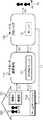
図1Aは、宅内に設置された機器を遠隔制御するサービスをユーザへ提供する際のシステム構成の全体像を示した図である。(Overview of services provided)
FIG. 1A is a diagram showing an overview of a system configuration when providing a service for remotely controlling a device installed in a home to a user.
グループ100は、例えば企業、団体、家庭等であり、その規模を問わない。グループ100には、複数の機器101である機器A、機器B、およびホームゲートウェイ102が存在する。複数の機器101には、インターネットと接続可能な機器(例えば、スマートフォン、PC、TV等)もあれば、それ自身ではインターネットと接続不可能な機器(例えば、照明、洗濯機、冷蔵庫等)も存在する。それ自身ではインターネットと接続不可能な機器であっても、ホームゲートウェイ102を介してインターネットと接続可能となる機器が存在してもよい。また、グループ100には複数の機器101を使用するユーザ10が存在する。 The
データセンタ運営会社110には、クラウドサーバ111が存在する。クラウドサーバ111とはインターネットを介して様々な機器と連携する仮想化サーバである。クラウドサーバ111は、主に通常のデータベース管理ツール等で扱うことが困難な巨大なデータ(ビッグデータ)等を管理する。データセンタ運営会社110は、データ管理やクラウドサーバ111の管理、それらを行うデータセンタの運営等を行っている。データセンタ運営会社110が行っている役務の詳細は後述する。ここで、データセンタ運営会社110は、データ管理やクラウドサーバ111の運営等のみを行っている会社に限られない。例えば複数の機器101のうちの一つの機器を開発および製造している機器メーカが、併せてデータ管理やクラウドサーバ111の管理等を行っている場合は、機器メーカがデータセンタ運営会社110に該当する(図1B)。また、データセンタ運営会社110は一つの会社に限らない。例えば機器メーカおよび他の管理会社が共同もしくは分担してデータ管理やクラウドサーバ111の運営を行っている場合は、両者もしくはいずれか一方がデータセンタ運営会社110に該当する(図1C)。 A
サービスプロバイダ120は、サーバ121を保有している。ここで言うサーバ121とは、その規模は問わず例えば、個人用PC内のメモリ等も含む。また、サービスプロバイダ120がサーバ121を保有していない場合もある。 The
なお、上記サービスにおいてホームゲートウェイ102は必須ではない。例えば、クラウドサーバ111が全てのデータ管理を行っている場合等は、ホームゲートウェイ102は不要となる。また、家庭内のあらゆる機器がインターネットに接続されている場合のように、それ自身ではインターネットと接続不可能な機器は存在しない場合もある。 Note that the
次に、上記サービスにおける情報の流れを説明する。 Next, the flow of information in the above service will be described.
まず、グループ100の機器A又は機器Bは、各ログ情報をデータセンタ運営会社110のクラウドサーバ111に送信する。クラウドサーバ111は機器A又は機器Bのログ情報を集積する(図1A(a))。ここで、ログ情報とは複数の機器101の、例えば運転状況や動作日時等を示す情報である。例えば、テレビの視聴履歴やレコーダの録画予約情報、洗濯機の運転日時および洗濯物の量、ならびに冷蔵庫の開閉日時および開閉回数などがログ情報に該当する。但し、ログ情報は、これらの情報に限定されず、あらゆる機器から取得が可能なすべての情報が該当する。ログ情報は、インターネットを介して複数の機器101自体から直接クラウドサーバ111に提供される場合もある。また、複数の機器101から一旦ホームゲートウェイ102にログ情報が集積され、ホームゲートウェイ102からクラウドサーバ111にログ情報が提供されてもよい。 First, the device A or the device B of the
次に、データセンタ運営会社110のクラウドサーバ111は、集積したログ情報を一定の単位でサービスプロバイダ120に提供する。ここで、一定の単位は、データセンタ運営会社110が集積した情報を整理してサービスプロバイダ120に提供することのできる単位でもいいし、サービスプロバイダ120が要求した単位でもいい。一定の単位と記載したが一定でなくてもよく、状況に応じてサービスプロバイダ120に提供されるログ情報は、情報量が変化する場合もある。 Next, the
前記ログ情報は、必要に応じてサービスプロバイダ120が保有するサーバ121に保存される(図1A(b))。そして、サービスプロバイダ120は、ログ情報をユーザに提供するサービスに適合する情報に整理し、ユーザに提供する。ログ情報が提供されるユーザは、複数の機器101を使用するユーザ10であってもよいし、外部のユーザ20であってもよい。ユーザへのサービス提供方法は、例えば、サービスプロバイダ120から直接、ユーザ20へ提供されてもよい(図1A(b)、(e))。また、ユーザへのサービス提供方法は、例えば、データセンタ運営会社110のクラウドサーバ111を再度経由して、ユーザ10に提供されてもよい(図1A(c)、(d))。また、データセンタ運営会社110のクラウドサーバ111は、ユーザに提供するサービスに適合する情報にログ情報を整理し、サービスプロバイダ120に提供してもよい。 The log information is stored in the
なお、ユーザ10とユーザ20とは、別でも同一でもよい。 The
(実施の形態)
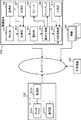
図2は、実施の形態における遠隔制御システムの全体構成の一例を示すブロック図である。本遠隔制御システムは、サーバ200、情報端末300、機器400、および対象機器500を備える。Embodiment
FIG. 2 is a block diagram showing an example of the overall configuration of the remote control system according to the embodiment. The remote control system includes a
サーバ200は、例えば、1以上のコンピュータから構成されるクラウドサーバである。ここで、サーバ200は、機器400および対象機器500から、状態と状態の取得時刻とユーザIDと対応付けられた家電ログを定期的に取得し、機器400および対象機器500を管理する。 The
情報端末300は、例えば、ユーザにより携帯される携帯端末(例えば、スマートフォンや携帯電話やタブレット端末)で構成される。なお、情報端末300は、ユーザの自動車或いは自転車に搭載されたナビゲーション装置で構成されてもよい。 The
機器400は、リモート制御対象となる電化機器が採用されている。機器400としては、例えば、ポット、IHコンロ、洗濯機、電子レンジ、テレビ、AV機器、レコーダ装置、エアコン、電動シャッター、電動カーテンといった遠隔制御可能な全ての機器が該当する。 As the
対象機器500は、機器状態が取得される電化機器である。ここで、機器状態は、ユーザの宅内の状況を特定するために用いられるデータであり、例えば、対象機器500がテレビであれば、視聴テレビ番組が採用される。なお、対象機器500としては、機器400のいずれかの電化機器が採用されてもよいし、機器400とは異なる電化機器が採用されてもよい。 The
図1では、ある1のユーザに対して適用される遠隔制御システムが示されている。そのため、図1では、機器400および対象機器500はこの1のユーザの宅内に設置された電化機器が示されており、情報端末300はこの1のユーザが携帯する情報端末300が示されている。但し、実際には別のユーザにより携帯される情報端末300および別のユーザの宅内に設置された機器400および対象機器500もサーバ200に接続されている。 FIG. 1 shows a remote control system applied to a certain user. Therefore, in FIG. 1, the
サーバ200、情報端末300、機器400、および対象機器500はネットワークを通じて相互に通信可能に接続されている。ここで、機器400および対象機器500は宅内のLANを介して接続されている。LANとしては、無線および有線のいずれであってもよい。また、ユーザが宅内にいる場合、情報端末300はLANを通じて機器400および対象機器500と接続される。ユーザが宅外にいる場合、情報端末300はWANを通じて機器および対象機器500と接続される。WANとしてはインターネットや携帯電話通信網が採用できる。また、サーバ200は、情報端末300、機器400、および対象機器500とWANを通じて接続されている。 The
以下、サーバ200、情報端末300の詳細な構成について説明する。サーバ200は、データベース2011、通信部2012、および処理部2013を備える。データベース2011は、本遠隔監視システムを実現するうえで必要な種々のデータを蓄積する。本開示では、データベース2011は、図10に示すように、宅外情報801および宅内情報802をユーザ別に蓄積すると共に、複数のユーザの宅外情報801および宅内情報802から生成された蓄積情報803を蓄積する。 The detailed configurations of the
処理部2013は、例えば、CPU等のプロセッサで構成され、サーバ200の全体制御を司る。本開示では、処理部2013は、上述の宅外情報801、宅内情報802、および蓄積情報803をデータベース2011に蓄積し、データベース2011を管理する。 The
通信部2012は、サーバ200をネットワークに接続させる通信装置で構成される。 The
情報端末300は、検出部301、取得部302、選択部303、通知制御部304、状態遷移部305、通信部306、記憶部307、スピーカ308、ディスプレイ309、および入力部310を備える。 The
検出部301は、ユーザの外出又は帰宅を検出する。情報端末300がユーザに携帯される携帯端末或いはカーナビゲーション装置で構成される場合、検出部301は、GPSセンサを備え、GPSセンサが検出するユーザの位置にしたがって、ユーザの外出又は帰宅を検出する。また、情報端末300が携帯端末で構成される場合、検出部301は、通信部306を通じて携帯電話の基地局の情報を取得し、基地局の情報から情報端末300が通信している基地局を特定することで、ユーザの外出又は帰宅を検出してもよい。また、検出部301は、通信部306が近接無線通信で宅内の特定の電化機器と通信できたか否かに応じて、ユーザの外出又は帰宅を検出してもよい。 The detection unit 301 detects the user going out or going home. When the
また、検出部301は、通信部306を通じて、自宅のドアに取り付けられたインターフォンからユーザの帰宅又は外出したことを示す通知を取得し、その通知にしたがって、ユーザの外出又は帰宅を検出してもよい。 Further, the detection unit 301 acquires a notification indicating that the user has returned home or went out from the interphone attached to the door of the home through the
また、検出部301は、ユーザの自宅の玄関に取り付けられた錠が外側から開けられたか或いは内側から開けられたかを示す通知を通信部306を通じて取得し、取得した通知にしたがって、ユーザの外出又は帰宅を検出してもよい。 In addition, the detection unit 301 acquires, through the
また、検出部301は、宅内状態を検出する。宅内状態としては、例えば、宅内に所在している人物の数を示す在宅人数が該当する。ここで、検出部301は、人物検出センサを備える電化機器(例えば、エアコンやテレビ)から、人物の検出結果を用いて在宅人数を検出すればよい。また、検出部301は、家族の人数が予め登録されているのであれば、家族の人数と、外出又は帰宅の検出結果とを用いて在宅人数を検出すればよい。例えば、家族の人数が5人であれば、検出部301は、デフォルトの在宅人数を5に設定する。そして、検出部301は、1の外出を検出する都度、在宅人数から1を減じると共に、1の帰宅を検出する都度、在宅人数に1を加算し、在宅人数を更新すればよい。 The detection unit 301 also detects an in-home state. The in-home state corresponds to, for example, the number of people at home indicating the number of persons located in the home. Here, the detection unit 301 may detect the number of people at home using a detection result of a person from an electric appliance (for example, an air conditioner or a television) including a person detection sensor. Further, if the number of family members is registered in advance, the detection unit 301 may detect the number of people at home using the number of family members and the detection result of going out or returning home. For example, if the number of family members is five, the detection unit 301 sets the default number of people at home to five. Then, the detection unit 301 may reduce one from the number of people at home and may add one to the number of people at home to update the number of people at home, every time when detecting that one is going out, the number of people at home is reduced by one.
取得部302は、検出部301がユーザの外出又は帰宅を検出すると、機器400の現在の設定状態を取得する。ここで、設定状態としては、機器400の電源のオン又はオフや、機器400の現在の動作状態や、動作モードなどが採用される。また、取得部302は、検出部301がユーザの外出又は帰宅を検出すると、対象機器500の現在の機器状態を取得する。 The
ここで、取得部302は、サーバ200に家電ログの取得要求を送信し、サーバ200から応答として送信された家電ログから、機器400の現在の設定状態および対象機器500の現在の機器状態を取得してもよい。また、取得部302は、機器400および対象機器500と直接通信し、現在の設定状態および現在の機器状態を取得してもよい。 Here, the
また、取得部302は、検出部301がユーザの外出又は帰宅を検出すると、検出部301に在宅人数を検出させ、現在の在宅人数を取得する。 In addition, when the detection unit 301 detects that the user is out or home, the
そして、取得部302は、外出日時又は帰宅日時と機器400の現在の設定状態とを対応付け、サーバ200にアップロードしたり、記憶部307に蓄積したりする。これにより、データベース2011および記憶部307には、図6A、図6Bに示すような設定状態履歴が蓄積される。このとき、サーバ200は、アップロードされたデータをユーザ毎に区分して管理する。 Then, the acquiring
また、取得部302は、外出日時又は帰宅日時と、対象機器500の現在の機器状態と、現在の在宅人数とを対応付け、サーバ200にアップロードしたり、記憶部307に蓄積したりする。これにより、データベース2011および記憶部307には、図7A、図7Bに示すような宅内履歴が蓄積される。このとき、サーバ200は、アップロードされたデータをユーザ毎に区分して管理する。 In addition, the acquiring
また、取得部302は、検出部301により外出又は帰宅が検出されると、サーバ200から宅外情報801および宅内情報802および蓄積情報803を取得する。そして、取得部302は、取得したデータから、図6A、図6Bに示すようなユーザ毎の設定状態履歴を取得すると共に、図7A、図7Bに示すようなユーザ毎の宅内履歴を取得する。なお、取得部302は、同一宅内のユーザの設定状態履歴および宅内履歴は記憶部307から取得してもよい。この場合、取得部302は、他のユーザの設定状態履歴および宅内履歴は必要に応じてサーバ200から取得すればよい。 In addition, when the detection unit 301 detects going out or return home, the
選択部303は、取得部302が取得した現在の機器状態および宅内状態(在宅人数)に応じた普段の設定状態を、取得部302が取得した設定状態履歴の中から選択する。そして、選択部303、取得部302が取得した現在の設定状態と、選択した普段の設定状態とを比較し、両設定状態の一致の有無を判定する。 The
例えば、取得部302が図6A、図6Bに示す設定状態履歴および図7A、図7Bに示す宅内履歴を取得したとすると、選択部303は、同一宅内のユーザの宅内履歴に対して、宅内状態および機器状態を入力データとするクラスタ処理を行う。そして、選択部303は、現在の宅内状態および機器状態が属するクラスタに対応する設定状態の中から最多の設定状態を、設定状態履歴から選択する。ここで、選択された設定状態は、現在の設定状態および機器状態に応じた普段の設定状態となる。そして、選択部303は、選択した普段の設定状態と、現在の設定状態との一致の有無を判定する。 For example, assuming that the acquiring
通知制御部304は、選択部303により設定状態が一致しないと判定された場合、現在の設定状態が普段の設定状態とは異なることをユーザに通知する第1通知を実行する。ここで、通知制御部304は、第1通知を示す映像をディスプレイ309に出力する、或いは、第1通知を示す音声をスピーカ308から出力することで第1通知を実行すればよい。 When the
一方、通知制御部304は、選択部303により設定状態が一致すると判定された場合、現在の設定状態が普段の設定状態と同じであることをユーザに通知する第2通知を実行する。ここで、通知制御部304は、第1通知と同様、映像或いは音声を用いて第2通知を実行すればよい。 On the other hand, when the
状態遷移部305は、通知制御部304により第1通知が実行された場合、機器400の設定状態を普段の設定状態に戻すための操作入力の待ち受け状態に、情報端末300の状態を遷移させる。そして、状態遷移部305は、この操作入力が入力部310により受け付けられた場合、普段と異なる設定状態の機器400の設定状態を普段の設定状態に戻すための制御コマンドを生成し、該当する機器400に送信する。 When the
通信部306は、無線LAN、有線LAN、モデム、および近接無線通信装置といった通信装置で構成され、情報端末300をネットワークに接続させる。 The
記憶部307は、例えば、不揮発性の書き換え可能な記憶装置で構成され、設定状態履歴および宅内履歴を記憶する。 The
スピーカ308は、通知制御部304の制御に下、音声を出力し、第1、第2通知を実行する。ディスプレイ309は、液晶パネルといった表示パネルで構成され、通知制御部304の制御の下、映像を出力し、ユーザに第1、第2通知を実行する。 Under the control of the
入力部310は、例えば、ディスプレイ309がタッチパネル式の表示パネルで構成されていれば、タッチパネルで構成される。また、情報端末300がデスクトップコンピュータで構成されるのであれば、入力部310は、マウス、キーボードといった入力装置で構成される。 For example, when the
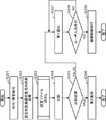
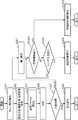
図3は、実施の形態における遠隔制御システムの処理フローを示す図である。本開示では、ユーザの位置が宅内から宅外に変化することでユーザの外出が検出され、ユーザの位置が宅外から宅内に変化することでユーザの帰宅が検出される。そして、ユーザの外出或いは帰宅が検出された場合、リモート制御可能な機器400の設定状態が取得される。そして、取得した設定状態がユーザの宅内の普段の設定状態と異なれば、異なることを示す第1通知がユーザの情報端末300に提示される。一方、取得した設定状態がユーザの宅内の普段の設定状態と同じであれば、同じであることを示す第2通知がユーザの情報端末300に提示される。 FIG. 3 is a diagram showing a processing flow of the remote control system in the embodiment. In the present disclosure, when the user's position changes from inside the house to outside the house, the user's leaving is detected, and when the user's position changes from outside the house to inside the house, the user's returning home is detected. Then, when it is detected that the user has gone out or returned home, the setting state of the remotely
なお、本開示において、宅内とは、例えば、一戸建ての住宅および集合住宅が含まれる。一戸建ての住宅であれば、建物の内部のみならず、建物が建てられている土地が宅内に含まれていてもよい。また、集合住宅であれば、一つの住戸の内部が宅内に該当する。また、本開示では、宅内の周辺の領域から外部へのユーザの移動が外出として取り扱われてもよい。また、本開示では、外部から宅内の周辺の領域へのユーザの移動が帰宅として取り扱われてもよい。 In the present disclosure, the term “in-home” includes, for example, single-family homes and multi-family homes. If it is a single-family house, not only the inside of the building but also the land where the building is built may be included in the house. Moreover, if it is a collective housing, the inside of one dwelling unit corresponds to the inside of a house. Further, in the present disclosure, the movement of the user from the area around the home to the outside may be treated as going out. Further, in the present disclosure, the movement of the user from the outside to the surrounding area in the home may be treated as returning home.
S201では、検出部301は、ユーザの外出又は帰宅を検出する。ユーザの外出又は帰宅の検出は、様々な方法で実現できる。例えば、情報端末300がユーザに携帯される携帯電話やスマートフォン等の携帯端末或いはユーザと共に移動するナビゲーション装置で構成されとする。この場合、携帯電話或いはナビゲーション装置が備えるGPSセンサが検知した位置を用いて、ユーザの外出又は帰宅が検出される。そして、この場合、携帯端末或いはナビゲーション装置のGPSセンサが検知した位置が、ユーザの宅内の領域内から領域外に移動したことを示した場合、検出部301は、ユーザが外出したと判定し、その逆の場合、ユーザが帰宅したと判定すればよい。 In S201, the detection unit 301 detects the user going out or going home. The detection of the user going out or returning home can be realized in various ways. For example, it is assumed that the
また、検出部301は、携帯端末がユーザの自宅の通信エリアを担当する基地局以外の基地局と通信を始めた場合、ユーザが外出したと判定してもよい。一方、ユーザの自宅の通信エリアを担当する基地局と携帯端末が通信を始めた場合、検出部301は、ユーザが帰宅したと判定してもよい。 The detection unit 301 may also determine that the user has gone out when the mobile terminal starts communication with a base station other than the base station that takes charge of the communication area of the user's home. On the other hand, when the mobile terminal and the base station in charge of the communication area of the user's home start communication, the detection unit 301 may determine that the user has returned home.
また、位置が決まっている機器との通信結果を用いてユーザの外出又は帰宅が検出されてもよい。例えば、冷蔵庫や電子レンジなどは宅内から宅外に持ち出されることはない。そのため、情報端末300がこれらの機器と近接無線通信(例えば、NFCやBluetooth(登録商標)等)を開始した場合、検出部301はユーザが帰宅したと判定してもよい。一方、情報端末300がこれらの機器と近接無線通信ができなくなった場合、検出部301は、ユーザが外出したと判定してもよい。 Also, the user's going out or going home may be detected using the communication result with the device whose position is determined. For example, refrigerators and microwaves are not taken out of the house. Therefore, when the
また、ユーザの自宅のドアに取り付けられたインターフォンが備える顔認識装置を用いてユーザの外出又は帰宅が検出されてもよい。例えば、顔認識装置は、インターフォンが押されると、インターフォンを押したユーザの顔を撮像して顔の特徴量を抽出し、抽出した特徴量が予め登録されている顔の特徴量と一致すれば、ユーザが帰宅したと判定し、帰宅通知を検出部301に通知する。そして、検出部301は、顔認識装置から帰宅通知を受信した場合、ユーザが帰宅したと判定すればよい。 Also, the user's going out or going home may be detected using a face recognition device provided in the interphone attached to the door of the user's home. For example, when the intercom is pressed, the face recognition apparatus captures the face of the user who pressed the interphone to extract the feature amount of the face, and if the extracted feature amount matches the feature amount of the face registered in advance. It is determined that the user has returned home, and the detection unit 301 is notified of the return home notification. When the detection unit 301 receives a return notification from the face recognition apparatus, the detection unit 301 may determine that the user has returned.
また、情報端末300がナビゲーション装置で構成されている場合において、ユーザにより目的地が自宅に設定され、帰宅の予兆が入力された場合、検出部301は、ユーザが帰宅すると判定してもよい。 In addition, when the
また、ユーザの自宅の玄関のドアに取り付けられた錠が宅内側から閉められた場合、検出部301はユーザが帰宅したと判定してもよい。一方、この錠が外側から閉められた場合、検出部301はユーザが外出したと判定してもよい。この場合、錠に、宅内側から閉められたか宅外側から閉められたか否かを検知するセンサと通信装置とを取り付ける。そして、錠が宅内側から閉められたこと或いは宅外側から閉められたことをセンサが検知した場合、通信装置は、この検知結果を検出部301に送信する。そして、検出部301は、この通信装置から送信された検知結果を用いて、ユーザの外出又は帰宅を検出すればよい。 In addition, when the lock attached to the front door of the user's home is closed from inside the house, the detection unit 301 may determine that the user has returned home. On the other hand, when the lock is closed from the outside, the detection unit 301 may determine that the user has gone out. In this case, a sensor and a communication device are attached to the lock to detect whether the door is closed from inside or outside the house. Then, when the sensor detects that the lock is closed from inside the house or from outside the house, the communication device transmits the detection result to the detection unit 301. Then, the detection unit 301 may detect the user going out or going home using the detection result transmitted from the communication device.
以上のようにユーザの外出又は帰宅の検出は、ユーザの実際の移動のみならず、ユーザの外出又は帰宅の予兆が用いられてもよい。 As described above, not only the actual movement of the user but also an indication of the user's going out or going home may be used for detection of the user's going out or going home.
S202では、取得部302は、機器400の現在の設定状態、対象機器500の現在の機器状態、および現在の宅内状態を取得する。ここで、取得部302は、直接、機器400および対象機器500と通信することで設定状態および機器状態を取得してもよいし、設定状態がサーバ200で管理されているのであれば、サーバ200から機器400の設定状態および対象機器500の機器状態を取得してもよい。 In S202, the
S203では、選択部303は、機器400の普段の設定状態を示す設定ファイルの読み出し処理を実行する。この処理の詳細については、後述する。 In S <b> 203, the
S204では、選択部303は、読み出した設定ファイルに示された設定状態と、現在の設定状態とを比較する。 In S204, the
この比較結果が真であれば(S205でTRUE)、つまり、全ての機器400の現在の設定状態が設定ファイルに示された設定状態と一致していれば、通知制御部304は、現在の設定状態が普段の設定状態と同じであることを示す第2通知を実行する(S206)。 If this comparison result is true (TRUE in S205), that is, if the current setting state of all the
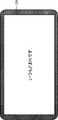
図4Aは第2通知の第1例を示す図である。図4Aの例では、通知制御部304は、機器400の現在の設定状態が普段の設定状態と同じであることを示す「いつもどおりです」とのテキストが記載された画面をディスプレイ309に出力する。この第2通知により、外出時において、ユーザは、機器400の設定状態が普段の設定状態と同じであることを認識でき、安心感が得られる。一方、帰宅時においては、ユーザは、機器400の設定状態が普段の設定状態と同じであるため、外出中に第三者による宅内への侵入がなかったと判断し、安心感が得られる。 FIG. 4A is a diagram showing a first example of the second notification. In the example of FIG. 4A, the
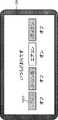
図4Bは、第2通知の第2例を示す図である。第2例では、通知制御部304は、機器400の設定状態が普段の設定状態と同じであることを示す「いつもどおりです。」とのテキストに加えて、更に、各機器400の設定状態を視覚的に明示する情報を含む画面をディスプレイ309に出力する。これにより、具体的な設定状態も通知され、ユーザは更なる安心感を得ることができる。この例では、機器400の名称が示されたアイコン4000を用いて機器400の設定状態が示されている。更に、この例では、アイコン4000の下側に、機器400の設定状態を示すテキストも表示されている。 FIG. 4B is a diagram illustrating a second example of the second notification. In the second example, the
ここでは、機器400として、テレビ(TV)、IHコンロ、エアコン、およびアイロンが採用されている。そして、TV、IHコンロ、およびアイロンの設定状態はオフである。そのため、TV、IHコンロ、およびアイロンのアイコン4000は、灰色で表示され、各アイコン4000の下に「オフ」とのテキストが表示されている。一方、エアコンの設定状態はオンである。そのため、エアコンのアイコン4000は白色で表示され、エアコンのアイコン4000の下側には「オン」とのテキストが表示されている。 Here, a television (TV), an IH stove, an air conditioner, and an iron are adopted as the
なお、第2通知の第2例では、「いつもどおりです。」、「オン」、および「オフ」のテキストを表示させたが、これは一例である。例えば、これらのテキストを非表示にし、アイコン4000のみを用いて機器400の設定状態を通知する態様が採用されてもよい。 In the second example of the second notification, the texts “as usual”, “on”, and “off” are displayed, but this is an example. For example, a mode may be adopted in which these texts are hidden and only the
また、図4Bの例では、オフの機器400のアイコン4000を灰色、オンの機器400のアイコン4000を白色で表示する態様が示されたが、これは一例であり、ユーザに機器400のオン、オフが認識させることが可能な色であれば、別の色が採用されてもよい。或いは、オンの機器400のアイコン4000の輝度をオフの機器400のアイコン4000の輝度よりも高くする態様が採用されてもよい。或いは、オンの機器400のアイコン4000を点滅表示させ、オフの機器400のアイコン4000は点滅表示させない態様が採用されてもよい。 Also, in the example of FIG. 4B, a mode is shown in which the
図3に戻り、比較結果が偽であれば(S205でFALSE)、つまり、現在の設定状態が普段の設定状態と異なる機器400が少なくとも1つ存在すれば、通知制御部304は、機器400の現在の設定状態が普段の設定状態と異なることを示す第1通知を実行する(S207)。 Returning to FIG. 3, if the comparison result is false (FALSE in S205), that is, if there is at least one
S208では、状態遷移部305は、入力部310を用いたユーザによる操作入力の待ち受け状態になる。 In S208, the
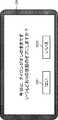
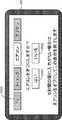
図5Aは、第1通知の第1例を示す図である。第1通知の第1例では、通知制御部304は、機器400の現在の設定状態が普段の設定状態と異なることを示す「今日は、アイロンがオンのままです。」とのテキストが記載された画面をディスプレイ309に出力する。これにより、機器400の設定状態が普段の設定状態とは異なる旨の注意をユーザに喚起できる。 FIG. 5A is a diagram showing a first example of the first notification. In the first example of the first notification, the
第1通知が実行される場合、機器400の設定状態が普段の設定状態と異なっており、ユーザから機器400の設定状態を普段の設定状態に戻すための操作入力を受け付ける可能性が高い。そのため、図5Aの例では、「いつもどおりの状態のオフにしますか?」というユーザへの問いかけのメッセージが表示されている。ここでは、アイロンの設定状態が普段の設定状態と異なり、「オン」であったため、アイロンがオンであることをユーザに通知するための「今日は、アイロンがオンのままです。」とのメッセージも表示されている。 When the first notification is executed, the setting state of the
そして、このメッセージの下側には、機器400の設定状態を普段の設定状態に戻す処理を実行させるための「はい」のアイコン5001と、その処理を実行させない「いいえ」のアイコン5002とが表示されている。これにより、状態遷移部305は、ユーザからの操作入力の待ち受け状態となる。この場合、ユーザはアイコン5001を選択する操作を入力するだけで、設定状態が普段と異なる機器400の設定状態を普段の設定状態に戻すことができる。また、ユーザは、今回、ある機器400の設定状態を、あえて普段と異なる設定状態にしていることもある。この場合、ユーザは、アイコン5002を選択する操作を入力するだけで、該当する機器400の設定状態を普段と異なる設定状態に維持できる。 At the lower side of this message, a “Yes”
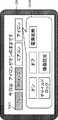
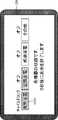
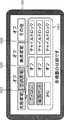
図5Bは、第1通知の第2例を示す図である。図5Bの例では、設定状態が普段と異なる機器400の設定状態を普段の設定状態へ戻すことを誘導するメッセージに代えて、全ての機器400の現在の設定状態を示すアイコン5003と、設定状態が普段と異なる機器400の操作ダイアログ5004とがディスプレイ309に表示されている。 FIG. 5B is a diagram showing a second example of the first notification. In the example of FIG. 5B, an
ここでは、機器400として、TV、IHコンロ、エアコン、およびアイロンが採用されているため、これらの機器の設定状態を示す4つのアイコン5003が表示されている。この例では、TV、IHコンロ、エアコン、およびアイロンはそれぞれ設定状態が「オフ」、「オフ」、「オン」、および「オン」であるため、TVおよびIHコンロのアイコン5003は灰色で表示され、エアコンおよびアイロンのアイコン5003は白色で表示されている。そして、TV、IHコンロ、およびエアコンの設定状態は普段と同じであるが、アイロンの設定状態は普段と異なり「オン」となっている。 Here, since the TV, the IH stove, the air conditioner, and the iron are adopted as the
そのため、図5Bの例では、設定状態が普段と異なる機器400をユーザに示す「今日は、アイロンがオンのままです。」とのメッセージが表示されている。そして、設定状態が普段と異なるアイロンのアイコン5003に対応付けて、アイロンを操作するための操作ダイアログ5004が表示されている。操作ダイアログ5004には、アイロンを操作するための種々のボタンが表示されている。図5Bの例では、「オン」、「オフ」、「電源遮断」、「チャイルドロック」、および「機器設定」のボタンが操作ダイアログ5004に含まれている。よって、ユーザは、設定状態が普段と異なる機器400について、普段の設定状態に戻すか戻さないかの操作のみならず、更に、きめの細かな操作を入力できる。 Therefore, in the example of FIG. 5B, a message “Iron is still on” is displayed to the user, which shows the
設定状態が普段と異なる機器400が複数ある場合、ディスプレイ309は、サイズ上の制約から、複数の機器400の操作ダイアログ5004を一度に表示できないことも想定される。この場合、ユーザがある機器400のアイコン5003を選択する操作を入力すると、通知制御部304はその機器400のみの操作ダイアログ5004のみをディスプレイ309に表示すればよい。 When there are a plurality of
図3に戻り、入力部310がユーザから操作入力を受け付けた場合(S208でYES)、状態遷移部305は、ユーザからの操作入力に従った機器制御を実行する(S209)。一方、ユーザからの操作入力を入力部310が受け付けない場合(S208でNO)、処理がS208に戻され、操作入力の待ち受け状態が維持される。 Returning to FIG. 3, when the
図5Aの例において、ユーザが「はい」のアイコン5001を選択したとする。この場合、状態遷移部305は、該当する機器400(アイロン)の設定状態(オン)を、普段の設定状態(オフ)に戻すための制御コマンドを該当する機器400(アイロン)に出力する。一方、ユーザが「いいえ」のアイコン5002を選択したとする。この場合、状態遷移部305は、該当する機器400(アイロン)の設定状態(オン)を維持させるため、該当する機器400に制御コマンドを出力しない。 In the example of FIG. 5A, it is assumed that the user selects the “Yes”
なお、S208において、一定期間内にユーザから操作入力を受け付けなかった場合、状態遷移部305は、制御コマンドを出力することなく、処理を終了させればよい。 If no operation input is received from the user within a predetermined period in S208, the
以上のように、機器400の設定状態が普段と同じ設定状態の場合、第2通知が実行される。ここで、第2通知には、機器400の設定状態が普段と同じである旨のメッセージのみが含まれた控え目な通知であり、ユーザに対して確認した旨の回答を入力する操作を強いる通知ではない。そのため、ユーザは第2通知が行われる都度、確認した旨の回答を入力する手間が省かれ、操作ストレスが抑制される。また、第2通知には、機器400の設定状態が普段と同じである旨のメッセージが含まれている。そのため、ユーザに安心感を与えることができる。 As described above, when the setting state of the
一方、機器400の設定状態が普段と異なる場合には、第1通知が実行される。ここで、第1通知には、設定状態が普段と異なる機器400を示す情報や、その機器400の設定状態を普段の設定状態に戻すことが可能なボタンなどが含まれている。これにより、例えば、外出時において、機器400の電源の消し忘れをユーザに認識させることができ、ユーザは該当する機器400の電源を消して、安心して外出することができる。 On the other hand, when the setting state of the
リモート操作ではユーザは制御対象の機器400の実際の稼働状態を目視して確認できない。そのため、このようにユーザに安心感を与えることは、リモート制御における重要な要素である。 In remote operation, the user can not visually check the actual operating state of the
<学習による機器の設定ファイルの生成>
リモート制御対象の機器400の普段の設定状態を示す設定ファイルを、ユーザの普段の行動を学習して生成することで、更なるユーザへの操作性の向上が実現できる。つまり、学習により設定ファイルが生成されることで、ユーザの生活行動により適合した設定ファイルが生成される。そして、この設定ファイルと機器400の現在の設定状態とが比較され、現在の設定状態が普段と同じであれば簡素な第2通知が行われる。<Generation of device configuration file by learning>
By learning and generating the setting file indicating the usual setting state of the remote
一方、現在の設定状態が普段と異なる場合には第1通知が行われ、ユーザは機器400をリモート制御できる。また、ユーザは普段の機器400への操作を意識しなくても、ユーザの日常生活に適合する設定ファイルが作成され、その設定ファイルにしたがって、機器400をリモート制御できる。更に、細かに学習したとしても、前述のようにいつもと違う時にだけ第1通知が行われるため、ユーザに与える操作ストレスは低い。 On the other hand, when the current setting state is different from usual, the first notification is performed, and the user can remotely control the
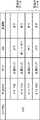
次に、設定ファイルの生成の詳細について説明する前に、図6A〜図7Bを用いて設定ファイルの生成の概要について説明する。図6A、図6Bは、あるユーザの外出日時、および外出する際の宅内の機器400の設定状態が記録された設定状態履歴を示す図である。図6Aは、午前の設定状態履歴が示されており、図6Bは午後の設定状態履歴が示されている。設定状態履歴には、「ユーザID」、「外出日時」、および機器400のそれぞれの「設定状態」が含まれる。 Next, before describing details of generation of a setting file, an outline of generation of a setting file will be described with reference to FIGS. 6A to 7B. FIG. 6A and FIG. 6B are diagrams showing a setting state history in which a setting date of a certain user's going out date and a setting state of the
「ユーザID」は、本遠隔制御システムのサービスが適用されるユーザの識別子である。「外出日時」は、ユーザが外出した日および時刻を示す。また、図6A、図6Bの例では、リモート制御対象の機器400として、ポット、IHコンロ(IHC)、および洗濯機が採用されているため、設定状態履歴には、「ポット」、「IHC」、および「洗濯機」の設定状態が記録されている。 "User ID" is an identifier of a user to which the service of the present remote control system is applied. “Going date and time” indicates the date and time when the user went out. Further, in the example of FIGS. 6A and 6B, since the pot, the IH stove (IHC), and the washing machine are adopted as the
図6Aの最下行を例に挙げて説明すると、「ユーザID」が「978」のユーザの宅内では、4月12日の7:03にこのユーザの外出が検出され、外出の検出時において、ポット、IHC、および洗濯機の設定状態が、それぞれ、「お湯ロック」、「オフ」、および「オフ」であったことが記録されている。また、図6A、図6Bにおいて、最下行のレコードには、最新の設定状態、すなわち、現在の設定状態が記録され、それ以外の行は、過去の設定状態が記録されている。 Taking the bottom line of FIG. 6A as an example, in the home of the user whose “user ID” is “978”, the user's going out is detected at 7:03 on April 12, and when going out is detected, It is recorded that the settings of the pot, IHC, and washing machine were "hot water lock", "off" and "off", respectively. Further, in FIG. 6A and FIG. 6B, the latest setting state, that is, the current setting state is recorded in the lowermost row record, and the past setting state is recorded in the other rows.
図6Aに示されるように、午前の外出時では、「ポット」、「IHC」、および「洗濯機」の設定状態は、それぞれ、大半が「お湯のロック」、「オフ」、および「オフ」である。一方、図6Bに示されるように、午後の外出時では、「ポット」の設定状態は午前と同様に「お湯のロック」であるが、「IHC」および「洗濯機」の設定状態は、午前と異なり、大半が「電源遮断」および「チャイルドロック」である。このようにある宅内におけるユーザの日々の行動パターンは、同じ行動の繰り返しであることが多い。一方、午前と午後とではユーザの行動パターンは異なることもあり、午前と午後とを区別することなく、一様に機器400をオフにするというような固定的な制御を行うと、ユーザのニーズを満たすことはできない。 As shown in FIG. 6A, when going out in the morning, most of the setting states of “pot”, “IHC” and “washing machine” are “hot water lock”, “off” and “off”, respectively. It is. On the other hand, as shown in FIG. 6B, when going out in the afternoon, the setting state of “pot” is “hot water lock” as in the morning, but the setting states of “IHC” and “washing machine” are morning Unlike, most are "power off" and "child lock". Thus, the daily behavior pattern of the user in a certain home is often a repetition of the same behavior. On the other hand, the behavior pattern of the user may be different in the morning and the afternoon, and a fixed control such as turning off the
図7A、図7Bは、図6A、図6Bと同一ユーザの宅内における、外出日時、宅内状態、および機器状態が記録された宅内履歴を示す図である。図7Aは、午前の宅内履歴が示され、図7Bは午後の宅内履歴がを示されている。宅内履歴には、「ユーザID」、「外出日時」、「宅内状態」、および「機器状態」が含まれる。 FIGS. 7A and 7B are diagrams showing an in-home history in which the leaving date, the in-home state, and the device state are recorded in the home of the same user as in FIGS. 6A and 6B. FIG. 7A shows the in-home history of the morning, and FIG. 7B shows the in-home history of the afternoon. The in-home history includes the “user ID”, the “time out date”, the “in-home state”, and the “device state”.
「ユーザID」および「外出日時」は、図6A、図6Bと同じである。「宅内状態」は、ユーザが居住する宅内の状態を示す。ここでは、「宅内状態」としては、外出が検出される直前における宅内の在宅人数が採用されている。「機器状態」は宅内に設置された監視対象となる対象機器500の状態を示す。ここでは、対象機器500としてテレビが採用され、「機器状態」として、ユーザが視聴するテレビ番組が採用されている。この例では、「宅内状態」および「機器状態」として、「在宅人数」および「視聴テレビ番組」が採用されているが、本開示はこれに限定されない。例えば、「宅内状態」として「在宅人数」に代えて、或いは加えて「室温」が採用されてもよい。また、「機器状態」として「視聴テレビ番組」代えて或いは加えて「洗濯機の稼働情報」など他の対象機器500の機器状態が採用されてもよい。また、対象機器500としては、リモート制御対象の機器400が採用されてもよい。 The “user ID” and the “going out date” are the same as in FIGS. 6A and 6B. The “in-home state” indicates the state in the home where the user resides. Here, as the “in-home state”, the number of people at home in the home immediately before the detection of going out is employed. “Device status” indicates the status of the
図7Aの最下行を例に挙げて説明すると、「ユーザID」が「978」のユーザの宅内では、4月12日の7:03にこのユーザの外出が検出され、外出の検出時において、外出したユーザを含めて「在宅人数」は「3名」であり、宅内の誰かが「時代劇」のテレビ番組を試聴していたことが記録されている。 Taking the bottom line of FIG. 7A as an example, in the home of the user whose “user ID” is “978”, the user's going out is detected at 7:03 on April 12, and when going out is detected, It is recorded that "the number of people at home" is "three" including the user who went out, and that someone in the house auditioned a television program of "the drama".
図7Aに示されるように、午前の外出時には、外出するユーザを含めて3名の人間が在宅しており、そのうち1名は時代劇のテレビ番組を視聴していたことが記録されている。一方、午後の外出時には外出するユーザを含めて2名の人間が在宅しており、そのうち1名は子供番組を視聴していることが記録されている。ここで、テレビ番組の視聴人数は、例えば、テレビやエアコンが備える人物検出センサの検出結果を利用することで特定できる。 As shown in FIG. 7A, at the time of going out in the morning, it is recorded that three people, including the user who goes out, are at home, and one of them is watching the television program of the drama. On the other hand, at the time of going out in the afternoon, two people, including the user who goes out, are at home, and it is recorded that one of them is watching a child program. Here, the number of viewers of the television program can be specified, for example, by using a detection result of a person detection sensor provided in the television or the air conditioner.
また、外出するユーザ(ユーザIDが「978」のユーザ)の登録情報には、このユーザは40代の女性であることが記録されている。また、図7Bの宅内履歴には「在宅人数」として「2名」、「視聴テレビ番組」として「子供番組」が記録されている。そのため、母親であるこのユーザが外出する前の午後において、宅内には母親および子供の2名が在宅していた可能性が高いと推測できる。そのため、図6Bの設定状態履歴には、「IHC」および「洗濯機」の設定状態として、「チャイルドロック」および「電源遮断」など安全対策のための設定状態が記録されていることが推測できる。 Further, in the registration information of the user who goes out (user whose user ID is "978"), it is recorded that this user is a woman in his forties. Further, in the in-home history of FIG. 7B, “two people” is recorded as “the number of people at home”, and “child program” is recorded as “viewing television program”. Therefore, it can be inferred that there is a high possibility that two mothers and children were at home in the house in the afternoon before this user who is a mother goes out. Therefore, it can be inferred in the setting state history of FIG. 6B that the setting states for safety measures such as “child lock” and “power off” are recorded as the setting states of “IHC” and “washing machine”. .
一方、図7Aの宅内履歴には、「在宅人数」として「3名」、「視聴テレビ番組」として「時代劇」が記録されている。そのため、母親であるユーザが外出する前の午前において、「3名」の中には時代劇を見るような大人が含まれており、母親と祖父(もしくは祖母)と子供との3名が在宅していると推測できる。そのため、図6Aの設定状態履歴には、「IHC」および「洗濯機」は「電源遮断」および「チャイルドロック」といった安全対策のための設定状態が実施されていないと推測できる。 On the other hand, in the in-home history of FIG. 7A, “three people” is recorded as “the number of people at home”, and “a period drama” is recorded as a “viewing television program”. Therefore, in the morning before the user who is the mother goes out, "three" include adults who watch a drama, and three mothers, grandfather (or grandmother), and children are at home It can be guessed that Therefore, in the setting state history of FIG. 6A, it can be inferred that the setting states for safety measures such as “power off” and “child lock” are not implemented for “IHC” and “washing machine”.
以上のように、宅内履歴から宅内の状況がある程度予測でき、更に同じような状況の時にユーザが外出した場合には、機器400の設定状態は同じであるケースが多い。すなわち、外出時における宅内の状況と、外出時における機器400の設定状態とは相関があるといえる。本開示はこの点に注目した。 As described above, the home status can be predicted to some extent from the home history, and the setting state of the
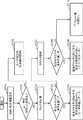
図8は、図3のS203の設定ファイルの読み出し処理の詳細を示すフローチャートである。S701では、取得部302は、サーバ200から同一宅内のユーザ(以下、ユーザAとする。)の宅外情報801および宅内情報802を取得する。図10は、宅外情報801および宅内情報802の概念図である。サーバ200は、宅外情報801および宅内情報802をユーザ別に管理している。 FIG. 8 is a flowchart showing details of the process of reading the setting file of S203 of FIG. In S701, the acquiring
宅内情報802には、在宅人数、外出日時、および家電ログなどが含まれる。在宅人数および外出日時は図7A、図7Bに示す「在宅人数」および「外出日時」と同じである。家電ログは、機器400および対象機器500のログ情報である。ここでは、家電ログとしては、図6A、図6Bに示す機器400の設定状態および図7A、図7Bに示す対象機器500の「視聴テレビ番組」が含まれる。 The in-
ここで、在宅人数および家電ログは、それぞれ、該当する外出日時が対応付けられている。そのため、取得部302は、家電ログから、図6A、図6Bに示す設定状態履歴を取得できる。また、取得部302は、家電ログから、図7A、図7Bに示す宅内履歴を取得できる。 Here, the number of people at home and the home appliance log are respectively associated with the relevant going-out date and time. Therefore, the
なお、上記の家電ログは一例であり、電気使用量、水の使用量、或いは窓の開閉などのログ情報が家電ログとして採用されてもよい。 In addition, said household appliance log is an example, and log information, such as electricity consumption, water consumption, or opening and closing of a window, may be employ | adopted as a household appliance log.
宅外情報801には、スケジュール、携帯使用頻度、およびナビ設定地などが含まれる。スケジュールは、ユーザAの携帯端末にユーザが登録した自身のスケジュールであり、サーバ200により管理されている。携帯使用頻度はユーザAの携帯電話の通話履歴などであり、サーバ200により管理されている。ナビ設定地は、ユーザAが自身の自動車に搭載されたナビゲーション装置に設定した目的地の履歴であり、サーバ200により管理されている。 The out-of-
なお、S701では、サーバ200が管理するユーザAの全て宅外情報801および宅内情報802を取得するとデータ量が膨大になるため、取得部302は、過去一定期間の宅外情報801および宅内情報802を取得してもよい。 In S701, acquiring all the out-of-
また、S701では、宅外情報801および宅内情報802の両方を取得するとしたが、取得部302は、宅外情報801を取得せず、宅内情報802のみ取得してもよい。また、携帯使用頻度は、宅内情報802として取り扱われてもよい。また、宅内情報802として、ユーザAの家族の1以上の構成員のそれぞれの属性(例えば、父親、年齢)を示す家族・ユーザ属性が含まれてもよい。宅外情報801には、ユーザAの属性(例えば、母親、年齢)が含まれていてもよい。 In S701, although both out-of-
また、宅内情報802には、在宅人数、外出日時、および家電ログと、家族・ユーザ属性とを加工および解析することで作成された宅内行動DB(データベース)が含まれていてもよい。ここで、宅内行動DBは、例えば、家族の各構成員の時間帯別の外出頻度や、在宅確率や、行動履歴などを示すデータベースである。また、宅外情報801には、スケジュール、携帯使用頻度、およびナビ設定値と、ユーザ属性とを加工および解析することで作成された宅外行動DBが含まれてもよい。ここで、宅外行動DBは、例えば、ユーザAの時間帯別の外出頻度や、在宅確率や、行動履歴などを示すデータベースである。 In addition, the in-
S702では、選択部303は、現在の「外出日時」が示す外出時刻が、ユーザAが指定した条件にあてはまるか否かを判定する。例えば、午後15時〜16時の時間帯においては、機器400に対して指定した設定状態で動作をさせるという条件をユーザAが事前に登録していたとする。そして、現在の「外出時刻」が午後15時〜16時の時間帯に該当したとする。この場合、S702でYESと判定される。 In S702, the
S703では、状態遷移部305は、ユーザAが事前に指定した設定状態を読み出し、読み出した設定状態で機器400を動作させるための制御コマンドを機器400に出力する。一方、現在の「外出時刻」が指定した条件にあてはまらない場合(S702でNO)、処理がS704に進められる。 In step S703, the
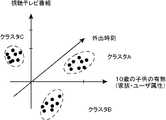
S704では、選択部303は、クラスタ処理を行う。図11は、クラスタ処理の概念図である。ここでは、説明の簡略化ために、処理対象の入力データとして、「10歳の子供の有無」、「外出日時」、および「視聴テレビ番組」の3つのデータがクラスタ処理されるものとする。したがって、図11の例では、視聴テレビ番組の軸と、外出時刻を示す軸と、10歳の子供の存在の有無を示す軸との3つの軸を用いた3次元の座標空間でクラスタ処理の結果が示されている。 In S704, the
ここで、視聴テレビ番組は、図7A、図7Bで示したものと同じである。外出時刻は、図7A、図7Bに示す外出日時から月日の情報を取り除いた外出時刻である。例えば、外出日時が「7月9日7:03」とすると、「7:03」が外出時刻となる。10歳の子供の有無は、ユーザの家族に10歳の子供がいるか否かを示す。このデータは、例えば家族・ユーザ属性としてユーザが予め登録したデータが採用できる。 Here, the viewing television program is the same as that shown in FIGS. 7A and 7B. The going-out time is the going-out time obtained by removing the information on the month and day from the going-out date and time shown in FIGS. 7A and 7B. For example, assuming that the outing date and time is "7: 7 7:03", "7:03" is the outing time. The presence or absence of a 10-year-old child indicates whether or not the user's family has a 10-year-old child. As this data, for example, data registered in advance by the user as a family / user attribute can be adopted.
なお、実際にはこれら3つだけではなく、S701で取得した種々のデータに対してクラスタ処理が行われる。このように日々、宅内からサーバ200にアップロードされるデータを解析することで、アップロードされたデータはいくつかのクラスタに分類される。そして、図11の例では、入力データは3つのクラスタA、B、Cに分類されている。次に、図11に示す各クラスタについて図12を用いて説明する。 In actuality, cluster processing is performed not only on these three but also on various data acquired in S701. By analyzing the data uploaded from the home to the
図12は、図11に示す各クラスタの特徴を示す図である。クラスタAは、家族に10歳の子供がいて、ユーザが12〜15時頃外出し、外出の直前に子供番組を視聴するという特徴を持つ「宅内の状況」が表されている。また、クラスタAに属する入力データに対応する設定状態を分析すると、電子レンジ、テレビ、およびエアコンは、それぞれ、「チャイルドロック」、「操作なし」、および「操作なし」が最も多かった。 FIG. 12 is a view showing the feature of each cluster shown in FIG. Cluster A represents a “home condition” having a feature that a family has a 10-year-old child, the user goes out at around 12 to 15 o'clock, and views a child program immediately before going out. In addition, analyzing the setting state corresponding to the input data belonging to cluster A, the microwave oven, the television and the air conditioner were the most “child lock”, “no operation” and “no operation”, respectively.
ここで、入力データに対応する設定状態とは、入力データに対して、外出日時を同一とする設定状態が該当する。例えば、図7Bに示す「外出日時」が「4月9日19:01」の「視聴テレビ番組」が「子供番組」のデータが入力データとしてクラスタリングされたとすると、このデータに対応する設定状態は、「外出日時」が「4月9日19:01」で同じである、図6Bの「ポット」の「お湯ロック」、「IHC」の「電源遮断」、および「洗濯機」の「チャイルドロック」が該当する。 Here, the setting state corresponding to the input data corresponds to the setting state in which the leaving date and time is the same for the input data. For example, if "view TV program" with "outgoing date and time" shown in FIG. 7B as "April 9 19: 01" is clustered as data for "child program" as input data, the setting state corresponding to this data is , "Outgoing date and time" is the same as "April 9 19:01", "hot water lock" in "pot" in Fig. 6B, "power off" in "IHC", and "child lock" in "washing machine" "Corresponds.
つまり、クラスタAの特徴が示す「宅内の状況」下においてユーザが外出した場合の機器400の電子レンジ、テレビ、およびエアコンの設定状態は、それぞれ、「チャイルドロック」、「操作なし」、および「操作なし」が普段の設定状態を表す。 That is, the setting states of the microwave oven, the television, and the air conditioner of the
よって、現在の宅内の状況がクラスタAに属しているとすると、機器400の現在の設定状態が図12に示した設定状態と同じであれば、機器400の現在の設定状態は普段と同じと考えられる。一方、機器400の現在の設定状態が図12に示した設定状態と異なっていれば、機器400の現在の設定状態は普段と異なると考えられる。 Therefore, assuming that the current in-home state belongs to cluster A, if the current setting state of
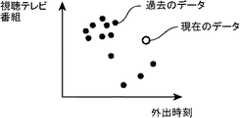
次に、具体的な処理について説明する。図13A、図13Bは、図7A又は図7Bに示す過去のデータおよび現在のデータのそれぞれを入力データとした場合のクラスタ処理を示す図である。 Next, specific processing will be described. 13A and 13B are diagrams showing cluster processing when each of the past data and the present data shown in FIG. 7A or 7B is used as input data.
なお、この例でも説明の便宜上、外出時刻および視聴テレビ番組の2種類のデータのみが入力データとして採用されている。クラスタリング処理は、これらの多次元の入力データ(この例では2次元)に対して、例えば、k-means法によって行われる。 Also in this example, for convenience of explanation, only two types of data of the leaving time and the viewing television program are adopted as input data. The clustering process is performed, for example, by the k-means method on these multidimensional input data (two-dimensional in this example).
図13A、図13Bのそれぞれにおいて、縦軸は視聴テレビ番組を示し、横軸は外出時刻を示している。図13Aは、プロットされる前の入力データを示し、図13Bは、図13Aの入力データのクラスタ処理の結果が示されている。図13Bの例では、入力データは、クラスタA、B、Cの3つに分類されている。また、図13A、図13Bにおいて、黒丸は図7A、図7Bに示す過去のデータを示し、白丸は図7A又は図7Bに示す現在のデータを示している。図13Bに示されるように、現在のデータは、クラスタBにクラスタリングされている。 In each of FIG. 13A and FIG. 13B, the vertical axis represents a viewing television program, and the horizontal axis represents time when the user went out. FIG. 13A shows the input data before being plotted, and FIG. 13B shows the result of the clustering of the input data of FIG. 13A. In the example of FIG. 13B, the input data is classified into three of clusters A, B, and C. 13A and 13B, black circles indicate the past data shown in FIGS. 7A and 7B, and white circles indicate the current data shown in FIG. 7A or 7B. As shown in FIG. 13B, current data is clustered into cluster B.
図8に戻り、選択部303は、現在のデータが属するクラスタが所定のクラスタの条件を満たすか否かを判定する(S705)。 Returning to FIG. 8, the
図14は、クラスタの条件の一例を示す図である。図14の例では、クラスタの条件として3つの条件が示されている。条件1は、各クラスタにおいて、クラスタリングされた入力データの数が閾値より大きいか否かによって、クラスタの有効性を判定する条件である。例えば、クラスタAの入力データ数は8であり、これは閾値5よりも大きな数である。そのため、クラスタAは、条件1を満たし、クラスタの条件として条件1のみが採用された場合、有効なクラスタである。 FIG. 14 is a diagram illustrating an example of cluster conditions. In the example of FIG. 14, three conditions are shown as the conditions of the cluster.
一方、現在のデータが属するクラスタBは、入力データの数が2であり、閾値値以下である。そのため、クラスタBは、条件1を満たさず、有効なクラスタではないと判定される。 On the other hand, in the cluster B to which the present data belongs, the number of input data is 2 and is equal to or less than the threshold value. Therefore, cluster B does not satisfy
このように、クラスタの条件として条件1のみが採用された場合、現在のデータが属するクラスタにクラスタリングされた入力データの数が閾値である5より大きければ、S705でYESと判定され、処理がS706に進められる。つまり、現在のデータが属するクラスタBにクラスタリングされた入力データの数が5より大きければ、処理がS706に進められる。 As described above, when only the
そして、S705では、各クラスタに対応する設定状態が書き込まれた設定ファイルが作成される。この場合、各クラスタの入力データに対応する設定状態の中で、最も多い設定状態が設定ファイルに書き込まれ、設定ファイルが生成される。 Then, in S705, a setting file in which the setting state corresponding to each cluster is written is created. In this case, among the setting states corresponding to the input data of each cluster, the most setting state is written to the setting file, and the setting file is generated.
S706では、選択部303は、現在のデータが属するクラスタに対応する設定状態を設定ファイルから読み出す。 In S706, the
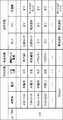
図9は設定ファイルの一例を示す図である。図9の設定ファイルは、ユーザIDが「978」のユーザの設定ファイルが示されている。また、図9の設定ファイルは、1つの行が1つのクラスタを示している。また、図9の設定ファイルは、外出時刻、曜日、在宅人数、および視聴テレビ番組が対応付けられたデータが入力データとしてクラスタ処理されたときのクラスタリング結果が書き込まれている。そのため、設定ファイルには、「時間帯」、「曜日」、「在宅人数」、および「視聴テレビ番組」が書き込まれている。ここで、「時間帯」は、クラスタリングされた入力データが示す「外出時刻」のうち、最も後の時刻と最も前の時刻とを含む区切りの良い時間帯が採用されている。つまり、図9の設定ファイルは、外出時刻、曜日、在宅人数、および視聴テレビ番組が入力データとしてクラスタリングされたものである。 FIG. 9 is a view showing an example of the setting file. The setting file of FIG. 9 shows the setting file of the user whose user ID is "978". Further, in the configuration file of FIG. 9, one line indicates one cluster. Further, in the setting file of FIG. 9, a clustering result is written when data associated with leaving time, day of the week, number of people at home, and viewing television programs are subjected to cluster processing as input data. Therefore, “time zone”, “day of the week”, “number of people at home”, and “viewed television program” are written in the setting file. Here, as the “time zone”, a good time zone of a section including the latest time and the earliest time among the “going out time” indicated by the clustered input data is adopted. That is, the setting file in FIG. 9 is obtained by clustering outing time, day of the week, number of people at home, and viewing television programs as input data.
また、図9において、「設定状態」は、各クラスタに属する入力データに対応する設定状態の中で最も多い設定状態を示している。例えば、時間帯「6:00−12:00」の行のクラスタに属する入力データに対応する設定状態は、「ポット」の設定状態が「お湯ロック」、「IHC」の設定状態が「オフ」、「洗濯機」の設定状態が「オフ」が最も多かった。そのため、時間帯「6:00−12:00」の行の「ポット」、「IHC」、および「洗濯機」は、それぞれ、「お湯ロック」、「オフ」、および「オフ」の設定状態が書き込まれている。 Further, in FIG. 9, the “setting state” indicates the most setting state among the setting states corresponding to the input data belonging to each cluster. For example, the setting status corresponding to the input data belonging to the cluster in the row of the time zone "6:00 to 12:00" is "hot water lock" for the setting status of "pot" and "off" for the setting status of "IHC" , "Washing machine" setting state was "off" most. Therefore, the "pot", "IHC", and "washing machine" in the time zone "6:00-12:00" are set to "hot water lock", "off" and "off", respectively. It has been written.
ここで、現在が「12:00」の「月曜日」であり、「ポット」、「IHC」、および「洗濯機」の現在の設定状態が「お湯ロック」、「オフ」、および「チャイルドロック」であったとする。この場合、設定ファイルに書き込まれた普段の設定状態と現在の設定状態とが相違するため、図3のS205でFALSEと判定され、第1通知が行われる。 Here, the current setting state of "pot", "IHC", and "washing machine" is "hot water lock", "off", and "child lock", which is "Monday" at "12:00" at present. It is assumed that In this case, since the normal setting state written in the setting file is different from the current setting state, it is determined as FALSE in S205 of FIG. 3, and the first notification is performed.
一方、この例において、「ポット」、「IHC」、および「洗濯機」の現在の設定状態が「お湯ロック」、「オフ」、および「オフ」であったすると、図9に示す普段の設定状態と同じであるため、図3のS205でTRUEと判定され、第2通知が行われる。 On the other hand, in this example, if the current setting states of "pot", "IHC" and "washing machine" are "hot water lock", "off" and "off", the usual setting shown in FIG. Since it is the same as the state, it is determined as TRUE in S205 of FIG. 3, and the second notification is performed.
また、図9において「Default」の行に記録された設定状態は、後述するS710で読み出されるデフォルト値である。 Further, the setting state recorded in the “Default” line in FIG. 9 is a default value read out in S710 to be described later.
なお、上記では、S705において、クラスタの条件として条件1のみを用いた例を示したが、図14に示す条件2および条件3に示される複数の条件が用いられてもよい。例えば、クラスタの条件として、条件1に更に条件2が付け加えられてもよい。 In the above, an example in which only the
条件2は、クラスタリングされた入力データに対応する設定状態の中で、最も多い設定状態の個数が一定個数以上あれば、有効なクラスタとする条件である。例えば、クラスタAでは、「電子レンジ:チャイルドロック」、「テレビ:オフ」、「エアコン:オフ」が最多の設定状態であり、かつ、これらの設定状態を持つデータの個数が一定値以上であった。そのため、クラスタAは条件2を満たすと判定される。ここで、一定値としては、クラスタ内の全数に対する割合が採用できる。また、割合としては、過半数(例えば50%)が採用されてもよいし、クラスタ内の全数の90%、80%、70%、60%等の過半数より大きな値が採用されてもよい。例えば、一定値として過半数が採用された場合、クラスタAにおいて、「電子レンジ:チャイルドロック」の割合が80%、「テレビ:オフ」の割合が80%、「エアコン:オフ」の割合が80%であれば、いずれの割合も過半数を超えているため、クラスタAは、条件2を満たすと判定される。
ここでは、一定値として全数に対する割合が採用されたが、固定の数が採用されてもよい。また、統計分析により算出された数が一定値として採用されてもよい。条件2では、設定状態に統一性があるクラスタのみが有効なクラスタとして取り扱われる。 Here, the ratio to the total number is adopted as a constant value, but a fixed number may be adopted. Moreover, the number calculated by statistical analysis may be adopted as a fixed value. Under
また、条件2に代えて、或いは加えて条件3がクラスタの条件として付け加えられてもよい。条件3は、対象となるクラスタにおいて、現在のデータを加えることによって、クラスタの中心値が大きく変化する場合、そのクラスタを有効なクラスタから除外するという条件である。 Also, instead of or in addition to
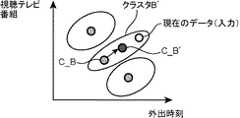
図15A、図15Bはクラスタの条件の一例を示す図である。図15Aは、過去のデータのみを入力データとした場合のクラスタ処理を示した図であり、図15Bは、過去のデータのクラスタリング結果に対して現在のデータを加えた場合の中心値の変化を示した図である。なお、図15A、図15Bにおいて、縦軸および横軸は図13A、図13Bと同じである。 FIG. 15A and FIG. 15B are diagrams showing an example of cluster conditions. FIG. 15A is a diagram showing cluster processing in the case where only past data is used as input data, and FIG. 15B shows a change in central value when current data is added to the clustering result of past data. FIG. In FIGS. 15A and 15B, the vertical axis and the horizontal axis are the same as in FIGS. 13A and 13B.
図15Aでは、視聴テレビ番組および外出時刻の過去のデータを入力データとした場合のクラスタリング結果が示されており、入力データはクラスタA、B、Cの3つのクラスタに分類されている。この際、選択部303は、各クラスタにつき、中心値を算出しておく。ここで、クラスタBの中心値をC_Bと表す。次に、選択部303は、図15Aのクラスタリング結果に対して現在のデータも付け加えてクラスタリングを行う。そして、選択部303は、再度、現在のデータが属するクラスタの中心値を求める。ここで、中心値としては、例えば、各クラスタの重心が採用される。 FIG. 15A shows a clustering result when viewing television programs and past data of leaving time as input data, and the input data is classified into three clusters of clusters A, B, and C. At this time, the
図15Bの例では、現在のデータはクラスタBに分類されている。ここで、現在のデータを加えたときのクラスタBをクラスタB’と表す。そして、選択部303は、クラスタB’の中心値C_B’を算出する。次に、選択部303は、中心値C_B’と中心値C_Bとを比較する。そして、中心値C_B’と中心値C_Bとの距離(移動量)が一定値より大きければクラスタB’は無効なクラスタと判定される。一方、中心値C_B’の中心値C_Bとの距離が一定値以下であれば、クラスタB’は有効なクラスタと判定される。 In the example of FIG. 15B, current data is classified into cluster B. Here, cluster B when current data is added is represented as cluster B '. Then, the
新しいデータが追加された場合に中心値が大きく変わるということは、そのクラスタの学習が不十分であり、このクラスタに対応する設定状態は、普段の設定状態を正確に算出できていない可能性が高い。そこで、条件3を加えることで、普段の設定状態をより正確に表したデータが書き込まれた設定ファイルが作成される。 The fact that the central value changes significantly when new data is added means that the learning of the cluster is insufficient, and the setting status corresponding to this cluster may not have calculated the normal setting status correctly. high. Therefore, by adding condition 3, a setting file in which data representing the normal setting state more accurately is written is created.
なお、以上の3つの条件の組み合わせは変えられてもよい。例えば、条件1と条件3とが組み合わされてもよいし、条件2だけが用いられてもよい。つまり、クラスタの条件は条件1〜3のうち、少なくともいずれか1つの条件が用いられればよい。また、以上で説明したもの以外の条件がクラスタの条件として用いられてもよい。この場合、ユーザの行動が十分に学習できていないクラスタを無効クラスタとして取り扱うような条件であればどのような条件が採用されてもよい。また、クラスタリングの分析方法として、k-means法が示されたが、他のクラスタリング法が採用されてもよい。 The combination of the above three conditions may be changed. For example,
以上の処理は、ユーザの個人データ内でのクラスタ処理が示されたが、一定条件を満たすクラスタに分類ができない場合、他のすべてのユーザのデータを用いたクラスタ処理を行い、普段の設定状態が抽出されてもよい。つまり、S705でNOと判定された場合、選択部303は、S707以降の処理を実行し、サーバ200が管理する他の複数のユーザのデータを用いて、クラスタ処理を行う。 The above processing showed cluster processing within the personal data of the user, but if classification into a cluster satisfying a certain condition can not be performed, cluster processing using data of all other users is performed, and the normal setting state is performed. May be extracted. That is, when the determination result in S705 is NO, the
S707では、選択部303は、図10のユーザ別の宅外情報801、宅内情報802、および全ユーザの蓄積情報803を用いて、クラスタ処理を実行する。具体的には、図7A、図7Bに示す宅内履歴の全ユーザ分の宅内履歴に対して、クラスタリング処理が行われる。 In S707, the
S705では、入力データが該当するユーザ個人のデータが入力データとしてクラスタ処理が行われていたが、S707では、該当するユーザのデータに加えて他のユーザのデータも入力データとしてクラスタ処理が行われる。それ以外は、S704と同じである。 In S705, the cluster process is performed with the data of the individual user corresponding to the input data as the input data, but in S707, the cluster process is performed as the input data with data of other users in addition to the data of the corresponding user . Other than that, it is the same as S704.
ここで、入力データとしては、サーバ200が管理する全ユーザの過去一定期間のデータが採用されてもよいし、全ユーザのうち所定条件を満たすユーザの過去一定期間のデータが採用されてもよい。なお、所定条件としては、該当するユーザと家族構成が同じであるといった条件、該当するユーザと性別および世代が同じであるといった条件が採用できる。 Here, as input data, data of a past fixed period of all users managed by the
例えば、図13A、13Bを例に挙げると、S704では、ある1のユーザ(ユーザA)の視聴テレビ番組および外出時刻を入力データとしてクラスタ処理が行われているが、S707では、ユーザAに加えてサーバ200が管理する他のユーザの視聴テレビ番組および外出時刻も用いてクラスタ処理が行われる。 For example, taking FIGS. 13A and 13B as an example, cluster processing is performed with the viewing television program of one user (user A) and outing time as input data in S704, but in addition to user A in S707. The cluster processing is performed using the viewing television programs of other users managed by the
S708では、選択部303は、S705と同様、現在のデータが属するクラスタが所定のクラスタ条件を満たすクラスタか否かを判定する。そして、S708において、有効と判定されると(S708でYES)、処理がS709に進められ、無効と判定されると(S708でNO)、処理がS710に進められる。なお、S708でも、S705と同様、各クラスタの入力データに対応する設定状態の中で、最も多い設定状態が設定ファイルに書き込まれ、設定ファイルが生成される。この場合、図9においてユーザIDが省かれた設定ファイルが生成される。 In S708, the
S709では、選択部303は、S706と同様、現在のデータが属するクラスタに対応する設定状態が、S708で作成した設定ファイルから読み出す。ここでは、ユーザAの現在の宅内の状況に対して、近い状況下にある多くのユーザの設定状態が読み出されることになる。そして、ユーザAの現在の設定状態がS709で読み出した設定状態と異なれば、図3に示すS205でFALSEと判定され、第1通知が実行される。一方、ユーザAの現在の設定状態がS709で読み出した設定状態と同じであれば、図3に示すS205でTRUEと判定され、第2通知が実行される。 In S709, the
なお、S708、S709の処理の詳細は、S705、S706と同じであるため、説明を省略する。ただし、クラスタの有効性を判定する際に用いられる閾値などは、S705とは異なる値が適宜採用される。例えば、S708では、S705に比べ、特定のユーザのみならず他のユーザのデータも用いられるため、データ数が膨大である。そのため、条件1の閾値としては、S705では1のユーザを想定した値(例えば、5)が採用されていたが、S708では、処理対象とされるデータ数に応じた値が採用される。また、S707では、S704に比べて処理対象とされるデータ数が膨大となるため、S704で用いたクラスタ処理とはアルゴリズムの異なるクラスタ処理が採用されてもよい。 The details of the processes of S708 and S709 are the same as those of S705 and S706, and thus the description thereof is omitted. However, as the threshold used to determine the effectiveness of the cluster, a value different from that in S 705 is appropriately adopted. For example, in S708, as compared with S705, data of not only a specific user but also other users are used, so the number of data is enormous. Therefore, although the value (for example, 5) which assumed 1 user was employ | adopted as a threshold value of
S710では、選択部303は、設定状態のデフォルト値を読み出す。ここで、デフォルト値は、例えば、ユーザが初期化時に決めた値が採用されてもよいし、各機器400の機器メーカが出荷時にあらかじめ決めた値が採用されてもよい。 In S710, the
例えば、発熱系の機器400であればデフォルト値としてオフが採用され、回転系の機器400であればデフォルト値としてチャイルドロックが採用される。 For example, in the case of the
以上説明したように、ユーザの位置が宅内から宅外、或いは宅外から宅内に変化した場合に、各機器400の設定状態と、該当するユーザ或いは他のユーザのデータから学習された同一の宅内の状況下での各機器400の普段の設定状態とが比較される。そして、比較結果が真の場合はユーザへ第2通知が実行され、比較結果が偽の場合は第1通知が実行され、情報端末300がユーザからの操作入力の待ち受け状態にされる。そのため、外出時或いは帰宅時において、入力を強いるような通知を必要な場合のみユーザに提示し、ユーザへの操作負担を軽減できる。 As described above, when the position of the user changes from inside the house to outside the house or from outside the house to the inside of the house, the setting state of each
(変形例1)
図16は、本実施の形態における変形例1の処理フローを示す図である。図16の処理フローは、図3の処理フローに対して、更にS1401、S1402の処理が追加されている。それ以外の図16の処理は、図3と同じであるため、説明を省略する。(Modification 1)
FIG. 16 is a diagram showing a processing flow of Modification Example 1 of the present embodiment. The process flow of FIG. 16 further includes the processes of S1401 and S1402 in addition to the process flow of FIG. The other processes in FIG. 16 are the same as those in FIG.
S1401では、状態遷移部305は、第1通知が実行されてから一定期間が経過したか否かを判定する。そして、一定期間内においてユーザから操作入力があれば(S1401でNO、且つ、S208でYES)、図3と同様、状態遷移部305は、ユーザからの操作入力に従った機器制御を実行する(S206)。 In S1401, the
一方、一定期間内にユーザからの操作入力があれば(S1401でYES)、状態遷移部305は、S203で読み出した設定ファイルが示す設定状態で各機器400を稼働させる自動の機器制御を実行する(S1402)。ここで、操作入力の回数を低減するという観点からすると、第1通知においては、機器400の設定状態をあえて普段と異なる設定にしているレアケースの場合にのみユーザに回答を入力をさせればよい。そこで、第1通知を実行したが、ユーザから第1通知に対する操作入力が一定期間内に行われない場合、状態遷移部305は、機器400の設定状態を普段の設定状態に強制的に戻す。 On the other hand, if there is an operation input from the user within a certain period (YES in S1401), the
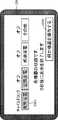
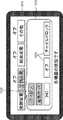
図17は、本実施の形態の変形例1における第1通知の一例を示す図である。図17の例では、機器400として、TV、IHコンロ、エアコン、およびアイロンが採用されている。そして、エアコンの設定状態が外出時における普段の設定状態とは異なり「オン」であったため、図17の例では、エアコンのアイコン5003が白色で表示され、「エアコンをオフにしますか?」という問い合わせを示すテキストが表示されている。 FIG. 17 is a diagram showing an example of the first notification in the first modification of the present embodiment. In the example of FIG. 17, a TV, an IH stove, an air conditioner, and an iron are adopted as the
そして、このテキストの下側には、エアコンを普段通りオフするための「はい」のアイコン5001と、エアコンの設定状態をオンに維持するための「いいえ」のアイコン5002とが表示されている。 Further, below the text, a "Yes"
今回の外出に限り意図的にエアコンをオンにしている場合、ユーザは「いいえ」のアイコン5002を選択する。一方、エアコンをオフするのを忘れて外出した場合、ユーザは「はい」のアイコン5001を選択する。ここで、変形例1では、第1通知に対してユーザは何も操作を入力しなくても、一定期間経過(図17では5秒)すると、エアコンは自動的にオフされる。そのため、図17の例では、「5秒間の間に入力がない場合は、エアコンをオフにしてこの表示を終了します。」とのテキストが表示されている。これにより、ユーザは、エアコンをオフにするのを忘れて外出した場合、第1通知に対する回答をあえて入力をしなくても、エアコンの設定状態を普段通りの設定状態に戻すことができる。そのため、ユーザの操作回数が1回少なくなり、操作性が向上する。 When the air conditioner is intentionally turned on only for the current outing, the user selects the "No"
(変形例2)
次に、第1、第2通知の変形例を示す変形例2について説明する。図18Aは変形例2における第2通知の第1例を示す図であり、図18Bは変形例2における第2通知の第2例を示す図である。(Modification 2)
Next, a second modification showing the first and second notifications will be described. FIG. 18A is a diagram showing a first example of the second notification in the second modification, and FIG. 18B is a diagram showing a second example of the second notification in the second modification.
図18Aの第2通知の例では、機器400の設定状態がいつもと同じ状態であることを示すメッセージに加えて各機器400の設定状態を示すアイコン5003も表示されている。ユーザは、いつもと同じ設定状態であることを示すメッセージを単に確認しただけでは、各機器400がどのような設定状態であるか確認ができず、心理的に不安になる可能性がある。そこで、図18Aの例では、これを回避するために各機器400の設定状態がアイコン5003を用いて具体的に示されている。これにより、ユーザは更なる安心感を得ることができる。 In the second notification example of FIG. 18A, in addition to the message indicating that the setting state of the
ここで、機器400の数が多い場合にはスマートフォンのような小さな画面に、全ての機器400の設定状態を同時に表示することは難しい。そこで、図18Aの例では、機器400の設定状態を機器400の分類別に示すアイコン5003が採用されている。 Here, when the number of
図18Aの例では、機器400は、「発熱家電」、「空調家電」、「娯楽家電」、および「その他」に分類されており、これら4つの分類に対応する4つのアイコン5003が表示されている。 In the example of FIG. 18A, the
ここで、「発熱家電」としては、例えば、IHコンロ、電気ケトル、およびオーブントースターといった機器400が該当する。「空調家電」としては、例えば、エアコン、および空気清浄機といった機器400が該当する。「娯楽家電」としては、例えば、テレビ、レコーダ、およびゲーム機器といった機器400が該当する。「その他」としては、これら3つの分類に属さない機器400が該当する。 Here, as the “heat generation home appliance”, for example, an
また、図18Aの例では、各アイコン5003の設定状態が表示されている。例えば、「発熱家電」は設定状態が「チャイルドロック」であるため、「チャイルドロック」と表示されている。なお、図18Aの例では、「発熱家電」、「空調家電」、および「娯楽家電」の各分類において複数の機器400が含まれる場合、複数の機器400の普段の設定状態は同じであるものとする。 Further, in the example of FIG. 18A, the setting state of each
また、図18Bの例では、図18Aに示す情報に加えて、機器400を操作する操作ダイアログを表示させるための「何か機器を操作する」と記載された呼出アイコン1800が表示されている。但し、第2通知は機器400の設定状態が普段通りであることをユーザに通知することを目的とするため、入力待ちの状態にするとユーザへの操作負担が増えてしまう。そこで、通知制御部304は、第2通知を一定期間(ここでは、3秒)経過後にディスプレイ309から消去する。そのため、図18Bの例では、「3秒後に表示を終了させます。」というメッセージが表示されている。また、第2通知は、機器400の設定状態が普段と同じであることをユーザに通知すれば足りるため、図18Aの例でも、一定期間(3秒)経過後に第2通知がディスプレイ309から消去される。そのため、図18Aの例でも、「3秒後に表示を終了させます。」とのメッセージが表示されている。 Further, in the example of FIG. 18B, in addition to the information shown in FIG. 18A, a
なお、図18Bにおいて、呼出アイコン1800がユーザにより選択されると、通知制御部304は、機器400の名称が一覧表示された機器一覧画面をディスプレイ309に表示する。そして、機器一覧画面の中からユーザにより1の機器400が選択されると、通知制御部304は、選択された機器400の操作ダイアログをディスプレイ309に表示する。 In FIG. 18B, when the
図19Aは変形例2における第1通知の第1例を示す図であり、図19Bは変形例2における第1通知の第2例を示す図である。図19Aの例では、「発熱家電」が普段の設定状態と異なっていた。そのため、図19Aに示す第1通知には、「発熱家電」に分類される各機器400の設定状態を示すと共に、各機器400を操作可能な操作ボタンを含む操作ダイアログ1901が表示されている。 FIG. 19A is a diagram showing a first example of the first notification in the second modification, and FIG. 19B is a diagram showing a second example of the first notification in the second modification. In the example of FIG. 19A, the “heat generation home appliance” was different from the normal setting state. Therefore, in the first notification shown in FIG. 19A, the setting state of each
図19Aの例では、「発熱家電」には、アイロン、電気ポット、およびIHCが含まれているため、これら3つの機器400に対応するアイコン1902が表示されている。そして、この例では、アイロンおよび電気ポットは普段通りにオフになっているが、IHCは普段とは異なりオンになっている。そのため、アイロンおよび電気ポットのアイコン1902は設定状態が普段通りであることを示す色(例えば灰色)で表示され、IHCのアイコン1902は設定状態が普段と異なることを示す色(例えば白色)で表示されている。 In the example of FIG. 19A, since the “heat generation home appliance” includes an iron, an electric pot, and an IHC,
また、図19Aに示す操作ダイアログ1901には、アイロン、電気ポット、およびIHCを操作するために、各機器400につき2つのボタン1903が表示されている。ここでは、アイロン、電気ポット、IHCのそれぞれに対して、「オフ」および「チャイルドロック」に設定するための2つのボタン1903が表示されている。 Further, in the
この操作ダイアログ1901を通じて、IHCの消し忘れに気づいたユーザは、IHCに対応する「オフ」のボタン1903を選択することで、IHCをオフにできる。 A user who notices that IHC has forgotten to be erased through this
図19Bの第1通知では、設定状態が普段通りでない機器400についてのみ、ボタン1903が表示されている点が図19Aと異なる。図19Bの例では、発熱家電に分類される機器400のうち、IHCのみの設定状態が普段と異なっていた。そのため、IHCのアイコン1902は白色で表示されると共に、IHCを操作するための2つのボタン1903のみが表示されている。 The first notification in FIG. 19B differs from FIG. 19A in that the
図20は、変形例2における第1通知の第3例を示す図である。図20の例では、機器400として、TV、IHコンロ、エアコン、およびアイロンが採用されている。そして、図20の例では、ユーザの帰宅時におけるエアコンの設定状態として27度が遠隔制御システムによって学習されていたとする。また、図20の例では、この学習結果に対してユーザの帰宅時における現在の設定状態が相違していた。そのため、エアコンのアイコン5003が普段の設定状態とは異なることを示す色(図20では白色)で表示されている。また、このことをユーザに認識させるために、図20の例では、「いつも通りアイコンを27度にしますか?」とのテキストが表示されている。ここで、ユーザが「はい」のアイコン2001を選択したとする。すると、遠隔制御システムは、学習結果が正しかったと認識する。一方、ユーザが「いいえ」のアイコン2002を選択したとする。すると、遠隔制御システムは、学習結果が正しくなかったと認識する。そして、学習結果が正しくない場合、遠隔制御システムは、この学習結果に対応するクラスタを例えば無効として取り扱い、再度、クラスタ処理をやり直せばよい。 FIG. 20 is a diagram illustrating a third example of the first notification in the second modification. In the example of FIG. 20, a TV, an IH stove, an air conditioner, and an iron are adopted as the
(変形例3)
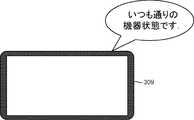
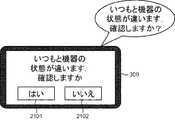
本開示では、第1通知および第2通知は映像を用いて視覚的に行われていた。本開示はこれに限定されず、音声を用いて第1および第2通知が行われてもよい。図21Aは変形例3における第2通知を示す図であり、図21Bは変形例3における第1通知を示す図である。図21Aの場合、通知制御部304は、「いつも通りの機器状態です。」との音声をスピーカ308から出力し、第2通知を実行している。(Modification 3)
In the present disclosure, the first notification and the second notification are visually performed using an image. The present disclosure is not limited to this, and the first and second notifications may be performed using voice. FIG. 21A is a diagram showing a second notification in the third modification, and FIG. 21B is a diagram showing a first notification in the third modification. In the case of FIG. 21A, the
一方、図21Bの場合、通知制御部304は、「いつもと機器の状態が違います。確認しますか?」との音声をスピーカ308から出力すると共に、「いつもと機器の状態が違います。確認しますか?」とのメッセージが記載された画面をディスプレイ309に出力する。この画面には「はい」のアイコン2101と「いいえ」のアイコン2102とが含まれている。 On the other hand, in the case of FIG. 21B, the
変形例3では、ユーザは、「はい」のアイコン2101又は「いいえ」のアイコン2102を選択することで、第1通知に対する回答を入力してもよいし、「はい」または「いいえ」の音声を発話することで、第1通知に対する回答を入力してもよい。 In the third modification, the user may input an answer to the first notification by selecting the “Yes”
このように、変形例3では、少なくとも音声を用いてユーザに第1、第2通知が行われている。そのため、ユーザに対して第1通知および第2通知をより確実に認識させることができる。なお、本開示では、視覚、および聴覚に加えて或いは代えて触覚を通じてユーザに第1、第2通知を認識させてもよい。この場合、例えば、通知制御部304は、情報端末300のバイブレータを振動させて第1、第2通知を実行すればよい。そして、この場合、通知制御部304は、第1、第2通知において、バイブレータの振動数を変えてもよい。また、通知制御部304は、情報端末300としての携帯電話およびスマートフォンに対して第1、第2通知を行ってもよいし、テレビおよびカーナビゲーションシステムといった情報端末300とは異なる装置に第1通知、第2通知を行ってもよい。 Thus, in the third modification, the first and second notifications are performed to the user using at least voice. Therefore, the user can be made to recognize the first notification and the second notification more reliably. In the present disclosure, the first and second notifications may be made to be recognized by the user through a sense of touch in addition to or instead of the sense of sight and the sense of hearing. In this case, for example, the
上記態様において説明された技術は、例えば、以下のクラウドサービスの類型において実現されうる。しかし、上記態様において説明された技術が実現される類型はこれに限られるものでない。 The techniques described in the above aspects may be implemented, for example, in the following cloud service types. However, the type in which the technology described in the above aspect is realized is not limited to this.
(サービスの類型1:自社データセンタ型)
図22は、サービスの類型1(自社データセンタ型)を示す図である。本類型は、サービスプロバイダ120がグループ100から情報を取得し、ユーザに対してサービスを提供する類型である。本類型では、サービスプロバイダ120が、データセンタ運営会社の機能を有している。即ち、サービスプロバイダ120が、ビッグデータの管理をするデータセンタ203(クラウドサーバ111)を保有している。従って、データセンタ運営会社は存在しない。(Service Type 1: In-house data center type)
FIG. 22 is a diagram of service type 1 (in-house data center type). The present type is a type in which the
本類型では、サービスプロバイダ120は、データセンタ203(クラウドサーバ111)を運営、管理している。また、サービスプロバイダ120は、OS202及びアプリケーション201を管理する。サービスプロバイダ120は、サービスプロバイダ120が管理するOS202及びアプリケーション201を用いてユーザにサービスを提供する(204)。 In this type, the
(サービスの類型2:IaaS利用型)
図23は、サービスの類型2(IaaS利用型)を示す図である。ここでIaaSとはインフラストラクチャー・アズ・ア・サービスの略であり、コンピュータシステムを構築および稼動させるための基盤そのものを、インターネット経由のサービスとして提供するクラウドサービス提供モデルである。(Service type 2: IaaS usage type)
FIG. 23 is a diagram illustrating service type 2 (IaaS usage type). Here, IaaS is an abbreviation of infrastructure as a service, and is a cloud service providing model that provides a platform itself for building and operating a computer system as a service via the Internet.
本類型では、データセンタ運営会社110がデータセンタ203(クラウドサーバ111)を運営、管理している203。また、サービスプロバイダ120は、OS202及びアプリケーション201を管理する。サービスプロバイダ120は、サービスプロバイダ120が管理するOS202及びアプリケーション201を用いてユーザにサービスを提供する(204)。 In this type, the data
(サービスの類型3:PaaS利用型)
図24は、サービスの類型3(PaaS利用型)を示す図である。ここでPaaSとはプラットフォーム・アズ・ア・サービスの略であり、ソフトウェアを構築および稼動させるための土台となるプラットフォームを、インターネット経由のサービスとして提供するクラウドサービス提供モデルである。(Service Type 3: PaaS Type)
FIG. 24 is a diagram showing service type 3 (PaaS using type). Here, PaaS is an abbreviation of platform as a service, and is a cloud service providing model that provides a platform serving as a foundation for building and operating software as a service via the Internet.
本類型では、データセンタ運営会社110は、OS202を管理し、データセンタ203(クラウドサーバ111)を運営、管理している203。また、サービスプロバイダ120は、アプリケーション201を管理する。サービスプロバイダ120は、データセンタ運営会社が管理するOS202及びサービスプロバイダ120が管理するアプリケーション201を用いてユーザにサービスを提供する(204)。 In this type, the data
(サービスの類型4:SaaS利用型)
図25は、サービスの類型4(SaaS利用型)を示す。ここでSaaSとはソフトウェア・アズ・ア・サービスの略である。例えばデータセンタ(クラウドサーバ)を保有しているプラットフォーム提供者が提供するアプリケーションを、データセンタ(クラウドサーバ)を保有していない会社・個人(利用者)がインターネットなどのネットワーク経由で使用できる機能を有するクラウドサービス提供モデルである。(Service type 4: SaaS usage type)
FIG. 25 shows service type 4 (SaaS usage type). Here, SaaS is an abbreviation of software as a service. For example, an application provided by a platform provider having a data center (cloud server) can be used by a company / individual (user) who does not have a data center (cloud server) via a network such as the Internet. Cloud service provision model.
本類型では、データセンタ運営会社110は、アプリケーション201を管理し、OS202を管理し、データセンタ203(クラウドサーバ111)を運営、管理している。また、サービスプロバイダ120は、データセンタ運営会社110が管理するOS202及びアプリケーション201を用いてユーザにサービスを提供する(204)。 In this type, the data
以上いずれの類型においても、サービスプロバイダ120がサービス提供行為を行ったものとする。また、例えば、サービスプロバイダ120若しくはデータセンタ運営会社110は、OS202、アプリケーション201若しくはビックデータのデータベース等を自ら開発してもよいし、また、第三者に外注させてもよい。 In any of the above types, it is assumed that the
本開示は、遠隔から宅内の制御を行うためのネットワーク家電システムにおいて有用である。 The present disclosure is useful in a network home appliance system for remotely controlling in-home.
101 機器
102 ホームゲートウェイ
110 データセンタ運営会社
111 クラウドサーバ
120 サービスプロバイダ
121 サーバ
200 サーバ
201 アプリケーション
203 データセンタ
300 情報端末
301 検出部
302 取得部
303 選択部
304 通知制御部
305 状態遷移部
306 通信部
307 記憶部
308 スピーカ
309 ディスプレイ
310 入力部
400 機器
500 対象機器
801 宅外情報
802 宅内情報
803 蓄積情報
2011 データベース
2012 通信部
2013 処理部101
Claims (12)
Translated fromJapanese前記宅内の状態を示す宅内状態、前記宅内に設置された所定の第1機器の状態を示す機器状態、および前記宅内に設置され、リモート制御対象となる第2機器の設定状態を取得し、
前記宅内状態および前記機器状態に応じて予め分類された複数の設定状態の中から、前記取得した前記宅内状態および前記機器状態に応じた普段の設定状態を、前記取得した前記宅内状態および前記機器状態を用いて選択し、
前記選択した前記普段の設定状態と前記取得した設定状態とが相違する場合、前記相違することをユーザに通知する第1通知を行い、
前記第1通知から所定期間経過までに、前記ユーザの入力を受け付けなかった場合、前記第2機器に、前記取得した設定状態を前記普段の設定状態にする信号を出力する、
情報通知方法。An information notification method in a remote control system for remotely controlling a device installed in a user's house using an information terminal,
Obtaining an in-house state indicating an in-house state, an apparatus state indicating a state of a predetermined first device installed in the in-house, and a setting state of a second device installed in the house and to be a remote control target;
Among the plurality of setting states classified in advance according to the in-home state and the device state, the acquired in-home state and the device may be obtained from the acquired in-home state and the usual setting state according to the device state. Select using state,
When the selected normal setting state and the acquired setting state are different, a first notification to notify the user of the difference is performed.
If the user's input is not received within a predetermined period from the first notification, a signal is output to the second device to set the acquired setting state to the normal setting state.
Information notification method.
前記分類された設定状態は、サービスの適用対象となる1のユーザが住居する第1宅内から収集された前記設定状態を前記宅内状態および前記機器状態に応じて分類することで得られる第1設定状態、又は前記第1宅内および前記第1宅内とは別の1以上の第2宅内から収集された前記設定状態を前記宅内状態および前記機器状態に応じて分類することで得られる第2設定状態である請求項1〜3のいずれかに記載の情報通知方法。The remote control system includes a database that associates and stores the in-home state, the device state, and the setting state collected from one or more homes,
The classified setting state is a first setting obtained by classifying the setting state collected from the first house where one user who is the application target of the service is located according to the in-home state and the device state A second setting state obtained by classifying the setting states collected from the state, or one or more second homes other than the first home and the first home according to the home state and the device state The information notification method according to any one of claims 1 to 3, wherein
前記データベースに蓄積された前記宅内状態および前記機器状態をクラスタリングし、前記取得した前記宅内状態および前記機器状態が属するクラスタに対応する設定状態の中の最多の設定状態を、前記普段の設定状態として選択する請求項1〜7のいずれかに記載の情報通知方法。The remote control system includes a database that associates and stores the in-home state, the device state, and the setting state collected from the home.
The in-home state and the device state stored in the database are clustered, and the acquired in-home state and the largest number of setting states among the setting states corresponding to the cluster to which the device state belongs are regarded as the ordinary setting state. The information notification method according to any one of claims 1 to 7, which is to be selected.
前記対象クラスタに対応する設定状態の中で最多の設定状態が占める割合が第2閾値より大きいという第2条件と、
前記対象クラスタにおいて、前記取得した前記宅内状態および前記機器状態を加えた場合の中心値の移動量が第3閾値以下であるという第3条件とのうち、
少なくとも1の条件を満たす場合、前記対象クラスタに対応する前記最多の設定状態を、前記普段の設定状態として選択する請求項8記載の情報通知方法。A first condition that the number of clustered data is greater than a first threshold in a target cluster to which the acquired in-home state and the device state belong;
A second condition that a ratio of the largest number of setting states among the setting states corresponding to the target cluster is larger than a second threshold;
In the target cluster, of the third condition that the movement amount of the central value when the acquired indoor state and the device state are added is equal to or less than a third threshold value,
9. The information notification method according to claim 8, wherein when the at least one condition is satisfied, the largest number of setting states corresponding to the target cluster is selected as the normal setting state.
請求項1に記載の情報通知方法。After the first notification, the state of the information terminal is transitioned to a state in which an input for remotely controlling the second device can be received.
The information notification method according to claim 1.
請求項1に記載の情報通知方法。At the time of the first notification, when the input of the user is not received within a predetermined period from the first notification, a signal is output to the second device to set the acquired setting state to the normal setting state. Notify the user that
The information notification method according to claim 1.
前記情報端末のコンピュータに対し、
前記宅内の状態を示す宅内状態、前記宅内に設置された所定の第1機器の状態を示す機器状態、および前記宅内に設置され、リモート制御対象となる第2機器の設定状態を取得させ、
前記宅内状態および前記機器状態に応じて予め分類された複数の設定状態の中から、前記取得させた前記宅内状態および機器状態に応じた普段の設定状態を、前記取得させた宅内状態および前記機器状態を用いて選択させ、
前記選択させた設定状態と前記取得させた設定状態とが相違する場合、前記相違することをユーザに通知する第1通知を行わせ、
前記第1通知から所定期間経過までに、前記ユーザの入力を受け付けなかった場合、前記第2機器に、前記取得した設定状態を前記普段の設定状態にする信号を出力するプログラム。A program for an information terminal in a remote control system for remotely controlling a device installed in a home where a user resides using the information terminal,
For the computer of the information terminal,
The in-home state indicating the in-home state, the device state indicating the state of the predetermined first device installed in the home, and the setting state of the second device installed in the home and to be a remote control target
Among the plurality of setting states classified in advance according to the in-home state and the device state, the in-home state and the device obtained the ordinary setting state according to the acquired in-home state and the device state Use the state to select
When the selected setting state is different from the acquired setting state, the user is notified of the first notification to notify the user of the difference.
The program which outputs the signal which makes the acquired setting state the said usual setting state to the said 2nd apparatus when not receiving the said user's input by predetermined period progress from the said 1st notification.
Applications Claiming Priority (2)
| Application Number | Priority Date | Filing Date | Title |
|---|---|---|---|
| US201361838540P | 2013-06-24 | 2013-06-24 | |
| US61/838,540 | 2013-06-24 |
Related Parent Applications (1)
| Application Number | Title | Priority Date | Filing Date |
|---|---|---|---|
| JP2015502978ADivisionJP6305390B2 (en) | 2013-06-24 | 2014-06-18 | Information notification method, information terminal, and program |
Publications (2)
| Publication Number | Publication Date |
|---|---|
| JP2018088720A JP2018088720A (en) | 2018-06-07 |
| JP6538221B2true JP6538221B2 (en) | 2019-07-03 |
Family
ID=52141420
Family Applications (2)
| Application Number | Title | Priority Date | Filing Date |
|---|---|---|---|
| JP2015502978AActiveJP6305390B2 (en) | 2013-06-24 | 2014-06-18 | Information notification method, information terminal, and program |
| JP2018038800AActiveJP6538221B2 (en) | 2013-06-24 | 2018-03-05 | Information notification method, information terminal, and program |
Family Applications Before (1)
| Application Number | Title | Priority Date | Filing Date |
|---|---|---|---|
| JP2015502978AActiveJP6305390B2 (en) | 2013-06-24 | 2014-06-18 | Information notification method, information terminal, and program |
Country Status (3)
| Country | Link |
|---|---|
| US (1) | US9530306B2 (en) |
| JP (2) | JP6305390B2 (en) |
| WO (1) | WO2014208057A1 (en) |
Families Citing this family (29)
| Publication number | Priority date | Publication date | Assignee | Title |
|---|---|---|---|---|
| KR20150077005A (en)* | 2013-12-27 | 2015-07-07 | 삼성전자주식회사 | Electric device and method for controlling target device |
| JP6140214B2 (en)* | 2015-04-20 | 2017-05-31 | シャープ株式会社 | CONTROL DEVICE, CONTROL DEVICE CONTROL METHOD, CONTROL SYSTEM, ENVIRONMENT CONTROL DEVICE, AND CONTROL PROGRAM |
| CN105227627B (en)* | 2015-08-25 | 2017-10-03 | 广东欧珀移动通信有限公司 | A kind of playback equipment packet control process and user terminal |
| KR102395529B1 (en)* | 2015-10-22 | 2022-06-02 | 삼성전자주식회사 | Communication apparatus, display apparatus and method of controlling the same |
| US10430025B2 (en) | 2015-10-30 | 2019-10-01 | Bank Of America Corporation | Active selection configuration system with suggested actions |
| USD815107S1 (en) | 2015-10-30 | 2018-04-10 | Bank Of America Corporation | Display screen with a transitional graphical user interface |
| US10095497B2 (en) | 2015-10-30 | 2018-10-09 | Bank Of America Corporation | System for discovery of software operable on a device |
| US10048836B2 (en) | 2015-10-30 | 2018-08-14 | Bank Of America Corporation | Application connectivity for aggregation and for use in data filtering |
| US10091206B2 (en)* | 2015-10-30 | 2018-10-02 | Bank Of America Corporation | System for discovery of devices and connections associated with a device |
| US10031645B2 (en) | 2015-10-30 | 2018-07-24 | Bank Of America Corporation | Application connectivity for aggregation |
| US10051015B2 (en) | 2015-10-30 | 2018-08-14 | Bank Of America Corporation | System for configuration, device connectivity and device control based on user selection |
| CN105717814A (en)* | 2016-03-18 | 2016-06-29 | 浙江吉利控股集团有限公司 | Vehicle remote control system and control method thereof |
| JP6934892B2 (en)* | 2016-06-12 | 2021-09-15 | アップル インコーポレイテッドApple Inc. | User interface for managing controllable external devices |
| DK179494B1 (en) | 2016-06-12 | 2019-01-11 | Apple Inc. | User interface for managing controllable external devices |
| WO2018011639A1 (en) | 2016-07-13 | 2018-01-18 | Vocal Power-House Sysytems, Llc | Responsive communication system |
| US11665009B2 (en) | 2016-07-13 | 2023-05-30 | Vocal Power-House Systems, LLC | Responsive communication system |
| US10820183B2 (en) | 2016-08-05 | 2020-10-27 | D&M Holdings, Inc. | System and method for device control based upon home or away detection of a mobile device |
| JP6461894B2 (en)* | 2016-12-20 | 2019-01-30 | ソフトバンク株式会社 | Seat information management system, seat information management method and program |
| JP6904827B2 (en)* | 2017-07-18 | 2021-07-21 | トヨタホーム株式会社 | Air conditioning control system |
| WO2019167684A1 (en)* | 2018-02-27 | 2019-09-06 | 株式会社Nttドコモ | At-home prediction device |
| KR102710586B1 (en) | 2018-03-14 | 2024-09-27 | 구글 엘엘씨 | Generating iot-based notification(s) and provisioning of command(s) to cause automatic rendering of the iot-based notification(s) by automated assistant client(s) of client device(s) |
| EP4113989A1 (en) | 2018-05-07 | 2023-01-04 | Apple Inc. | User interfaces for viewing live video feeds and recorded video |
| JP7056604B2 (en)* | 2019-02-14 | 2022-04-19 | オムロン株式会社 | Operation terminal, device operation system, device operation method, and device operation program |
| JP2022051981A (en)* | 2019-02-15 | 2022-04-04 | ソニーグループ株式会社 | Data processing device and display control method |
| US10904029B2 (en) | 2019-05-31 | 2021-01-26 | Apple Inc. | User interfaces for managing controllable external devices |
| US11363071B2 (en) | 2019-05-31 | 2022-06-14 | Apple Inc. | User interfaces for managing a local network |
| US11513667B2 (en) | 2020-05-11 | 2022-11-29 | Apple Inc. | User interface for audio message |
| US20220365667A1 (en) | 2021-05-15 | 2022-11-17 | Apple Inc. | User interfaces for managing accessories |
| US12379827B2 (en) | 2022-06-03 | 2025-08-05 | Apple Inc. | User interfaces for managing accessories |
Family Cites Families (5)
| Publication number | Priority date | Publication date | Assignee | Title |
|---|---|---|---|---|
| JP2010049455A (en)* | 2008-08-21 | 2010-03-04 | Hochiki Corp | Residential control apparatus and residential alarm unit |
| JP5364441B2 (en) | 2009-05-15 | 2013-12-11 | トヨタホーム株式会社 | Building equipment control device |
| CN103782479B (en) | 2011-08-31 | 2016-04-20 | 株式会社东芝 | Power supply forgets closing detecting apparatus, power supply is forgotten to close detection method and detection system |
| TWI450056B (en)* | 2011-10-31 | 2014-08-21 | Hon Hai Prec Ind Co Ltd | Household electronic device inspection system and method thereof |
| EP2932650B1 (en)* | 2012-12-13 | 2021-01-27 | Samsung Electronics Co., Ltd. | Apparatus for controlling devices in home network system |
- 2014
- 2014-06-18WOPCT/JP2014/003278patent/WO2014208057A1/enactiveApplication Filing
- 2014-06-18USUS14/415,335patent/US9530306B2/enactiveActive
- 2014-06-18JPJP2015502978Apatent/JP6305390B2/enactiveActive
- 2018
- 2018-03-05JPJP2018038800Apatent/JP6538221B2/enactiveActive
Also Published As
| Publication number | Publication date |
|---|---|
| JP2018088720A (en) | 2018-06-07 |
| JP6305390B2 (en) | 2018-04-04 |
| JPWO2014208057A1 (en) | 2017-02-23 |
| US20150179057A1 (en) | 2015-06-25 |
| US9530306B2 (en) | 2016-12-27 |
| WO2014208057A1 (en) | 2014-12-31 |
Similar Documents
| Publication | Publication Date | Title |
|---|---|---|
| JP6538221B2 (en) | Information notification method, information terminal, and program | |
| US11386285B2 (en) | Systems and methods of person recognition in video streams | |
| US11256951B2 (en) | Systems and methods of person recognition in video streams | |
| US20250231666A1 (en) | Timeline-Video Relationship Presentation for Alert Events | |
| JP6301829B2 (en) | Control method | |
| CN110753949B (en) | A hotel management system | |
| US9778634B2 (en) | Method of controlling a target apparatus, selected from a plurality of apparatuses based on a selection from displayed apparatus information, place information, or operator information | |
| US20140192197A1 (en) | Method and apparatus for controlling access to a home using visual cues | |
| US11783010B2 (en) | Systems and methods of person recognition in video streams | |
| KR20160083760A (en) | Method and device for controlling home device | |
| US12164572B2 (en) | Inferring semantic label(s) for assistant device(s) based on device-specific signal(s) | |
| EP3410343A1 (en) | Systems and methods of person recognition in video streams | |
| US20250238495A1 (en) | User access to functionality of a docked tablet computing device | |
| WO2024107187A1 (en) | Point and gesture control of remote devices |
Legal Events
| Date | Code | Title | Description |
|---|---|---|---|
| A621 | Written request for application examination | Free format text:JAPANESE INTERMEDIATE CODE: A621 Effective date:20180305 | |
| TRDD | Decision of grant or rejection written | ||
| A01 | Written decision to grant a patent or to grant a registration (utility model) | Free format text:JAPANESE INTERMEDIATE CODE: A01 Effective date:20190514 | |
| A61 | First payment of annual fees (during grant procedure) | Free format text:JAPANESE INTERMEDIATE CODE: A61 Effective date:20190605 | |
| R150 | Certificate of patent or registration of utility model | Ref document number:6538221 Country of ref document:JP Free format text:JAPANESE INTERMEDIATE CODE: R150 |