JP2010503044A - System and method for modifying a media library - Google Patents
System and method for modifying a media libraryDownload PDFInfo
- Publication number
- JP2010503044A JP2010503044AJP2009527605AJP2009527605AJP2010503044AJP 2010503044 AJP2010503044 AJP 2010503044AJP 2009527605 AJP2009527605 AJP 2009527605AJP 2009527605 AJP2009527605 AJP 2009527605AJP 2010503044 AJP2010503044 AJP 2010503044A
- Authority
- JP
- Japan
- Prior art keywords
- media
- electronic device
- client electronic
- user
- distribution system
- Prior art date
- Legal status (The legal status is an assumption and is not a legal conclusion. Google has not performed a legal analysis and makes no representation as to the accuracy of the status listed.)
- Pending
Links
Images





Classifications
- H—ELECTRICITY
- H04—ELECTRIC COMMUNICATION TECHNIQUE
- H04N—PICTORIAL COMMUNICATION, e.g. TELEVISION
- H04N1/00—Scanning, transmission or reproduction of documents or the like, e.g. facsimile transmission; Details thereof
- H04N1/00127—Connection or combination of a still picture apparatus with another apparatus, e.g. for storage, processing or transmission of still picture signals or of information associated with a still picture
- G—PHYSICS
- G06—COMPUTING OR CALCULATING; COUNTING
- G06F—ELECTRIC DIGITAL DATA PROCESSING
- G06F16/00—Information retrieval; Database structures therefor; File system structures therefor
- G06F16/40—Information retrieval; Database structures therefor; File system structures therefor of multimedia data, e.g. slideshows comprising image and additional audio data
- G06F16/43—Querying
- G06F16/438—Presentation of query results
- G06F16/4387—Presentation of query results by the use of playlists
- G—PHYSICS
- G06—COMPUTING OR CALCULATING; COUNTING
- G06F—ELECTRIC DIGITAL DATA PROCESSING
- G06F16/00—Information retrieval; Database structures therefor; File system structures therefor
- G06F16/90—Details of database functions independent of the retrieved data types
- G06F16/95—Retrieval from the web
- G06F16/958—Organisation or management of web site content, e.g. publishing, maintaining pages or automatic linking
- G—PHYSICS
- G06—COMPUTING OR CALCULATING; COUNTING
- G06F—ELECTRIC DIGITAL DATA PROCESSING
- G06F17/00—Digital computing or data processing equipment or methods, specially adapted for specific functions
Landscapes
- Engineering & Computer Science (AREA)
- Theoretical Computer Science (AREA)
- Databases & Information Systems (AREA)
- Physics & Mathematics (AREA)
- General Engineering & Computer Science (AREA)
- General Physics & Mathematics (AREA)
- Data Mining & Analysis (AREA)
- Multimedia (AREA)
- Signal Processing (AREA)
- Mathematical Physics (AREA)
- Software Systems (AREA)
- Information Transfer Between Computers (AREA)
- Computer And Data Communications (AREA)
Abstract
Translated fromJapaneseDescription
Translated fromJapanese 関連出願
本願は、参照により本明細書に組み込まれる以下の出願の優先権を主張する。2006年9月8日出願の「System and Method for Modifying a Media Library」という名称の米国仮特許出願第60/843,166号。Related Applications This application claims priority to the following applications, which are incorporated herein by reference. US Provisional Patent Application No. 60 / 843,166 entitled “System and Method for Modifying a Media Library” filed on September 8, 2006.
本開示はメディア・ライブラリ・ファイルに関し、より詳細には、ラジオ・メディア・コンテンツを定義するように修正されるメディア・ライブラリ・ファイルに関する。 The present disclosure relates to media library files, and more particularly to media library files that are modified to define radio media content.
メディア配布システム(例えば、ワシントン州シアトルのRealNetworks Inc.によって提供されるRhapsody(商標)サービス)は、メディア・データ・ファイルをメディア・サーバからユーザのクライアント電子装置(例えば、パーソナル・メディア・プレーヤ、携帯情報端末、またはマルチメディア携帯電話)に配布する。メディア配布システムは、ユーザが例えばダウンロード済みメディア・データ・ファイルを受信し、かつ/またはリモート・メディア・データ・ファイルをストリーミングすることを可能にすることにより、メディア・データ・ファイルを配布することができる。 A media distribution system (eg, Rhapsody ™ service provided by RealNetworks Inc. of Seattle, Washington) allows media data files to be retrieved from the media server to the user's client electronic device (eg, personal media player, mobile Distribute to information terminals or multimedia mobile phones. The media distribution system may distribute media data files, for example, by allowing a user to receive downloaded media data files and / or stream remote media data files. it can.
ユーザにメディア・データ・ファイルをストリーミングするとき、ユーザは、ストリーミングされるメディア・データ・ファイルのうちの1つまたは複数をユーザのメディア・ライブラリ・ファイル内に定義し、したがって、定義したメディア・データ・ファイルをその後で再生することを可能にすることを望むことがある。 When streaming media data files to a user, the user defines one or more of the streamed media data files in the user's media library file, and thus the defined media data • You may want to be able to play the file later.
第1の実施態様では、方法が、クライアント電子装置上でラジオ・メディア・データ・ファイルをレンダリングすることを含む。ラジオ・メディア・データ・ファイルをメディア・ライブラリ・ファイルに追加したいというユーザの要望の指示が、クライアント電子装置のユーザから受信される。指示の受信に応答して、メディア・ライブラリ・ファイルが、ラジオ・メディア・データ・ファイルを定義するように修正される。 In a first embodiment, the method includes rendering a radio media data file on the client electronic device. An indication of the user's desire to add a radio media data file to the media library file is received from a user of the client electronic device. In response to receiving the indication, the media library file is modified to define a radio media data file.
以下の特徴のうちの1つまたは複数を含めることができる。クライアント電子装置の記憶装置上にメディア・ライブラリ・ファイルを格納することができる。メディア・ライブラリ・ファイルを修正する前に、ユーザの要望の指示を確認することができる。ユーザの要望の指示が意図的なものであったことを確認することは、クライアント電子装置のディスプレイ・パネル上に確認画面をレンダリングすることを含むことができる。 One or more of the following features may be included. The media library file can be stored on the storage device of the client electronic device. Before modifying the media library file, the user's desired instructions can be confirmed. Confirming that the user-desired indication was intentional can include rendering a confirmation screen on the display panel of the client electronic device.
ライブラリ管理API(API:アプリケーション・プログラム・インターフェース)を介してリモート・メディア配布システムと通信することができる。メディア・ライブラリ・ファイルを修正することは、ラジオ・メディア・データ・ファイルのコピーを得ること、および得られたラジオ・メディア・データ・ファイルのコピーをクライアント電子装置上にローカルに格納することを含むことができる。メディア・ライブラリ・ファイルを修正することは、ユーザがアクセス可能なクライアント電子装置内のメモリ位置にラジオ・メディア・データ・ファイルを移動すること、およびユーザがアクセス可能なクライアント電子装置内のメモリ位置に対するポインタを含むようにメディア・ライブラリ・ファイルを修正することを含むことができる。 It is possible to communicate with a remote media distribution system via a library management API (API: application program interface). Modifying the media library file includes obtaining a copy of the radio media data file and storing the obtained copy of the radio media data file locally on the client electronic device. be able to. Modifying the media library file moves the radio media data file to a memory location in the client electronic device accessible to the user and to the memory location in the client electronic device accessible to the user. Modifying the media library file to include a pointer can be included.
別の実施態様では、コンピュータ・プログラム製品が、複数の命令がその上に格納されたコンピュータ可読媒体上に常駐する。プロセッサによって実行されたとき、命令は、クライアント電子装置上でラジオ・メディア・データ・ファイルをレンダリングすることを含むオペレーションをプロセッサに実行させる。ラジオ・メディア・データ・ファイルをメディア・ライブラリ・ファイルに追加したいというユーザの要望の指示が、クライアント電子装置のユーザから受信される。指示の受信に応答して、メディア・ライブラリ・ファイルが、ラジオ・メディア・データ・ファイルを定義するように修正される。 In another embodiment, the computer program product resides on a computer readable medium having a plurality of instructions stored thereon. When executed by the processor, the instructions cause the processor to perform operations including rendering a radio media data file on the client electronic device. An indication of the user's desire to add a radio media data file to the media library file is received from a user of the client electronic device. In response to receiving the indication, the media library file is modified to define a radio media data file.
以下の特徴のうちの1つまたは複数を含めることができる。クライアント電子装置の記憶装置上にメディア・ライブラリ・ファイルを格納することができる。メディア・ライブラリ・ファイルを修正する前に、ユーザの要望の指示を確認することができる。ユーザの要望の指示が意図的なものであったことを確認することは、クライアント電子装置のディスプレイ・パネル上に確認画面をレンダリングすることを含むことができる。 One or more of the following features may be included. The media library file can be stored on the storage device of the client electronic device. Before modifying the media library file, the user's desired instructions can be confirmed. Confirming that the user-desired indication was intentional can include rendering a confirmation screen on the display panel of the client electronic device.
ライブラリ管理APIを介してリモート・メディア配布システムと通信することができる。メディア・ライブラリ・ファイルを修正することは、ラジオ・メディア・データ・ファイルのコピーを得ること、および得られたラジオ・メディア・データ・ファイルのコピーをクライアント電子装置上にローカルに格納することを含むことができる。メディア・ライブラリ・ファイルを修正することは、ユーザがアクセス可能なクライアント電子装置内のメモリ位置にラジオ・メディア・データ・ファイルを移動すること、およびユーザがアクセス可能なクライアント電子装置内のメモリ位置に対するポインタを含むようにメディア・ライブラリ・ファイルを修正することを含むことができる。 It can communicate with a remote media distribution system via a library management API. Modifying the media library file includes obtaining a copy of the radio media data file and storing the obtained copy of the radio media data file locally on the client electronic device. be able to. Modifying the media library file moves the radio media data file to a memory location in the client electronic device accessible to the user and to the memory location in the client electronic device accessible to the user. Modifying the media library file to include a pointer can be included.
別の実施態様では、クライアント電子装置が、クライアント電子装置上でラジオ・メディア・データ・ファイルをレンダリングすることを含むオペレーションを実行するように構成される。ラジオ・メディア・データ・ファイルをメディア・ライブラリ・ファイルに追加したいというユーザの要望の指示が、クライアント電子装置のユーザから受信される。指示の受信に応答して、メディア・ライブラリ・ファイルが、ラジオ・メディア・データ・ファイルを定義するように修正される。 In another embodiment, the client electronic device is configured to perform operations including rendering a radio media data file on the client electronic device. An indication of the user's desire to add a radio media data file to the media library file is received from a user of the client electronic device. In response to receiving the indication, the media library file is modified to define a radio media data file.
以下の特徴のうちの1つまたは複数を含めることができる。クライアント電子装置の記憶装置上にメディア・ライブラリ・ファイルを格納することができる。メディア・ライブラリ・ファイルを修正する前に、ユーザの要望の指示を確認することができる。ユーザの要望の指示が意図的なものであったことを確認することは、クライアント電子装置のディスプレイ・パネル上に確認画面をレンダリングすることを含むことができる。 One or more of the following features may be included. The media library file can be stored on the storage device of the client electronic device. Before modifying the media library file, the user's desired instructions can be confirmed. Confirming that the user-desired indication was intentional can include rendering a confirmation screen on the display panel of the client electronic device.
ライブラリ管理APIを介してリモート・メディア配布システムと通信することができる。メディア・ライブラリ・ファイルを修正することは、ラジオ・メディア・データ・ファイルのコピーを得ること、および得られたラジオ・メディア・データ・ファイルのコピーをクライアント電子装置上にローカルに格納することを含むことができる。メディア・ライブラリ・ファイルを修正することは、ユーザがアクセス可能なクライアント電子装置内のメモリ位置にラジオ・メディア・データ・ファイルを移動すること、およびユーザがアクセス可能なクライアント電子装置内のメモリ位置に対するポインタを含むようにメディア・ライブラリ・ファイルを修正することを含むことができる。 It can communicate with a remote media distribution system via a library management API. Modifying the media library file includes obtaining a copy of the radio media data file and storing the obtained copy of the radio media data file locally on the client electronic device. be able to. Modifying the media library file moves the radio media data file to a memory location in the client electronic device accessible to the user and to the memory location in the client electronic device accessible to the user. Modifying the media library file to include a pointer can be included.
1つまたは複数の実施態様の詳細が、添付の図面および以下の説明で記述される。説明、図面、および特許請求の範囲から他の特徴および利点が明らかとなるであろう。 The details of one or more implementations are set forth in the accompanying drawings and the description below. Other features and advantages will be apparent from the description, drawings, and claims.
様々な図面中の同様の参照符号は同様の要素を示す。 Like reference symbols in the various drawings indicate like elements.
システム概要
図1を参照すると、例えばパーソナル・メディア装置12(したがってユーザ14)が、メディア配布システム18からメディア・コンテンツ16を得ることを可能にするAPI(すなわちアプリケーション・プログラム・インターフェース)10が示されている。メディア・コンテンツ16は、例えば、周知の圧縮技法を使用して圧縮することのできるデジタル符号化オーディオおよび/またはビデオ・メディア・データ・ファイルでよい。そのような圧縮技法の例は、限定はしないが、MPEG−1、MPEG−2、MPEG−4、H.263、H.264、Advanced Audio Coding、ならびに国際標準化機構(ISO)およびMotion Picture Experts Group(MPEG)によって公表された他の技法を含むことができる。System Overview Referring to FIG. 1, an API (ie, application program interface) 10 is shown that enables, for example, a personal media device 12 (and thus a user 14) to obtain
メディア配布システム18から受信されるメディア・コンテンツ16のフォーマットの例は、例えば、メディア配布システム18から受信される購入済みダウンロード(すなわち、例えばユーザ14に対して永続的な使用のために許諾されたメディア・コンテンツ)と、メディア配布システム18から受信される加入ダウンロード(すなわち、例えばユーザ14に対して、メディア配布システム18との有効な加入契約が存在する間の使用のために許諾されたメディア・コンテンツ)と、メディア配布システム18からストリーミングされるメディア・コンテンツとを含むことができる。通常、メディア・コンテンツが、例えばコンピュータ28からパーソナル・メディア装置12にストリーミングされるとき、メディア・コンテンツのコピーは、パーソナル・メディア装置12上に永続的に保持されない。メディア配布システム18に加えて、他のソースからメディア・コンテンツを得ることができ、他のソースの例は、限定はしないが、音楽コンパクト・ディスクからリッピングされたファイルを含むことができる。 An example format of
メディア配布システム18によって配布されるメディア・コンテンツ16のタイプの例は、オーディオ・メディア・データ・ファイル(その例は、限定はしないが、例えば音楽ファイル、オーディオ・ニュース・ブロードキャスト、オーディオ・スポーツ・ブロードキャスト、および書籍の音声記録を含むことができる)と、ビデオ・メディア・データ・ファイル(その例は、限定はしないが、例えば音声を含まないビデオ場面を含むことができる)と、オーディオ/ビデオ・メディア・データ・ファイル(その例は、限定はしないが、例えばa/vニュース・ブロードキャスト、a/vスポーツ・ブロードキャスト、長編の映画およびムービークリップ、ミュージック・ビデオ、ならびにテレビジョン・ショーのエピソードを含むことができる)と、マルチメディア・コンテンツ・メディア・データ・ファイル(その例は、限定はしないが、例えば対話型のプレゼンテーションおよびスライドショーを含むことができる)とを含む。 Examples of types of
メディア配布システム18は、メディア・データ・ストリームおよび/またはメディア・データ・ファイルを複数のユーザ(例えばユーザ14、20、22、24、26)に提供することができる。そのようなメディア配布システム18の例は、ワシントン州シアトルのRealNetworks Inc.によって提供されるRhapsody(商標)サービスを含む。
メディア配布システム18は、ネットワーク30(例えばインターネット)に接続されるコンピュータ28(例えばサーバコンピュータ)上に常駐し、コンピュータ28によって実行されるサーバアプリケーションでよい。コンピュータ28は、ネットワーク・オペレーティング・システムを実行するウェブサーバでよく、ネットワーク・オペレーティング・システムの例は、限定はしないが、Microsoft Windows(登録商標) XP Server(商標)、Novell Netware(商標)、またはRedhat Linux(商標)を含むことができる。 The
コンピュータ28はまた、ウェブサーバ・アプリケーションも実行することができ、ウェブサーバ・アプリケーションの例は、限定はしないが、ネットワーク30を介してコンピュータ28へのHTTP(すなわちHyperText Transfer Protocol)アクセスを可能にするMicrosoft IIS(商標)、Novell Webserver(商標)、またはApache Webserver(商標)を含むことができる。例えばローカル・エリア・ネットワーク、広域ネットワーク、イントラネットなどの1つまたは複数の2次ネットワーク(例えばネットワーク32)にネットワーク30を接続することができる。 The computer 28 can also run web server applications, examples of which include, but are not limited to, HTTP (ie, HyperText Transfer Protocol) access to the computer 28 via the
コンピュータ28に結合された記憶装置34上に格納することのできる、メディア配布システム18およびAPI10の命令セットおよびサブルーチンを、コンピュータ28に組み込まれた1つまたは複数のプロセッサ(図示せず)ならびに1つまたは複数のメモリ・アーキテクチャ(図示せず)で実行することができる。さらに、メディア配布システム18から入手可能なメディア・データ・ファイルを、例えば、コンピュータ28に取り付けられた記憶装置34上に格納することができる。記憶装置34は、限定はしないが、ハード・ディスク・ドライブ、テープ・ドライブ、光学式ドライブ、RAIDアレイ、ランダム・アクセス・メモリ(RAM)、または読取り専用メモリ(ROM)を含むことができる。 The
ユーザ14、20、22、24、26は、例えばネットワーク30および/または2次ネットワーク32を介して、メディア配布システム18にアクセスすることができる。さらに、擬似リンク線36で示されるように、2次ネットワーク32を介してコンピュータ28(すなわち、メディア配布システム18を実行するコンピュータ)をネットワーク30に接続することができる。
メディア配布システム18に直接的にアクセスすることができ、またはプロキシ・コンピュータを介してアクセスすることができる。例えば、ユーザ20、24、26は、様々なクライアント電子装置を介してメディア配布システム18に直接的にアクセスすることができ、様々なクライアント電子装置の例は、限定はしないが、例えばパーソナル・メディア装置38、携帯情報端末40、携帯電話42、テレビジョン(図示せず)、ケーブル・ボックス(図示せず)、インターネットラジオ(図示せず)、または専用ネットワーク装置(例えば、A Roku(商標) Soundbridge M500、M1000、およびM2000、図示せず)を含むことができる。さらに/あるいは、クライアント・コンピュータ44を介してメディア配布システム18に直接的にアクセスすることができる。 The
さらに、メディア配布システム18に直接的にアクセスする装置を、ネットワーク30(またはネットワーク32)に直接的に結合することができる。例えば、クライアント・コンピュータ44が、ハードワイヤード・ネットワーク接続を介してネットワーク30に直接的に結合されるように示されている。さらに、クライアント・コンピュータ44は、例えばユーザ22がネットワーク30(またはネットワーク32)を介してメディア配布システム18にアクセスし、メディア配布システム18を構成することを可能にするクライアント・アプリケーション46(その例は、限定はしないが、ワシントン州レドモンドのMicrosoft Inc.から入手可能なMicrosoft Internet Explorer(商標)、Netscape Navigator(商標)、ワシントン州シアトルのRealNetworks Inc.から入手可能なRhapsody(商標)クライアントおよびRealPlayer(商標)クライアント、または特殊インターフェースを含むことができる)を実行することができる。クライアント・コンピュータ44はオペレーティング・システムを実行することができ、オペレーティング・システムの例は、限定はしないが、Microsoft Windows(登録商標) XP(商標)またはRedhat Linux(商標)を含むことができる。 Further, devices that directly access the
クライアント・コンピュータ44に結合された記憶装置48上に格納することのできるクライアント・アプリケーション46の命令セットおよびサブルーチンを、クライアント・コンピュータ44に組み込まれた1つまたは複数のプロセッサ(図示せず)ならびに1つまたは複数のメモリ・アーキテクチャ(図示せず)で実行することができる。記憶装置48は、限定はしないが、ハード・ディスク・ドライブ、テープ・ドライブ、光学式ドライブ、RAIDアレイ、ランダム・アクセス・メモリ(RAM)、または読取り専用メモリ(ROM)を含むことができる。 The
あるいは、メディア配布システム18に直接的にアクセスする装置を、ネットワーク30(またはネットワーク32)に間接的に結合することもできる。例えば、パーソナル・メディア装置38が、パーソナル・メディア装置38とワイヤレス・アクセス・ポイント(すなわちWAP)52との間で確立されたワイヤレス通信チャネル50を介してネットワーク30にワイヤレスに結合されるように示されており、WAP52が、ネットワーク30に直接的に結合されるように示されている。WAP52は、例えば、パーソナル・メディア装置38とWAP52の間の通信チャネル50を確立することのできるIEEE802.11a装置、IEEE802.11b装置、IEEE802.11g装置、Wi−Fi装置、および/またはBluetooth装置でよい。 Alternatively, a device that directly accesses the
当技術分野で周知のように、IEEE802.11x仕様は、経路共有のためにイーサネット(登録商標)・プロトコルおよびキャリア検知多重アクセス/衝突回避(すなわちCSMA/CA)を使用することができる。様々な802.11x仕様は、例えば位相偏移キーイング(すなわちPSK)変調または相補符号キーイング(すなわちCCK)変調を使用することができる。当技術分野で周知のように、Bluetoothは、近距離ワイヤレス接続を使用して、例えば携帯電話、コンピュータ、および携帯情報端末を相互接続することを可能にする、電気通信業界の仕様である。 As is well known in the art, the IEEE 802.11x specification can use the Ethernet protocol and carrier sense multiple access / collision avoidance (ie, CSMA / CA) for path sharing. Various 802.11x specifications may use, for example, phase shift keying (ie PSK) modulation or complementary code keying (ie CCK) modulation. As is well known in the art, Bluetooth is a specification in the telecommunications industry that allows short-range wireless connections to be used to interconnect, for example, cell phones, computers, and personal digital assistants.
さらに、携帯情報端末40が、セルラ/ネットワーク・ブリッジ54(ネットワーク30に直接的に結合されるように示されている)を介してネットワーク30にワイヤレスに結合されるように示されており、携帯電話42が、セルラ/ネットワーク・ブリッジ56(ネットワーク32に直接的に結合されるように示されている)を介してネットワーク32にワイヤレスに結合されるように示されている。 Further, a personal
メディア配布システム18に直接的にアクセスすることに加えて、クライアント電子装置は、プロキシ・コンピュータを介してメディア配布システム18に間接的にアクセスすることができる。例えば、パーソナル・メディア装置12が、プロキシ・コンピュータ58を介してメディア配布システム18にアクセスするように示されている。プロキシ・コンピュータ58はプロキシ・アプリケーション59を実行することができ、プロキシ・アプリケーション59は、クライアント・アプリケーション46の機能と同様の機能を有することができる。 In addition to accessing the
クライアント電子装置
上記で論じたように、クライアント電子装置の例は、パーソナル・メディア装置12、38、携帯情報端末40、および携帯電話42を含むことができる。したがって、以下の開示はパーソナル・メディア装置12、38を対象とするが、以下の開示を任意のクライアント電子装置(携帯情報端末40、携帯電話42、テレビジョン(図示せず)、ケーブル・ボックス(図示せず)、インターネットラジオ(図示せず)、および専用ネットワーク装置(図示せず)を含む)に対して同様に適用できることを理解されたい。Client Electronic Device As discussed above, examples of client electronic devices can include
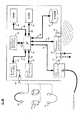
図2も参照すると、ドッキング・クレードル60を介してパーソナル・メディア装置12、38を例えばプロキシ・コンピュータ58に接続することができる。通常、パーソナル・メディア装置12、38は、パーソナル・メディア装置12、38をドッキング・クレードル60に結合するバス・インターフェース(以下でより詳細に議論する)を含む。ドッキング・クレードル60を、例えばプロキシ・コンピュータ58内に含まれるユニバーサル・シリアル・バス(すなわちUSB)ポート、シリアル・ポート、またはIEEE1394(すなわちFireWire)ポートに(ケーブル62で)結合することができる。例えば、パーソナル・メディア装置12、38内に含まれるバス・インターフェースはUSBインターフェースでよく、ドッキング・クレードル60は、USBハブ(すなわち、パーソナル・メディア装置12、38とドッキング・クレードル60の「ホット」結合および解放を可能にするプラグ・アンド・プレイ・インターフェース)として機能することができる。 Referring also to FIG. 2, the
プロキシ・コンピュータ58は、パーソナル・メディア装置12、38に対するインターネット・ゲートウェイとして機能することができる。例えばユニバーサル・プラグ・アンド・プレイ・プロトコル(すなわちUPnP)の使用により、例えば、パーソナル・メディア装置12、38は、プロキシ・コンピュータ58を使用して、ネットワーク30(およびネットワーク32)を介してメディア配布システム18にアクセスし、メディア・コンテンツ16を得ることができる。具体的には、メディア配布システム18を求める要求をパーソナル・メディア装置12、38から受信したとき、プロキシ・コンピュータ58(パーソナル・メディア装置12、38の代わりにインターネット・クライアントとして働く)は、コンピュータ28(すなわち、メディア配布システム18を実行するコンピュータ)に適切なウェブページ/サービスを要求することができる。要求されたウェブページ/サービスがプロキシ・コンピュータ58に返されたとき、プロキシ・コンピュータ58は、返されたウェブページ/サービスを(パーソナル・メディア装置12、38によって行われた)元の要求と関係付けることができ、ウェブページ/サービスをパーソナル・メディア装置12、38に転送することができる。したがって、プロキシ・コンピュータ58は、パーソナル・メディア装置12、38をコンピュータ28に、したがってメディア配布システム18に結合するコンジットとして機能することができる。
図3も参照すると、パーソナル・メディア装置12、38のダイアグラムが示されている。パーソナル・メディア装置12、38は、マイクロプロセッサ150(例えば、カリフォルニア州サンタクララのIntel Corporationによって製造されるARM(商標)マイクロプロセッサ)、不揮発性メモリ(例えば読取り専用メモリ152)、および揮発性メモリ(例えばランダム・アクセス・メモリ154)を含むことができ、そのそれぞれを、1つまたは複数のデータ/システム・バス156、158を介して相互接続することができる。パーソナル・メディア装置12、38はまた、例えばアナログ・オーディオ信号を、例えばヘッドフォン・アセンブリ164、リモート・スピーカ・アセンブリ166、またはイヤ・バッド・アセンブリ168と取外し可能に係合するオーディオ・ジャック162に提供するオーディオ・サブシステム160をも含むことができる。あるいは、1つまたは複数の内部オーディオ・スピーカ(図示せず)を含むようにパーソナル・メディア装置12、38を構成することもできる。 Referring also to FIG. 3, a diagram of the
パーソナル・メディア装置12、38は、装置アプリケーション64(その例は、限定はしないが、Rhapsody(商標)クライアント、RealPlayer(商標)クライアント、または特殊インターフェースを含むことができる)を実行することができる。パーソナル・メディア装置12、38は、オペレーティング・システムを実行することができ、オペレーティング・システムの例は、限定はしないが、Microsoft Windows(登録商標) CE(商標)、Redhat Linux(商標)、Palm OS(商標)、または装置特有のオペレーティング・システム(すなわちカスタム・オペレーティング・システム)を含むことができる。 The
パーソナル・メディア装置12、38に結合された記憶装置66上に格納することのできる装置アプリケーション64の命令セットおよびサブルーチンを、パーソナル・メディア装置12、38に組み込まれた1つまたは複数のプロセッサ(図示せず)および1つまたは複数のメモリ・アーキテクチャ(図示せず)で実行することができる。記憶装置66は、例えば、ハード・ディスク・ドライブ、光学式ドライブ、ランダム・アクセス・メモリ(RAM)、読取り専用メモリ(ROM)、CF(すなわちコンパクト・フラッシュ)カード、SD(すなわちsecure digital)カード、スマートメディア・カード、メモリ・スティック、およびマルチメディア・カードでよい。 The instruction set and subroutines of the
パーソナル・メディア装置12、38はまた、ユーザ・インターフェース170およびディスプレイ・サブシステム172をも含むことができる。ユーザ・インターフェース170は、パーソナル・メディア装置12、38内に含まれる様々な入力装置からデータ信号を受信することができ、様々な入力装置の例は、(限定はしないが)例えばレーティング・スイッチ74、76、後方スキップ・スイッチ78、前方スキップ・スイッチ80、再生/停止スイッチ82、メニュー・スイッチ84、ラジオ・スイッチ86、およびスライダ・アセンブリ88を含むことができる。ディスプレイ・サブシステム172は、パーソナル・メディア装置12、38内に含まれるディスプレイ・パネル90にディスプレイ信号を提供することができる。ディスプレイ・パネル90は、例えばアクティブ・マトリックス液晶ディスプレイ・パネル、パッシブ・マトリックス液晶ディスプレイ・パネル、発光ダイオード・ディスプレイ・パネルでよい。 The
オーディオ・サブシステム160、ユーザ・インターフェース170、およびディスプレイ・サブシステム172を、(それぞれ)1つまたは複数のデータ/システム・バス174、176、178を介してマイクロプロセッサ150とそれぞれ結合することができる。 Audio subsystem 160,
パーソナル・メディア装置12、38の使用中、パーソナル・メディア装置12、38内に格納された様々なメディア・コンテンツ92、94、96の例えばタイトルおよびアーティストを表示するようにディスプレイ・パネル90を構成することができる。スライダ・アセンブリ88を使用して、パーソナル・メディア装置12、38内に格納されたメディア・コンテンツのリストを上方または下方にスクロールすることができる。所望のメディア・コンテンツが強調表示されるとき(例えば、「Taj Mahal」による「Phantom Blues」)、ユーザ14は、再生/停止スイッチ82を使用して、レンダリングのためにメディア・コンテンツを選択することができる。ユーザ14は、前方スキップ・スイッチ80を使用して、次のメディア・コンテンツ(例えば「Robert Johnson」による「Happy To Be Just...」)まで前方にスキップすることができ、または後方スキップ・スイッチ78を使用して、前のメディア・コンテンツ(例えば「Leroy Brownstone」による「Big New Orleans...」)まで後方にスキップすることができる。さらに、ユーザ14は、レーティング・スイッチ74、76を使用することにより、メディア・コンテンツを聴くときにメディア・コンテンツをレーティングすることができる。 During use of
ユーザは、ディスプレイ・パネル90を例えばスライダ・アセンブリ88と共に使用して、パーソナル・メディア装置12、38内に格納され、かつ/またはメディア配布システム18から入手可能なメディア・コンテンツを検索/ブラウズすることができる。例えば、検索画面100をレンダリングするために、ユーザは、スライダ・アセンブリ88を押下して保持することができる。検索画面100は、アーティスト・フィールド102、アルバム・フィールド104、およびトラック・フィールド106を含むことができる。例えばスライダ・アセンブリ88を使用して、ユーザは、フィールド102、104、106の間を移動し、適切な検索語句を適切なフィールドに入力することができる。例えば、ユーザは、「Robert Johnson」という語句をアーティスト・フィールド102に入力することができる。フィールド102に入力するとき、スライダ・アセンブリ88を使用して、適切な文字を入力することができる。例えば、スライダ・アセンブリ88の上方移動または下方移動は、ユーザがフィールド間を移動することを可能にすることができ、スライダ・アセンブリ88の押下の結果、特定のフィールドを選択することができる。選択の後、スライダ・アセンブリ88の上方移動または下方移動は、ユーザが適切な文字を選択することを可能にすることができ、スライダ・アセンブリ88の押下の結果、文字を選択することができる。あるいは、フル・キーボードまたは部分的キーボード(図示せず)を含むようにパーソナル・メディア装置12、38を構成することもできる。検索語句が定義された後、ユーザは、「検索」ボタン108または(別法として)「取消し」ボタン110を選択することができる。 A user may use
上記で論じたように、パーソナル・メディア装置12、38は、ドッキング・クレードル60を介して例えばプロキシ・コンピュータ58とインターフェースするためのバス・インターフェース180を含むことができる。さらに、上記で論じたように、パーソナル・メディア装置12、38を、例えば、パーソナル・メディア装置12、38と、例えばWAP52との間で確立されたワイヤレス通信チャネル50を介して、ネットワーク30(および/または他のパーソナル・メディア装置)にワイヤレスに結合することができる。したがって、パーソナル・メディア装置12、38は、パーソナル・メディア装置12、38をネットワーク30(またはネットワーク32)および/または他のパーソナル・メディア装置にワイヤレスに結合するワイヤレス・インターフェース182を含むことができる。例えばWAP52に対するRF通信のためのアンテナ・アセンブリ184、および/または例えば第2パーソナル・メディア装置との赤外線通信のためのIR(すなわち赤外線)通信アセンブリ186に、ワイヤレス・インターフェース182を結合することができる。さらに、上記で論じたように、パーソナル・メディア装置12、38は、装置アプリケーション64の命令セットおよびサブルーチンを格納する記憶装置66を含むことができる。さらに、記憶装置66を使用して、メディア配布システム18からダウンロードされたメディア・データ・ファイルを格納し、メディア配布システム18からストリーミングされたメディア・データ・ストリーム(またはその部分)を一時的に格納することができる。 As discussed above, the
記憶装置66、バス・インターフェース180、およびワイヤレス・インターフェース182を、(それぞれ)1つまたは複数のデータ/システム・バス188、190、192を介してマイクロプロセッサ150とそれぞれ結合することができる。
上記で論じたように、メディア配布システム18は、ユーザ14、20、22、24、26にメディア・コンテンツを配布することができ、それによって、配布されるメディア・コンテンツは、メディア・データ・ストリームおよび/またはメディア・データ・ファイルの形式でよい。 As discussed above, the
したがって、ユーザがメディア・データ・ファイルをダウンロードすることだけを可能にするようにメディア配布システム18を構成することができる。例えば、メディア配布システム18からメディア・データ・ファイル(その例は、限定はしないが、MP3エンコーダまたはAdvanced Audio Coding(AAC)エンコーダを使用して符号化および圧縮されたオーディオ・ファイル、あるいはデジタル・ビデオ符号化ファイルを含むことができる)をダウンロードすることをユーザ20に許可することができ、それによって、メディア・データ・ファイルのコピーが、パーソナル・メディア装置38に転送される。 Thus, the
あるいは、ユーザがメディア・データ・ファイルのメディア・データ・ストリームを受信および処理することだけを可能にするようにメディア配布システム18を構成することもできる。例えば、メディア配布システム18から受信されるメディア・データ・ストリームを(携帯情報端末40上で)受信および処理することをユーザ24に許可することができる。上記で論じたように、メディア・コンテンツが例えばコンピュータ28から携帯情報端末40にストリーミングされるとき、メディア・データ・ファイルのコピーを携帯情報端末40上に永続的に保持することはできない。 Alternatively,
さらに、ユーザがメディア・データ・ストリームを受信および処理し、メディア・データ・ファイルをダウンロードすることを可能にするようにメディア配布システム18を構成することができる。そのようなメディア配布システムの例は、ワシントン州シアトルのRealNetworks,Inc.によって提供されるRhapsody(商標)サービスを含む。したがって、メディア配布システム18から、デジタル符号化メディア・データ・ファイルをダウンロードし、メディア・データ・ストリームを受信および処理することをユーザ26に許可することができる。したがって、メディア・データ・ファイルのコピーをコンピュータ28から携帯電話42に転送することができ、メディア・データ・ファイルのストリームをコンピュータ28から携帯電話42で受信することができる。 In addition,
直接的アクセス
上記で論じたように、メディア配布システム18に直接的にアクセスすることができ、またはプロキシ・コンピュータを介してアクセスすることができる。例えば、ユーザ20、24、26は、様々なクライアント電子装置を介してメディア配布システム18に直接的にアクセスすることができ、様々なクライアント電子装置の例は、限定はしないが、例えばパーソナル・メディア装置38、携帯情報端末40、携帯電話42、テレビジョン(図示せず)、ケーブル・ボックス(図示せず)、インターネットラジオ(図示せず)、または専用ネットワーク装置(図示せず)を含むことができる。Direct Access As discussed above, the
メディア配布システム18に直接的にアクセスするとき、標準化プロトコルを使用することができる。例えば、SOAP(すなわちSimple Object Access Protocol)を使用して、クライアント電子装置(例えばパーソナル・メディア装置38、携帯情報端末40、携帯電話42)をメディア配布システム18に結合することができる。 A standardized protocol can be used when accessing the
当技術分野で周知のように、SOAPプロトコルは、コンピュータ・ネットワーク(例えばネットワーク30、32)を介してXML(eXtensible Markup Language)メッセージを交換することを可能にする。HTTP(すなわちHyperText Transfer Protocol)を使用してこうしたメッセージを交換することができる。 As is well known in the art, the SOAP protocol allows exchanging XML (extensible Markup Language) messages over a computer network (eg,
SOAPは、RPC(すなわちRemote Procedure Protocol)プロセスを使用することができ、RPCプロセスでは、第1ネットワーク・ノード(例えばパーソナル・メディア装置38)が別のネットワーク・ノード(例えばコンピュータ28)に要求メッセージを送信し、第2ネットワーク・ノード(例えばコンピュータ28)が第1ネットワーク・ノード(例えばパーソナル・メディア装置38)に応答メッセージを送信する。上記ではシステムがSOAPを使用するものとして説明されるが、他の構成も可能であり、本開示の範囲内にあるとみなされる。例えば、JSON(すなわちJava(登録商標) Script Object Natation)、REST(すなわちREpresentational State Transfer)、およびXML−RPC(すなわちeXtensible Markup Langeage Remote Procedure Protocol)などの他のプロトコルを使用することができる。 SOAP can use an RPC (ie, Remote Procedure Protocol) process, in which a first network node (eg, personal media device 38) sends a request message to another network node (eg, computer 28). And the second network node (eg, computer 28) sends a response message to the first network node (eg, personal media device 38). While the above describes the system as using SOAP, other configurations are possible and are considered to be within the scope of this disclosure. For example, other protocols such as JSON (ie, Java® Script Object Natation), REST (ie, Representative State Transfer), and XML-RPC (ie, eXtensible Markup Range Remote Protocol) can be used.
アプリケーション・プログラミング・インターフェース
図4および5も参照すると、上記で論じたように、メディア配布システム18は、コンピュータ28と、パーソナル・メディア装置38、携帯情報端末40、および携帯電話42との間の、例えばSOAPを介する通信を可能にするためにAPI10を含むことができる。さらに、以下でより詳細に論じるように、メディア配布システム18/API10は、装置アプリケーション64内に含まれる1つまたは複数のクライアント・スタブ202と対話するために1つまたは複数のサーバ・スタブ200を含むことができる。Application Programming Interface Referring also to FIGS. 4 and 5, as discussed above, the
API10は、メディア配布システム18のサービスを求める要求を他のコンピュータ・プログラム(例えば装置アプリケーション64)によって作成することを可能にし、かつ/またはメディア配布システム18からデータを取り出すこと、および/またはメディア配布システム18にデータを提供することを可能にする、メディア配布システム18に対するインターフェースとして働くことができる。 The
API10は、(メディア配布システム18内の)機能のソース・コードに対するアクセスを許可することなく、または(メディア配布システム18内の)機能の内部動作の詳細な理解を必要とすることなく、どのように装置アプリケーション64が(メディア配布システム18内の)1組の機能にアクセスすることができるかを記述することができる。 How
上記で論じたように、メディア配布システム18は、(ダウンロードまたはストリームの形態の)メディア・データ・ファイル204を、例えば、パーソナル・メディア装置12、38、携帯情報端末40、携帯電話42などのクライアント電子装置に提供する。メディア配布システム18はまた、メディア・データ・ファイル204を索引付けし、メディア配布システム18を介して入手可能なメディア・データ・ファイル204をユーザが検索/ブラウズすることを可能にするファイル・カタログ206を維持することもできる。コンピュータ28に結合された記憶装置34上にファイル・カタログ206を維持することができる。メディア・データ・ファイル204および/またはファイル・カタログ206をメディア・リポジトリ207内に含めることができる。メディア・リポジトリ207の任意の例は、Oracle(商標)データベース、IBM DB2(商標)データベース、Sybase(商標)データベース、Computer Associates(商標)データベース、またはMicrosoft Access(商標)データベースなどのデータベースを含むことができる。 As discussed above, the
以下でより詳細に論じるように、クライアント電子装置(例えばパーソナル・メディア装置12、38、携帯情報端末40、および携帯電話42)のユーザが、ファイル・カタログ206をブラウズ/検索し(250)、複数のメディア・データ・ファイル204から選ばれた1つまたは複数のメディア・データ・ファイルを識別する(252)ことを可能にするようにAPI10を構成することができる。さらに、標準化プロトコルを使用して、クライアント電子装置(例えばパーソナル・メディア装置12、38、携帯情報端末40、および携帯電話42)からデータ要求を受信し(254)、受信したデータ要求に応答して、データをサード・パーティ使用可能フォーマットでクライアント電子装置(例えばパーソナル・メディア装置12、38、携帯情報端末40、および携帯電話42)に提供する(256)ようにAPI10を構成することができる。 As discussed in more detail below, a user of a client electronic device (eg,
クライアント電子装置の構成
メディア配布システム18に直接的にアクセスするようにクライアント電子装置(例えばパーソナル・メディア装置12、38、携帯情報端末40、および携帯電話42)を構成するとき、2つの装置(例えばクライアント電子装置とコンピュータ28)間で、標準化プロトコルを確立することができる。上記で論じたように、そのような標準化プロトコルの一例はSOAPである。標準化プロトコルが確立され、装置が互いに通信することができるようになると、例えば記憶装置34上に常駐する、1つまたは複数のWSDL(すなわちWeb Services Description Language)208をクライアント電子装置で処理して、任意の必要なクライアント・スタブ(例えばクライアント・スタブ202)の生成を自動化することができる。Client Electronic Device Configuration When configuring a client electronic device (eg,
WSDL208は、クライアント装置がどのようにウェブ・サービスと通信することができるかを記述するサービス記述(通常はXML)である。例えば、WSDL208は、装置アプリケーション64(したがってクライアント電子装置)がどのようにメディア配布システム18/API10と通信することができるかを記述することができる。さらに、WSDL208は、例えば、メディア配布システム18と対話するのに必要なプロトコル・バインディングおよびメッセージ・フォーマットを定義することができる。通常、サポートされるオペレーションおよびメッセージが抽象的に記述され、次いでネットワーク・プロトコル(例えばSOAP)にバインドされる。したがって、WSDL208は、メディア配布システム18に対するパブリック・インターフェースを定義することができる。
したがって、メディア配布システム18に直接的にアクセスするようにクライアント電子装置を構成するとき、通信がコンピュータ28(すなわち、メディア配布システム18を実行するコンピュータ)とクライアント電子装置(例えばパーソナル・メディア装置12、38、携帯情報端末40、および携帯電話42)との間で(標準化プロトコルを使用して)確立されると、クライアント電子装置は、1つまたは複数のWSDL208を(コンピュータ28から)得て、それを処理して、クライアント電子装置がアクセスすることを望むサービス/機能に関する適切なクライアント・スタブ(例えばクライアント・スタブ202)を生成することができる。 Thus, when configuring the client electronic device to directly access the
WSDLを生成するとき、WSDLが構成される方式(したがって、クライアント・スタブが生成される方式)は、プログラマの意図に基づいて変化する可能性がある。例えば、メディア配布システム18のすべてのサービス/機能に関するクライアント・スタブを生成するように単一のWSDLを設計することができる。あるいは、メディア配布システム18内で利用可能な各サービス/機能について別々のWSDLを利用可能にすることもできる。例えば、第1WSDLを、メディア配布システム18のアカウント管理サービス/機能に関するクライアント・スタブを生成するのに利用可能にすることができ、第2WSDLを、メディア配布システム18のライブラリ管理サービス/機能に関するクライアント・スタブを生成するのに利用可能にすることができ、第3WSDLを、メディア配布システム18のメタデータ・サービス/機能に関するクライアント・スタブを生成するのに利用可能にすることができ、第4WSDLを、メディア配布システム18の再生サービス/機能に関するクライアント・スタブを生成するのに利用可能にすることができ、第5WSDLを、メディア配布システム18の検索サービス/機能に関するクライアント・スタブを生成するのに利用可能にすることができる。 When generating WSDL, the manner in which WSDL is configured (and thus the manner in which client stubs are generated) can vary based on the programmer's intention. For example, a single WSDL can be designed to generate client stubs for all services / functions of the
クライアント電子装置(例えばパーソナル・メディア装置12、38、携帯情報端末40、携帯電話42)がメディア配布システム18の様々なサービス/機能にアクセスすることを可能にするように適切なクライアント・スタブ(例えば、クライアント・スタブ202)が生成された後、クライアント電子装置は、例えば、ファイル・カタログ206をブラウズ/検索し(250)、複数のメディア・データ・ファイル204から選ばれた1つまたは複数のメディア・データ・ファイルを識別し(252)、標準化プロトコルを使用してクライアント電子装置からデータ要求(複数可)を受信し(254)、受信したデータ要求(複数可)に応答して、データをサード・パーティ使用可能フォーマットでクライアント電子装置に提供する(256)ことができる。メディア配布システム18の様々なサービス/機能の例は、検索サービス/機能、アカウント管理サービス/機能、再生サービス/機能、メタデータ・サービス/機能、およびライブラリ・サービス/機能を含む。 Appropriate client stubs (e.g.,
RPC通信
上記で論じたように、SOAPは、RPC(すなわちRemote Procedure Protocol)プロセスを使用することができ、RPCプロセスでは、第1ネットワーク・ノード(例えばパーソナル・メディア装置38)が別のネットワーク・ノード(例えばコンピュータ28)に要求メッセージを送信し、第2ネットワーク・ノード(例えばコンピュータ28)が第1ネットワーク・ノード(例えばパーソナル・メディア装置38)に応答メッセージを送信する。RPC Communication As discussed above, SOAP can use an RPC (ie, Remote Procedure Protocol) process, where the first network node (eg, personal media device 38) is another network node. A request message is sent to (eg, computer 28), and a second network node (eg, computer 28) sends a response message to the first network node (eg, personal media device 38).
RPCプロセスは通常、(例えば、装置アプリケーション64内の)クライアント側で開始する。装置アプリケーション64はクライアント・スタブ202を呼び出すことができ、上述のように、クライアント・スタブ202は、(通常はWSDLを使用して)メディア配布システム18の様々なサービス/機能へのアクセスを可能にするように生成される。通常、サービス/機能を実装するコードを含むのではなく、クライアント・スタブ202は、必要なパラメータを装置アプリケーション64から取り出すことができ、それをクライアント・ランタイム・ライブラリ210に提供することができる。装置アプリケーション64から得られるパラメータは、例えば、ファイル・カタログ202をブラウズ/検索する(250)ときに使用される検索語句を定義し、ダウンロードのための1つまたは複数のメディア・データ・ファイル200を識別し(252)、コンピュータ28にメタデータを要求または送信し、ユーザのライブラリにエントリを追加し、またはユーザのライブラリからエントリを除去し、あるいは加入アカウントをセットアップし、または取り消すことができる。 The RPC process is typically initiated on the client side (eg, within device application 64). The
クライアント・ランタイム・ライブラリ210は、(装置アプリケーション64から得られる)パラメータをNDR(すなわちNetwork Data Representaion)フォーマットのメッセージ212に変換することができる。標準化プロトコル214(例えばSOAP)を使用して、ネットワーク30、32を介してメッセージ212をコンピュータ28(すなわち、メディア配布システム18を実行するコンピュータ)に送信することができる。クライアント・ランタイム・ライブラリ210は、クライアント・スタブ202の機能をサポートするルーチンのオブジェクト・ライブラリでよい。 The client runtime library 210 can convert the parameters (obtained from the device application 64) into
コンピュータ28がクライアント電子装置からNDRメッセージ212を受信するとき(254)、サーバ・ランタイム・ライブラリ216は、NDRメッセージ212を受諾して、サーバ・スタブ200を呼び出すことができる。サーバ・スタブ200は、メッセージ212内に含まれるパラメータを取り出し、それを、ネットワーク伝送フォーマット(すなわちNDRフォーマット)から、コンピュータ28で使用可能なフォーマットに変換することができる。変換した後、サーバ・スタブ200は、メディア配布システム18内の要求されたサービス/機能を呼び出すことができる。 When the computer 28 receives the
メディア配布システム18内の要求されたサービス/機能が実行されると、1つまたは複数の出力パラメータを(コンピュータ28上で)生成することができる。メディア配布システム18で生成される出力パラメータは、例えば、検索結果を定義し、ダウンロード要求の受信を確認し、またはメタデータの受信を確認することができる。 Once the requested service / function within
サーバ・ランタイム・ライブラリ216は、(メディア配布システム18で生成された)出力パラメータをNDRフォーマットのメッセージ218に変換することができる。ネットワーク30、32を介してクライアント電子装置(例えばパーソナル・メディア装置12、38、携帯情報端末40、または携帯電話42)にメッセージ218を(すなわち、標準化プロトコル220(例えばSOAP)を使用して)提供することができる(256)。サーバ・ランタイム・ライブラリ216は、サーバ・スタブ200の機能をサポートするルーチンのオブジェクト・ライブラリでよい。 Server runtime library 216 can convert output parameters (generated by media distribution system 18) into messages 218 in NDR format. Provides message 218 (ie, using standardized protocol 220 (eg, SOAP)) to client electronic devices (eg,
クライアント電子装置がコンピュータ28からNDRメッセージ218を受信したとき、クライアント・ランタイム・ライブラリ210は、NDRメッセージ218を受諾し、クライアント・スタブ202を呼び出すことができる。クライアント・スタブ202は、メッセージ218内に含まれる出力パラメータを取り出し、それを、ネットワーク伝送フォーマット(すなわちNDRフォーマット)から、クライアント電子装置で使用可能なフォーマットに変換することができる。 When the client electronic device receives an NDR message 218 from the computer 28, the client runtime library 210 can accept the NDR message 218 and invoke the client stub 202. The client stub 202 can retrieve the output parameters included in the message 218 and convert it from a network transmission format (ie, NDR format) to a format usable by the client electronic device.
上記で論じたように、クライアント電子装置に提供されるデータを、サード・パーティ使用可能フォーマット(すなわち、サード・パーティアプリケーションで使用可能な標準化フォーマット)で提供することができる。そのようなフォーマットの一例はXMLである。したがって、メッセージ212、218のうちの1つまたは複数は、様々なアプリケーション(例えばウェブ・ブラウザ)で処理可能なXMLベースのメッセージでよい。 As discussed above, the data provided to the client electronic device can be provided in a third party usable format (ie, a standardized format that can be used in a third party application). An example of such a format is XML. Thus, one or more of the
特殊API
上記で論じたように、WSDLを生成するとき、WSDLが構成される方式(したがって、クライアント・スタブが生成される方式)は、プログラマの意図に基づいて変化する可能性がある。例えば、メディア配布システム18内で利用可能な各サービス/機能について別々のWSDLを利用可能にすることができる。したがって、第1WSDLを、メディア配布システム18のアカウント管理サービス/機能に関するクライアント・スタブを生成するのに利用可能にすることができ、第2WSDLを、メディア配布システム18のライブラリ管理サービス/機能に関するクライアント・スタブを生成するのに利用可能にすることができ、第3WSDLを、メディア配布システム18のメタデータ・サービス/機能に関するクライアント・スタブを生成するのに利用可能にすることができ、第4WSDLを、メディア配布システム18の再生サービス/機能に関するクライアント・スタブを生成するのに利用可能にすることができ、第5WSDLを、メディア配布システム18の検索サービス/機能に関するクライアント・スタブを生成するのに利用可能にすることができる。Special API
As discussed above, when generating WSDL, the manner in which WSDL is configured (and thus the manner in which client stubs are generated) can vary based on the programmer's intention. For example, a separate WSDL can be made available for each service / function available within the
アカウント管理API
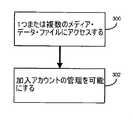
図6も参照すると、クライアント電子装置(例えばパーソナル・メディア装置38、携帯情報端末40、携帯電話42)のユーザ(例えばユーザ20、24、26)が複数のメディア・データ・ファイル(例えばメディア・データ・ファイル204)から選ばれた1つまたは複数のメディア・データ・ファイルにアクセスする(300)ことを可能にすることのできるアカウント管理APIとしてAPI10を構成することができる。クライアント電子装置(例えばパーソナル・メディア装置38、携帯情報端末40、携帯電話42)のユーザ(例えばユーザ20、24、26)がメディア配布システム18に関連する1つまたは複数の加入アカウントを管理する(302)ことを可能にするようにアカウント管理APIを構成することができる。Account management API
Referring also to FIG. 6, a user (eg,
メディア配布システム18は、ユーザ(例えばユーザ20、24、26)がメディア配布システム18に加入し、メディア配布システム18へのアクセスの許可を受けるための、例えば月々の加入料を支払うという点で、加入ベースのサービスでよい。ユーザ(例えばユーザ20、24、26)がメディア配布システム18に加入すると、ユーザは、クライアント電子装置上で使用するためにメディア・コンテンツ(例えばメディア・データ・ファイル204)を得ることができ、クライアント電子装置の例は、限定はしないが、パーソナル・メディア装置38、携帯情報端末40、携帯電話42、テレビジョン(図示せず)、ケーブル・ボックス(図示せず)、インターネットラジオ(図示せず)、または専用ネットワーク装置(図示せず)を含むことができる。 The
上記で論じたように、メディア配布システム18から得られるメディア・コンテンツ(例えばメディア・データ・ファイル204)は、例えば、メディア配布システム18から受信される購入済みダウンロード(すなわち、例えばユーザ20、24、26に対して、永続的な使用のために許諾されたメディア・コンテンツ)と、メディア配布システム18から受信される加入ダウンロード(すなわち、例えばユーザ20、24、26に対して、メディア配布システム18との有効な加入契約が存在する間の使用のために許諾されたメディア・コンテンツ)と、メディア配布システム18からストリーミングされるメディア・コンテンツの形態でよい。 As discussed above, the media content (eg, media data file 204) obtained from the
通常、メディア配布システム18にアクセスするとき、メディア配布システム18に対して、ユーザ(例えばユーザ20、24、26)および/またはクライアント電子装置(例えばパーソナル・メディア装置38、携帯情報端末40、携帯電話42)を識別するユーザ「証明書」を提供するようにユーザ20、24、26に要求することができる。こうした証明書の受信時に、メディア配布システム18は、証明書を検証することを試みることができ、検証された場合、ユーザ20、24、26および/または装置38、40、42に、メディア加入システム18へのアクセスを許可する。メディア配布システム18で受信および検証される証明書は、限定はしないが、ユーザ名、ユーザ・パスワード、ユーザ・キー、装置名、装置パスワード、装置キー、ならびに/あるいは1つまたは複数のデジタル証明書を含むことができる。 Typically, when accessing the
最初にクライアント電子装置を構成するとき、ユーザにメディア配布システム18への「トライアル」加入を許可することができ、したがって、ユーザは、サービスを無料で試すことが可能となる。したがって、「トライアル」加入の生成を可能にするようにアカウント管理API(例えばAPI10)を構成することができる。しかし、こうした「トライアル」加入は、限定された期間(例えば1か月)についてのものでよく、または使用の制限を与えることができる(例えば25回の再生/ダウンロード)。したがって、トライアル加入の満了日/時刻を監視するようにAPI10を構成することができ、満了日/時刻(またはそれに妥当に近い日付/時刻)の発生時に、API10は、ユーザ(例えばユーザ20、24、26)に、ユーザの「トライアル」加入を有料加入に転換するオプションを提示することができる。例えばディスプレイ・パネル90(図2)を介して、この提案をユーザに提示することができる。提案が受諾された場合、追加の情報(例えば請求情報)を提供するようにユーザに要求することができる。 When initially configuring the client electronic device, the user can be allowed to “trial” to the
アカウント管理API(例えばAPI10)を介して、他のアカウント管理サービス/機能をユーザ(例えばユーザ20、24、26)に対して利用可能にすることができる。例えば、API10は、ユーザがメディア配布システム18との新しい有料加入を生成し、メディア配布システム18との既存の有料加入を更新し、メディア配布システム18とのトライアル加入を取り消し、メディア配布システム10との有料加入を取り消すことを可能にすることができる。 Other account management services / functions can be made available to users (eg,
ライブラリ管理API
図7も参照すると、クライアント電子装置(例えばパーソナル・メディア装置38、携帯情報端末40、携帯電話42)のユーザ(例えばユーザ20、24、26)が複数のメディア・データ・ファイル(例えばメディア・データ・ファイル204)から選ばれた1つまたは複数のメディア・データ・ファイルにアクセスする(350)ことを可能にすることのできるライブラリ管理APIとしてAPI10を構成することができる。クライアント電子装置(例えばパーソナル・メディア装置38、携帯情報端末40、携帯電話42)のユーザ(例えばユーザ20、24、26)が、メディア配布システム18に関連する1つまたは複数のメディア・ライブラリを管理する(352)ことを可能にするようにライブラリ管理APIを構成することができる。Library management API
Referring also to FIG. 7, a user (eg,
限定はしないが、パーソナル・メディア装置38、携帯情報端末40、携帯電話42、テレビジョン(図示せず)、ケーブル・ボックス(図示せず)、インターネットラジオ(図示せず)、または専用ネットワーク装置(図示せず)を含むことのできるクライアント電子装置の使用中、クライアント電子装置上でレンダリングされるメディア・コンテンツ項目(例えばメディア・データ・ファイル204)を監視して、クライアント電子装置上でレンダリングされるメディア・コンテンツ項目のシーケンスを定義するメディア履歴ファイル112を編集するのに使用することができる。メディア履歴ファイル112は通常はローカルに維持される(例えば、クライアント電子装置上のメモリ内に維持される)が、別法として/さらに、メディア履歴ファイル112をリモート・メディア履歴ファイル112’としてリモートに維持する(例えば、コンピュータ28上に維持する)ことができる。 Without limitation,
クライアント電子装置を通じて、ユーザ(例えばユーザ20、24、26)は、メディア履歴ファイル112、112’(またはその部分)をプレイリストとして保存することができる。プレイリストの一例は、メディア配布システム18が順番にレンダリングすることのできるメディア・コンテンツ項目(例えば、ストリーミングされた加入トラックおよびアルバム、ダウンロードされた加入トラックおよびアルバム、ならびに購入/リッピングされたトラック)のグループを含むことができる。このことは、ユーザが、カスタム音楽コンピレーションを(複数のプレイリストの形態で)編集することを可能にする。 Through the client electronic device, a user (eg,
ライブラリ管理API(例えばAPI10)は、クライアント電子装置のユーザが、メディア配布システム18に関連する1つまたは複数のメディア・ライブラリ・ファイル(例えばライブラリ・ファイル114、114’)を管理する(352)ことを可能にすることができる。プレイリストと同様に、メディア・ライブラリ・ファイル114、114’は、個々のメディア・コンテンツ項目(例えば、ストリーミングされた加入トラックおよびアルバム、ダウンロードされた加入トラックおよびアルバム、ならびに購入/リッピングされたトラック)をグループ化し、定義し、かつ/または配置することができる。メディア・ライブラリ・ファイル114は通常はローカルに維持される(例えば、クライアント電子装置上のメモリ内に維持される)が、別法として/さらに、メディア・ライブラリ・ファイル114をリモート・メディア・ライブラリ・ファイル114’としてリモートに維持する(例えば、コンピュータ28上に維持する)ことができる。 A library management API (eg, API 10) allows a user of a client electronic device to manage (352) one or more media library files (eg, library files 114, 114 ') associated with the
ライブラリ管理API(例えばAPI10)を介して、他のライブラリ管理サービス/機能をユーザ(例えばユーザ20、24、26)に対して利用可能にすることができる。例えば、API10は、ユーザがライブラリ・ファイル(例えばライブラリ・ファイル114、114’)を定義し、ライブラリ・ファイルを保存し、ライブラリ・ファイルを削除し、ライブラリ・ファイルを修正し、ライブラリ・ファイルを(メディア配布システム18の別のユーザと)共有し、(メディア配布システム18の別のユーザによる閲覧のために)ライブラリ・ファイルを公表することを可能にすることができる。 Other library management services / functions can be made available to users (eg,
メタデータAPI
図8も参照すると、クライアント電子装置(例えばパーソナル・メディア装置38、携帯情報端末40、携帯電話42)のユーザ(例えばユーザ20、24、26)が、複数のメディア・データ・ファイル(例えばメディア・データ・ファイル204)から選ばれた1つまたは複数のメディア・データ・ファイルにアクセスする(400)ことを可能にすることのできるメタデータAPIとしてAPI10を構成することができる。クライアント電子装置(例えばパーソナル・メディア装置38、携帯情報端末40、携帯電話42)のユーザ(例えばユーザ20、24、26)が1つまたは複数の検索語句を定義する(402)ことを可能にするようにメタデータ・アプリケーション・プログラミング・インターフェースを構成することができる。1つまたは複数の検索語句に基づいて、複数のメディア・データ・ファイルの少なくとも一部に対して照会を実行することができる(404)。結果セットを生成することができ(406)、結果セットの一部を、その一部が結果セット全体未満となることができるようにユーザ(例えばユーザ20、24、26)に対して表示することができる(408)。Metadata API
Referring also to FIG. 8, a user (eg,
上記で論じたように、メディア配布システム18は、メディア・データ・ストリームおよび/またはメディア・データ・ファイルをユーザ(例えばユーザ20、24、26)に提供することができる。メタデータを、メディア配布システム18によって提供される各メディア・データ・ストリームおよび/またはメディア・データ・ファイルと関連付けることができる。このメタデータは、(限定はしないが)例えばアーティスト識別子、アルバム識別子、トラック識別子、アルバム・カバー・イメージ、音楽ジャンル識別子、および優先順位レーティングを含むことができる。音楽ジャンル識別子の例は、限定はしないが「ロック」、「ブルース」、「クラシック」、「オールディーズ」、および「ヒップ・ホップ」を含むことができる。優先順位レーティングの例は、番号1〜10を含むことができる。したがって、番号1の優先順位レーティングは、非常に影響力のある/人気のあるアーティストを識別することができ、番号10の優先順位レーティングは、影響力のない/人気のないアーティストを識別することができる。メディア配布システム18の従業員がレーティングを定義することができるという点で、優先順位レーティングを編集式に決定することができる。あるいは/さらに、例えばトラックまたはアーティストが(任意のユーザによって)レンダリングされる回数がアーティストの優先順位レーティングを決定するという点で、優先順位レーティングを統計的に決定することができる。 As discussed above, the
上記で論じたように、クライアント電子装置のユーザ(例えばユーザ20、24、26)は、検索画面100を例えばスライダ・アセンブリ88と共に使用して、パーソナル・メディア装置12、38内に格納され、かつ/またはメディア配布システム18から利用可能なメディア・コンテンツを検索/ブラウズすることができる。アーティスト・フィールド102、アルバム・フィールド104、およびトラック・フィールド106に加えて、検索画面100は、ジャンル・フィールド116および優先順位フィールド118を含むことができる。例えばスライダ・アセンブリ88を使用して、ユーザは、フィールド102、104、106、116、118の間を移動し、適切な検索語句を適切なフィールドに入力することができる。 As discussed above, the user of the client electronic device (eg,
メタデータAPI(例えばAPI10)は、クライアント電子装置(例えばパーソナル・メディア装置38、携帯情報端末40、携帯電話42)のユーザ(例えばユーザ20、24、26)が、例えばフィールド102、104、106、116、118内の1つまたは複数の検索語句を定義する(402)ことを可能にすることができる。例えば、フィールド102、104、106を空白のままにすることができ、ユーザは、ジャンル・フィールド116に「ブルース」という語を入力し、優先順位フィールド118に「10」を入力することができる。上記で論じたように、フィールド(例えばフィールド116、118)に入力するとき、スライダ・アセンブリ88を使用して適切な文字を入力することができる。検索語句が定義されると、ユーザは、「検索」ボタン108または(別法として)「取消し」ボタン110を選択することができる。 The metadata API (eg, API 10) is used by a user (eg,
「検索」ボタン108が選択される場合、1つまたは複数の検索語句に基づいて、複数のメディア・データ・ファイルの少なくとも一部に対して照会を実行することができる(404)。例えば、検索語句が「ブルース」(ジャンルについて)および「10」(優先順位レーティングについて)である場合、API10は、メディア・データ・ファイル(例えばメディア・データ・ファイル204)を照会して、どのメディア・データ・ファイルが照会を満たすか(すなわち、どのメディア・データ・ファイルが優先順位レーティング「10」を有し、かつ「ブルース」として分類されるか)を判定することができる。上記で論じたように、メタデータを使用して、メディア・データ・ファイルの優先順位レーティングおよびジャンルを定義することができる。したがって、メディア・データ・ファイルに関連するメタデータを検索することにより、結果セットを生成することができる(406)。クライアント電子装置は、比較的小型のディスプレイ・パネル(例えば図2のディスプレイ・パネル90)を含むことがあるので、ディスプレイ・パネルの表示能力を超える、無制限の結果セットの生成は望ましくないことがある。例えば、ディスプレイ・パネル90が最大で10個の行項目を含む結果セットを表示することができ、生成される結果セットが350個の行項目を含む場合、結果セットを10個の行項目の増分で表示することが望ましいことがある。したがって、API10は、結果セットの一部のみを、その一部が結果セット全体未満となることができるように、ユーザ(例えばユーザ20、24、26)に対して表示することができる(408)。したがって、結果セットが大規模であり、ディスプレイ・パネルが最大で10個の行項目を表示することができる場合、API10は行項目1〜10を表示することができる。ディスプレイ・パネル90上で行項目11〜20を確認するために、例えばスライダ・アセンブリ88を下方向に移動するようにユーザに要求することができる。 If the “Search”
さらに/あるいは、大規模な結果セットについて、API10は、アルファベットの各文字についての開始行項目を識別するアルファベット索引をレンダリングすることができる。例えば、350個の行項目結果セットが生成される場合、ディスプレイ・パネル90上にアルファベット索引をレンダリングすることができる。そのようなアルファベット索引の一例は以下の通りである。
したがって、350個の行項目を含む結果セットについて、(API10によってレンダリングされた)アルファベット索引は、アルファベットの各文字についての開始行項目を定義することができる。例えば、ユーザが「Robert Johnson」に関心があった場合、「Robert Johnson」が行項目110から行項目122の中のどこかにリストされることになるので(アーティストがラスト・ネーム、ファースト・ネームのフォーマットでリストされると仮定する)、ユーザは、行項目110まで前方にスキップすることができる。 Thus, for a result set containing 350 line items, an alphabetic index (rendered by API 10) can define a starting line item for each letter of the alphabet. For example, if the user is interested in “Robert Johnson”, “Robert Johnson” will be listed somewhere in line item 110 through line item 122 (artist is the last name, first name The user can skip forward to line item 110.
API10がアルファベット索引をレンダリングするとき、ユーザは、例えばスライダ・アセンブリ88を使用して、適切な行項目開始地点(例えば行項目110)を選択することができる。ユーザが適切な行項目開始地点(例えば行項目110)を選択すると、API10は、定義済みのいくつかの行項目(例えば10個)を、例えばディスプレイ・パネル90内でレンダリングすることができる。例えば、上述のアルファベット索引から「110」を選択するとき、API10は、(ディスプレイ・パネル90内で)行項目110〜119をレンダリングすることができる。ユーザが次の10個の行項目を確認することを望む場合、ユーザは、例えばスライダ・アセンブリ88を使用することができる。 When
再生API
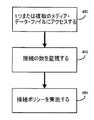
図9も参照すると、クライアント電子装置(例えばパーソナル・メディア装置38、携帯情報端末40、携帯電話42)のユーザ(例えばユーザ20、24、26)が複数のメディア・データ・ファイル(例えばメディア・データ・ファイル204)から選ばれた1つまたは複数のメディア・データ・ファイルにアクセスする(450)ことを可能にする再生APIとしてAPI10を構成することができる。ユーザ(例えばユーザ20、24、26)によって確立された、音楽配布システム18との間の接続の数を監視する(452)ように再生APIを構成することができる。ユーザ(例えばユーザ20、24、26)によって確立可能な接続の数を定義済みの接続限度に制限する最大接続ポリシーを実施することができる(454)。Replay API
Referring also to FIG. 9, a user (eg,
具体的には、音楽配布システム18を複数の装置と共に働くように構成することができる。例えば、クライアント電子装置(例えば、パーソナル・メディア装置38、携帯情報端末40、および携帯電話42)は、ユーザ(例えばユーザ20、24、26)が(例えば、車内にいる間、ジョギング中、ハイキング中、または運動中に)メディア配布システム18にリモートにアクセスすることを可能にすることができる。さらにクライアント・コンピュータ44は、ユーザが自宅または仕事場にいる間にメディア配布システム18にアクセスすることを可能にすることができる。さらに、専用ネットワーク装置(例えば、A Roku(商標) Soundbridge M500、M1000、およびM2000、図示せず)が、メディア配布システム18をホーム・エンターテイメント・システム(図示せず)とインターフェースさせることができ、したがって、ホーム・エンターテイメント・システムを使用してメディア・コンテンツ項目をレンダリングすることが可能となる。したがって、単一の加入が複数の同時接続をサポートすることを可能にするようにメディア配布システム18を構成することができる。したがって、ユーザが、仕事場にいる間にメディア配布システム18にアクセスすることができると共に、ユーザの配偶者が、自宅にいる間にメディア配布システム18に同時にアクセスすることができる。 Specifically, the
したがって、ユーザ(例えばユーザ20、24、26)によって確立された、音楽配布システム18との間の接続の数を監視する(452)ように再生APIを構成することができる。ユーザ(例えばユーザ20、24、26)によって確立可能な接続の数を定義済みの接続限度に制限する最大接続ポリシーを実施することができる(454)。したがって、定義済みの接続限度が2である場合、ユーザが、(例えば仕事場から)メディア配布システム18にアクセスすることができると共に、ユーザの配偶者が、(例えば自宅から)メディア配布システム18に同時にアクセスすることができる。しかし、ユーザの息子がジョギング中に(パーソナル・メディア装置38を使用して)メディア配布システム18に同時にアクセスすることを試みる場合、(この例では)第3の接続を許可することは、同時接続が2つという例示的接続限度を超過することになるので、接続を拒否することができる。 Thus, the playback API can be configured to monitor (452) the number of connections established with the
検索API
図10も参照すると、クライアント電子装置(例えばパーソナル・メディア装置38、携帯情報端末40、携帯電話42)のユーザが複数のメディア・データ・ファイル(例えばメディア・データ・ファイル204)から選ばれた1つまたは複数のメディア・データ・ファイルにアクセスする(500)ことを可能にすることのできる検索APIとしてAPI10を構成することができる。ユーザ(例えばユーザ20、24、26)が第1検索語句を定義し(502)、第1検索語句に基づいて複数のメディア・データ・ファイルの少なくとも一部の第1照会を実行する(504)ことを可能にするように検索APIを構成することができる。ユーザ(例えばユーザ20、24、26)が第2検索語句を定義し(506)、第1および第2検索語句に基づいて、複数のメディア・データ・ファイルの少なくとも一部の第2照会を実行する(508)ことを可能にすることができる。Search API
Referring also to FIG. 10, a user of a client electronic device (eg,
上記で論じたように、クライアント電子装置のユーザ(例えばユーザ20、24、26)は、検索画面100を例えばスライダ・アセンブリ88と共に使用して、パーソナル・メディア装置12、38内に格納され、かつ/またはメディア配布システム18から入手可能なメディア・コンテンツを検索/ブラウズすることができる。検索画面100は、アーティスト・フィールド102、アルバム・フィールド104、トラック・フィールド106、ジャンル・フィールド116、および優先順位フィールド118などの複数の検索フィールドを含むことができる。 As discussed above, the user of the client electronic device (eg,
上述の検索手順に加えて、各文字がフィールド102、104、106、116、118のうちの1つに入力された後に照会を自動的に実行することができる。例えば、ユーザが「Johnson」から「J」を定義する場合(502)、照会を自動的に実行して(504)、どのアーティストが「J」で始まるラスト・ネームを有するかを判定することができる。この結果、可能性のある合致が例えば50,000個得られることがある。次いでユーザは、第2語句(すなわち「O」)をアーティスト・フィールド102内に定義することができ(506)(合計で2つの検索語句、すなわち「JO」)、第2照会を自動的に実行することができる(508)。この結果、可能性のある合致が例えば30,000個得られることがある。次いでユーザは、結果セットが、例えばサイズがディスプレイ・パネル90上で容易にナビゲート可能となるまで、引き続き追加の文字を入力することができる(その結果、検索語句の合計数が多くなる)。したがって、固有であり、かつ長いラスト・ネームを有するアーティストについて、管理可能な結果セットを生成するために、ユーザが必要なのは、アーチストの(ラスト・ネーム全体ではなく)ラスト・ネームの小部分を入力することだけでよい。 In addition to the search procedure described above, the query can be performed automatically after each character is entered into one of the
ラジオ・コンテンツのレンダリング
上記で論じたように、メディア配布システム18から受信されるメディア・コンテンツ16のフォーマットは、例えば、メディア配布システム18から受信される購入済みダウンロード(すなわち、ユーザに対して永続的な使用のために許諾されたメディア・コンテンツ)と、メディア配布システム18から受信される加入ダウンロード(すなわち、ユーザに対して、メディア配布システム18との有効な加入契約が存在する間の使用のために許諾されたメディア・コンテンツ)と、メディア配布システム18からストリーミングされるメディア・コンテンツとを含むことができる。Radio Content Rendering As discussed above, the format of the
パーソナル・メディア装置12、38、携帯情報端末40、携帯電話42、クライアント・コンピュータ44、およびプロキシ・コンピュータ58は、ラジオ・メディア・コンテンツを受信および処理することができる。ラジオ・メディア・コンテンツは、例えば特定の音楽ジャンル/時間枠から選ばれ、例えばデジタル・ミレニアム著作権法に準拠するシーケンスで再生される、複数のトラックを含むことができる。通常、ユーザがラジオ・メディア・コンテンツを受信および処理したいとき、ユーザは、メディア配布システム18からユーザが利用可能な複数のラジオ局から、ラジオ局を選択することができる。
1998年のデジタル・ミレニアム著作権法は、特定の歌、アーティスト、アーティストのグループを指定の時間間隔内にレンダリングすることのできる回数を制限することができる。トラックのシーケンスをレンダリングするとき、例えば3時間の時間間隔にわたって、(i)同一のアルバムの3つ以下のトラックがレンダリングされる場合、(ii)同一のアルバムの2つ以下の連続するトラックがレンダリングされる場合、(iii)同一のアーティスト(すなわち個人/グループ)またはアンソロジーの4つ以下のトラックがレンダリングされる場合、および(iv)同一のアーティスト(すなわち個人/グループ)またはアンソロジーの3つ以下の連続するトラックがレンダリングされる場合、シーケンスは、デジタル・ミレニアム著作権法に準拠することができる。 The 1998 Digital Millennium Copyright Act can limit the number of times a particular song, artist, or group of artists can be rendered within a specified time interval. When rendering a sequence of tracks, for example, over a time interval of 3 hours, if (i) 3 or fewer tracks of the same album are rendered, (ii) 2 or fewer consecutive tracks of the same album are rendered If (iii) less than 4 tracks of the same artist (ie individual / group) or anthology are rendered; and (iv) less than 3 tracks of the same artist (ie individual / group) or anthology If successive tracks are rendered, the sequence can comply with the Digital Millennium Copyright Act.
パーソナル・メディア装置12、38、携帯情報端末40、携帯電話42、クライアント・コンピュータ44、およびプロキシ・コンピュータ58上での再生のためにラジオ・メディア・コンテンツがコンピュータ28からストリーミングされるとき、ラジオ・メディア・コンテンツ内の個々のトラック(すなわち個々のラジオ・メディア・データ・ファイル)のレンダリング・シーケンスが、通常はメディア配布システム18によって制御される。ラジオ・メディア・コンテンツをレンダリングする装置にトラックが一度に1つストリーミングされるからである。したがって、メディア配布システム18は、レンダリング・シーケンスが例えばデジタル・ミレニアム著作権法に準拠することを保証することができる。 When radio media content is streamed from computer 28 for playback on
ラジオ・メディア・コンテンツが装置にストリーミングされることに加えて、メディア配布システム18に対するアクティブな接続を有さない装置上での再生のためにラジオ・メディア・コンテンツをキャッシュすることができる。例えば、パーソナル・メディア装置38、携帯情報端末40、および携帯電話42をメディア配布システム18にワイヤレスに結合することができるが、メディア配布システム18に対するワイヤレス接続が利用可能ではない可能性のある状況がある。例えば、この例示的実施形態では、パーソナル・メディア装置12が、プロキシコンピュータ58を介してメディア配布システム18に結合される。したがって、パーソナル・メディア装置12が、例えばドッキング・クレードル60内にないとき、パーソナル・メディア装置12は、メディア配布システム18にアクティブに接続されない。 In addition to streaming radio media content to the device, the radio media content can be cached for playback on a device that does not have an active connection to the
したがって、後の時間にクライアント電子装置(例えばパーソナル・メディア装置、12、38、携帯情報端末40、携帯電話42)上で再生するためにラジオ・メディア・コンテンツをキャッシュすることができる。クライアント電子装置上での再生のためにラジオ・メディア・コンテンツをキャッシュするとき、ラジオ・メディア・コンテンツ内の個々のトラックをメディア配布システム18から加入ダウンロードとして取り出すことができる。上記で論じたように、加入ダウンロードは、ユーザに対して、メディア配布システム18との有効な加入契約が存在する間の使用のために許諾されたメディア・コンテンツである。したがって、キャッシュされたラジオ・メディア・コンテンツ内に含まれる加入ダウンロードのうちの1つまたは複数をレンダリングおよび/または処理する前に、コンテンツをレンダリングする装置はまず、ユーザがメディア配布システム18との最新の加入契約を有することを検証することができる。 Thus, radio media content can be cached for playback on a client electronic device (eg,
しばしば、ラジオ・メディア・コンテンツがクライアント電子装置(例えばパーソナル・メディア装置12、38、携帯情報端末40、携帯電話42)に提供されるとき、ラジオ局の要件(例えばジャンルおよび/または時間枠)に合致する複数の加入ダウンロードをメディア配布システム18から取り出すことができる。取り出される加入ダウンロードの厳密な数は、準拠法およびポリシーに応じて変化することがあり、準拠法およびポリシーの例は、(限定はしないが)デジタル・ミレニアム著作権法、ASCAP(すなわちthe American Society of Composers, Authors, and Publishers)ポリシー、およびBMI(すなわちBroadcast Music, Inc.)ポリシーを含む。例えば、ラジオ・メディア・コンテンツ内に含まれる加入ダウンロードの最小数を例えばわずか80個と定義することができるが、その数字は、例えば装置(例えば、パーソナル・メディア装置12、38、携帯情報端末40、携帯電話42)の記憶容量、メディア配布システム18によって確立されるポリシー・ガイドライン、ならびに/あるいは準拠法およびポリシー(例えばデジタル・ミレニアム著作権法、ASCAP、およびBMI)に応じて、かなり増加する(例えば500加入ダウンロード超まで)可能性がある。 Often, when radio media content is provided to a client electronic device (eg,
さらに、上記で論じたように、ラジオ・メディア・コンテンツ内に含まれる個々のトラックのレンダリング・シーケンスを、例えばデジタル・ミレニアム著作権法で管理することができる。したがって、クライアント電子装置上にラジオ・メディア・コンテンツをキャッシュするとき、クライアント電子装置のユーザにはアクセス不能/閲覧不能であるメモリの保護エリア内にラジオ・メディア・コンテンツを格納することができ、したがって、ユーザがラジオ・メディア・コンテンツに直接的にアクセスして、ラジオ・メディア・コンテンツを非準拠シーケンスでレンダリングすることが防止される。 Further, as discussed above, the rendering sequence of individual tracks contained within radio media content can be managed, for example, with the Digital Millennium Copyright Act. Thus, when caching radio media content on the client electronic device, the radio media content can be stored in a protected area of memory that is inaccessible / invisible to the user of the client electronic device, and thus The user is prevented from directly accessing the radio media content and rendering the radio media content in a non-compliant sequence.
さらに/あるいは、ラジオ・メディア・コンテンツがクライアント電子装置上にキャッシュされるとき、ラジオ・メディア・コンテンツをより小さいデータ「チャンク」に分割し、記憶装置全体にわたって分散させることができる。そのような方法の一例が、参照により本明細書に組み込まれる、2005年10月3日出願の「SYSTEM AND METHOD OF RELICENSING CONTENT」という名称の米国特許出願第11/242,341号で開示されている。したがって、キャッシュされたラジオ・メディア・コンテンツがレンダリングされるとき、まず、各ラジオ・メディア・データ・ファイルを構成する個々の「チャンク」の位置を突き止め、再び集めることができる。 Additionally or alternatively, when the radio media content is cached on the client electronic device, the radio media content can be divided into smaller data “chunks” and distributed across the storage device. An example of such a method is disclosed in US patent application Ser. No. 11 / 242,341, entitled “SYSTEM AND METHOD OF RELICENSING CONTENT”, filed Oct. 3, 2005, which is incorporated herein by reference. Yes. Thus, when cached radio media content is rendered, the location of the individual “chunks” that make up each radio media data file can first be located and collected again.
ラジオ・コンテンツのライブラリ管理
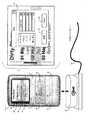
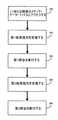
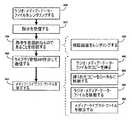
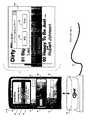
図11および12も参照すると、クライアント電子装置上でラジオ・メディア・データ・ファイルをレンダリングするとき(550)、クライアント電子装置のユーザがメディア・ライブラリ・ファイル(例えばメディア・ライブラリ・ファイル114、114’)にラジオ・メディア・データ・ファイルを追加したい場合、ユーザは、メディア・ライブラリ・ファイルにラジオ・メディア・データ・ファイルを追加したいというユーザの要望の指示を提供することができる。ユーザは、ラジオ・メディア・データ・ファイルのレンダリング中に、例えばスライダ装置88を定義済みの期間(例えば2秒)にわたって押下して保持することにより、この指示を提供することができる。この指示がクライアント電子装置のユーザから受信される(552)と、装置アプリケーション64は、ディスプレイ・パネル90上に情報画面600をレンダリングする(556)ことができる。情報画面600は、メディア・ライブラリ・ファイルの修正に関してユーザに確認558を要求することができる。指示が意図せずに生成された場合、ユーザは、「取消し」ボタン602を選択することができる。しかし、指示が意図的なものであった場合、ユーザは「確認」ボタン604を選択することができ、装置アプリケーション64は、現在レンダリング中のラジオ・メディア・データ・ファイルを定義するようにメディア・ライブラリ・ファイルを修正する(554)ことができる。Radio Content Library Management Referring also to FIGS. 11 and 12, when a radio media data file is rendered 550 on a client electronic device (550), the user of the client electronic device can create a media library file (eg, a media library). If the user wishes to add a radio media data file to the file 114, 114 '), the user may provide an indication of the user's desire to add the radio media data file to the media library file. it can. The user can provide this indication while rendering the radio media data file, for example by pressing and holding the
レンダリング中のラジオ・メディア・データ・ファイルのタイプに応じて、装置アプリケーション64がメディア・ライブラリ・ファイル(例えばメディア・ライブラリ・ファイル114、114’)を修正する方式は変化することができる。 Depending on the type of radio media data file being rendered, the manner in which the
例えば、ラジオ・メディア・データ・ファイルがメディア配布システム18に対するアクティブな接続を維持するクライアント電子装置(例えばパーソナル・メディア装置38、携帯情報端末40、携帯電話42)にストリーミングされる場合、修正すべきメディア・ライブラリ・ファイルは単に、メディア配布システム18を介してコンピュータ28上で利用可能なリモート・メディア・データ・ファイルの位置を突き止めるポインタのリストでよい。したがって、ユーザが、メディア配布システム18に対するアクティブな接続を維持するクライアント電子装置上でレンダリング中のラジオ・メディア・データ・ファイルを定義するようにメディア・ライブラリ・ファイルを修正したい場合、装置アプリケーション64は単に、アクティブに接続されたクライアント電子装置上でレンダリング中のラジオ・メディア・データ・ファイルに対応するリモート・メディア・データ・ファイルの位置を定義するポインタをメディア・ライブラリ・ファイルに追加するだけでよい。 For example, if a radio media data file is streamed to a client electronic device (eg,
さらに/あるいは、メディア配布システム18に対するアクティブな接続を維持する装置について、メディア・ライブラリ・ファイル内にラジオ・メディア・データ・ファイルを定義するとき、(リモート・メディア・データ・ファイルの位置を突き止めるためにメディア・ライブラリ・ファイルにポインタを単に追加するのではなく)メディア・データ・ファイルのローカル・コピーを得て(560)、格納する(562)ことが望ましいことがある。ラジオ・メディア・データ・ファイルのローカル・コピーを格納する(562)ことにより、ユーザは、メディア配布システム18に対するアクティブな接続が利用不能である間(例えば、飛行機の中、地下鉄の中、エレベータの内部にいる間など)に、ラジオ・メディア・データ・ファイルをレンダリングすることができる。したがって、ユーザがクライアント電子装置上でレンダリング中のストリーミング・ラジオ・メディア・データ・ファイルを聴取しており、ユーザがユーザのライブラリにラジオ・メディア・データ・ファイルを追加することを望むとき、アクティブに接続されたクライアント電子装置上でレンダリング中のラジオ・メディア・データ・ファイルに対応するリモート・メディア・データ・ファイルを(上記で論じたように)ライブラリ・ファイル内で識別することができる。さらに、装置アプリケーション64は、ラジオ・メディア・データ・ファイルのコピーがメディア配布システム18から得られ(560)、クライアント電子装置上にローカルに格納される(562)ようにフラグ(図示せず)をセットすることができる。装置アプリケーション64は、例えば次回にクライアント電子装置がドッキングされるときに、ラジオ・メディア・データ・ファイルのコピーを得ることができる。 Additionally / or when defining a radio media data file in the media library file for a device that maintains an active connection to the media distribution system 18 (to locate the remote media data file) It may be desirable to obtain (560) and store (562) a local copy of the media data file (rather than simply adding a pointer to the media library file). By storing (562) a local copy of the radio media data file, the user can access the
クライアント電子装置(例えばパーソナル・メディア装置12)がメディア配布システム18に対するアクティブな接続を維持しない場合、ラジオ・メディア・データ・ファイル(すなわち、集合的にはラジオ・メディア・コンテンツ)を後続のレンダリングのためにクライアント電子装置上にキャッシュすることができる。例えば、パーソナル・メディア装置12がクレードル60内にドッキングされる(したがってメディア配布システム18に接続される)とき、メディア配布システム18からラジオ・メディア・コンテンツをダウンロードし、後続のレンダリング(例えば、装置12がクレードル60から取り外されたとき)のためにパーソナル・メディア装置12上にキャッシュすることができる。 If the client electronic device (e.g., personal media device 12) does not maintain an active connection to the
上記で論じたように、例えばパーソナル・メディア装置12上にキャッシュされたラジオ・メディア・データ・ファイルを、ユーザがアクセス不能なメモリ位置内に格納することができる。したがって、メディア・ライブラリ・ファイル(例えばメディア・ライブラリ・ファイル114、114’)内にラジオ・メディア・データ・ファイルを定義するとき、装置アプリケーション64は、ユーザがアクセス可能なメモリ位置にラジオ・メディア・データ・ファイルを移動することができる(564)。装置アプリケーション64は、新しく追加されたラジオ・メディア・データ・ファイルが格納されるメモリ位置に対するポインタを含むようにメディア・ライブラリ・ファイルを修正することができる(566)。 As discussed above, for example, radio media data files cached on the
キャッシング時に、(上記で論じたように)ラジオ・メディア・データ・ファイルがより小さいデータ「チャンク」に分割され、例えばパーソナル・メディア装置12の記憶装置全体にわたって分散される場合、ユーザがアクセス可能なメモリ位置にラジオ・メディア・データ・ファイルを移動する前に、装置アプリケーション64は、メディア・ライブラリ・ファイル内に定義されるべきラジオ・メディア・データ・ファイルを構成する個々の「チャンク」の(例えば記憶装置66内の)位置を突き止め、「再び集める」ことができる。「再び集められた」後に、装置アプリケーション64は、ユーザがアクセス可能なメモリ位置にラジオ・メディア・データ・ファイルを移動することができる。装置アプリケーション64は、新しく追加されたラジオ・メディア・データ・ファイルが格納されるメモリ位置に対するポインタを含むようにメディア・ライブラリ・ファイルを修正することができる。 When caching, the radio media data file is split into smaller data “chunks” (as discussed above) and is accessible to the user, for example if distributed across the storage of the
メディア・ライブラリ・ファイルの修正に関する上述の機能の一部またはすべてを、上述のライブラリ管理APIを介してメディア配布システム18と通信する(568)ことによって(全体的または部分的に)実施することができる。 Some or all of the functions described above for media library file modification may be performed (in whole or in part) by communicating 568 with the
いくつかの実施態様を説明した。それでも、様々な修正を行うことができることを理解されよう。したがって、他の実施態様は、以下の特許請求の範囲の範囲内にある。 Several embodiments have been described. Nevertheless, it will be understood that various modifications can be made. Accordingly, other embodiments are within the scope of the following claims.
Claims (21)
Translated fromJapanese前記クライアント電子装置のユーザから、前記ラジオ・メディア・データ・ファイルをメディア・ライブラリ・ファイルに追加したいというユーザの要望の指示を受信すること、および
前記指示の受信に応答して、前記ラジオ・メディア・データ・ファイルを定義するように前記メディア・ライブラリ・ファイルを修正すること
を含む方法。Rendering a radio media data file on the client electronic device;
Receiving an indication from a user of the client electronic device that the user desires to add the radio media data file to a media library file; and in response to receiving the indication, the radio media • Modifying the media library file to define a data file.
をさらに含む請求項1に記載の方法。The method of claim 1, further comprising: verifying that the indication of a user request was intentional before modifying the media library file.
前記クライアント電子装置のディスプレイ・パネル上に確認画面をレンダリングすること
を含む請求項3に記載の方法。Confirming that the indication of the user's request was intentional,
The method of claim 3, comprising rendering a confirmation screen on a display panel of the client electronic device.
をさらに含む請求項1に記載の方法。The method of claim 1, further comprising communicating with a remote media distribution system via a library management API.
前記ラジオ・メディア・データ・ファイルのコピーを得ること、および
得られた前記ラジオ・メディア・データ・ファイルの前記コピーを前記クライアント電子装置上にローカルに格納すること
を含む請求項5に記載の方法。Modifying the media library file,
6. The method of claim 5, comprising: obtaining a copy of the radio media data file; and storing the obtained copy of the radio media data file locally on the client electronic device. .
ユーザがアクセス可能な前記クライアント電子装置内のメモリ位置に前記ラジオ・メディア・データ・ファイルを移動すること、および
ユーザがアクセス可能な前記クライアント電子装置内の前記メモリ位置に対するポインタを含むように前記メディア・ライブラリ・ファイルを修正すること
を含む請求項5に記載の方法。Modifying the media library file,
Moving the radio media data file to a memory location in the client electronic device accessible to a user, and to include a pointer to the memory location in the client electronic device accessible to the user; 6. The method of claim 5, comprising modifying the library file.
クライアント電子装置上でラジオ・メディア・データ・ファイルをレンダリングすること、
前記ラジオ・メディア・データ・ファイルをメディア・ライブラリ・ファイルに追加したいというユーザの要望の指示を、前記クライアント電子装置のユーザから受信すること、および
前記指示の受信に応答して、前記ラジオ・メディア・データ・ファイルを定義するように前記メディア・ライブラリ・ファイルを修正すること
を含むオペレーションを実行させるコンピュータ・プログラム製品。A computer program product residing on a computer readable medium having a plurality of instructions stored thereon, wherein when the plurality of instructions are executed by a processor, the processor
Rendering a radio media data file on the client electronic device;
Receiving an indication from a user of the client electronic device that the user desires to add the radio media data file to a media library file; and in response to receiving the indication, the radio media A computer program product that performs an operation that includes modifying the media library file to define a data file.
をさらに含む請求項8に記載のコンピュータ・プログラム製品。The computer program product of claim 8, further comprising instructions for verifying that the indication of a user request was intentional before modifying the media library file.
前記クライアント電子装置のディスプレイ・パネル上に確認画面をレンダリングすること
を含む請求項10に記載のコンピュータ・プログラム製品。The instruction to confirm that the indication of the user's request was intentional,
The computer program product of claim 10, comprising rendering a confirmation screen on a display panel of the client electronic device.
をさらに含む請求項8に記載のコンピュータ・プログラム製品。The computer program product of claim 8, further comprising instructions for communicating with a remote media distribution system via a library management API.
前記ラジオ・メディア・データ・ファイルのコピーを得る命令と、
得られた前記ラジオ・メディア・データ・ファイルの前記コピーを前記クライアント電子装置上にローカルに格納する命令と
を含む請求項12に記載のコンピュータ・プログラム製品。The instructions for modifying the media library file are:
Instructions to obtain a copy of the radio media data file;
13. The computer program product of claim 12, comprising instructions for storing the obtained copy of the radio media data file locally on the client electronic device.
ユーザがアクセス可能な前記クライアント電子装置内のメモリ位置に前記ラジオ・メディア・データ・ファイルを移動する命令と、
ユーザがアクセス可能な前記クライアント電子装置内の前記メモリ位置に対するポインタを含むように前記メディア・ライブラリ・ファイルを修正する命令と
を含む請求項12に記載のコンピュータ・プログラム製品。The instructions for modifying the media library file are:
Instructions for moving the radio media data file to a memory location in the client electronic device accessible to a user;
13. The computer program product of claim 12, comprising instructions for modifying the media library file to include a pointer to the memory location in the client electronic device accessible to a user.
前記クライアント電子装置上でラジオ・メディア・データ・ファイルをレンダリングすること、
前記クライアント電子装置のユーザから、前記ラジオ・メディア・データ・ファイルをメディア・ライブラリ・ファイルに追加したいというユーザの要望の指示を受信すること、および
前記指示の受信に応答して、前記ラジオ・メディア・データ・ファイルを定義するように前記メディア・ライブラリ・ファイルを修正すること
を含むクライアント電子装置。A client electronic device configured to perform an operation, the operation comprising:
Rendering a radio media data file on the client electronic device;
Receiving an indication from a user of the client electronic device that the user desires to add the radio media data file to a media library file; and in response to receiving the indication, the radio media • Modifying the media library file to define a data file.
前記メディア・ライブラリ・ファイルを修正する前に、ユーザの要望の前記指示が意図的なものであったことを確認すること
を含むオペレーションを実行するように構成される請求項15に記載のクライアント電子装置。The client electronic device further comprises:
16. The client electronic device of claim 15, wherein the client electronic device is configured to perform an operation comprising: verifying that the indication of a user request was intentional before modifying the media library file. apparatus.
前記クライアント電子装置のディスプレイ・パネル上に確認画面をレンダリングすること
を含む請求項17に記載のクライアント電子装置。Confirming that the indication of the user's request was intentional,
18. The client electronic device of claim 17, comprising rendering a confirmation screen on a display panel of the client electronic device.
ライブラリ管理APIを介してリモート・メディア配布システムと通信すること
を含むオペレーションを実行するように構成される請求項15に記載のクライアント電子装置。The client electronic device further comprises:
The client electronic device of claim 15, configured to perform operations including communicating with a remote media distribution system via a library management API.
前記ラジオ・メディア・データ・ファイルのコピーを得ること、および
得られた前記ラジオ・メディア・データ・ファイルの前記コピーを前記クライアント電子装置上にローカルに格納すること
を含む請求項19に記載のクライアント電子装置。Modifying the media library file,
20. The client of claim 19, comprising: obtaining a copy of the radio media data file; and storing the obtained copy of the radio media data file locally on the client electronic device. Electronic equipment.
ユーザがアクセス可能な前記クライアント電子装置内のメモリ位置に前記ラジオ・メディア・データ・ファイルを移動すること、および
ユーザがアクセス可能な前記クライアント電子装置内の前記メモリ位置に対するポインタを含むように前記メディア・ライブラリ・ファイルを修正すること
を含む請求項19に記載のクライアント電子装置。Modifying the media library file,
Moving the radio media data file to a memory location in the client electronic device accessible to a user, and to include a pointer to the memory location in the client electronic device accessible to the user; 20. The client electronic device of claim 19, comprising modifying the library file.
Applications Claiming Priority (2)
| Application Number | Priority Date | Filing Date | Title |
|---|---|---|---|
| US84316606P | 2006-09-08 | 2006-09-08 | |
| PCT/US2007/077987WO2008031086A2 (en) | 2006-09-08 | 2007-09-10 | System and method for modifying a media library |
Publications (1)
| Publication Number | Publication Date |
|---|---|
| JP2010503044Atrue JP2010503044A (en) | 2010-01-28 |
Family
ID=39158128
Family Applications (1)
| Application Number | Title | Priority Date | Filing Date |
|---|---|---|---|
| JP2009527605APendingJP2010503044A (en) | 2006-09-08 | 2007-09-10 | System and method for modifying a media library |
Country Status (6)
| Country | Link |
|---|---|
| US (1) | US20080077626A1 (en) |
| EP (1) | EP2062162A4 (en) |
| JP (1) | JP2010503044A (en) |
| KR (1) | KR101433402B1 (en) |
| CN (1) | CN101553805A (en) |
| WO (1) | WO2008031086A2 (en) |
Cited By (1)
| Publication number | Priority date | Publication date | Assignee | Title |
|---|---|---|---|---|
| JP7220765B1 (en) | 2021-09-24 | 2023-02-10 | 上海物騏微電子有限公司 | Voice data communication method and wireless voice system |
Families Citing this family (5)
| Publication number | Priority date | Publication date | Assignee | Title |
|---|---|---|---|---|
| US20100142521A1 (en)* | 2008-12-08 | 2010-06-10 | Concert Technology | Just-in-time near live DJ for internet radio |
| US9946583B2 (en)* | 2009-03-16 | 2018-04-17 | Apple Inc. | Media player framework |
| US20130282956A1 (en)* | 2012-04-20 | 2013-10-24 | Pradeep Ramdeo | Automobile MP3 System |
| US9235867B2 (en)* | 2012-06-04 | 2016-01-12 | Microsoft Technology Licensing, Llc | Concurrent media delivery |
| US20220334836A1 (en)* | 2021-04-15 | 2022-10-20 | Dell Products L.P. | Sharing of computing resources between computing processes of an information handling system |
Citations (9)
| Publication number | Priority date | Publication date | Assignee | Title |
|---|---|---|---|---|
| JPH1173360A (en)* | 1997-08-29 | 1999-03-16 | Matsushita Electric Ind Co Ltd | Server / client type database search method |
| JP2001024817A (en)* | 1999-07-08 | 2001-01-26 | Hitachi Ltd | Mobile communication terminal |
| JP2002140533A (en)* | 2000-10-31 | 2002-05-17 | Pioneer Electronic Corp | Contents distributing method, contents property managing server, contents provider server, and recording medium where the same method is programmed and recorded |
| JP2002251191A (en)* | 2001-02-23 | 2002-09-06 | Japan Total Design Communication Co Ltd | Information reproduction system |
| JP2003316367A (en)* | 2002-04-24 | 2003-11-07 | Sharp Corp | Content recording and playback device |
| JP2004127159A (en)* | 2002-10-07 | 2004-04-22 | Sanyo Electric Co Ltd | Content management device |
| JP2004241977A (en)* | 2003-02-05 | 2004-08-26 | Toshiba Tec Corp | Download device |
| JP2006113905A (en)* | 2004-10-15 | 2006-04-27 | I-O Data Device Inc | Content distribution system, content reproduction device, and content distribution method |
| JP2006138922A (en)* | 2004-11-10 | 2006-06-01 | Sharp Corp | Content receiving device, content receiving system, network connection device, content transmitting device |
Family Cites Families (13)
| Publication number | Priority date | Publication date | Assignee | Title |
|---|---|---|---|---|
| US6981217B1 (en)* | 1998-12-08 | 2005-12-27 | Inceptor, Inc. | System and method of obfuscating data |
| US6192340B1 (en)* | 1999-10-19 | 2001-02-20 | Max Abecassis | Integration of music from a personal library with real-time information |
| US7010263B1 (en)* | 1999-12-14 | 2006-03-07 | Xm Satellite Radio, Inc. | System and method for distributing music and data |
| ES2341845T3 (en)* | 2000-09-13 | 2010-06-29 | Stratosaudio, Inc. | SYSTEM AND PROCEDURE FOR REQUESTING AND DISTRIBUTING MEDIA CONTENT USING COMPLEMENTARY DATA TRANSMITTED BY RADIO SIGNAL. |
| US20020156912A1 (en)* | 2001-02-15 | 2002-10-24 | Hurst John T. | Programming content distribution |
| CA2438998C (en)* | 2001-02-20 | 2011-08-23 | Caron S. Ellis | Multiple radio signal processing and storing method and apparatus |
| US7016668B2 (en)* | 2001-09-26 | 2006-03-21 | Koninklijke Philips Electronics N.V. | Method and apparatus for a reconfigurable multi-media system |
| US6941324B2 (en)* | 2002-03-21 | 2005-09-06 | Microsoft Corporation | Methods and systems for processing playlists |
| US20040006541A1 (en)* | 2002-07-08 | 2004-01-08 | International Business Corporation | Method and system for purchasing broadcast content |
| KR20060120029A (en)* | 2003-09-10 | 2006-11-24 | 뮤직매치, 인크. | Music purchasing and playing system and method |
| US20050108413A1 (en)* | 2003-11-03 | 2005-05-19 | Matthew Melmon | Personal digital radio network |
| US7654462B2 (en)* | 2005-02-16 | 2010-02-02 | Casey Steven M | Mobile device base station for enhanced signal strength for on-demand media services |
| US20070239611A1 (en)* | 2006-04-10 | 2007-10-11 | Scott Blum | Media player and access system and method |
- 2007
- 2007-09-10JPJP2009527605Apatent/JP2010503044A/enactivePending
- 2007-09-10USUS11/852,552patent/US20080077626A1/ennot_activeAbandoned
- 2007-09-10KRKR1020097007036Apatent/KR101433402B1/ennot_activeExpired - Fee Related
- 2007-09-10WOPCT/US2007/077987patent/WO2008031086A2/enactiveApplication Filing
- 2007-09-10CNCNA2007800412029Apatent/CN101553805A/enactivePending
- 2007-09-10EPEP07842126Apatent/EP2062162A4/ennot_activeCeased
Patent Citations (9)
| Publication number | Priority date | Publication date | Assignee | Title |
|---|---|---|---|---|
| JPH1173360A (en)* | 1997-08-29 | 1999-03-16 | Matsushita Electric Ind Co Ltd | Server / client type database search method |
| JP2001024817A (en)* | 1999-07-08 | 2001-01-26 | Hitachi Ltd | Mobile communication terminal |
| JP2002140533A (en)* | 2000-10-31 | 2002-05-17 | Pioneer Electronic Corp | Contents distributing method, contents property managing server, contents provider server, and recording medium where the same method is programmed and recorded |
| JP2002251191A (en)* | 2001-02-23 | 2002-09-06 | Japan Total Design Communication Co Ltd | Information reproduction system |
| JP2003316367A (en)* | 2002-04-24 | 2003-11-07 | Sharp Corp | Content recording and playback device |
| JP2004127159A (en)* | 2002-10-07 | 2004-04-22 | Sanyo Electric Co Ltd | Content management device |
| JP2004241977A (en)* | 2003-02-05 | 2004-08-26 | Toshiba Tec Corp | Download device |
| JP2006113905A (en)* | 2004-10-15 | 2006-04-27 | I-O Data Device Inc | Content distribution system, content reproduction device, and content distribution method |
| JP2006138922A (en)* | 2004-11-10 | 2006-06-01 | Sharp Corp | Content receiving device, content receiving system, network connection device, content transmitting device |
Cited By (2)
| Publication number | Priority date | Publication date | Assignee | Title |
|---|---|---|---|---|
| JP7220765B1 (en) | 2021-09-24 | 2023-02-10 | 上海物騏微電子有限公司 | Voice data communication method and wireless voice system |
| JP2023047253A (en)* | 2021-09-24 | 2023-04-05 | 上海物騏微電子有限公司 | Voice data communication method and wireless voice system |
Also Published As
| Publication number | Publication date |
|---|---|
| US20080077626A1 (en) | 2008-03-27 |
| KR101433402B1 (en) | 2014-08-27 |
| WO2008031086A2 (en) | 2008-03-13 |
| EP2062162A2 (en) | 2009-05-27 |
| KR20090060331A (en) | 2009-06-11 |
| EP2062162A4 (en) | 2012-08-15 |
| CN101553805A (en) | 2009-10-07 |
| WO2008031086A3 (en) | 2008-07-03 |
Similar Documents
| Publication | Publication Date | Title |
|---|---|---|
| JP2010503080A (en) | API accessible media distribution system | |
| US11544313B2 (en) | System and method for transferring playlists | |
| US9529802B2 (en) | System and method for generating homogeneous metadata from pre-existing metadata | |
| JP4982563B2 (en) | Improved AV player apparatus and content distribution system and method using the same | |
| EP1955278B1 (en) | System and method for obtaining and sharing media content | |
| US20190068672A1 (en) | System And Method For Caching Data | |
| WO2007078395A2 (en) | System and method for automatically transferring dynamically changing content | |
| US20160132666A1 (en) | System And Method For Relicensing Content | |
| KR101433402B1 (en) | Systems and methods for modifying media libraries | |
| JP2009163595A (en) | Information processing system, information processor, information processing method, and computer program |
Legal Events
| Date | Code | Title | Description |
|---|---|---|---|
| A621 | Written request for application examination | Free format text:JAPANESE INTERMEDIATE CODE: A621 Effective date:20100823 | |
| A977 | Report on retrieval | Free format text:JAPANESE INTERMEDIATE CODE: A971007 Effective date:20121106 | |
| A131 | Notification of reasons for refusal | Free format text:JAPANESE INTERMEDIATE CODE: A131 Effective date:20121120 | |
| A601 | Written request for extension of time | Free format text:JAPANESE INTERMEDIATE CODE: A601 Effective date:20130220 | |
| A602 | Written permission of extension of time | Free format text:JAPANESE INTERMEDIATE CODE: A602 Effective date:20130227 | |
| A601 | Written request for extension of time | Free format text:JAPANESE INTERMEDIATE CODE: A601 Effective date:20130319 | |
| A602 | Written permission of extension of time | Free format text:JAPANESE INTERMEDIATE CODE: A602 Effective date:20130327 | |
| A521 | Request for written amendment filed | Free format text:JAPANESE INTERMEDIATE CODE: A523 Effective date:20130422 | |
| A131 | Notification of reasons for refusal | Free format text:JAPANESE INTERMEDIATE CODE: A131 Effective date:20130815 | |
| A711 | Notification of change in applicant | Free format text:JAPANESE INTERMEDIATE CODE: A711 Effective date:20130827 | |
| A521 | Request for written amendment filed | Free format text:JAPANESE INTERMEDIATE CODE: A821 Effective date:20130827 | |
| A601 | Written request for extension of time | Free format text:JAPANESE INTERMEDIATE CODE: A601 Effective date:20131115 | |
| A602 | Written permission of extension of time | Free format text:JAPANESE INTERMEDIATE CODE: A602 Effective date:20131122 | |
| A601 | Written request for extension of time | Free format text:JAPANESE INTERMEDIATE CODE: A601 Effective date:20131216 | |
| A602 | Written permission of extension of time | Free format text:JAPANESE INTERMEDIATE CODE: A602 Effective date:20131224 | |
| A601 | Written request for extension of time | Free format text:JAPANESE INTERMEDIATE CODE: A601 Effective date:20140115 | |
| A602 | Written permission of extension of time | Free format text:JAPANESE INTERMEDIATE CODE: A602 Effective date:20140122 | |
| A521 | Request for written amendment filed | Free format text:JAPANESE INTERMEDIATE CODE: A523 Effective date:20140217 | |
| A02 | Decision of refusal | Free format text:JAPANESE INTERMEDIATE CODE: A02 Effective date:20140317 |