JP2007233828A - Self-checkout terminal - Google Patents
Self-checkout terminalDownload PDFInfo
- Publication number
- JP2007233828A JP2007233828AJP2006056265AJP2006056265AJP2007233828AJP 2007233828 AJP2007233828 AJP 2007233828AJP 2006056265 AJP2006056265 AJP 2006056265AJP 2006056265 AJP2006056265 AJP 2006056265AJP 2007233828 AJP2007233828 AJP 2007233828A
- Authority
- JP
- Japan
- Prior art keywords
- self
- checkout
- screen
- customer
- displayed
- Prior art date
- Legal status (The legal status is an assumption and is not a legal conclusion. Google has not performed a legal analysis and makes no representation as to the accuracy of the status listed.)
- Pending
Links
Images




Classifications
- A—HUMAN NECESSITIES
- A47—FURNITURE; DOMESTIC ARTICLES OR APPLIANCES; COFFEE MILLS; SPICE MILLS; SUCTION CLEANERS IN GENERAL
- A47F—SPECIAL FURNITURE, FITTINGS, OR ACCESSORIES FOR SHOPS, STOREHOUSES, BARS, RESTAURANTS OR THE LIKE; PAYING COUNTERS
- A47F9/00—Shop, bar, bank or like counters
- A47F9/02—Paying counters
- A47F9/04—Check-out counters, e.g. for self-service stores
- A47F9/046—Arrangement of recording means in or on check-out counters
- A47F9/047—Arrangement of recording means in or on check-out counters for recording self-service articles without cashier or assistant
- G—PHYSICS
- G07—CHECKING-DEVICES
- G07G—REGISTERING THE RECEIPT OF CASH, VALUABLES, OR TOKENS
- G07G1/00—Cash registers
- G07G1/0036—Checkout procedures
- G—PHYSICS
- G07—CHECKING-DEVICES
- G07G—REGISTERING THE RECEIPT OF CASH, VALUABLES, OR TOKENS
- G07G3/00—Alarm indicators, e.g. bells
- G07G3/006—False operation
Landscapes
- Physics & Mathematics (AREA)
- General Physics & Mathematics (AREA)
- Cash Registers Or Receiving Machines (AREA)
Abstract
Description
Translated fromJapanese本発明は、顧客によるセルフチェックアウトを可能にするセルフチェックアウト端末に関する。 The present invention relates to a self-checkout terminal that enables self-checkout by a customer.
従来、顧客によるセルフチェックアウトを可能にしたセルフチェックアウト端末がある(例えば、特許文献1参照)。セルフチェックアウト端末では、商品に付された商品コードを読み取るための商品コード読取部等の端末が備える各部を顧客が自ら操作する。このとき、操作に不慣れな顧客も多いため、セルフチェックアウトの各段階に応じて顧客に対して適切なガイダンスを提供することが重要である。特許文献1に記載されたセルフチェックアウト端末は、センサとして顧客を監視するビデオカメラを設けてセルフチェックアウトを行う顧客を監視し、商品コードの読み取りに不備があった場合等に、再度の読み取りについて表示部を介して案内している。 Conventionally, there is a self-checkout terminal that enables self-checkout by a customer (see, for example, Patent Document 1). In the self-checkout terminal, the customer operates each unit provided in the terminal such as a product code reading unit for reading the product code attached to the product. At this time, since many customers are unfamiliar with the operation, it is important to provide appropriate guidance to the customer at each stage of self-checkout. The self-checkout terminal described in
ところで、顧客がセルフチェックアウトをよりスムーズにできるようにするためには、セルフチェックアウトをする前の顧客に対してあらかじめセルフチェックアウトの開始から終了までの一連の流れを知らしめておくことが望ましい。 By the way, in order to enable customers to carry out self-checkout more smoothly, it is desirable to let the customer before self-checkout know the series of flow from the start to the end of self-checkout in advance. .
特許文献2には、POS端末が備えるセンサがチェックアウト待ちの顧客を検知して、表示部等を介して情報を提供するようにした技術が開示されている。しかし、ここで提供される情報の詳細については明らかでなく、特許文献1は、セルフチェックアウトの流れをあらかじめ顧客に対して知らしめるようにするものではない。
本発明の目的は、セルフチェックアウトを行う前にあらかじめ顧客に対してセルフチェックアウトの一連の流れを知らしめることができるようにすることである。 An object of the present invention is to enable a customer to be informed of a series of self-checkout flows before performing self-checkout.
本発明のセルフチェックアウト端末は、商品が収納された商品籠を載置するための商品籠載置部と商品コードを読み取る商品コード読取部と情報を入力する入力部と決済を可能にする決済部とを含むセルフチェックアウトを可能にする各部を顧客が操作できる位置に有し、前記商品コード読取部により読み取った商品コードに基づき商品販売データ処理を実行する決済端末と、前記決済端末に設けられて情報を表示する表示部と、前記各部を操作できる位置に顧客が位置していることを検知するセンサとを備え、前記センサにより顧客が検知されない場合、前記表示部に前記各部を利用したセルフチェックアウトの開始から終了までの手順の概要を表示する全体ガイダンス画面を表示し、前記センサにより顧客が検知された場合、前記全体ガイダンス画面を消去して、セルフチェックアウトの各手順に応じた各種ガイダンスを表示する基本画面を前記表示部に表示し、前記商品販売データ処理の実行に伴い前記基本画面に表示されるガイダンスを遷移させるようにした。 The self-checkout terminal according to the present invention is a settlement that enables settlement with a merchandise bag placement unit for placing a merchandise bag containing products, a merchandise code reading unit that reads a merchandise code, and an input unit that inputs information. A payment terminal for performing product sales data processing based on the product code read by the product code reading unit, and provided in the payment terminal. And a display unit for displaying information and a sensor for detecting that a customer is located at a position where each unit can be operated. When the customer is not detected by the sensor, each unit is used for the display unit. When an overall guidance screen displaying an overview of the procedure from the start to the end of self-checkout is displayed and the customer is detected by the sensor, the overall guidance screen is displayed. Clear the dance screen, display a basic screen on the display unit that displays various guidance according to each procedure of self-checkout, and change the guidance displayed on the basic screen as the product sales data processing is executed I tried to make it.
本発明によれば、セルフチェックアウトを遂行するための各部を操作できる位置における顧客の在否がセンサにより検知されて、この位置に顧客がいない場合には、セルフチェックアウトの手順の概要を表示する全体ガイダンス画面が表示部に表示されるため、セルフチェックアウトを行う前の顧客に対してあらかじめセルフチェックアウトの一連の流れを知らしめることができる。したがって、店舗はセルフチェックアウトの一連の流れを案内する看板やビデオ映像等を別途用意する必要がない。 According to the present invention, the presence or absence of a customer at a position where each unit for performing self-checkout can be operated is detected by a sensor, and when there is no customer at this position, an overview of the self-checkout procedure is displayed. Since the entire guidance screen to be displayed is displayed on the display unit, it is possible to inform the customer before the self-checkout of a series of flow of self-checkout in advance. Therefore, it is not necessary for the store to separately prepare a signboard, a video image, etc. for guiding a series of self-checkout flows.
本発明の実施の一形態を図1ないし図15に基づいて説明する。 An embodiment of the present invention will be described with reference to FIGS.
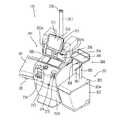
図1は、セルフチェックアウト端末101を示す斜視図である。セルフチェックアウト端末101は、決済端末201と秤装置301とから構成されている。 FIG. 1 is a perspective view showing a self-
決済端末201は、床面に設置されるベースハウジング202aと、ベースハウジング202aの上面に載置される小振りな上部ハウジング202bとを有する。ベースハウジング202aの左脇からは、顧客が購入しようとする商品が収納された商品籠(図示せず)を載置するための商品籠載置部としての商品籠載置台102が突出している。商品籠載置台102の下面側には、セルフチェックアウト端末101の前面側の位置における顧客の在否を検知するためのセンサ103が設けられている。ここで、センサ103としては、例えば、人体が発する微弱な赤外線(7〜20μm程度の波長)を検出する焦電型赤外線センサが用いられる。 The
上部ハウジング202b前面には、左側に商品コードを読み取る商品コード読取部としてのバーコードスキャナ203、右側にレシート発行口208が設けられたプリンタカバー204が備えられている。プリンタカバー204の奥側にはレシートプリンタ251(図3参照)が内蔵され、このレシートプリンタ251によって印字される図示しないレシートは、レシート発行口208から発行されるように構成されている。そして、バーコードスキャナ203とプリンタカバー204との間にはカード挿入口212が設けられ、カード挿入口212の奥部には、決済部としてのカードリーダライタ252(図3参照)が内蔵されている。カードリーダライタ252は、クレジットカード等の磁気カードに記録された情報、例えばカード番号や暗証番号を読み取る。また、上部ハウジング202b左側面には、商品コード読取部としてのハンディタイプの補助バーコードスキャナ203aが備えられて、大きい商品や重量商品等に付された商品コードを読み取る際に使用される。また、上部ハウジング202bには、音声情報を報知するためのスピーカ271(図3参照)が内蔵されている。さらに、上部ハウジング202bには、液晶表示パネルを有する表示部としてのLCD210がその表示面に入力部としてのタッチパネル211を有して取り付けられている。 On the front surface of the upper housing 202b, a
また、ベースハウジング202aには、決済部としての硬貨と紙幣との入出金装置221(図3参照)が内蔵されている。入出金装置221の一部として、ベースハウジング202aの中央上面には硬貨投入口213が配置され、その左側には硬貨払出口214が配置されている。また、ベースハウジングの前面右上方位置には、紙幣投入口215と紙幣払出口216とが配置されている。このような入出金装置221は、貨幣及び紙幣の取扱いを可能にする機構部とこの機構部を制御する制御部とを有している(いずれも図示せず)。このような機構部の構造及び制御部での処理手順等については、その内容が周知なので、説明を省略する。 The base housing 202a incorporates a coin / banknote depositing / dispensing device 221 (see FIG. 3) as a settlement unit. As a part of the deposit / withdrawal device 221, a
さらに、ベースハウジング202aの背面からは、セルフチェックアウト端末101の現在の状態を表示する表示ポール217が立設されている。この表示ポール217は、先端部に青色と赤色とに選択的に発光する発光部218を有する。 Further, a
秤装置301は、秤ハウジング302の上部に秤皿303が設けられ、この秤皿303に袋保持具304が取り付けられて構成されている。秤皿303は、その上面に載置台303aを有する。袋保持具304は載置台303aに取り付けられている。したがって、袋保持具304からすると、秤皿303は台座を構成する。つまり、載置台303aの後方中央部にはポール形状のアーム支持部305が立設され、このアーム支持部305の上端には品物を載置するための一時置き台306が固定されている。一時置き台306は、上面が平坦面となっており、決済端末201のバーコードスキャナ203でバーコードを読み取った後の商品を一時的に置く用途で用いられる台である。このような一時置き台306の下面には、一対の保持アーム307とフック308とが取り付けられている。保持アーム307は、ビニール袋等のレジ袋(図示せず)が有する一対の把手を串刺し状態で保持する。また、レジ袋には、一対の把手の間にミシン目で脱落可能であって引掛け穴が形成された耳部が形成されており、フック308は、引掛け穴を挿通してレジ袋を保持アーム307と共に保持する。秤ハウジング302は、載置台303aに載置された商品の荷重を電気信号に変換する図示しないロードセルユニットを内蔵する。ロードセルユニットの出力信号は、決済端末201へ出力される。 The
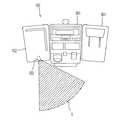
図2は、セルフチェックアウト端末101とセンサ103の検知範囲Sとの関係を示す平面図である。図2に示すように、センサ103が顧客を検知する範囲として、決済端末201の真正面の領域をカバーする範囲が設定されている。このような検知範囲Sにすることで、センサ103は、決済端末201が備えるセルフチェックアウトのための各部を操作できる位置に顧客が位置したことを検知することができる。また、セルフチェックアウトに際して顧客は、まず商品籠載置台102の上に商品籠を載置させることから、この商品籠載置台102側(図2中左側)から決済端末201に近づくと考えられる。そのため、センサ103を商品籠載置台102に設けることで、商品籠載置台102側から決済端末201に近づいた顧客を漏れなく検知することができる。センサ103は、この検知範囲Sに顧客が入った場合、また、この検知範囲Sから顧客がいなくなった場合等に決済端末201の制御部253(図3参照)に対して信号を送信する。 FIG. 2 is a plan view showing the relationship between the self-
なお、本実施の形態ではセンサ103を決済端末201の商品籠載置台102に設けた例を示したが、セルフチェックアウトを行う顧客が決済端末201の各部を操作できる位置に位置していることを検知できればこれに限ることはない。また、本実施の形態では、一つのセンサ103のみを備えた例を示したが、例えば、秤装置301の前面側にセンサ103とは異なる別のセンサを設けるようにしても良い。 In this embodiment, an example is shown in which the
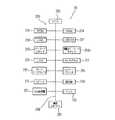
図3は、決済端末201の電気的なハードウェア構成を示すブロック図である。決済端末201は、内部にマイクロコンピュータ構成の制御部253を有する。制御部253の中核をなすのはCPU255である。CPU255には、固定データを固定的に記憶するROM256と、可変データを書き換え自在に記憶するRAM254と、LCD210に表示する表示画像を生成するVRAM257と、HDD258とがバスライン259を介して接続されている。HDD258には動作プログラム、各種表示フレーム及び商品データファイルとしてのPLUファイル、部門ファイル、画像ファイル、音声ファイル、売上ファイル等の各種ファイルが記憶保存されており、これらの動作プログラム、各種表示フレーム、各種ファイル等は、その全部又は一部が決済端末201の起動時にRAM254に移されて使用される。 FIG. 3 is a block diagram showing an electrical hardware configuration of the
PLUファイルは、各商品を特定する商品コードに対応させて、単価の他に、重量、重量に対する下限値と上限値、商品表示、割引商品の別、割引金額等を書き換え自在に記憶する。商品表示は、商品コードによって特定される商品の商品名称のテキストデータと、その商品の画像データとを含む。 The PLU file stores, in addition to unit price, weight, lower and upper limit values, weight display, product display, discount product type, discount price, etc. in addition to the unit price, in association with the product code that identifies each product. The product display includes text data of the product name of the product specified by the product code and image data of the product.
部門ファイルは、PLUファイルに記憶されない各商品に対応させて、その単価、重量、重量に対する下限値と上限値、商品表示、割引商品の別、割引金額等を書き換え自在に記憶する。商品表示は、商品コードによって特定される商品の商品名称のテキストデータと、その商品の画像データとを含む。 The department file stores a unit price, weight, lower and upper limit values for weight, weight, product display, discount product type, discount amount, etc. in a rewritable manner in correspondence with each product not stored in the PLU file. The product display includes text data of the product name of the product specified by the product code and image data of the product.
制御部253には、バーコードスキャナ203、補助バーコードスキャナ203a、LCD210、タッチパネル211、カードリーダライタ252、レシートプリンタ251、スピーカ271、発光部218、入出金装置221、センサ103、秤装置301、アテンダント端末(図示せず)及びストアコントローラ(図示せず)との間でデータ通信を実現するための通信インターフェース261がバスライン259を介して接続され、制御部253による制御を受ける。制御部253は、それらの各部を制御し、検索処理と重量チェック処理と商品販売データ処理とを実行する。 The
検索処理は、バーコードスキャナ203によって商品に付されたバーコードが読み取られた場合、このバーコードによって特定される商品コードを認識し、PLUファイルを検索してその商品コードに対応する単価、重量及び商品表示を取得する。 When the barcode attached to the product is read by the
重量チェック処理は、バーコードの読み取り後に秤装置301によって計量された重量が、検索処理によって取得した重量と同一性を有しているかどうかを判定する処理である。同一性を有しているかどうかは、計量重量が検索処理によって取得した重量の下限値と上限値との間に収まっているかどうかを判定することによってなされる。 The weight check process is a process for determining whether the weight measured by the
商品販売データ処理は、検索処理によって取得した単価に基づいて決済金額を算出し、その決済金額の決済を実行する処理である。決済金額は、タッチパネル211での締め操作に応じて必要な消費税計算等を含む売上合計金額を計算することによって算出され、RAM254等に仮登録するか、あるいは売上ファイルに登録する。決済処理では、算出した決済金額について、現金、クレジットカード等の磁気カードを利用した決済を可能にする。現金の扱いは、ベースハウジング202aに設けられた入出金装置221で実行され、磁気カードの扱いは、カードリーダライタ252によって実行される。本実施の形態では、商品販売データ処理という概念は、検索処理や重量チェック処理等を含む広義の概念として用いている。 The merchandise sales data process is a process of calculating a settlement amount based on the unit price acquired by the search process and executing settlement of the settlement amount. The settlement amount is calculated by calculating the total sales amount including the necessary consumption tax calculation according to the closing operation on the
このような構成において、セルフチェックアウト端末101は、セルフチェックアウトを可能にする。この際、決済端末201の制御部253は、各種演算処理や各部の駆動制御処理等を実行し、セルフチェックアウト処理を支援する。つまり、決済端末201では、そのLCD210に各種のユーザ支援画面を表示し、前述した検索処理、重量チェック処理及び商品販売データ処理を実行する。秤装置301は、重量チェック処理を支援するように、計量した重量の値を決済端末201に送信出力する。 In such a configuration, the self-
次に、図4ないし図6に基づき各種の画面例及びフローチャートを用いて、セルフチェックアウト開始時における処理の流れを説明する。 Next, the flow of processing at the start of self-checkout will be described using various screen examples and flowcharts based on FIGS.
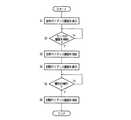
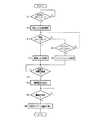
図4は、セルフチェックアウト開始時における処理の流れを示すフローチャートである。制御部253は、センサ103が検知範囲Sに顧客が入ったことを検知するまで、LCD210に全体ガイダンス画面Gを表示する(ステップS1)。 FIG. 4 is a flowchart showing the flow of processing at the start of self-checkout. The
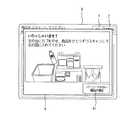
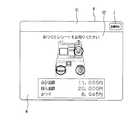
図5は、全体ガイダンス画面Gの一例を示す模式図である。全体ガイダンス画面Gは、各部を利用したセルフチェックアウトの開始から終了までの手順の概要を表示するものであり、図5に示すように、セルフチェックアウト端末101の外観を示す絵柄G1と、セルフチェックアウトの各段階におけるガイダンスを表示する複数のガイダンス領域G2とから構成されている。ガイダンス領域G2は、セルフチェックアウトの段階を示す番号表示、その段階でのセルフチェックアウト端末101の各部の操作案内、その操作を支援する絵柄等を含み、これにより、顧客は、セルフチェックアウト端末101でのチェックアウトの開始から終了までの一連の流れを、セルフチェックアウト前にあらかじめ知ることができる。 FIG. 5 is a schematic diagram illustrating an example of the overall guidance screen G. The overall guidance screen G displays an outline of the procedure from the start to the end of self-checkout using each part. As shown in FIG. 5, a picture G1 showing the appearance of the self-
より具体的には、全体ガイダンス画面Gは、ガイダンス領域G2として、上方左端の位置に、「1」という数字と「カゴを置いてください」という文字とその操作を支援する絵柄とを含むガイダンス領域G21、その右隣の位置に、「2」という数字と「商品を登録してください」という文字とその操作を支援する絵柄とを含むガイダンス領域G22、その右隣の位置に、「3」という数字と「商品をレジ袋に入れてください」という文字とその操作を支援する絵柄とを含むガイダンス領域G23と、その下方位置に、「4」という数字と「現金またはクレジットカードでお支払いください」という文字と現金及びカードの絵柄とを含むガイダンス領域G24とを表示している。ガイダンス領域G21、ガイダンス領域G22、ガイダンス領域G23は、それぞれ絵柄G1の対応する部分とコネクタが表示されて結ばれている。各ガイダンス領域G2に表示された数字によって、顧客はセルフチェックアウトの手順をより明確に知ることができる。また、各ガイダンス領域G2と絵柄G1の各部とがコネクタで結ばれることで、顧客はセルフチェックアウトの手順毎に何を操作すればよいのかも明確に知ることができる。 More specifically, the entire guidance screen G is a guidance area G2 including a number “1”, a letter “Please place a basket”, and a pattern that supports the operation as a guidance area G2. G21, a guidance area G22 including a number “2”, a letter “Register product” and a picture supporting the operation at a position to the right of the G21, and “3” at a position to the right of the G21 Guidance area G23 containing numbers, the words "Please put product in a plastic bag" and a picture that supports the operation, and the number "4" and "Please pay with cash or credit card" below it And a guidance area G24 including cash and a card pattern. The guidance area G21, the guidance area G22, and the guidance area G23 are each connected by displaying a corresponding portion of the pattern G1 and a connector. With the numbers displayed in each guidance area G2, the customer can know the self-checkout procedure more clearly. In addition, since each guidance area G2 and each part of the picture G1 are connected by a connector, the customer can clearly know what to operate for each self-checkout procedure.
また、全体ガイダンス画面Gが表示された状態で、制御部253は、音声ファイルに含まれる音声情報をスピーカ271を介して音声出力する。ここで音声出力される音声情報は、各ガイダンス領域G2が含む文字を読みあげるようなものがよく、例えば、「まず、カゴをおいてください」「次に、商品を登録してください」等の音声情報である。 In addition, in a state where the overall guidance screen G is displayed, the
図4のフローチャートに戻る。センサ103により顧客が検知されたならば(ステップS2のY)、制御部253は、全体ガイダンス画面Gを消去し(ステップS3)、基本画面Bを生成してLCD210に表示させるとともに、基本画面Bに重ねて初期ガイダンス画面Aを表示させる(ステップS4)。 Returning to the flowchart of FIG. If the customer is detected by the sensor 103 (Y in Step S2), the
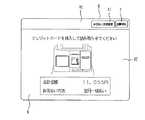
図6は、基本画面Bに重ねられて表示される初期ガイダンス画面Aの一例を示す模式図である。なお、基本画面Bについては後述する。初期ガイダンス画面Aは、顧客がセルフチェックアウトを開始するために必要な操作をガイダンスする画面である。具体的には、「左の台にカゴをのせ、商品をひとつずつスキャンして右の袋に入れてください」という文字がその操作を支援する絵柄と共に表示されている。なお、このとき、制御部253は、音声ファイルに含まれる上記文字を読み上げるような音声情報をスピーカ271を介して音声出力する。これにより、顧客は、セルフチェックアウトに際しての最初にすべき操作が、持ち運んだ商品についてのバーコードスキャナ203を用いた商品コードの読み取りであることを知ることができる。また、初期ガイダンス画面Aは、「バーコードのない商品の場合」と表示されたボタンA1を表示する。これにより、バーコードが付されていない商品のみを持ち込んだ顧客等に対しても、セルフチェックアウトに際して最初にすべき操作、つまり、ボタンA1のタッチ指定をガイダンスする。 FIG. 6 is a schematic diagram illustrating an example of the initial guidance screen A displayed on the basic screen B. The basic screen B will be described later. The initial guidance screen A is a screen for guiding operations necessary for the customer to start self-checkout. Specifically, the characters “Put the basket on the left base, scan the products one by one and put them in the right bag” are displayed together with a pattern that supports the operation. At this time, the
また、LCD210に初期ガイダンス画面Aが表示されている状態で、顧客がセルフチェックアウト端末101を離れてセンサ103により顧客が検知されなくなった場合、制御部253は、LCD210に再び全体ガイダンス画面Gを表示する。これにより、まだ商品購入の意思がない顧客がセルフチェックアウト端末101に近づき、全体ガイダンス画面Gが消去されて初期ガイダンス画面Aが表示された場合であっても、再び全体ガイダンス画面Gが表示されて、他のセルフチェックアウト前の顧客に対してセルフチェックアウトの一連の流れを案内することができる。 When the customer leaves the self-
図4のフローチャートに戻る。初期ガイダンス画面Aのガイダンスに従い、顧客が最初にすべき操作としてバーコードスキャナ203を用いたバーコードの読み取り、または、ボタンA1のタッチパネル211によるタッチ指定を実行したならば(ステップS5のY)、制御部253は、初期ガイダンス画面Aを消去する(ステップS6)。なお、商品コードの読み取りがなされた場合は、制御部253は、初期ガイダンス画面Aを消去した後、基本画面Bに重ねて後述する読取確認画面Cを生成して表示する。ボタンA1がタッチ指定された場合は、制御部253は、初期ガイダンス画面Aを消去して、基本画面Bを表示させる。 Returning to the flowchart of FIG. In accordance with the guidance on the initial guidance screen A, if the customer reads the barcode using the
次に、図7ないし図10に基づき、セルフチェックアウトの開始時の処理を終えた後の決済端末201の制御部253が実行する商品販売データ処理について説明する。なお、各画面例では、そのとき表示される文字を読み上げるような音声情報がスピーカ271から音声出力されるが、省略して説明する(以下、同じ)。 Next, the merchandise sales data process executed by the
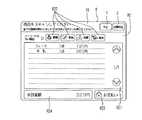
図7は、基本画面Bの一例を示す模式図である。基本画面Bは、セルフチェックアウトの各手順に応じたセルフチェックアウトを遂行するための各種ガイダンスを表示するものであり、上方に配列されたガイダンス表示領域B1と、その下方に配列されたユーザ領域B2とから構成されている。ガイダンス表示領域B1には、ガイダンスとして各種文字及び各種の操作ボタンが表示される。ユーザ領域B2には、ガイダンスとして顧客にとってのお買上一覧となる取引情報B21と、商品指定ボタンB22と、お支払いボタンB23と、商品の合計金額B24とが表示される。 FIG. 7 is a schematic diagram illustrating an example of the basic screen B. As illustrated in FIG. The basic screen B displays various types of guidance for performing self-checkout according to each procedure of self-checkout, and includes a guidance display area B1 arranged above and a user area arranged below the guidance display area B1. And B2. In the guidance display area B1, various characters and various operation buttons are displayed as guidance. In the user area B2, transaction information B21 that is a purchase list for the customer, a product designation button B22, a payment button B23, and a total amount B24 of the product are displayed as guidance.
ガイダンス表示領域B1には、図7に示す画面例では、「商品をスキャンしてください」という文字と、その下方に配置された「全ての登録が終わりましたらお支払いボタンを押してください」という文字とが表示されている。また、操作ボタンとして中止ボタンYと店員呼出ボタンZとが表示されている。中止ボタンYは、処理の中止を指示するためのボタンであり、店員呼出ボタンZは、案内係の店員を呼び出すためのボタンである。制御部253は、これらガイダンスとしての文字、操作ボタンを、セルフチェックアウト処理の一連の流れに従い遷移させて出現させる。 In the guidance display area B1, in the screen example shown in FIG. 7, the letters “Please scan the product” and the letters “Please press the payment button when all registration is completed” are placed below it. And are displayed. Also, a stop button Y and a store clerk call button Z are displayed as operation buttons. The stop button Y is a button for instructing to stop processing, and the store clerk call button Z is a button for calling a store clerk at the information desk. The
ユーザ領域B2には、「バーコードのない商品」という文字と共にバーコードのない商品を指定するための商品指定ボタンB22が表示され、取引情報B21として、購入する商品の名称、点数、単価を含む情報が表示されている。購入点数が増えて表示しきれない場合には、取引情報B21中のスクロールボタンのタッチ指定によって、スクロール表示可能となっている。さらに、ユーザ領域B2には、合計金額B24として、その時点における商品の合計金額と、全ての商品の登録を終えた際にタッチ指定して決済を実行するためのお支払いボタンB23とが表示されている。お支払いボタンB23のタッチ指定は、締め指定を意味する。 In the user area B2, a product designation button B22 for designating a product without a barcode is displayed together with the characters “product without a barcode”, and the name, points, and unit price of the product to be purchased are included as transaction information B21. Information is displayed. When the number of purchase points increases and cannot be displayed, scroll display is possible by touch designation of the scroll button in the transaction information B21. Furthermore, in the user area B2, as the total amount B24, the total amount of the product at that time, and a payment button B23 for performing a payment by designating touch when all the products have been registered are displayed. ing. The touch designation of the payment button B23 means a tightening designation.
そして、ガイダンス表示領域B1に表示されているガイダンス表示に従い、顧客は、バーコードスキャナ203の前に商品をかざし、商品に付されたバーコードを読み取らせる。これにより、決済端末201の制御部253は、前述した検索処理を実行し、PLUファイルから必要な情報を取得する。この際、制御部253は、ガイダンスとしての読取確認画面Cを生成し、ユーザ領域B2に重ねて表示する。なお、読取確認画面Cは、ユーザ領域B2の表示であってもよい。 Then, according to the guidance display displayed in the guidance display area B1, the customer holds the product in front of the
図8は、基本画面Bのユーザ領域B2に重ねて表示された読取確認画面Cの一例を示す模式図である。読取確認画面Cは、PLUファイルから検索されたバーコードが読み取られた商品の単価、購入点数等の取引情報を含み、PLUファイルに記録されている商品表示から引用された当該商品の商品名称のテキストデータに基づく文字と当該商品の画像データに基づく絵柄とを含む。読取確認画面Cにおける上方位置には、ガイダンスとして「商品を右の袋に入れてください」という文字が表示されており、これにより、顧客は、次にどのような操作をすれば良いのかを知ることができる。 FIG. 8 is a schematic diagram illustrating an example of a reading confirmation screen C displayed so as to overlap the user area B2 of the basic screen B. The reading confirmation screen C includes transaction information such as the unit price and purchase points of the product from which the bar code retrieved from the PLU file is read, and the product name of the product quoted from the product display recorded in the PLU file. It includes characters based on text data and a pattern based on image data of the product. In the upper position on the reading confirmation screen C, the text “Please put the product in the right bag” is displayed as a guidance, so that the customer knows what operation should be performed next. be able to.
そして、顧客は、バーコードスキャナ203によってバーコードを読み取らせた商品をレジ袋に入れる。これにより、レジ袋に詰められた商品は、秤装置301の秤皿303に荷重をかけることになり、その荷重がロードセルユニットによって計量されることになる。ロードセルユニットによる計量結果は、決済端末201に出力される。決済端末201は、計量結果を受信し、重量チェック処理を実行する。重量チェック処理の結果、両重量間に同一性がないと判定された場合は、制御部253は、商品販売データ処理の進行を停止し、表示ポール217の先端部に設けられている発光部218の発光色を青色から赤色に変更し、何らかの操作ミスか又は不正が行われたことを案内係の店員等に向けて報知する。このときLCD210の表示画面は、読取確認画面Cが表示されたままの状態となり、顧客に対して処理が進行しないことが示される。一方、重量チェック処理の結果、両重量間に同一性があると判定された場合には、制御部253は、商品販売データ処理の進行を許容し、読取確認画面Cを消去する。 Then, the customer puts the commodity whose bar code is read by the
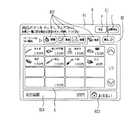
ところで、図7に示した基本画面Bのユーザ領域B2には、バーコードのない商品を登録するための画像として、「野菜」、「果物」、「惣菜」、「魚貝」の四種類のタッチボタンからなる商品指定ボタンB22が表示されている。顧客は、購入しようとする商品にバーコードが付されていない場合、商品指定ボタンB22をタッチパネル211によってタッチ指定することになる。また、図5で示したフローチャートのステップS5で、初期ガイダンス画面AにおいてボタンA1をタッチ指定した場合も、初期ガイダンス画面Aが消去されて、顧客は基本画面Bのユーザ領域B2のガイダンスに従い、この商品指定ボタンB22をタッチ指定することになる。そして、いずれかの商品指定ボタンB22がタッチパネル211によってタッチ指定されると、基本画面B中のユーザ領域B2の取引情報B21がガイダンスとしての部門選択画面Eに遷移する。 By the way, in the user area B2 of the basic screen B shown in FIG. 7, four kinds of images “vegetable”, “fruit”, “sugar beet”, and “fish shell” are registered as images for registering products without barcodes. A product designation button B22 composed of touch buttons is displayed. If the customer does not have a barcode attached to the product to be purchased, the customer touches and designates the product designation button B22 using the
図9は、ユーザ領域B2に部門選択画面Eが表示された状態の基本画面Bの一例を示す模式図である。図9の部門選択画面Eは、「魚貝」がタッチパネル211によってタッチ指定された一例を示している。この場合、部門選択画面Eとして、「魚貝」の範疇に含まれる各種の食品が4列4行の合計16種、スクロールボタンによってスクロール可能に表示される。部門選択画面Eには、戻るボタンE1も表示され、この戻るボタンE1がタッチパネル211によってタッチ指定された場合には、部門選択画面Eから切り替えて取引情報B21が表示される。また、ユーザ領域B2に部門選択画面Eが表示されている場合、制御部253は、ガイダンス表示領域B1に、ガイダンスとして「商品ボタンをタッチしてください」という文字を表示する。これにより、顧客は、次にどのような操作をすれば良いのかを知ることができる。そこで、このガイダンスに従い、顧客が部門選択画面Eから一つの食品をタッチパネル211によってタッチ指定すると、基本画面B中のユーザ領域B2に重ねて、その食品についてのガイダンスとしての部門登録画面Fが出現する。 FIG. 9 is a schematic diagram illustrating an example of the basic screen B in a state where the department selection screen E is displayed in the user area B2. The department selection screen E in FIG. 9 shows an example in which “fish shell” is touch-designated by the
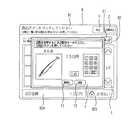
図10は、基本画面Bのユーザ領域B2に重ねて表示された部門登録画面Fの一例を示す模式図である。部門登録画面Fは、商品の単価、購入点数、という取引情報を含み、当該商品の商品名称のテキストデータに基づく文字と当該商品の画像データに基づく絵柄とを含み、更に、テンキーを含む。割引金額、購入金額を含んでいても良い。テンキーは、デフォルト設定が1点である購入点数の変更入力を可能にする。これらの各種データは、決済端末201においてPLUファイルとは別個に設けられた部門ファイルに記録されている情報から引用される。また、部門登録画面Fには、取消ボタンF1と決定ボタンF2とが含まれている。取消ボタンF1がタッチパネル211によってタッチ指定された場合、基本画面Bのユーザ領域B2に部門選択画面Eが表示された画面に復帰する。 FIG. 10 is a schematic diagram illustrating an example of a department registration screen F displayed so as to overlap the user area B2 of the basic screen B. The department registration screen F includes transaction information such as the unit price of the product and the number of points purchased, includes characters based on the text data of the product name of the product, a pattern based on the image data of the product, and further includes a numeric keypad. It may include a discount amount and purchase amount. The numeric keypad enables the change input of the purchase points whose default setting is one point. These various data are quoted from information recorded in the department file provided separately from the PLU file in the
さらに、部門登録画面Fには、「点数を変更するときは数字キーから入力し、「決定」ボタンを押してください」という文字が表示されている。これにより、顧客は、次にどのような操作をすれば良いのかを知ることができる。そして、このガイダンスに従い、必要に応じてテンキーによって購入点数を変更入力した後、決定ボタンF2をタッチ指定すると、購入点数分だけ、選択した食品についての部門登録が完了する。そこで、制御部253は、LCD210に読取確認画面Cをユーザ領域B2に重ねて表示する。ここで、読取確認画面Cを表示させた後の処理は、重量チェック処理である。つまり、バーコードスキャナ203によって商品に付されたバーコードを読み取った場合の処理と共通性を有している。そのため、その後の処理については説明を省略する。 Furthermore, on the department registration screen F, characters “Please input from the numeric keys and press the“ OK ”button to change the score” are displayed. Thereby, the customer can know what operation should be performed next. Then, according to this guidance, if the purchase point is changed and input with the numeric keypad as necessary, and the decision button F2 is touch-designated, the department registration for the selected food is completed by the purchase point. Therefore, the
次に、図11ないし図15に基づいて決済処理について説明する。 Next, settlement processing will be described with reference to FIGS.
図11は、決済処理の流れを示すフローチャートである。ガイダンス表示領域B1に表示されている「全ての登録が終わりましたらお支払いボタンを押してください」というガイダンスに従い、顧客がタッチパネル211によってお支払いボタンB23をタッチ指定すると(ステップS11のY)、制御部253は、ユーザ領域B2の表示をガイダンスとしての支払方法選択画面Jに遷移させる(ステップS12)。 FIG. 11 is a flowchart showing the flow of payment processing. When the customer designates the payment button B23 by touching the
図12は、ユーザ領域B2に支払方法選択画面Jが表示された状態の基本画面Bの一例を示す模式図である。支払方法選択画面Jは、ガイダンスとして「お支払い方法を選択してください」という文字と、合計金額B24と、支払方法を選択するためのボタンJ1、J2とを含んでいる。ボタンJ1は現金決済、ボタンJ2はクレジット決済をそれぞれ選択指定する。 FIG. 12 is a schematic diagram illustrating an example of the basic screen B in a state where the payment method selection screen J is displayed in the user area B2. The payment method selection screen J includes, as guidance, characters “Please select a payment method”, a total amount B24, and buttons J1 and J2 for selecting a payment method. Button J1 selects and designates cash settlement, and button J2 selects and designates credit settlement.
図11のフローチャートに戻る。支払方法選択画面Jにおいて現金決済を選択指定するためのボタンJ1がタッチ指定された場合(ステップS13のY)、制御部253は、現金による決済を実行する(ステップS14)。まず制御部253は、ユーザ領域B2を入出金装置221への現金の投入をガイダンスする現金決済ガイダンス画面(図示せず)に遷移させる。この現金決済ガイダンス画面は、例えば、入出金装置221に対して現金が未投入の場合、「お金を投入してください」という文字とそのための操作を顧客に示す絵柄とを含んだガイダンスを決済状況と共に表示する。そして、現金が投入されると、「お支払いのときは「確認」ボタンを押してください」というガイダンスに遷移し、投入金額確認ボタンが出現する。制御部253は、この投入金額確認ボタンがタッチ指定されると、現金決済確認画面(図示せず)に遷移させる。この現金決済確認画面は、「はい」と「いいえ」と表示された選択ボタンを有する。制御部253は、「いいえ」に対応する選択ボタンがタッチ指定されると直前の現金決済ガイダンス画面に遷移させ、「はい」に対応する選択ボタンがタッチ指定されると、ユーザ領域B2をガイダンスとしての現金決済終了画面Mに遷移させる。 Returning to the flowchart of FIG. When the button J1 for selecting and specifying cash settlement is touch-designated on the payment method selection screen J (Y in step S13), the
図13は、ユーザ領域B2に現金決済終了画面Mが表示された状態の基本画面Bの一例を示す模式図である。現金決済終了画面Mには、「おつりとレシートをお取りください」という文字とそのための操作を顧客に示す絵柄とを含んだガイダンスが決済状況と共に表示される。 FIG. 13 is a schematic diagram illustrating an example of the basic screen B in a state where the cash settlement end screen M is displayed in the user area B2. On the cash settlement end screen M, guidance including a letter “Please take change and receipt” and a picture showing the operation for the customer together with the settlement status is displayed.
図11のフローチャートに戻る。一方、支払方法選択画面Jにおいてクレジット決済を選択指定するためのボタンJ2がタッチ指定された場合(ステップS15のY)、制御部253は、クレジットによる決済を実行する(ステップS16)。まず制御部253は、ユーザ領域B2をガイダンスとしてのクレジット決済ガイダンス画面Kに遷移させる。 Returning to the flowchart of FIG. On the other hand, when the button J2 for selecting and specifying credit settlement is touch-designated on the payment method selection screen J (Y in Step S15), the
図14は、ユーザ領域B2にクレジット決済ガイダンス画面Kが表示された状態の基本画面Bの一例を示す模式図である。クレジット決済ガイダンス画面Kは、「クレジットカードを挿入して読み取らせてください」という文字とそのための操作を支援する絵柄とを含んだガイダンスを表示する。このとき、ガイダンス表示領域B1には支払方法変更ボタンK1が表示され、この支払方法変更ボタンK1がタッチ指定されると、制御部253は、ユーザ領域B2の表示を支払方法選択画面Jに復帰させる。 FIG. 14 is a schematic diagram illustrating an example of the basic screen B in a state where the credit settlement guidance screen K is displayed in the user area B2. The credit settlement guidance screen K displays a guidance including the characters “Please insert a credit card and read” and a picture supporting the operation. At this time, the payment method change button K1 is displayed in the guidance display area B1, and when the payment method change button K1 is touch-designated, the
顧客は、ガイダンスに従い、カード挿入口212にクレジットカードを挿入する。カードリーダライタ252によってクレジットカードの磁気ストライプに記録されている情報が読み取られると、制御部253は、クレジット決済確認画面(図示せず)に遷移させる。磁気ストライプに記録されている情報が正しく読み取られなかった場合には、再度の読み取りが促されるガイダンスが表示される。クレジット決済確認画面は、「はい」と「いいえ」とが表示されたボタンを有する。制御部253は、「いいえ」に対応するボタンがタッチ指定されると直前のクレジット決済ガイダンス画面Kに遷移させ、「はい」に対応する選択ボタンがタッチ指定されると、「ただ今認証中です」という文字が表示された認証中画面(図示せず)に遷移させて、認証処理を実行する。その後、制御部253は、認証が得られなかった場合には、認証拒否画面(図示せず)に遷移させる。一方、認証が得られた場合には、制御部253は、「レシートをお取りください」という文字とそのための操作を示す絵柄とを含んだクレジット決済終了画面(図示せず)に遷移させる。 The customer inserts a credit card into the
図11のフローチャートに戻る。制御部253は、現金又はクレジットによる決済の後、所定の時間が経過したならば(ステップS17のY)、基本画面Bを消去して最終画面Nを表示する(ステップS18)。 Returning to the flowchart of FIG. If a predetermined time has elapsed after the settlement by cash or credit (Y in Step S17), the
図15は、最終画面Nの一例を示す模式図である。最終画面Nには、「ご利用ありがとうございます。またのご来店をお待ちしております」という文字が店員の絵柄と共に表示される。 FIG. 15 is a schematic diagram illustrating an example of the final screen N. On the final screen N, the words “Thank you for your use. We look forward to seeing you again” are displayed along with the clerk's design.
図11のフローチャートに戻る。最終画面Nを表示した後(ステップS18)、セルフチェックアウトを終えた顧客がセルフチェックアウト端末101を離れたことによってセンサ103が顧客を検知しなくなったならば(ステップS19のY)、制御部253は、最終画面Nを消去して、LCD210に再び全体ガイダンス画面Gを表示する(ステップ20)。つまり、商品販売データ処理の実行が終了した後、センサ103により顧客が検知されなくなった場合に、LCD210に全体ガイダンス画面Gが表示されることになる。これにより、別のセルフチェックアウト前の顧客に対して、セルフチェックアウトの一連の流れを案内することができるようになる。なお、センサ103が顧客を検知しなくなったことにより、決済端末201が備える各部についてスリープモードに移行するようにしてもよい。 Returning to the flowchart of FIG. After the final screen N is displayed (step S18), if the
101…セルフチェックアウト端末,102…商品籠載置部(商品籠載置台),103…センサ,201…決済端末,203…商品コード読取部(バーコードスキャナ),210…表示部(LCD),211…入力部(タッチパネル),221…決済部(入出金装置),252…決済部(カードリーダライタ),A…初期ガイダンス画面,B…基本画面,G…全体ガイダンス画面
DESCRIPTION OF
Claims (4)
Translated fromJapanese前記決済端末に設けられて情報を表示する表示部と、
前記各部を操作できる位置に顧客が位置していることを検知するセンサと、
前記センサにより顧客が検知されない場合、前記表示部に前記各部を利用したセルフチェックアウトの開始から終了までの手順の概要を表示する全体ガイダンス画面を表示する手段と、
前記センサにより顧客が検知された場合、前記全体ガイダンス画面を消去して、セルフチェックアウトの各手順に応じたセルフチェックアウトを遂行するための各種ガイダンスを表示する基本画面を前記表示部に表示する手段と、
前記基本画面に表示されるガイダンスを遷移させる手段と、
を備えるセルフチェックアウト端末。When performing self-checkout including a product basket placement unit for placing a product basket containing products, a product code reading unit for reading product codes, an input unit for inputting information, and a settlement unit for enabling settlement A payment terminal for executing product sales data processing based on the product code read by the product code reading unit.
A display unit provided in the payment terminal for displaying information;
A sensor for detecting that a customer is located at a position where each of the parts can be operated;
Means for displaying a general guidance screen for displaying an overview of the procedure from the start to the end of self-checkout using each unit on the display unit when a customer is not detected by the sensor;
When a customer is detected by the sensor, the general guidance screen is deleted, and a basic screen for displaying various guidances for performing self-checkout according to each self-checkout procedure is displayed on the display unit. Means,
Means for transitioning the guidance displayed on the basic screen;
Self-checkout terminal equipped with.
The self-checkout terminal according to claim 3, wherein when the customer is no longer detected by the sensor while the initial guidance screen is displayed on the display unit, the overall guidance screen is displayed on the display unit.
Priority Applications (4)
| Application Number | Priority Date | Filing Date | Title |
|---|---|---|---|
| JP2006056265AJP2007233828A (en) | 2006-03-02 | 2006-03-02 | Self-checkout terminal |
| EP06027088AEP1829465A3 (en) | 2006-03-02 | 2006-12-29 | Self-checkout terminal |
| US11/652,995US7325731B2 (en) | 2006-03-02 | 2007-01-12 | Self-checkout terminal |
| CNB2007100081441ACN100517403C (en) | 2006-03-02 | 2007-01-26 | self checkout terminal |
Applications Claiming Priority (1)
| Application Number | Priority Date | Filing Date | Title |
|---|---|---|---|
| JP2006056265AJP2007233828A (en) | 2006-03-02 | 2006-03-02 | Self-checkout terminal |
Publications (1)
| Publication Number | Publication Date |
|---|---|
| JP2007233828Atrue JP2007233828A (en) | 2007-09-13 |
Family
ID=38255029
Family Applications (1)
| Application Number | Title | Priority Date | Filing Date |
|---|---|---|---|
| JP2006056265APendingJP2007233828A (en) | 2006-03-02 | 2006-03-02 | Self-checkout terminal |
Country Status (4)
| Country | Link |
|---|---|
| US (1) | US7325731B2 (en) |
| EP (1) | EP1829465A3 (en) |
| JP (1) | JP2007233828A (en) |
| CN (1) | CN100517403C (en) |
Cited By (21)
| Publication number | Priority date | Publication date | Assignee | Title |
|---|---|---|---|---|
| JP2009087312A (en)* | 2007-09-12 | 2009-04-23 | Teraoka Seiko Co Ltd | Product sales data processing device |
| JP2009122771A (en)* | 2007-11-12 | 2009-06-04 | Toshiba Tec Corp | Self-checkout terminal and self-checkout method |
| JP2010015426A (en)* | 2008-07-04 | 2010-01-21 | Toshiba Tec Corp | Merchandise sales data processor |
| JP2013108817A (en)* | 2011-11-18 | 2013-06-06 | Ishida Co Ltd | Weighing device |
| JP2013178843A (en)* | 2013-06-18 | 2013-09-09 | Nec Infrontia Corp | Stationary scanner, pos terminal and settled article selecting method |
| JP2014098722A (en)* | 2014-03-05 | 2014-05-29 | Ishida Co Ltd | Weighing instrument and label issuing and reading system including the same |
| JP2014220019A (en)* | 2012-01-25 | 2014-11-20 | 株式会社寺岡精工 | Pos system and registration device |
| JP2017062670A (en)* | 2015-09-25 | 2017-03-30 | 東芝テック株式会社 | Checkout system, accounting apparatus, and control program |
| JP2017102749A (en)* | 2015-12-02 | 2017-06-08 | 富士通フロンテック株式会社 | Product registration device, customer operation guidance display program, and customer operation guidance display method |
| JP2017130117A (en)* | 2016-01-21 | 2017-07-27 | 東芝テック株式会社 | Checkout system |
| CN107358734A (en)* | 2017-07-17 | 2017-11-17 | 北京牧家科技有限公司 | Method and system for unmanned vending based on gravity sensing |
| JP2018085146A (en)* | 2018-02-07 | 2018-05-31 | 東芝テック株式会社 | Checkout system, settlement apparatus and control program thereof |
| JP2019087094A (en)* | 2017-11-08 | 2019-06-06 | 東芝テック株式会社 | Settlement device and settlement program |
| JP2019175517A (en)* | 2019-07-12 | 2019-10-10 | 東芝テック株式会社 | Checkout system, settlement device and control program therefor |
| JP2020074229A (en)* | 2020-02-05 | 2020-05-14 | 東芝テック株式会社 | Settlement device, information processing program, and method of operating settlement device |
| JP2020166891A (en)* | 2020-06-23 | 2020-10-08 | 東芝テック株式会社 | Checkout system, payment device and its control program |
| JP2022040221A (en)* | 2020-06-23 | 2022-03-10 | 東芝テック株式会社 | Checkout system, settlement device and control program therefor |
| US11276053B2 (en) | 2018-03-22 | 2022-03-15 | Nec Corporation | Information processing system, method, and storage medium for detecting a position of a customer, product or carrier used for carrying the product when the customer approaches a payment lane and determining whether the detected position enables acquisition of identification information from the product |
| KR20230014627A (en)* | 2021-07-21 | 2023-01-30 | 도시바 테크 가부시키가이샤 | Information processing system, information processing apparatus, and manufacturing program thereof |
| JP7554693B2 (en) | 2021-03-11 | 2024-09-20 | 東芝テック株式会社 | Product sales data processing device and program |
| JP7586526B2 (en) | 2018-07-27 | 2024-11-19 | 株式会社寺岡精工 | Product sales data processing device and program |
Families Citing this family (49)
| Publication number | Priority date | Publication date | Assignee | Title |
|---|---|---|---|---|
| JP2009157563A (en)* | 2007-12-26 | 2009-07-16 | Toshiba Tec Corp | Self-checkout terminal |
| US7720711B2 (en)* | 2008-01-15 | 2010-05-18 | Ncr Corporation | Self-guiding interface for customer service machines |
| JP4441574B2 (en)* | 2008-02-04 | 2010-03-31 | 東芝テック株式会社 | Settlement device for stores |
| JP5300320B2 (en)* | 2008-05-21 | 2013-09-25 | 株式会社Pfu | Information kiosk terminal |
| US9092951B2 (en)* | 2008-10-01 | 2015-07-28 | Ncr Corporation | Surveillance camera assembly for a checkout system |
| JP4773535B2 (en)* | 2009-02-13 | 2011-09-14 | 東芝テック株式会社 | Product sales data processing device |
| US8602199B1 (en)* | 2009-04-03 | 2013-12-10 | Carlo Aldo Palombi | Method and apparatus for controlling and operating a plurality of electronic appliances |
| JP2011191930A (en)* | 2010-03-12 | 2011-09-29 | Toshiba Tec Corp | Checkout processor and checkout processing program |
| JP5038450B2 (en)* | 2010-03-12 | 2012-10-03 | 東芝テック株式会社 | Checkout terminal device and guidance notification program |
| US8333328B2 (en)* | 2010-12-08 | 2012-12-18 | Ncr Corporation | Optical code recognition apparatus |
| JP5606988B2 (en)* | 2011-04-25 | 2014-10-15 | 東芝テック株式会社 | Display input device |
| US8825531B1 (en)* | 2011-05-12 | 2014-09-02 | Ecr Software Corporation | Automated self-checkout system |
| JP5799593B2 (en)* | 2011-06-07 | 2015-10-28 | 株式会社寺岡精工 | Product search device, product information processing device, and label issuing device |
| US8245934B1 (en)* | 2011-09-30 | 2012-08-21 | Google Inc. | Apparatus and method for automatically providing information to a new computer |
| US20130254044A1 (en) | 2012-01-13 | 2013-09-26 | Peter Terry Catoe | Self-checkout guidance systems and methods |
| USD723538S1 (en) | 2012-09-06 | 2015-03-03 | Ecr Software Corporation | Kiosk |
| US10089614B1 (en)* | 2013-10-04 | 2018-10-02 | Ecr Software Corporation | System and method for self-checkout, scan portal, and pay station environments |
| US9595029B1 (en) | 2012-10-04 | 2017-03-14 | Ecr Software Corporation | System and method for self-checkout, scan portal, and pay station environments |
| JP5816638B2 (en)* | 2013-01-08 | 2015-11-18 | 東芝テック株式会社 | Customer service system and program |
| JP6253998B2 (en)* | 2013-10-23 | 2017-12-27 | 東芝テック株式会社 | Checkout terminal |
| JP6134664B2 (en)* | 2014-01-31 | 2017-05-24 | 東芝テック株式会社 | Product data registration apparatus and program |
| USD809068S1 (en) | 2015-02-19 | 2018-01-30 | XeraFlop Technologies Inc. | Wagering kiosk |
| USD809069S1 (en) | 2015-02-19 | 2018-01-30 | XeraFlop Technologies Inc. | Wagering kiosk |
| USD752573S1 (en)* | 2015-02-19 | 2016-03-29 | XeraFlop Technologies Inc. | Wagering kiosk |
| JP6725244B2 (en)* | 2015-12-24 | 2020-07-15 | 東芝テック株式会社 | Product registration device and program |
| USD808380S1 (en)* | 2016-04-11 | 2018-01-23 | DBSI, Inc. | Financial services kiosk |
| WO2017218609A1 (en)* | 2016-06-14 | 2017-12-21 | Wal-Mart Stores, Inc. | Modular bagging apparatus for weight scale |
| US10064503B2 (en) | 2016-06-14 | 2018-09-04 | Walmart Apollo, Llc | Modular bagging apparatus for weight scale |
| US10081496B2 (en) | 2016-06-14 | 2018-09-25 | Walmart Apollo, Llc | Self-checkout register configurations |
| CN106251515A (en)* | 2016-09-23 | 2016-12-21 | 广东风信子网络科技有限公司 | A kind of efficient cross-border store cash device and method |
| JP6890996B2 (en)* | 2017-02-17 | 2021-06-18 | 東芝テック株式会社 | Checkout equipment and programs |
| JP6996856B2 (en)* | 2017-03-21 | 2022-01-17 | 東芝テック株式会社 | Product sales data processing device and display control program |
| US10979649B2 (en)* | 2018-01-29 | 2021-04-13 | Don Atkinson | Auxiliary apparatus for a digital imaging device |
| CN108171502A (en)* | 2018-03-26 | 2018-06-15 | 浙江行雨网络科技有限公司 | A kind of small micro- unattended self-service vending system based on commodity image identification |
| CN109271847B (en)* | 2018-08-01 | 2023-04-07 | 创新先进技术有限公司 | Abnormity detection method, device and equipment in unmanned settlement scene |
| USD891422S1 (en)* | 2018-12-04 | 2020-07-28 | Innovative Strollers Llc | Single-sided kiosk system |
| USD891421S1 (en) | 2018-12-04 | 2020-07-28 | Innovative Strollers Llc | Double-sided kiosk system |
| USD891722S1 (en) | 2019-01-17 | 2020-07-28 | Innovative Strollers Llc | Cart chassis with a bag holder |
| USD891721S1 (en) | 2019-01-17 | 2020-07-28 | Innovative Strollers Llc | Cart chassis with a cup holder |
| USD891720S1 (en) | 2019-01-17 | 2020-07-28 | Innovative Strollers Llc | Cart chassis |
| EP3870499A4 (en) | 2019-01-18 | 2022-01-19 | Innovative Strollers, LLC | SALES SYSTEM WITH INTELLIGENT LOCKING MECHANISMS |
| US20200242712A1 (en)* | 2019-05-14 | 2020-07-30 | Alibaba Group Holding Limited | Method, apparatus and system for self-service contract for mobile payments |
| USD914667S1 (en) | 2020-01-08 | 2021-03-30 | Innovative Vending Solutions, Llc | Display device |
| USD1018097S1 (en) | 2020-01-31 | 2024-03-19 | Innovative Vending Solutions, Llc | Massage chairs with display device |
| JP2022043795A (en)* | 2020-09-04 | 2022-03-16 | 東芝テック株式会社 | Self-checkout device |
| USD1002217S1 (en) | 2020-09-14 | 2023-10-24 | Innovative Vending Solutions Llc | Massage chairs with a display device and a partition |
| USD979270S1 (en) | 2020-09-14 | 2023-02-28 | Innovative Vending Solutions Llc | Massage chair with kiosk display and partition |
| US11928660B2 (en)* | 2022-03-18 | 2024-03-12 | Toshiba Global Commerce Solutions Holdings Corporation | Scanner swipe guidance system |
| JP2024089399A (en)* | 2022-12-21 | 2024-07-03 | 東芝テック株式会社 | Product information registration device and program |
Family Cites Families (10)
| Publication number | Priority date | Publication date | Assignee | Title |
|---|---|---|---|---|
| US5083638A (en)* | 1990-09-18 | 1992-01-28 | Howard Schneider | Automated point-of-sale machine |
| US5543607A (en)* | 1991-02-16 | 1996-08-06 | Hitachi, Ltd. | Self check-out system and POS system |
| JPH0628576A (en) | 1992-03-24 | 1994-02-04 | Nec Eng Ltd | Pos device |
| US5747784A (en) | 1996-10-22 | 1998-05-05 | Ncr Corporation | Method and apparatus for enhancing security in a self-service checkout station |
| US5952642A (en)* | 1997-12-15 | 1999-09-14 | Ncr Corporation | Method and apparatus for detecting item substitutions during entry of an item into a self-service checkout terminal |
| US6354498B1 (en)* | 1997-12-24 | 2002-03-12 | Ncr Corporation | Method for displaying the status of a self-service checkout terminal |
| US20030028285A1 (en)* | 1999-03-10 | 2003-02-06 | Additech, Inc. | Method and apparatus for fuel and fuel additive dispensing |
| JP2001076261A (en) | 1999-08-31 | 2001-03-23 | Hitachi Ltd | Self-checkout system |
| CN100343856C (en)* | 2001-06-15 | 2007-10-17 | 谢瑞初 | Vehicle renting management system and method |
| BRPI0405598A (en)* | 2004-12-16 | 2006-08-29 | Itautec Philco Sa | constructive arrangement in automatic window for goods purchase transactions |
- 2006
- 2006-03-02JPJP2006056265Apatent/JP2007233828A/enactivePending
- 2006-12-29EPEP06027088Apatent/EP1829465A3/ennot_activeWithdrawn
- 2007
- 2007-01-12USUS11/652,995patent/US7325731B2/ennot_activeExpired - Fee Related
- 2007-01-26CNCNB2007100081441Apatent/CN100517403C/ennot_activeExpired - Fee Related
Cited By (30)
| Publication number | Priority date | Publication date | Assignee | Title |
|---|---|---|---|---|
| JP2009087312A (en)* | 2007-09-12 | 2009-04-23 | Teraoka Seiko Co Ltd | Product sales data processing device |
| JP2009122771A (en)* | 2007-11-12 | 2009-06-04 | Toshiba Tec Corp | Self-checkout terminal and self-checkout method |
| JP2010015426A (en)* | 2008-07-04 | 2010-01-21 | Toshiba Tec Corp | Merchandise sales data processor |
| JP2013108817A (en)* | 2011-11-18 | 2013-06-06 | Ishida Co Ltd | Weighing device |
| JP7010517B2 (en) | 2012-01-25 | 2022-01-26 | 株式会社寺岡精工 | POS systems, registration devices, and programs |
| JP2014220019A (en)* | 2012-01-25 | 2014-11-20 | 株式会社寺岡精工 | Pos system and registration device |
| JP2016035788A (en)* | 2012-01-25 | 2016-03-17 | 株式会社寺岡精工 | POS system, registration device, and program |
| JP2016105326A (en)* | 2012-01-25 | 2016-06-09 | 株式会社寺岡精工 | program |
| JP2016136404A (en)* | 2012-01-25 | 2016-07-28 | 株式会社寺岡精工 | POS system, registration device, settlement device, and program |
| JP2020194609A (en)* | 2012-01-25 | 2020-12-03 | 株式会社寺岡精工 | Pos system, registration device, program and method for transmitting registration data |
| JP2013178843A (en)* | 2013-06-18 | 2013-09-09 | Nec Infrontia Corp | Stationary scanner, pos terminal and settled article selecting method |
| JP2014098722A (en)* | 2014-03-05 | 2014-05-29 | Ishida Co Ltd | Weighing instrument and label issuing and reading system including the same |
| JP2017062670A (en)* | 2015-09-25 | 2017-03-30 | 東芝テック株式会社 | Checkout system, accounting apparatus, and control program |
| JP2017102749A (en)* | 2015-12-02 | 2017-06-08 | 富士通フロンテック株式会社 | Product registration device, customer operation guidance display program, and customer operation guidance display method |
| JP2017130117A (en)* | 2016-01-21 | 2017-07-27 | 東芝テック株式会社 | Checkout system |
| CN107358734A (en)* | 2017-07-17 | 2017-11-17 | 北京牧家科技有限公司 | Method and system for unmanned vending based on gravity sensing |
| JP2019087094A (en)* | 2017-11-08 | 2019-06-06 | 東芝テック株式会社 | Settlement device and settlement program |
| JP2018085146A (en)* | 2018-02-07 | 2018-05-31 | 東芝テック株式会社 | Checkout system, settlement apparatus and control program thereof |
| US11276053B2 (en) | 2018-03-22 | 2022-03-15 | Nec Corporation | Information processing system, method, and storage medium for detecting a position of a customer, product or carrier used for carrying the product when the customer approaches a payment lane and determining whether the detected position enables acquisition of identification information from the product |
| JP7586526B2 (en) | 2018-07-27 | 2024-11-19 | 株式会社寺岡精工 | Product sales data processing device and program |
| JP2019175517A (en)* | 2019-07-12 | 2019-10-10 | 東芝テック株式会社 | Checkout system, settlement device and control program therefor |
| JP2020074229A (en)* | 2020-02-05 | 2020-05-14 | 東芝テック株式会社 | Settlement device, information processing program, and method of operating settlement device |
| JP2020166891A (en)* | 2020-06-23 | 2020-10-08 | 東芝テック株式会社 | Checkout system, payment device and its control program |
| JP7007428B2 (en) | 2020-06-23 | 2022-01-24 | 東芝テック株式会社 | Checkout system, payment device and its control program |
| JP2022040221A (en)* | 2020-06-23 | 2022-03-10 | 東芝テック株式会社 | Checkout system, settlement device and control program therefor |
| JP7242916B2 (en) | 2020-06-23 | 2023-03-20 | 東芝テック株式会社 | Checkout system, payment device and its control program |
| JP7554693B2 (en) | 2021-03-11 | 2024-09-20 | 東芝テック株式会社 | Product sales data processing device and program |
| KR20230014627A (en)* | 2021-07-21 | 2023-01-30 | 도시바 테크 가부시키가이샤 | Information processing system, information processing apparatus, and manufacturing program thereof |
| US12056679B2 (en) | 2021-07-21 | 2024-08-06 | Toshiba Tec Kabushiki Kaisha | Detection apparatus for detecting abnormal operations at a point of sales apparatus |
| KR102732396B1 (en)* | 2021-07-21 | 2024-11-25 | 도시바 테크 가부시키가이샤 | Information processing system, information processing apparatus, and manufacturing program thereof |
Also Published As
| Publication number | Publication date |
|---|---|
| US7325731B2 (en) | 2008-02-05 |
| CN101030312A (en) | 2007-09-05 |
| CN100517403C (en) | 2009-07-22 |
| EP1829465A2 (en) | 2007-09-05 |
| US20070205277A1 (en) | 2007-09-06 |
| EP1829465A3 (en) | 2009-01-21 |
Similar Documents
| Publication | Publication Date | Title |
|---|---|---|
| JP2007233828A (en) | Self-checkout terminal | |
| JP5547166B2 (en) | Checkout terminal | |
| CN101470930B (en) | Self-checkout terminal and image display method thereof | |
| JP4874166B2 (en) | Checkout terminal | |
| JP4558013B2 (en) | Self-checkout terminal | |
| JP5037106B2 (en) | Self-checkout device | |
| JP2010257485A (en) | Self-checkout terminal and checkout program | |
| JP2007072803A (en) | Operation guidance display device, operation guidance display program, operation guidance display method, and checkout system | |
| JP4116647B2 (en) | Self-checkout terminal | |
| JP4199275B2 (en) | Self-checkout device | |
| JP2008059503A (en) | Self-checkout device | |
| JP2009129113A (en) | Product sales data processing device | |
| JP5463247B2 (en) | Self-checkout terminal and program | |
| JP4675724B2 (en) | Self-checkout terminal | |
| JP4758393B2 (en) | Self-checkout terminal | |
| JP4828183B2 (en) | Self-checkout terminal | |
| JP5180330B2 (en) | Self-checkout terminal | |
| JP4515412B2 (en) | Self-checkout terminal | |
| JP2007328426A (en) | Self-checkout device | |
| JP4732078B2 (en) | Self-checkout terminal | |
| JP5242743B2 (en) | Self-checkout terminal | |
| JP2007072560A (en) | Self-checkout terminal | |
| JP4116646B2 (en) | Self-checkout terminal | |
| JP2020004118A (en) | Commodity sales data processing apparatus, commodity sales data processing system, and program | |
| JP2017130051A (en) | Commodity selling device |
Legal Events
| Date | Code | Title | Description |
|---|---|---|---|
| A131 | Notification of reasons for refusal | Free format text:JAPANESE INTERMEDIATE CODE: A131 Effective date:20070724 | |
| A02 | Decision of refusal | Free format text:JAPANESE INTERMEDIATE CODE: A02 Effective date:20071106 |