CN112424731A - Information processing apparatus, information processing method, and program - Google Patents
Information processing apparatus, information processing method, and programDownload PDFInfo
- Publication number
- CN112424731A CN112424731ACN201980047761.3ACN201980047761ACN112424731ACN 112424731 ACN112424731 ACN 112424731ACN 201980047761 ACN201980047761 ACN 201980047761ACN 112424731 ACN112424731 ACN 112424731A
- Authority
- CN
- China
- Prior art keywords
- user
- information processing
- information
- processing apparatus
- control unit
- Prior art date
- Legal status (The legal status is an assumption and is not a legal conclusion. Google has not performed a legal analysis and makes no representation as to the accuracy of the status listed.)
- Granted
Links
Images








Classifications
- G—PHYSICS
- G06—COMPUTING OR CALCULATING; COUNTING
- G06F—ELECTRIC DIGITAL DATA PROCESSING
- G06F9/00—Arrangements for program control, e.g. control units
- G06F9/06—Arrangements for program control, e.g. control units using stored programs, i.e. using an internal store of processing equipment to receive or retain programs
- G06F9/44—Arrangements for executing specific programs
- G06F9/445—Program loading or initiating
- G06F9/44505—Configuring for program initiating, e.g. using registry, configuration files
- G06F9/4451—User profiles; Roaming
- G—PHYSICS
- G06—COMPUTING OR CALCULATING; COUNTING
- G06F—ELECTRIC DIGITAL DATA PROCESSING
- G06F3/00—Input arrangements for transferring data to be processed into a form capable of being handled by the computer; Output arrangements for transferring data from processing unit to output unit, e.g. interface arrangements
- G06F3/01—Input arrangements or combined input and output arrangements for interaction between user and computer
- G06F3/048—Interaction techniques based on graphical user interfaces [GUI]
- G06F3/0481—Interaction techniques based on graphical user interfaces [GUI] based on specific properties of the displayed interaction object or a metaphor-based environment, e.g. interaction with desktop elements like windows or icons, or assisted by a cursor's changing behaviour or appearance
- G06F3/04812—Interaction techniques based on cursor appearance or behaviour, e.g. being affected by the presence of displayed objects
- G—PHYSICS
- G06—COMPUTING OR CALCULATING; COUNTING
- G06F—ELECTRIC DIGITAL DATA PROCESSING
- G06F3/00—Input arrangements for transferring data to be processed into a form capable of being handled by the computer; Output arrangements for transferring data from processing unit to output unit, e.g. interface arrangements
- G06F3/01—Input arrangements or combined input and output arrangements for interaction between user and computer
- G06F3/048—Interaction techniques based on graphical user interfaces [GUI]
- G06F3/0487—Interaction techniques based on graphical user interfaces [GUI] using specific features provided by the input device, e.g. functions controlled by the rotation of a mouse with dual sensing arrangements, or of the nature of the input device, e.g. tap gestures based on pressure sensed by a digitiser
- G06F3/0488—Interaction techniques based on graphical user interfaces [GUI] using specific features provided by the input device, e.g. functions controlled by the rotation of a mouse with dual sensing arrangements, or of the nature of the input device, e.g. tap gestures based on pressure sensed by a digitiser using a touch-screen or digitiser, e.g. input of commands through traced gestures
- G06F3/04886—Interaction techniques based on graphical user interfaces [GUI] using specific features provided by the input device, e.g. functions controlled by the rotation of a mouse with dual sensing arrangements, or of the nature of the input device, e.g. tap gestures based on pressure sensed by a digitiser using a touch-screen or digitiser, e.g. input of commands through traced gestures by partitioning the display area of the touch-screen or the surface of the digitising tablet into independently controllable areas, e.g. virtual keyboards or menus
- G—PHYSICS
- G06—COMPUTING OR CALCULATING; COUNTING
- G06F—ELECTRIC DIGITAL DATA PROCESSING
- G06F3/00—Input arrangements for transferring data to be processed into a form capable of being handled by the computer; Output arrangements for transferring data from processing unit to output unit, e.g. interface arrangements
- G06F3/16—Sound input; Sound output
- G06F3/165—Management of the audio stream, e.g. setting of volume, audio stream path
- G—PHYSICS
- G06—COMPUTING OR CALCULATING; COUNTING
- G06F—ELECTRIC DIGITAL DATA PROCESSING
- G06F3/00—Input arrangements for transferring data to be processed into a form capable of being handled by the computer; Output arrangements for transferring data from processing unit to output unit, e.g. interface arrangements
- G06F3/16—Sound input; Sound output
- G06F3/167—Audio in a user interface, e.g. using voice commands for navigating, audio feedback
- G—PHYSICS
- G06—COMPUTING OR CALCULATING; COUNTING
- G06F—ELECTRIC DIGITAL DATA PROCESSING
- G06F9/00—Arrangements for program control, e.g. control units
- G06F9/06—Arrangements for program control, e.g. control units using stored programs, i.e. using an internal store of processing equipment to receive or retain programs
- G06F9/44—Arrangements for executing specific programs
- G06F9/451—Execution arrangements for user interfaces
Landscapes
- Engineering & Computer Science (AREA)
- Theoretical Computer Science (AREA)
- General Engineering & Computer Science (AREA)
- Software Systems (AREA)
- Physics & Mathematics (AREA)
- General Physics & Mathematics (AREA)
- Human Computer Interaction (AREA)
- Multimedia (AREA)
- Health & Medical Sciences (AREA)
- Audiology, Speech & Language Pathology (AREA)
- General Health & Medical Sciences (AREA)
- User Interface Of Digital Computer (AREA)
Abstract
Description
Technical Field
The present technology relates to an information processing apparatus, an information processing method, and a program capable of switching a user interface operated by a user or controlling playback of content viewed by the user according to a user context.
Background
The followingpatent document 1 discloses presenting content according to a distance between a user and a device or a distance between users.
Reference list
Patent document
Patent document 1: japanese patent laid-open publication No. 2010-191487
Disclosure of Invention
Technical problem
However, in the technique described in the above-mentionedpatent document 1, the content itself to be presented can be changed according to the situation of the user, but the playback content of the content or the user interface for operating the content cannot be switched.
In view of the above, it is an object of the present technology to provide an information processing apparatus, an information processing method, and a program capable of presenting a user interface optimal for a user or controlling playback content of content according to a user context.
Technical scheme for solving problems
In order to achieve the above object, an information processing apparatus according to an embodiment of the present technology includes: a control unit determining a user interface to be presented to the user from the plurality of user interfaces based on user context information including a user state of the user, a user profile, or user environment information.
With this configuration, the information processing apparatus can present a user interface optimal for the user according to the user context. Here, the user state represents, for example, the position of the user, the distance from the information processing apparatus, the behavior, the line of sight, the face orientation, the posture, the facial expression, the posture, or the biological information. The user profile represents name information, account information, attribute information, physical information, preference information, behavior history information, interpersonal relationship information, and the like. Further, the user environment information includes information acquired from a camera or a microphone of the information processing apparatus or other sensing apparatus, such as information of noise level, temperature, humidity, illuminance, brightness, and time, etc., at a location where the information processing apparatus is located, and also includes sensing information acquired from other apparatuses.
Here, the user interface means an information presentation means for prompting a user for input through a predetermined input means. The input devices may include, for example, voice inputs, touch inputs, button inputs, gesture inputs, line of sight inputs, and remote control inputs. Further, the information presentation device may include a screen output, a voice output, and the like.
The plurality of user interfaces may include a user interface for voice input and a user interface for touch input, a UI for gesture input, a UI for button input, a UI for line-of-sight input, a UI for remote control input, and the like. Here, for example, the UI for voice input represents an information presentation device for prompting the user to perform voice input, and includes, for example, information presentation by screen output or information presentation by voice output.
The control unit may determine the user interface for the touch input as the user interface to be presented in a case where it is determined that the distance between the user and the information processing apparatus is less than or equal to a predetermined distance, and may determine one of the user interface for the voice input, the UI for the gesture input, the UI for the line-of-sight input, and the UI for the remote control input as the user interface to be presented in a case where it is determined that the distance is greater than the predetermined distance.
This allows the information processing apparatus to present the UI for touch input in a case where the user is at a distance at which he/she can view or touch the screen content, and present one of the UI for voice input, the UI for gesture input, the UI for line-of-sight input, and the UI for remote control input in a case where the user is at a distance at which it is difficult for the user to view or touch the screen content, thereby improving the convenience of the user.
In a case where it is determined that the line of sight of the user is directed to the information processing apparatus, the control unit may cause the user interface for touch input or the user interface for voice input to include the first amount of information. Further, in a case where it is determined that the line of sight of the user is not directed to the information processing apparatus, the control unit may cause the user interface for touch input or the user interface for voice input to include a second amount of information smaller than the first amount of information.
This allows the information processing apparatus to present the user with an optimum UI according to the line of sight, for example, in the case where the user is looking at the information processing apparatus, the information processing apparatus presents a detailed UI, and in the case where the user is not looking at the information processing apparatus, a simple UI. Here, the information amount includes the number of contents, menus, buttons, meta information, and the like.
The control unit may determine the user interface to be presented based on a user determined to be present at a position closest to or farthest from the information processing apparatus among the plurality of users, in a case where it is determined that the plurality of users are present in the predetermined area including the information processing apparatus.
Further, the control unit may determine the user interface to be presented based on a user determined to be viewing the information processing apparatus among the plurality of users, in a case where it is determined that the plurality of users exist in the predetermined area including the information processing apparatus.
This allows the information processing apparatus to present a UI suitable for any user even in a case where there are a plurality of users.
The control unit may change the predetermined distance for determining the user interface to be presented, in accordance with the sound level detected around the information processing apparatus.
This allows the information processing apparatus to change the threshold for switching the presentation interface according to the quality of the surrounding voice input environment, thereby preventing an input error in the interface for voice input.
The control unit may determine the user interface for voice input as the user interface to be presented in a case where it is detected that the user is lying down.
This allows the information processing apparatus to present a UI for voice input in a case where, for example, the user is lying in bed, thereby avoiding the need for the user to sit up and perform a touch operation.
Further, the control unit may determine the user interface for voice input as the user interface to be presented in a case where it is recognized by image recognition or the like that both hands of the user are full.
This makes the information processing apparatus avoid the inconvenience of presenting the UI for touch input to the user in the case where both hands of the user are full, making the user unable to perform an operation.
An information processing apparatus according to another embodiment of the present technology includes: a control unit generating step switching information for controlling switching of a plurality of playback steps of the content based on user context information including a user state of the user, a user profile, or user environment information, or sensing information collected from different devices.
With this configuration, the information processing apparatus can control the playback content of the content according to the user context or the sensed information from a different apparatus. The different devices are, for example, cooking appliances (range, microwave, stirrer, etc.), refrigerators or cameras, and the sensed information is, for example, information of heating time of the range or microwave or food in the refrigerator.
The content may be video content in which the playing step and the playing time are associated with each other. In this case, the control unit may control the playback of the video content based on the step switching information and the playback time.
This allows the information processing apparatus to control pause, play, rewind, fast-forward, and the like of video content according to the user context.
The control unit may generate the step switching information in a case where a predetermined word has been recognized from a voice input from the voice input unit or a predetermined gesture has been recognized from an image input from the imaging unit.
This allows the information processing apparatus to appropriately recognize an instruction from the user and switch the content. Here, the predetermined words are, for example, "Tell me Next", "Go (Go)", "confirm (OK)", etc., and the predetermined gestures are, for example, sliding, gestures (good gesture, etc.), blinking, etc.
The content may be recipe content in which a cooking recipe is described for each cooking process corresponding to the playing step. In this case, the control unit may recognize the behavior of the user based on the sensing information, and may generate the step switching information in a case where it is determined that the cooking process corresponding to the current play step has been completed.
This allows the information processing apparatus to determine completion of the cooking process according to the behavior of the user and to play back the play-back step of the next cooking process without receiving an explicit instruction from the user. The user's actions are, for example, the action of moving a kitchen knife up and down during the user's cutting of food with the kitchen knife, the action of rotating chopsticks or spatula during the mixing of food in a bowl, etc.
Further, the control unit may identify a state of food corresponding to the food included in the cooking recipe based on the sensing information, and may generate the step switching information if it is determined that the cooking process corresponding to the current play step has been completed.
This allows the information processing apparatus to determine the completion of the cooking process from the state of the food identifiable by the sensed information and to play back the play-back step of the next cooking process without receiving an explicit instruction from the user. Here, the sensing information is, for example, information indicating that a sensor built in the kitchen knife detects a fine cutting state (predetermined acceleration/angular velocity, etc.) during the micro-machining and then ends, or information indicating that a sensor built in the range has recognized the weight of the pan for a predetermined period of time during the heating process and has detected heating within the predetermined period of time.
Further, the control unit may analyze each cooking process of the recipe contents and may transmit an instruction signal for instructing to output predetermined comment information to the user's cooking appliance or a device in the vicinity of the cooking appliance associated with the corresponding cooking process when each cooking process arrives.
This allows the information processing apparatus to make it easy for the user to grasp the cooking appliance used in each cooking process. The predetermined comment information is output of light or sound, for example.
Furthermore, the control unit may analyze each cooking process of the recipe content and send an instruction signal for instructing at least a part of the at least one cooking process to be performed to the user's cooking appliance used in the respective cooking process.
This allows the information processing apparatus to cook in place of the user for at least a portion of the process.
An information processing method according to another embodiment of the present technology includes: acquiring user context information including a user state, a user profile, or user environment information of a user; and determining a user interface of the plurality of user interfaces to present to the user based on the user context information.
An information processing method according to another embodiment of the present technology includes: acquiring user context information including a user state of a user, a user profile or user environment information or sensing information collected from different devices; and generating step switching information for controlling switching of a plurality of playback steps of the content based on the user context information or the sensed information.
A program according to another embodiment of the present technology causes an information processing apparatus to execute the steps of: acquiring user context information including a user state, a user profile, or user environment information of a user; and determining a user interface from the plurality of user interfaces to present to the user based on the user context information.
A program according to another embodiment of the present technology causes an information processing apparatus to execute the steps of: acquiring user context information including a user state of a user, a user profile or user environment information or sensing information collected from different devices; and generating step switching information for controlling switching of a plurality of playback steps of the content based on the user context information or the sensed information.
Advantageous effects of the invention
As described above, according to the present technology, it is possible to present a user interface optimal for a user or to control the playback content of content according to a user context. However, the effect does not limit the present technology.
Drawings
Fig. 1 is a diagram showing the configuration of a music playing system according to a first embodiment of the present technology.
Fig. 2 is a diagram showing the appearance of an information processing terminal of the music playing system.
Fig. 3 is a diagram showing a hardware configuration of an information processing terminal.
Fig. 4 is a diagram showing functional blocks of the information processing terminal.
Fig. 5 is a diagram showing functional blocks of an information processing server of the music playing system.
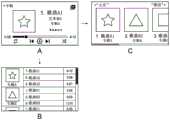
Fig. 6 is a diagram showing an example of various user interfaces that can be displayed by the information processing terminal.
Fig. 7 is a diagram showing a transition example of the user interface of the information processing terminal.
Fig. 8 is a flowchart showing a processing flow of displaying a user interface in the music playing system.
Fig. 9 is a diagram showing an example of a music play instruction voice-input to an information processing terminal.
Fig. 10 is a diagram showing an example of the user interface displayed in each final step of fig. 8 described above.
Fig. 11 is a diagram showing a region range for switching a user interface in the music playing system.
Fig. 12 is a flowchart showing a processing flow of displaying a user interface according to an area range in the music playing system.
Fig. 13 is a flowchart showing a processing flow of displaying a user interface in consideration of the line of sight of the user also in the music playing system.
Fig. 14 is a diagram showing an example of a music change instruction voice-inputted to the information processing terminal.
Fig. 15 is a diagram showing an example of the user interface displayed in each final step of fig. 14.
Fig. 16 is a diagram describing a relationship between a position and an area range of each of a plurality of users in a case where an information processing terminal is operated by the plurality of users.
Fig. 17 is a flowchart showing a processing flow of displaying a user interface according to the positions of a plurality of users in the music playing system.
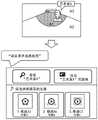
Fig. 18 is a diagram showing another example of a user interface displayed in a case where the user is located at a position close to the information processing terminal in the music playing system.
Fig. 19 is a diagram showing another example of a user interface displayed in a case where the user is located at a position remote from the information processing terminal in the music playing system.
Fig. 20 is a diagram describing a change in resolution of a user interface displayed in the music playing system.
Fig. 21 is a diagram showing an example of a user interface displayed in a case where the music playing system is applied to the recipe playing system.
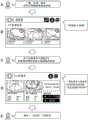
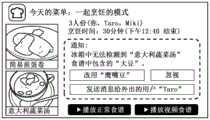
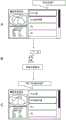
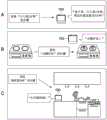
Fig. 22 is a diagram describing a flow of processing for selecting a recipe in the recipe play system according to the second embodiment of the present technology.
Fig. 23 is a diagram describing notification processing before cooking recipes are started in the recipe playback system.
Fig. 24 is a diagram describing another example of a process of selecting a recipe in the recipe play system.
Fig. 25 is a diagram showing an example of a process of switching the playback step in the recipe playback system.
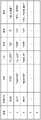
Fig. 26 is a diagram illustrating an example of recipe data using video content in the recipe play system.
Fig. 27 is a diagram showing an example of a process of switching a playback step using video content in a recipe playback system.
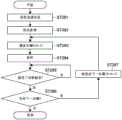
Fig. 28 is a flowchart showing a processing flow of switching the playback step using video content in the recipe playback system.
Fig. 29 is a diagram describing functions of the information processing terminal other than the recipe playback in the recipe playback system.
Detailed Description
Hereinafter, embodiments of the present technology will be described with reference to the drawings.
< first embodiment >
First, a first embodiment of the present technology will be described.
[ overview of the System ]
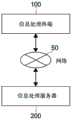
Fig. 1 is a diagram showing the configuration of a music playing system according to a first embodiment of the present technology.
As shown in the figure, the system includes aninformation processing terminal 100 and aninformation processing server 200, and both can communicate with each other via anetwork 50 such as the internet.
Theinformation processing terminal 100 is, for example, a smart speaker having a touch panel type display. The user can operate various applications installed on theinformation processing terminal 100 through both voice input and touch input.
The voice input to theinformation processing terminal 100 is transmitted to theinformation processing server 200 on the cloud, and theinformation processing server 200 converts the voice into a text, performs a process corresponding to the text, and transmits the voice corresponding to the processing result to theinformation processing terminal 100. Theinformation processing terminal 100 plays the voice.
Further, the processing instructed by the touch input to theinformation processing terminal 100 is basically not executed by theinformation processing server 200 but executed by theinformation processing terminal 100.
In this embodiment, theinformation processing terminal 100 presents a user interface for voice input (hereinafter, UI) and a UI for touch input switched according to the user context to the user.
The user context includes user state, user profile, or user context information. The user state represents, for example, the position of the user, the distance from theinformation processing terminal 100, the behavior, the line of sight, the face orientation, the posture, the facial expression, the posture, or the biological information. The user profile represents name information, account information, attribute information, physical information, preference information, behavior history information, interpersonal relationship information, and the like. Further, the user environment information includes information acquired from a camera or a microphone of the information processing apparatus or other sensing apparatus, such as information of noise level, temperature, humidity, illuminance, brightness, and time, etc., of a location where the information processing apparatus is located, and also includes sensing information acquired from other apparatuses.
[ hardware configuration of information processing terminal ]
Next, the hardware configuration of theinformation processing terminal 100 will be described.
Fig. 2 is a diagram showing an appearance of theinformation processing terminal 100. Further, fig. 3 is a block diagram showing an example of the hardware configuration of theinformation processing terminal 100.
As shown in fig. 2, theinformation processing terminal 100 includes, for example, a desktop-type housing whose front view is rectangular and which can be placed on a desk, a shelf, a floor, or the like.
Further, as shown in fig. 3, theinformation processing terminal 100 includes a CPU (central processing unit) 11, a ROM (read only memory) 12, and a RAM (random access memory) 13. Further, theinformation processing terminal 100 may include ahost bus 14, abridge 15, anexternal bus 16, aninterface 17, aninput device 18, anoutput device 19, astorage device 20, adrive 21, aconnection port 22, and acommunication device 23. Theinformation processing terminal 100 may further include animaging device 26 and asensor 27 as necessary. Theinformation processing terminal 100 may include a processing circuit such as a DSP (digital signal processor), an ASIC (application specific integrated circuit), and an FPGA (field programmable gate array) instead of or in addition to theCPU 11.
TheCPU 11 functions as an operation processing device and a control device, and controls the overall or partial operation of theinformation processing terminal 100 according to various programs recorded in theROM 12, theRAM 13, thestorage device 20, or theremovable recording medium 24. TheROM 12 stores programs, arithmetic parameters, and the like used by theCPU 11. TheRAM 13 mainly stores programs used when theCPU 11 executes, parameters appropriately changed in execution, and the like. TheCPU 11, theROM 12, and theRAM 13 are connected to each other through ahost bus 14 including an internal bus such as a CPU bus. Further, thehost bus 14 is connected to anexternal bus 16 such as a PCI (peripheral component interconnect/interface) bus via abridge 15.
Theinput device 18 is a device operated by a user, such as a touch panel, physical buttons, switches, and a joystick. Theinput device 18 may be, for example, a remote control device using infrared rays or other radio waves, or may be anexternal connection device 25 corresponding to the operation of theinformation processing terminal 100, such as a smart phone and a smart watch. Theinput device 18 includes an input control circuit that generates an input signal based on information input by the user and outputs the generated signal to theCPU 11. By operating thisinput device 18, the user inputs various types of data to theinformation processing terminal 100 and instructs theinformation processing terminal 100 to perform processing operations.
As shown in fig. 2, in the present embodiment, a touch panel provided from the center to the upper part of the front surface, a microphone provided on, for example, the top surface, other physical buttons (a power button, a volume adjustment button, and the like) are provided as theinput device 18.
Theoutput device 19 includes a device capable of notifying the user of the acquired information using senses such as sight, hearing, and touch. Theoutput device 19 may be, for example, a display device such as an LCD (liquid crystal display) and an organic EL (electroluminescence) display; a voice output device such as a speaker, etc. Theoutput device 19 outputs a result obtained by theinformation processing terminal 100 performing processing as video (e.g., text or image), voice (e.g., voice or sound), vibration, or the like.
As shown in fig. 2, in the present embodiment, a display provided integrally with the touch panel described above, a speaker provided below the display, and the like are provided as theoutput device 19.
The screen of the display shown in fig. 2 shows an example of a main screen, and for example, a plurality of icons i for starting applications such as a video application, a music application, a cooking application, and a camera application are displayed in addition to time, weather information, and login user information.
Thestorage device 20 is a data storage device configured as an example of a storage unit of theinformation processing terminal 100. Thestorage device 20 includes, for example, a magnetic storage unit device such as an HDD (hard disk drive), a semiconductor storage device, an optical storage device, or a magneto-optical storage device. Thestorage device 20 stores, for example, programs executed by theCPU 11, various types of data, and various types of data acquired from the outside.
Thedrive 21 is a reader/writer for aremovable recording medium 24 such as a magnetic disk, an optical disk, a magneto-optical disk, and a semiconductor memory, and is built in or externally connected to theinformation processing terminal 100. Thedrive 21 reads information recorded on the attachedremovable recording medium 24 and outputs the read information to theRAM 13. Further, thedrive 21 writes a record to the attachedremovable recording medium 24.
Theconnection port 22 is a port for connecting a device to theinformation processing terminal 100. Theconnection port 22 may be, for example, a USB (universal serial bus) port, an IEEE1394 port, or a SCSI (small computer system interface) port. Further, theconnection port 22 may be an RS-232C port, an optical audio terminal, an HDMI (registered trademark) (high definition multimedia interface) port, or the like. By connecting theexternal connection device 25 to theconnection port 22, various types of data can be exchanged between theinformation processing terminal 100 and theexternal connection device 25.
Thecommunication device 23 is a communication interface including, for example, a communication device for connecting to thecommunication network 50. Thecommunication device 23 may be, for example, a communication card for LAN (local area network), bluetooth (registered trademark), Wi-Fi, or WUSB (wireless USB). Further, thecommunication device 23 may be a router for optical communication, a router for ADSL (asymmetric digital subscriber line), or a modem for various types of communication. Thecommunication device 23 transmits and receives, for example, signals to and from the internet or other communication device using a predetermined protocol such as TCP/IP. Further, thecommunication network 50 connected to thecommunication device 23 may be a wired or wireless connected network, and may include, for example, the internet, a home LAN, infrared communication, radio wave communication, or satellite communication.
For example, theimaging device 26 is a camera that captures an image of a real space using various components such as an image sensor including CMOS (complementary metal oxide semiconductor) and CCD (charge coupled device) and a lens for controlling formation of an object image on the image sensor, and generates an image. Theimaging device 26 may capture still images or may capture moving images.
For example, thesensor 27 is various sensors such as an acceleration sensor, an angular velocity sensor, a geomagnetic sensor, an illuminance sensor, a heat sensor, a barometric pressure sensor, and a sound sensor (microphone). Thesensor 27 acquires information related to the state of theinformation processing terminal 100 itself, for example, the posture of the housing of theinformation processing terminal 100, or acquires information related to the surrounding environment of theinformation processing terminal 100, such as the brightness and noise around theinformation processing terminal 100. Further, thesensor 27 may include a GPS receiver that receives GPS (global positioning system) signals to measure the latitude, longitude and altitude of the device.
Each of the above components may be configured by using a general-purpose member, or may be configured by hardware dedicated to the function of the corresponding component. Such a configuration may be appropriately changed according to the technical level at the time of implementation.
[ functional Block configuration of information processing terminal ]
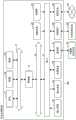
Fig. 4 is a diagram showing functional blocks of theinformation processing terminal 100.
As shown in the figure, theinformation processing terminal 100 includes acontrol unit 110, asensor unit 120, avoice input unit 130, atouch input unit 140, animaging unit 150, adisplay unit 160, avoice output unit 170, and acommunication unit 180 as functional blocks (software modules).
Thecontrol unit 110 cooperates with theCPU 11 to integrally control the processing of each functional block of theinformation processing terminal 100.
Thesensor unit 120 transmits sensing data detected by the above-describedsensor 27 to thecontrol unit 110.
Thevoice input unit 130 transmits a voice signal converted from voice input to a microphone serving as theinput device 18 to thecontrol unit 110. Thetouch input unit 140 transmits information of a touch position sensed by the touch panel serving as theinput device 18 to thecontrol unit 110 as an information signal. Theimaging unit 150 captures an image by theimaging device 26 based on an instruction from thecontrol unit 110, and transmits the captured image as digital data to thecontrol unit 110.
In addition to the above-described main screen, thedisplay unit 160 displays GUIs (graphical user interfaces; hereinafter, also referred to as UIs) of various activated applications on a touch panel as theoutput device 19.
As described above, in the present embodiment, the UI for voice input or the UI for touch input switched according to the user context is mainly displayed by the music application.
Thevoice output unit 170 outputs voice from a speaker as theoutput device 19 based on an instruction from thecontrol unit 110.
Thecommunication unit 180 cooperates with thecommunication device 23 to communicate with other devices such as theinformation processing server 200 via thenetwork 50. For example, thecommunication unit 180 transmits voice data input from the user to theinformation processing server 200.
These functions may not be provided in theinformation processing server 200 but may be provided in an external terminal such as theinformation processing terminal 100 or a device on the cloud. In particular, thevoice input unit 130, theimaging unit 150, and thedisplay unit 160 may be provided in an externally connected device.
[ function Block configuration of information processing Server ]
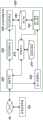
Fig. 5 is a diagram showing functional blocks of theinformation processing server 200.
As shown in the figure, theinformation processing server 200 includes, as functional blocks, acontrol unit 210, acommunication unit 220, avoice recognition unit 230, a semantic analysis unit 240, auser recognition unit 250, and a userstate estimation unit 260, and includes a database of a presentation information DB (database) 270 and auser DB 280.
Thecontrol unit 210 cooperates with the CPU of theinformation processing server 200 to integrally control the processing of each functional block of theinformation processing server 200.
Thecommunication unit 220 communicates with other devices such as theinformation processing terminal 100 via thenetwork 50, receives voice data from theinformation processing terminal 100, transmits the received data to thevoice recognition unit 230 and thecontrol unit 210, and transmits data representing the result of processing performed by thecontrol unit 210 to theinformation processing terminal 100, for example.
Thevoice recognition unit 230 processes voice data received from theinformation processing terminal 100 by voice recognition to convert it into text data, and sends the text data to the semantic analysis unit 240.
The semantic analysis unit 240 analyzes the semantics of the above-described text data with reference to the user DB280, and transmits data representing the analyzed semantics to thecontrol unit 210. Thecontrol unit 210 extracts presentation data corresponding to the data from thepresentation information database 270, and transmits the extracted presentation data to theinformation processing terminal 100 via thecommunication unit 220.
Theuser identification unit 250 identifies a person from image data obtained by the camera of theinformation processing terminal 100 received by thecommunication unit 220.
The userstate estimating unit 260 estimates the state (or behavior) of the above-identified user by referring to the user DB280, and transmits the estimation result to thecontrol unit 210. Thecontrol unit 210 extracts presentation data corresponding to the estimation result from thepresentation information database 270, and transmits the extracted presentation data to theinformation processing terminal 100 via thecommunication unit 220.
These functions may not be provided in theinformation processing server 200, but may be provided in an external terminal such as theinformation processing terminal 100 or a device on the cloud.
[ example of user interface of information processing terminal ]
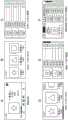
Next, an example of a UI that the above-describedinformation processing terminal 100 can display on thedisplay unit 160 when executing a music application among the above-described applications will be described. Fig. 6 is a diagram illustrating examples of various user interfaces. Fig. 7 is a diagram illustrating a transition example of a UI.
Part a of fig. 6 shows the UI when a specific music is played. For example, a control portion (e.g., a search bar, a play button, a fast-forward button, and a rewind button) is located at a lower portion, and music, an artist, a recorded album name, an album cover image, and the like are arranged at an upper portion thereof.
Parts B to E of the figure respectively show examples of music list screens for a user to select music. Part B of the figure is a list screen for voice input, and, for example, three album information mainly including an album cover image are displayed side by side in the lateral direction. Part C of the figure shows a list screen for touch input, compared with the list screen for voice input shown in part B described above, the list direction is a longitudinal direction, the image of each album cover becomes small, and information on pieces of music included in each album is also listed. Part D and part E of the figure are versions in which the list screens shown in the above-described parts B and C can be scrolled in the lateral and longitudinal directions by the scroll bar, respectively.
Part F of the diagram shows a screen obtained by combining the play screen shown in part a of the diagram and the list screen for touch input shown in part E of the diagram with each other.
As will be described in detail below, it is assumed that the UI of the voice input is presented in a case where the user cannot perform a touch input (hardly seen) on theinformation processing terminal 100 because he/she is located far from theinformation processing terminal 100, the amount of information (image object, text, list item, etc.) thereof is small, and the granularity is set to be large. In contrast, assuming that a UI for touch input is presented in a case where the user can perform touch input (easily see) on theinformation processing terminal 100 because he/she is located close to theinformation processing terminal 100, the amount of information thereof is large, and the granularity is set to be small.
Theinformation processing terminal 100 selects an appropriate UI from such UIs, and displays the selected UI according to the user context (location, etc.). For example, as shown in fig. 7, when the screen is changed from the play screen to the list screen, in the case where the user is in a state suitable for touch input, theinformation processing terminal 100 displays a detailed list screen for touch input as shown in part B of the figure, and in the case where the user is not in a state suitable for touch input, displays a relatively simple list screen for voice input as shown in part C of the figure.
[ operation of music playback System ]
Next, the operation of the music playing system configured as described above will be described. Hardware such as a CPU and a communication unit of theinformation processing terminal 100 or theinformation processing server 200 performs this operation in cooperation with software such as an application stored in a storage unit. In the following description, theCPU 11 of theinformation processing terminal 100 and thecontrol unit 210 of theinformation processing server 200 are mainly described as main operation bodies for the sake of convenience.
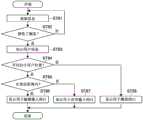
Fig. 8 is a flowchart showing a processing flow of displaying a UI in response to a trigger of theinformation processing terminal 100.
As shown in the figure, theCPU 11 of theinformation processing terminal 100 acquires information from theinput device 18, theimaging device 26, thesensor 27, and the like at any time (step 81), and determines whether a trigger has been accepted or not based on the information (step 82).
For example, in the case where the trigger is a music play instruction, the input source may be a voice input, a touch input, or a remote control operation by the user. For example, it is assumed that, starting from the display state of the main screen shown in fig. 2 described above, as shown in fig. 8, playing music of a specific artist by a music application is indicated by the speech expression of the user (yes in step 82).
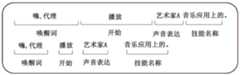
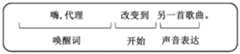
Note that the voice of the instruction has a predetermined wakeup word portion at the beginning, and then a skill name (function name of application, etc.) portion, a vocal expression (pronunciation opinion) portion, and a startup portion. The division of these parts and the determination of whether the trigger has been accepted are performed by thespeech recognition unit 230 and the semantic analysis unit 240 of theinformation processing server 200.
Then, theCPU 11 estimates the state of the user of the instruction source, particularly the position of the user (step 83). The estimation of the user position is performed by the userstate estimation unit 260 of theinformation processing server 200 based on the image captured by theimaging device 26.
In addition to the captured image, for example, the user position may be estimated based on a difference between arrival times of voices input to a plurality of microphones from the user or GPS (global positioning system) information or VPS (virtual positioning system) information received from a terminal (for example, a smartphone owned by the user). Further, the user position may be estimated by positioning technology using beacon (BLE (bluetooth low energy)) information or dead reckoning.
In the case where the user position can be estimated (yes in step 84), thecontrol unit 210 of theinformation processing server 200 determines whether the distance of the user position from theinformation processing terminal 100 is less than or equal to a predetermined distance based on the above-described captured image or the like (step 85). The predetermined distance is, for example, 0.5m, 1m, 2m, etc., but is not limited thereto.
In a case where it is determined that the user position is less than or equal to the predetermined distance, thecontrol unit 210 transmits, to theinformation processing terminal 100, an instruction signal for instructing to display a UI for touch input on the touch panel, the UI for touch input causing the user to select an album of an artist included in the above-described play instruction by touch. In response to this, theCPU 11 of theinformation processing terminal 100 controls the touch panel to display the UI for touch input as shown in part B of fig. 10 (step 86).
In a case where it is determined that the user is out of the predetermined distance, thecontrol unit 210 transmits an instruction signal instructing to display a UI for voice input on the touch panel, which allows the user to select the above-described album by voice, to theinformation processing terminal 100. In response to this, theCPU 11 of theinformation processing terminal 100 controls the touch panel to display the UI for voice input as shown in part C of fig. 10 (step 87).
In the case where it is determined in the above-described step 84 that the user position cannot be estimated (no), for example, thecontrol unit 210 picks up an album of an artist included in the play instruction at random or from the top in the list order, and transmits an instruction signal indicating that a UI for play is displayed on the touch panel to theinformation processing terminal 100, wherein music of the album is played from the beginning or at random. As shown in part D of fig. 10, in response to this, theCPU 11 of theinformation processing terminal 100 controls the touch panel to display the UI for playback (step 88).
Further, thecontrol unit 210 may set a first distance and a second distance (first distance < second distance) as the above-described predetermined distance, and transmit an instruction signal for causing a UI for touch input to be displayed in a case where the user position is less than or equal to the first distance, to theinformation processing terminal 100; causing display of a UI for voice input in the event that the user position exceeds the second distance; and causing display of other UIs, such as a UI for gesture input, a UI for gaze input, and a UI for remote control input, if the user position is between the first distance and the second distance.
(UI display based on user's range)
TheCPU 11 may use a predetermined area range instead of the predetermined range as the criterion of the user position described above. Fig. 11 is a diagram for describing a region range.
As shown in part a of the drawing, for example, theCPU 11 may set an area range within the above-described predetermined distance from the front surface of theinformation processing terminal 100 and within 60 degrees to the left and right as an area range a1 of the UI for touch input, and set the other area range as an area range a2 of the UI for voice input.
As shown in part B of the figure, for example, theCPU 11 may set an area range within the above-described predetermined distance from the front surface of theinformation processing terminal 100 and within 60 degrees to the left and right as an area range a1 of the UI for touch input; setting an area range, which is greater than the above-described predetermined distance from the front surface and is within 60 degrees to the left and right, as an area range a2 of the UI for voice input; and the other area range (the range in which the UI is not visible to the user) is set as the area range a3 of the UI for simple (simplex) play. Further, the area range a3 may be set as an area range (operation of only speakers) where no screen (UI) is displayed.
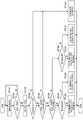
Fig. 12 is a flowchart showing a processing flow of displaying a UI corresponding to an area range.
In the figure, the processing from step 121 to step 124 is similar to the processing from step 81 to step 84 of fig. 8 described above.
In the case where it is determined in step 124 that the user position can be estimated (yes), thecontrol unit 210 of theinformation processing server 200 determines whether the user is within the first range (area ranges a1 and a2 in part B of fig. 11) within which he/she can see the display of the information processing terminal 100 (step 125).
In the case where it is determined that the user is within the first range (yes), thecontrol unit 210 determines whether the user is within a second range (area range a1 in part B of fig. 11) where the user can touch the display (step 126).
In a case where it is determined that the user is within the second range (yes), an instruction signal for instructing to display a UI for touch input on the touch panel is transmitted to theinformation processing terminal 100, the UI for touch input causing the user to select an album of an artist included in the above-described play instruction by touch. In response to this, theCPU 11 of theinformation processing terminal 100 controls the touch panel to display the UI for touch input as shown in part B of fig. 10 (step 127).
In the case where it is determined that the user exists within the first area and outside the second area (area a2 in part B of fig. 11), thecontrol unit 210 transmits, to theinformation processing terminal 100, an instruction signal for instructing display of a UI for voice input on the touch panel, which causes the user to select the above-described album by voice. In response to this, theCPU 11 of theinformation processing terminal 100 controls the touch panel to display the UI for voice input as shown in part C of fig. 10 (step 128).
In the case where it is determined in the above-described step 124 that the user position cannot be estimated (no), thecontrol unit 210 transmits an instruction signal for instructing to display a UI for playing on the touch panel to theinformation processing terminal 100, similarly to step 88 of fig. 8. In response to this, theCPU 11 controls the touch panel to display the UI for playback as shown in part D of fig. 10 (step 129).
For example, the above-described area ranges a1 and a2 may be further subdivided, and a4 may be disposed between a1 and a 2. In this case, in the case where it is determined that the user is present in the area range a4, thecontrol unit 210 may transmit an instruction signal to theinformation processing terminal 100 so as to display other UIs, such as a UI for gesture input, a UI for line-of-sight input, and a UI for remote control input.
(UI display also considering user gaze)
In addition to the above-described area range, theCPU 11 may use the line of sight of the user (whether the user is looking at the display of the information processing terminal 100) as the criterion of the above-described user position.
Fig. 13 is a flowchart showing a flow of processing in which theinformation processing terminal 100 displays the UI in consideration of the line of sight of the user as well.
In the figure, the processing from step 131 to step 136 is similar to the processing from step 121 to step 126 of fig. 12 described above. In this example, it is assumed that an instruction to change the music currently being played to another music has been accepted as a trigger by the voice input from the user, for example, as shown in fig. 14.
When it is determined in step 136 that the user is within the second range in which the user can touch the display (yes) or the user is outside the second range (no), thecontrol unit 210 of theinformation processing server 200 determines whether the line of sight of the user is directed to the display of theinformation processing terminal 100, for example, based on the image captured by the imaging device 26 (steps 137, 138).
In a case where it is determined that the user in the second range is looking at the display (yes in step 137), thecontrol unit 210 displays the UI for touch input with a large amount of information, and transmits, for example, an instruction signal for instructing to output a simple sound effect such as "beep" or turn on an LED to theinformation processing terminal 100. In response to this, as shown in part B of fig. 15, theCPU 11 of theinformation processing terminal 100 controls the touch panel to display a UI (large amount of information) for touch input, and controls the speaker to output the above-described sound effect or turn on the LED (step 139).
The reason why a sound effect or LED is used as the notification is that detailed voice guidance is considered as an obstacle to the user when he/she is looking at the display. In addition, the information amount specifically includes the number of contents (music), the number of menus, scroll bars, meta information, and the like.
In a case where it is determined that the user in the second range is not looking at the display ("no" in step 137), thecontrol unit 210 displays the UI for touch input having an information amount smaller than the above-described information amount, and transmits an instruction signal for instructing to output a voice guidance for guiding the line of sight of the user to the display, for example, "how are the songs? ". In response to this, as shown in part C of fig. 15, theCPU 11 of theinformation processing terminal 100 controls the touch panel to display a UI (small amount of information) for touch input, and controls the speaker to output the above-described voice guidance (step 140).
In a case where it is determined that the user outside the second range is looking at the display (yes in step 138), thecontrol unit 210 displays a UI for voice input with a large amount of information, and transmits, for example, an instruction signal for instructing to output a simple sound effect such as "beep" or turn on an LED to theinformation processing terminal 100. In response to this, as shown in part D of fig. 15, theCPU 11 of theinformation processing terminal 100 controls the touch panel to display a UI (large amount of information) for voice input, and controls the speaker to output a sound effect or turn on the LED (step 141).
In a case where it is determined that the user outside the second range is not looking at the display ("no" in step 138), thecontrol unit 210 displays a UI for voice input having an information amount smaller than the above-described information amount, and transmits an instruction signal for instructing to output a voice guidance (e.g., "how do the song") to theinformation processing terminal 100. In response to this, as shown in part E of fig. 15, theCPU 11 of theinformation processing terminal 100 controls the touch panel so as to display a UI (small amount of information) for voice input, and controls the speaker to output the above-described voice guidance (step 142).
In a case where it is determined that the position of the user cannot be estimated (no in step 134) or the user is not within the first range (no in step 135), thecontrol unit 210 transmits an instruction signal for instructing to switch only music to another piece of music (for example, the next piece of music from an album being played) without changing the UI being currently played, to theinformation processing terminal 100, and outputs a voice guidance for describing the music as the switching destination, for example, "play song B1". In response to this, as shown in part F of fig. 15, theCPU 11 of theinformation processing terminal 100 controls the touch panel to switch the contents without changing the UI, and controls the speaker to output the voice guidance (step 143).
(case where there are a plurality of users)
Although the above description is made on the assumption that the number of users of theinformation processing terminal 100 is one, it is also conceivable that a plurality of users operate theinformation processing terminal 100.
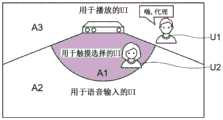
Fig. 16 is a diagram describing a relationship between a position and an area range of each of a plurality of users in a case where theinformation processing terminal 100 is operated by the plurality of users.
As shown, two users, i.e., a user U1 and a user U2, exist around theinformation processing terminal 100. The user U1 exists in an area range where he/she cannot see the display of theinformation processing terminal 100, that is, in the area range A3 of the UI for display, and the user U2 exists in an area range where he/she can touch the display of theinformation processing terminal 100, that is, in the area range a1 of the UI for touch selection. Theinformation processing terminal 100 displays the UI according to an area where a plurality of users exist.
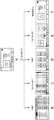
Fig. 17 is a flowchart showing a processing flow of displaying a UI by theinformation processing terminal 100 according to an area in which a plurality of users are located.
As shown in the figure, theCPU 11 of theinformation processing terminal 100 acquires information from theinput device 18, theimaging device 26, thesensor 27, and the like at any time (step 171), and determines whether a trigger has been accepted based on the information (step 172).
In a case where it is determined that the trigger (e.g., the voice of the music switching instruction has been input) (yes), theuser identifying unit 250 of theinformation processing server 200 determines whether or not a plurality of users are present around theinformation processing terminal 100, for example, based on the image captured by the imaging device 26 (step 173).
In a case where it is determined that there are no multiple users (no), theinformation processing server 200 and theinformation processing terminal 100 perform the above-described processing of step 83 and subsequent steps in fig. 8, step 123 and subsequent steps in fig. 12, or step 133 and subsequent steps in fig. 13.
In a case where it is determined that a plurality of users are present (yes), theuser identifying unit 250 determines whether the users are present in different area ranges from among the above-described area ranges a1 to A3 from the above-described captured image or the like (step 174).
In the case where it is determined that a plurality of users exist within the same area range (no), theinformation processing server 200 and theinformation processing terminal 100 perform the above-described processing of step 83 and subsequent steps in fig. 8, step 123 and subsequent steps in fig. 12, or step 133 and subsequent steps in fig. 13 (step 182), similarly to the case where the number of users is one.
In the case where it is determined that a plurality of users exist in different area ranges (yes), theuser identifying unit 250 determines whether there is a user who cannot see the display of theinformation processing apparatus 100, that is, a user located in the above-described area range a3, based on the above-described captured image or the like (step 175).
In a case where it is determined that there is a user who cannot see the display (yes), theuser identifying unit 250 determines whether there is a user who can touch the display based on the above-described captured image or the like (step 176).
In the case where it is determined that there is a user who can touch the display (yes), thecontrol unit 210 displays a UI for touch input for the user who can touch the display, and transmits an instruction signal for instructing output of voice guidance similar to that described above with reference to fig. 13 for the user who cannot see the display by beamforming (transmission of sound waves in a specific direction) to theinformation processing terminal 100. In response to this, theCPU 11 of theinformation processing terminal 100 displays the UI for touch input and controls the speaker so as to output directional voice guidance to a user who cannot see the display, for example, using only the speaker corresponding to the above-described area range a3 behind the information processing terminal 100 (step 178). As a result, the user who can see the display is not hindered by the above-described voice guidance, and appropriate information is provided to the user who cannot see the display.
In a case where it is determined that there is no user who can touch the display (no), thecontrol unit 210 displays a UI for voice input to the user who can see the display, and transmits an instruction signal for instructing output of the above-described voice guidance to the user who cannot see the display to theinformation processing terminal 100. In response to this, theCPU 11 of theinformation processing terminal 100 displays the UI for voice input, and controls the speaker to output voice guidance by beam forming similarly to the above (step 179).
In the case where it is determined in the above-described step 175 that there is no user who cannot see the display (no), thecontrol unit 210 determines whether the instruction user (user who issued the trigger) can perform the touch operation (whether he/she is in the area range a1) (step 177).
Here, the specification of instructing the user may be performed by checking a position of a microphone, from among a plurality of microphones included in theinformation processing terminal 100, at which the triggered voice is input, and a position of the user in the above-described captured image.
In a case where it is determined that the instruction user can touch the display (yes), thecontrol unit 210 displays the above-described UI for touch input, and transmits an instruction signal for instructing to output a sound effect similar to the case in fig. 13 or turn on the LED to theinformation processing terminal 100. In response to this, theCPU 11 of theinformation processing terminal 100 controls the touch panel to display the UI for touch input, and controls the speaker to output a sound effect or turn on the LED (step 180).
In a case where it is determined that the instruction user cannot touch the display (no), thecontrol unit 210 displays a UI for voice input and transmits an instruction signal for instructing to output the above-described sound effect or turn on the LED to theinformation processing terminal 100. In response to this, theCPU 11 of theinformation processing terminal 100 controls the touch panel to display the above-described UI for voice input, and controls the speaker to output a sound effect or turn on the LED (step 181).
The above-described voice guidance by beamforming can be output not only to a user who cannot see the display of theinformation processing terminal 100 but also to a user who can see the display. At this time, theCPU 11 may control the speaker so that the contents of the voice guidance for the user who cannot see the display and the contents of the voice guidance for the user who can see the display are output differently from each other. Further, in the case where only a certain instruction user among the plurality of users performs an operation, theCPU 11 may control the speaker so as to output only the voice guidance to the above instruction user through beamforming.
Further, theCPU 11 may cooperate with theinformation processing server 200 to specify the position of the user, which is farthest from or closest to theinformation processing terminal 100, among the plurality of users, and control the touch panel to display the UI according to the position (according to which of the area ranges a1 to A3 the position is located).
Further, theCPU 11 may specify a middle (average) position of the positions of the plurality of users, and control the touch panel to display the UI according to the position.
Further, theCPU 11 may specify a user who is looking at the display among the plurality of users, and control the touch panel to display the UI according to the position of the user.
The above examples show examples in which the instruction from the user is explicit, but there are cases in which the instruction from the user is ambiguous. In this case, theCPU 11 may also perform processing according to, for example, the determination result of determining the distance of the user from theinformation processing terminal 100 based on the image captured by theimaging device 26, determining the area range where the user is located, and determining whether the line of sight of the user is directed to theinformation processing terminal 10. This may include processing related to applications or services other than music applications. The above distance and area range may be determined based on sensing data of a distance sensor of theinformation processing terminal 100 or an external sensor (distance sensor, indoor camera, etc.).
For example, in a case where the voice of the "(hi, agency) artist a" is input from the user and the user is located at a position where he/she can touch or is looking at theinformation processing terminal 100, as shown in fig. 18, theCPU 11 may display not only a list display for selecting music of the artist a but also a UI including a web search and a news display (as a selection menu) related to the artist a.
Further, in the case where the instruction of the user is not clear and the user is at a distance from theinformation processing terminal 100 or does not look at theinformation processing terminal 100, theCPU 11 may instruct the content by voice inquiry, or may execute the play processing or the list display processing by arbitrarily predicting the execution procedure. Fig. 19 shows a state in which theCPU 11 predicts that "the play of music by the artist a has been instructed" and performs the play in the case where the voice of the "(hi, agency) artist a" is input.
Further, in the case where the ambient sound level of theinformation processing terminal 100 is equal to or higher than a predetermined level, or in the case where it is estimated that the voice input environment is poor from the sensed information, theCPU 11 may extend the distance/range to provide a UI for more reliable touch input as the operation input means, for example, to activate another AV device such as a television.
For example, in the case where the voice input environment is good, assuming that the distance from theinformation processing terminal 100 to the user is 1m (which is a reference for displaying a UI for touch input or a UI for voice input), theCPU 11 may change the above-described reference distance to 3m in the case where it has been detected that the ambient sound level is equal to or higher than a predetermined value or another AV device is activated. This prevents input errors in the interface for voice input.
Further, theCPU 11 may display a UI, an icon, a bar, or the like for indicating the recognition sensitivity or accuracy of the voice input to the user on the display according to the above-described voice input environment. For example, theCPU 11 may change the color of the bar at the top of the screen in fig. 2 or the microphone icon at the center of the group of icons (for example, red in the case where the voice input environment is good, and blue in the case where the voice input environment is poor).
As a result, for example, when theCPU 11 displays the UI for touch input due to poor speech recognition accuracy, the user can intuitively understand that the touch UI is displayed due to unsuccessful speech recognition, and can naturally select touch input instead of speech input.
In the above description, theCPU 11 may also switch the display of the UI in consideration of the posture of the user. That is, even in a case where the user is located at a position close to theinformation processing terminal 100, theCPU 11 may display the UI for voice input in a case where it is detected that the user is lying down. As a result, the necessity of the lying user sitting up to perform the touch operation can be avoided. The posture information is acquired from an image captured by theimaging device 26 or an external sensor (a sensor in a bed, a wearable terminal worn by the user, an indoor camera, etc.).
Alternatively, in a case where it has been detected that the user is lying down, theCPU 11 may display the UI for playing described above. This avoids the trouble of looking at the UI on the display and selecting a process without the lying user looking at the display.
In the above example, it is assumed that a UI for touch input and a UI for voice input are provided in advance in a music application. However, depending on an application or service, a UI for touch input and a UI for voice input are not provided in some cases. In this case, in the case of a different mode of the UI provided by the service, although it is not the UI for touch/voice input, theCPU 11 may use the UI for touch/voice input.
For example, in a case where there are a UI having a large amount of content and a UI having a small amount of content, theCPU 11 uses the former for touch input and the latter for voice input. Further, in the case of providing a tablet page and a smartphone page, theCPU 11 may use the former for touch input and the latter for voice input.
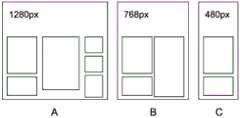
Further, in the case of creating a service-side web page by response design, as shown in fig. 20, theCPU 11 may virtually change the resolution information of the page, and use a high-resolution page (part a of fig. 20) as a UI for touch input and a low-resolution page (part B or part C of fig. 20) as a UI for voice input.
Further, in a case where the different modes of the UI as described above are not provided, theCPU 11 may display the UI for touch input or the UI for voice input by changing the size of the contents (images or fonts) to distinguish them from each other.
Further, in the case where the service-side page has a link or an option, in the case where the page serves as a UI for touch input, theCPU 11 may display the page as it is, and in the case where the page serves as a UI for voice input, provide an icon, such as a number, to the link or the option for voice instruction.
As a result, even in an application or service in which a UI for touch input and a UI for voice input are not provided in advance, theinformation processing terminal 100 can provide an appropriate UI corresponding to an input device.
In the above example, the UI in the music application has been described, but the process of switching the UI for voice input/the UI for touch input according to the context such as the distance, range, and line of sight of the user may be similarly implemented in other application programs.
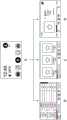
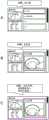
As an example, fig. 21 shows UIs corresponding to steps 86 to 88 of fig. 8 and parts B to D of fig. 10 as UIs displayed in the UI in the cooking application.
Part a of the diagram shows a UI for touch input, part B of the diagram shows a UI for voice input, and part C of the diagram shows a UI for play. In the UI for touch input, the screen information amount (character information amount) is large, and the voice information amount output therewith is small. In the UI for voice input, the screen information amount is small (character information is replaced with a picture), and the accompanying voice information amount is also small. In the UI for playback, the amount of screen information is small and the amount of voice information is large.
In the above-described example, theinformation processing terminal 100 and theinformation processing server 200 may determine the UI by learning at least one of the position, line of sight, posture, or facial expression of the user in association with the UI used by the user at that time or the instruction content from the user.
As the learning method, for example, a neural network or deep learning is used. The neural network is a model that mimics the human cranial neural circuit and includes three types of layers, namely an input layer, an intermediate layer (hidden layer), and an output layer. Further, deep learning is a model of a neural network using a multilayer structure, and a complex pattern hidden in a large amount of data can be learned by repeating feature learning in each layer. Deep learning is used, for example, to recognize objects in an image or words in speech.
In the case of using deep learning, the input may be a position, a posture, a facial expression, a line of sight of the user, or the like, and the output may be a UI for touch input, a UI for voice input, or the like.
Further, as a hardware structure for realizing such machine learning, a neural chip/neuromorphic chip incorporating the concept of a neural network may be used.
In addition, problem settings for machine learning include supervised learning, unsupervised learning, semi-supervised learning, reinforcement learning, inverse reinforcement learning, active learning, transitional learning, and the like. For example, supervised learning learns feature quantities based on given label learning data (teaching data). This makes it possible to derive the label of the unknown data.
Further, in unsupervised learning, a large amount of unlabeled learning data is analyzed to extract feature quantities, and clustering is performed based on the extracted feature quantities. This allows trends to be analyzed and the future predicted based on large amounts of unknown data.
Further, semi-supervised learning is a mixture of supervised learning and unsupervised learning, and is a method of providing a large amount of training data by unsupervised learning after learning a feature amount by the supervised learning, and repeatedly performing learning while automatically calculating the feature amount.
In addition, reinforcement learning solves the problem of agents observing the current state in certain environments to decide on an action to take. The agent receives rewards from the environment through a selection action and learns how to receive the maximum reward through a series of actions. As described above, by learning the optimal solution in some environments, it is possible to reproduce human judgment and make a computer learn more judgment than humans.
In the above-described example, the UI for touch input and the UI for voice input are shown as UIs to be switched, but other UIs, such as a UI for gesture input, a UI for line-of-sight input, and a UI for remote control input, may be switched and displayed. For example, in the above-described example, theCPU 11 may control the touch panel to display a UI for line-of-sight input instead of a UI for touch input and a UI for gesture input instead of a UI for voice input.
In the above-described example, the display of the UI is switched based on the distance between the user and theinformation processing terminal 100, the range of the area where the user is located, or the determination result of whether the line of sight of the user is directed to theinformation processing terminal 100. However, theCPU 11 may switch the display of the UI based on profile information relating to the auditory sense and the visual sense of the user. For example, theCPU 11 may control the touch panel to display a UI for touch input in a case where it is determined from the profile information that the identified user has a hearing impairment, and display a UI for voice input in a case where it is determined that the user has no hearing impairment. Further, in the above-described example, in the case where it is determined that the recognized user is hearing-impaired, theCPU 11 may control the touch panel to display a UI for gesture input, a UI for line-of-sight input, or a UI for remote control input, instead of a UI for voice input.
< second embodiment >
Next, a second embodiment of the present technology will be described. In the present embodiment, portions having functions and configurations similar to those in the first embodiment described above are denoted by the same reference numerals, and overlapping description is omitted or simplified.
In the above-described embodiment, the process of changing the UI for music playback in the music application according to the user context has been shown. Incidentally, unlike media contents such as music and video, contents such as cooking recipes and electronic books require operations, for example, a user needs to turn a page (step by step) after playing.
In this embodiment, a cooking application (recipe playback system) will be described as an example of a process of controlling switching of a plurality of playback steps included in content based on user context information including user states (positions/postures/line of sight/facial expressions, etc.) of a user, user profiles, or user environment information, or sensing information collected from other devices.
Com may download information such as recipes, images and contents from user distribution type services such as Cook pad and allclips through the internet and display the information while controlling the switching of the above-described playing steps or stream-play the information while controlling the switching of the above-described playing steps.
Fig. 22 is a diagram describing a flow of a process of playing a recipe in the recipe playing system according to the embodiment.
As shown in part a of the drawing, the user starts a cooking application by voice input from the main screen shown in fig. 2 and instructs to search for a recipe for a specific dish (e.g., omelet).
After recognizing the voice input, as shown in part B of fig. 22, theCPU 11 of theinformation processing terminal 100 displays the search result of the recipe for the corresponding dish on the display and notifies the user of the number of the search result by voice.
As shown in part C of the figure, according to the search result, the user instructs to add a specific recipe to "menu of today" by voice input.
After recognizing the voice input, theCPU 11 displays a page in which the above-described recipe has been added to the above-described "menu of today" on the display, and notifies the user of the addition and cooking time of the corresponding recipe by voice. The cooking time may be input by a user who publishes the recipe to the service, or may be published and otherwise registered by a user who actually creates the recipe. Further, the service side may record the time taken by each of a plurality of users who have played the recipe, and output the average thereof.
At this time, theCPU 11 also displays a button for selecting "cook one by one" or "cook together" for a plurality of recipes. "one-by-one cooking" means a mode in which the dishes are cooked one by one, and the order of cooking is given by the information processing terminal 100 (user selection is also possible). "cook together" means a mode in which theinformation processing terminal 100 presents a process for cooking a plurality of selected recipes together. In this embodiment, as shown in part E of the figure, it is assumed that "cook together" has been instructed by voice input from the user.
Existing methods can be used for "cooking together". That is, theCPU 11 solves the optimization problem of minimizing time based on the work (cutting, stir-frying, boiling, etc.) described in the recipe, the number of people, and the work environment (the number of stoves, pans, kitchen knives, etc.) in the user profile.
Instead of the above-described recipe search instruction from the user, theCPU 11 may acquire information of food in the refrigerator as sensing data and present the recipe including the food to the user. In this case, a sensor (camera or the like) and a transmitter are provided in the refrigerator, and information on food detected by the sensor is transmitted as sensed data to theinformation processing terminal 100 through the transmitter.
Fig. 23 is a diagram describing a screen of a cooking application before cooking recipes are started in the above-described recipe playback system.
Before starting cooking, theinformation processing terminal 100 displays a notification message such as preparation of food material, for example, as shown by a dotted line in the figure. The following is assumed to be an example of a notification message.
The recipe data and the user profile are compared with each other, and in the case where the recipe data includes an allergic food registered in the user profile, theCPU 11 displays a warning on the display. The warning may be output from the speaker as a warning sound or a warning message.
In the event that the presence of a substitute food material on the refrigerator or shelf is detected from the sensed data, then theCPU 11 will prompt for such a substitute food product (e.g., soy- > chickpeas).
TheCPU 11 may acquire exercise information or diet information from the healthcare application installed on theinformation processing terminal 100 and display a warning in the case where the calorie information of the recipe exceeds a predetermined value. The warning may be output from the speaker as a warning sound or a warning message.
TheCPU 11 may prompt to add food materials of foods in the refrigerator lacking foods in the recipe to a shopping cart/wishlist on the EC (e-commerce) site.
TheCPU 11 can check whether a message is transmitted from theinformation processing terminal 100 to a portable device such as a smartphone of the user to make the user purchase food, in a case where it is detected that the home user is out by referring to the location information of the home user. Then, in the case where the home user agrees to purchase, theCPU 11 may change the order of recipes according to the estimated return time of the user.
Next, a process of setting the cooking time as a function before the start of the play of the recipe will be described.
When the cooking completion time is designated from the user, theCPU 11 may propose to change the cooking start time. For example, theCPU 11 may compare the user's desired cooking completion time and the estimated cooking time with each other, and present the appropriate cooking start time to the user in the case where the cooking is completed earlier than the user's desired time.
In addition, in making all the above cooking recipes together, theCPU 11 may optimize the cooking time so that the cooking time is close to the time desired by the user rather than the minimum cooking time.
Further, in the case where the recipe is video content, theCPU 11 may adjust the cooking completion time by adjusting the video playback speed.
Further, in the case where it is determined that the planned cooking end time will exceed the user's desired cooking completion time, theCPU 11 may present a recipe for a shorter cooking time.
Further, theCPU 11 may acquire the location information of the outsider and the past behavior history information, and present the cooking start time to the user based on the estimated return time.
Further, theCPU 11 may set an experience value (experience) according to the past number of times of playing the recipe by the user, set a level, and display the menu according to the user level when searching the menu. Fig. 24 is a diagram showing an example of a presentation screen of recipes, and presents a menu according to a user having an empirical value (experience) of 325.
Further, theCPU 11 may present recipes based on recipe information on recipes that the user has previously cooked. For example, in the case where information on used food materials and works (stir-fry and cut) is stored in theinformation processing server 200 for each recipe, for example, a recipe using food or a cooking method frequently used by the user may be presented according to the stored information.
Next, the recipe data will be described. Fig. 26 is a diagram showing an example of recipe data using video content in this embodiment.
As shown in the figure, the recipe data includes data on names of respective playing steps of the recipe, start times of videos of the respective playing steps, contents of cooking processes corresponding to the respective playing steps, a user's work, food materials, the number, and appliances used in the respective cooking processes.
Wherein data relating to work, food material, quantities and appliances can be set by the user. Alternatively, the step names and contents may be set by the user, and the video time, work, food materials, number, and appliances may be estimated and set by the system (theinformation processing terminal 100 or the information processing server 200) from the video or contents.
Next, the operations of theinformation processing terminal 100 and theinformation processing server 200 at the time of playing a recipe will be described. Fig. 25 is a diagram showing an example of processing for switching the playing step of recipes by theinformation processing terminal 100 and theinformation processing server 200.
As shown in part a of the figure, a recipe to be played is configured as video content (recipe video) having a plurality of steps, which is stored in theinformation processing server 200 and played by TTS (time stamp transport stream) for each step.
In the recipe video, (the start time of) each step is marked in association with the playing time on the video content. The flag may be set by a publisher or a service user, or may be automatically set by theinformation processing server 200 analyzing a position where the service user pauses the video in many cases. Further, theinformation processing server 200 may analyze the recipe video and automatically perform labeling.
As shown in part a of the figure, the recipe video is played in units of steps, and when the recipe video is played to the next marked play position (start time of the next step), the recipe video is automatically paused.
Then, upon acquiring a switching trigger from the user in sections B and C as shown in the figure, theCPU 11 plays the next step of the recipe video. The identification of the switching trigger is performed by thecontrol unit 210 of theinformation processing server 200, and the processing result is transmitted to theinformation processing terminal 100.
Further, for example, in the lower left of the play screen of the recipe video, an area for displaying a notification from theinformation processing terminal 100 to the user is provided as a notification area. Further, the same contents may be output as voice except for being displayed in the notification area.
As an example of the notification content, as shown in part a in the figure, theinformation processing server 200 analyzes the work of the user and generates a recommendation. The advice may be generated by thecontrol unit 210 of theinformation processing server 200 analyzing the input from the imaging device 26 (e.g., insufficient mixing, too large vegetable pieces), or may be generated based on information acquired from the cooking appliance (weak fire, too much stir-baked).
Further, when receiving an instruction (e.g., music play or news play) for an application other than the cooking application or service from the user, theCPU 11 may reflect a process corresponding to the instruction using information of the cooking job currently being executed. For example, when a voice instruction such as "play recommended music" is received from the user, theCPU 11 may cooperate with thecontrol unit 210 of theinformation processing server 200 to search and play "a song containing an egg roll in the title", or "a play list having a play time close to the remaining cooking time". This allows theCPU 11 to relax the user who is cooking or to provide the user with useful information for cooking.
Further, as the switching trigger of the above-described playing step, there is a switching trigger intentionally instructed by the user and automatically switched by theCPU 11 by performing determination.
Examples of the former include voice instructions such as "tell me next", "go", and "confirm".
Further, theCPU 11 and thecontrol unit 210 may recognize a gesture or a line of sight of the user from the camera as an instruction of the user. Examples of gestures include a swipe, a predetermined gesture (a good gesture, etc.), and a blink. To prevent an erroneous instruction, theCPU 11 and thecontrol unit 210 may switch to the next playback step only in a case where both the voice and the gesture (or the line of sight) have been detected.
As an example of the latter, in a case where it is determined that the user has completed the cooking work corresponding to the current play step, theCPU 11 and thecontrol unit 210 may recognize the behavior of the user or the state of the food from the camera image and switch the play step.
Further, in a case where theCPU 11 and thecontrol unit 210 determine that the cooking work corresponding to the current play step has been completed based on the sensing information from another device (a range, a smart kitchen knife, a wearable terminal, etc.), the play step may be switched.
For example, in the case where the indication from the recipe in the playing step is "heating for o minutes", the range recognizes that the pan has been placed on the basis of weight, and in the case where theCPU 11 and thecontrol unit 210 detect that it has been heated for o minutes, theCPU 11 switches the playing step to the next step.
Further, in the case where the indication from the recipe in the playing step is "please finely chop", in the case where the sensor in the smart kitchen knife detects the chopping (frequent movement in the vertical direction) and then detects by sensing information that the chopping is no longer detected (or the kitchen knife is placed), theCPU 11 switches the playing step to the next step.
Further, theCPU 11 may perform recognition of the behavior related to cooking based on the sensed information of the wearable terminal worn by the user. For example, theCPU 11 and thecontrol unit 210 acquire information of an acceleration sensor and a gyro sensor included in a smart band, learn cooking behaviors (cutting, stir-frying, mixing, etc.) based on the information, recognize the behavior of the user, and switch the playback step to the next step in the case where it is determined that the cooking behaviors included in each cooking process have been completed.
In this way, theCPU 11 can switch the play step of the cooking process to the next step without receiving an explicit instruction from the user by determining the completion of the cooking process according to the state of the food identified by the behavior or sensing information of the user.
Fig. 28 is a flowchart showing the flow of processing of switching the playback step.
As shown in the figure, first, as described above, theCPU 11 acquires recipe information from theinformation processing server 200 based on a search instruction or the like by the user (step 281).
Subsequently, as described above, theCPU 11 and thecontrol unit 210 perform processing of optimizing recipes such as cooking time and food (step 282).
Subsequently, theCPU 11 plays the recipe video at step N (N ═ 1) (step 283).
Subsequently, when the playback of step N is completed, theCPU 11 pauses the recipe video (step 284).
Subsequently, theCPU 11 and thecontrol unit 210 determine whether the above-described switching trigger has been accepted (step 285).
As described above, the identification of the handover trigger is mainly performed by thecontrol unit 210 of theinformation processing server 200. Upon recognizing the switching trigger, thecontrol unit 210 generates step switching information for instructing switching of the playback step, and transmits the generated information to theinformation processing terminal 100.
In a case where it is determined that the switching trigger has been accepted (step switching information has been received) (yes), theCPU 11 determines whether the recipe video has the next step (step 286).
In a case where it is determined that there is the next step (yes), theCPU 11 increases the above N to advance the playback step to the next step (step 287), and repeats the processing of the above step 283 and subsequent steps until the final playback step.
The identification of the switching trigger may be performed by theCPU 11 of theinformation processing terminal 100. In this case, once the switching trigger is recognized and the next step is recognized, theCPU 11 generates the above-described step switching information. In this case, the step switching information is an instruction to the cooking application to switch the recipe video to the next step.
In the above-described flowchart, theCPU 11 switches the playback step by playing, pausing, or resuming the playback of the recipe video. However, for example, in the case of receiving an instruction from the user, the recipe video may be fast-forwarded for a predetermined time or to a next playing step, or may be rewound for a predetermined time or to a previous playing step.
Next, functions related to recipes other than the recipe video playback by theinformation processing terminal 100 and theinformation processing server 200 will be described. Fig. 29 is a diagram for describing functions.
Even without the user's instruction, theinformation processing terminal 100 can automatically perform the process included in the cooking process. This eliminates the need for user instruction and cooking labor.
That is, theCPU 11 and thecontrol unit 210 may analyze the step contents of the recipe and control the cooking appliance itself, or notify the user of a message in the case where it is determined that the step contents include a job that can be processed by theinformation processing terminal 100.
Specifically, as shown in part a of the figure, in the case where "slow stewing for 3 minutes" is indicated in the recipe, theCPU 11 sends a control signal to the timer to "set 3-minute timer". Then, in a case where it is recognized that the user has turned on the oven or the user has spoken "start timer", theCPU 11 transmits a signal for starting the timer set as described above.
Further, in the case where the recipe includes a statement to be heated by a medium fire and sensed information related to heating by a weak fire or a strong fire is received from the range, theCPU 11 transmits a signal for controlling the range to heat the medium fire and a voice guidance such as "change fire to medium fire".
Further, in the potentially dangerous cooking process, theCPU 11 and thecontrol unit 210 confirm with the user that the process is to be executed before the automatic process.
For example, when there are descriptions such as "middle fire stir fry" and "blender cut" in the steps of the recipe, theCPU 11 and thecontrol unit 210 recognize "light the range with middle fire" and "start the blender", they do not automatically perform the process, but confirm to the user through voice (e.g., "light the range with middle fire. This avoids the risk of using dangerous cooking appliances for automated handling.
Further, theCPU 11 and thecontrol unit 210 may execute an annotation process, which draws the attention of the user on the cooking appliance.
That is, as shown in part B of the figure, theCPU 11 and thecontrol unit 210 analyze the step contents of the recipe, and cause the cooking appliance related to the step to emit light or sound. As a result, theCPU 11 allows the user to easily grasp the cooking appliance to be used in the cooking process.
At this time, as shown in part C of the drawing, theCPU 11 may transmit a command signal to the cooking appliance itself to emit light/sound, or may transmit a command signal to a device near the cooking appliance to emit light/sound. Further, theCPU 11 may recognize "action/work" related to the step, and send an instruction signal for instructing to change the color or brightness of a place where the user normally performs the action, not to the cooking appliance, but to the lighting apparatus to guide the user to the place.
< modified example >
The present invention is not limited to the above-described embodiments, and various modifications may be made without departing from the spirit of the invention.
In the above-described embodiment, thecontrol unit 210 of theinformation processing server 200 performs functions such as recognition, analysis, and DB, but some or all of them may be executed by theCPU 11 of theinformation processing terminal 100.
In the first embodiment described above, the UI for voice input and the UI for touch input are shown as UIs, but the UIs are not limited thereto. For example, the present technology can be applied to a UI for mouse operation or remote control.
In the above-described second embodiment, the recipe video is shown as the video content, but the video is not limited thereto.
< others >
The present technology can also adopt the following configuration.
(1) An information processing apparatus comprising: a control unit which determines a user interface to be presented to the user among the plurality of user interfaces based on user context information including a user state, a user profile, or user environment information of the user.
(2) The information processing apparatus according to the above (1), wherein the plurality of user interfaces include a user interface for voice input and a user interface for touch input.
(3) The information processing apparatus according to the above (2), wherein the control unit executes the following:
determining a user interface for touch input as a user interface to be presented in a case where it is determined that a distance between the user and the information processing apparatus is less than or equal to a predetermined distance, an
In a case where it is determined that the distance is greater than the predetermined distance, the user interface for voice input is determined as the user interface to be presented.
(4) The information processing apparatus according to the above (2) or (3), wherein the control unit executes the following:
in a case where it is determined that the line of sight of the user is directed to the information processing apparatus, causing the user interface for touch input or the user interface for voice input to include a first amount of information, an
In a case where it is determined that the line of sight of the user is not directed to the information processing apparatus, the user interface for touch input or the user interface for voice input is caused to include a second amount of information smaller than the first amount of information.
(5) The information processing apparatus according to any one of the above (1) to (4), wherein the control unit determines the user interface to be presented based on a user determined to be present at a position closest to or farthest from the information processing apparatus among the plurality of users, in a case where it is determined that the plurality of users are present in the predetermined area including the information processing apparatus.
(6) The information processing apparatus according to any one of the above (1) to (4), wherein the control unit determines the user interface to be presented based on a user determined to be looking at the information processing apparatus among the plurality of users, in a case where it is determined that the plurality of users exist in the predetermined area including the information processing apparatus.
(7) The information processing apparatus according to any one of the above (1) to (6), wherein the control unit changes the predetermined distance for determining the user interface to be presented, in accordance with a sound level detected around the information processing apparatus.
(8) The information processing apparatus according to any one of the above (2) to (8), wherein the control unit determines the user interface for voice input as the user interface to be presented in a case where it is detected that the user is lying down.
(9) An information processing apparatus comprising:
a control unit generating step switching information for controlling switching of a plurality of playback steps of the content based on user context information including a user state of the user, a user profile, or user environment information, or sensing information collected from different devices.
(10) The information processing apparatus according to the above (9), wherein the content is a video content in which the playback step and the playback time are associated with each other, and the control unit controls playback of the video content based on the step switching information and the playback time.
(11) The information processing apparatus according to the above (9) or (10), wherein the control unit generates the step switching information in a case where a predetermined word has been recognized from a voice input from the voice input unit or a predetermined gesture has been recognized from an image input from the imaging unit.
(12) The information processing apparatus according to the above (9) or (11), wherein the content is a recipe content in which a cooking recipe is described for each cooking process corresponding to the playing step.
(13) The information processing apparatus according to any one of the above (9) to (12), wherein the control unit identifies a behavior of the user based on the sensing information, and generates the step switching information in a case where it is determined that the cooking process corresponding to the current playback step has been completed.
(14) The information processing apparatus according to the above (12) or (13), wherein the control unit identifies a state of food corresponding to the food included in the cooking recipe based on the sensing information, and generates the step switching information in a case where it is determined that the cooking process corresponding to the current playback step has been completed.
(15) The information processing apparatus according to any one of the above (12) to (14), wherein the control unit analyzes each cooking process of the recipe content, and transmits an instruction signal for instructing to output predetermined comment information to a cooking appliance of a user associated with the corresponding cooking process or an apparatus near the cooking appliance when each cooking process arrives.
(16) The information processing apparatus according to any one of the above (12) to (16), wherein the control unit analyzes each cooking process of the recipe contents, and transmits an instruction signal for instructing execution of at least a part of at least one cooking process to the cooking appliance of the user used in the corresponding cooking process.
(17) An information processing method comprising:
acquiring user context information including a user state, a user profile, or user environment information of a user; and
based on the user context information, a user interface of the plurality of user interfaces to present to the user is determined.
(18) An information processing method comprising:
acquiring user context information including a user state of a user, a user profile or user environment information or sensing information collected from different devices; and
step switching information for controlling switching of a plurality of playback steps of the content is generated based on the user context information or the sensed information.
(19) A program for causing an information processing apparatus to execute the steps of:
acquiring user context information including a user state, a user profile, or user environment information of a user; and
based on the user context information, a user interface is determined for a plurality of user interfaces to present to the user.
(20) A program for causing an information processing apparatus to execute the steps of:
acquiring user context information including a user state of a user, a user profile or user environment information or sensing information collected from different devices; and
step switching information for controlling switching of a plurality of playback steps of the content is generated based on the user context information or the sensed information.
Claims (21)
1. An information processing apparatus comprising:
a control unit determining a user interface to be presented to a user among a plurality of user interfaces based on user context information including a user state of the user, a user profile, or user environment information.
2. The information processing apparatus according to claim 1, wherein
The plurality of user interfaces includes a user interface for voice input and a user interface for touch input.
3. The information processing apparatus according to claim 2, wherein
The control unit is used for:
determining the user interface for touch input as the user interface to be presented in a case where it is determined that the distance between the user and the information processing apparatus is less than or equal to a predetermined distance, an
Determining the user interface for voice input as the user interface to be presented if it is determined that the distance is greater than the predetermined distance.
4. The information processing apparatus according to claim 3, wherein
The control unit is used for:
in a case where it is determined that the user's line of sight is directed to the information processing apparatus, the user interface for touch input or the user interface for voice input is caused to include a first amount of information, and
in a case where it is determined that the line of sight of the user is not directed to the information processing apparatus, the user interface for touch input or the user interface for voice input is caused to include a second amount of information that is smaller than the first amount of information.
5. The information processing apparatus according to claim 3, wherein
The control unit determines the user interface to be presented based on a user determined to be located at a position closest to or farthest from the information processing apparatus among the plurality of users, in a case where it is determined that the plurality of users exist in a predetermined area including the information processing apparatus.
6. The information processing apparatus according to claim 3, wherein
The control unit determines the user interface to be presented based on a user determined to be looking at the information processing apparatus among the plurality of users, in a case where it is determined that the plurality of users exist in a predetermined area including the information processing apparatus.
7. The information processing apparatus according to claim 3, wherein
The control unit changes the predetermined distance for determining the user interface to be presented, in accordance with a sound level detected around the information processing apparatus.
8. The information processing apparatus according to claim 2, wherein
The control unit determines the user interface for voice input as the user interface to be presented in a case where it is detected that the user is lying down.
9. An information processing apparatus comprising:
a control unit generating step switching information for controlling switching of a plurality of playback steps of the content based on user context information including a user state of the user, a user profile, or user environment information, or sensing information collected from different devices.
10. The information processing apparatus according to claim 9, wherein
The content is video content in which the playing step and the playing time are associated with each other, and
the control unit controls playback of the video content based on the step switching information and the playback time.
11. The information processing apparatus according to claim 9, wherein
The control unit generates the step switching information in a case where a predetermined word is recognized from a voice input from the voice input unit or a predetermined gesture is recognized from an image input from the imaging unit.
12. The information processing apparatus according to claim 9, wherein
The content is recipe content in which a cooking recipe is described for each cooking process corresponding to the playing step.
13. The information processing apparatus according to claim 12, wherein
The control unit identifies the behavior of the user based on the sensing information, and generates the step switching information if it is determined that the cooking process corresponding to the currently played step has been completed.
14. The information processing apparatus according to claim 12, wherein
The control unit identifies a state of food corresponding to the food included in the cooking recipe based on the sensing information, and generates the step switching information if it is determined that the cooking process corresponding to the currently played step is completed.
15. The information processing apparatus according to claim 12, wherein
The control unit analyzes each cooking process of the recipe contents and transmits an instruction signal to instruct to output predetermined comment information to the user's cooking appliance or an apparatus near the cooking appliance associated with the corresponding cooking process when each cooking process arrives.
16. The information processing apparatus according to claim 12, wherein
The control unit analyzes each cooking process of the recipe content and sends an instruction signal for instructing the execution of at least a part of at least one of the cooking processes to the user's cooking appliance used in the respective cooking process.
17. An information processing method comprising:
acquiring user context information including a user state, a user profile, or user environment information of a user; and
determining a user interface of a plurality of user interfaces to present to the user based on the user context information.
18. An information processing method comprising:
acquiring user context information including a user state of a user, a user profile or user environment information or sensing information collected from different devices; and
step switching information for controlling switching of a plurality of playback steps of content is generated based on the user context information or the sensing information.
19. A program for causing an information processing apparatus to execute the steps of:
acquiring user context information including a user state, a user profile, or user environment information of a user; and
determining a user interface of a plurality of user interfaces to present to the user based on the user context information.
20. A program for causing an information processing apparatus to execute the steps of:
acquiring user context information including a user state of a user, a user profile or user environment information or sensing information collected from different devices; and
step switching information for controlling switching of a plurality of playback steps of content is generated based on the user context information or the sensing information.
21. An information processing method for controlling a user interface of a voice-assisted device, comprising:
obtaining user context information including user state, user profile or user environment information;
determining a user interface to be presented from a user interface for voice input and a user interface for touch input based on the user context information; and
controlling an amount of information of the content to be displayed according to the determined user interface.
Applications Claiming Priority (3)
| Application Number | Priority Date | Filing Date | Title |
|---|---|---|---|
| US201862703145P | 2018-07-25 | 2018-07-25 | |
| US62/703,145 | 2018-07-25 | ||
| PCT/JP2019/026942WO2020022039A1 (en) | 2018-07-25 | 2019-07-08 | Information processing device, information processing method, and program |
Publications (2)
| Publication Number | Publication Date |
|---|---|
| CN112424731Atrue CN112424731A (en) | 2021-02-26 |
| CN112424731B CN112424731B (en) | 2024-04-12 |
Family
ID=69179545
Family Applications (1)
| Application Number | Title | Priority Date | Filing Date |
|---|---|---|---|
| CN201980047761.3AActiveCN112424731B (en) | 2018-07-25 | 2019-07-08 | Information processing apparatus, information processing method, and recording medium |
Country Status (4)
| Country | Link |
|---|---|
| US (2) | US10877781B2 (en) |
| JP (1) | JP7444060B2 (en) |
| CN (1) | CN112424731B (en) |
| WO (1) | WO2020022039A1 (en) |
Cited By (1)
| Publication number | Priority date | Publication date | Assignee | Title |
|---|---|---|---|---|
| CN116367047A (en)* | 2022-12-30 | 2023-06-30 | 瑞声科技(南京)有限公司 | Ultra-low frequency sound effect compensation system and method based on tactile feedback and storage medium |
Families Citing this family (3)
| Publication number | Priority date | Publication date | Assignee | Title |
|---|---|---|---|---|
| WO2020148978A1 (en)* | 2019-01-15 | 2020-07-23 | ソニー株式会社 | Information processing device and information processing method |
| US12045437B2 (en)* | 2020-05-22 | 2024-07-23 | Apple Inc. | Digital assistant user interfaces and response modes |
| WO2024233145A2 (en)* | 2023-05-09 | 2024-11-14 | Apple Inc. | Multi-modal digital assistant |
Citations (7)
| Publication number | Priority date | Publication date | Assignee | Title |
|---|---|---|---|---|
| US20140359499A1 (en)* | 2013-05-02 | 2014-12-04 | Frank Cho | Systems and methods for dynamic user interface generation and presentation |
| US20150379687A1 (en)* | 2013-02-13 | 2015-12-31 | Google Inc. | Adaptive screen interfaces based on viewing distance |
| US20160035312A1 (en)* | 2014-07-31 | 2016-02-04 | Samsung Electronics Co., Ltd. | Display apparatus and method of controlling the display apparatus |
| US20160085430A1 (en)* | 2014-09-24 | 2016-03-24 | Microsoft Corporation | Adapting user interface to interaction criteria and component properties |
| CN105677149A (en)* | 2015-12-31 | 2016-06-15 | 联想(北京)有限公司 | Electronic device and display handling method |
| CN106796570A (en)* | 2014-10-27 | 2017-05-31 | 索尼公司 | Message processing device, information processing method and computer program |
| US20180176662A1 (en)* | 2016-12-20 | 2018-06-21 | Frymaster L.L.C. | Data communication apparatus for a kitchen appliance |
Family Cites Families (23)
| Publication number | Priority date | Publication date | Assignee | Title |
|---|---|---|---|---|
| JP3515950B2 (en)* | 2000-09-12 | 2004-04-05 | 株式会社東芝 | Cooking information provision device |
| JP2010067104A (en) | 2008-09-12 | 2010-03-25 | Olympus Corp | Digital photo-frame, information processing system, control method, program, and information storage medium |
| JP5263088B2 (en)* | 2009-08-31 | 2013-08-14 | ソニー株式会社 | Information processing apparatus, program, and information processing system |
| CN103201710A (en) | 2010-11-10 | 2013-07-10 | 日本电气株式会社 | Image processing system, image processing method, and storage medium storing image processing program |
| US9104307B2 (en)* | 2011-05-27 | 2015-08-11 | Microsoft Technology Licensing, Llc | Multi-application environment |
| US20130147793A1 (en)* | 2011-12-09 | 2013-06-13 | Seongyeom JEON | Mobile terminal and controlling method thereof |
| US8990274B1 (en)* | 2012-05-10 | 2015-03-24 | Audible, Inc. | Generating a presentation associated with a set of instructions |
| KR20150081012A (en)* | 2014-01-03 | 2015-07-13 | 삼성전자주식회사 | user terminal apparatus and control method thereof |
| KR102119843B1 (en)* | 2014-02-10 | 2020-06-05 | 삼성전자주식회사 | User terminal device and method for displaying thereof |
| US10067641B2 (en)* | 2014-02-10 | 2018-09-04 | Samsung Electronics Co., Ltd. | User terminal device and displaying method thereof |
| US20180158288A1 (en)* | 2014-04-10 | 2018-06-07 | Twin Harbor Labs Llc | Methods and apparatus for notifying a user of the operating condition of a household appliance |
| US9788039B2 (en)* | 2014-06-23 | 2017-10-10 | Google Inc. | Camera system API for third-party integrations |
| US9690542B2 (en) | 2014-12-22 | 2017-06-27 | Microsoft Technology Licensing, Llc | Scaling digital personal assistant agents across devices |
| JP6508946B2 (en) | 2015-01-08 | 2019-05-08 | コニカミノルタ株式会社 | INFORMATION PROCESSING APPARATUS, INPUT METHOD SELECTION METHOD, AND COMPUTER PROGRAM |
| JP2016139356A (en) | 2015-01-29 | 2016-08-04 | 日本電信電話株式会社 | Cooking support device, cooking support method, and cooking support program |
| WO2017103682A2 (en)* | 2015-12-16 | 2017-06-22 | Mbl Limited | Robotic manipulation methods and systems for executing a domain-specific application in an instrumented environment with containers and electronic minimanipulation libraries |
| US11507064B2 (en)* | 2016-05-09 | 2022-11-22 | Strong Force Iot Portfolio 2016, Llc | Methods and systems for industrial internet of things data collection in downstream oil and gas environment |
| US20180136979A1 (en)* | 2016-06-06 | 2018-05-17 | Sitting Man, Llc | Offer-based computing enviroments |
| JP6169238B1 (en) | 2016-09-21 | 2017-07-26 | 京セラ株式会社 | Electronic device, program, and control method |
| JP6891897B2 (en) | 2016-10-07 | 2021-06-18 | ソニーグループ株式会社 | Information processing equipment, information processing methods, and programs |
| KR102626633B1 (en)* | 2016-11-17 | 2024-01-18 | 엘지전자 주식회사 | Terminal and method for controlling the same |
| US20180184152A1 (en)* | 2016-12-23 | 2018-06-28 | Vitaly M. Kirkpatrick | Distributed wireless audio and/or video transmission |
| US11297470B2 (en)* | 2017-01-17 | 2022-04-05 | Qualcomm Incorporated | User location aware smart event handling |
- 2019
- 2019-05-17USUS16/415,453patent/US10877781B2/enactiveActive
- 2019-07-08WOPCT/JP2019/026942patent/WO2020022039A1/ennot_activeCeased
- 2019-07-08JPJP2020532268Apatent/JP7444060B2/enactiveActive
- 2019-07-08CNCN201980047761.3Apatent/CN112424731B/enactiveActive
- 2020
- 2020-11-30USUS17/106,570patent/US11307877B2/enactiveActive
Patent Citations (7)
| Publication number | Priority date | Publication date | Assignee | Title |
|---|---|---|---|---|
| US20150379687A1 (en)* | 2013-02-13 | 2015-12-31 | Google Inc. | Adaptive screen interfaces based on viewing distance |
| US20140359499A1 (en)* | 2013-05-02 | 2014-12-04 | Frank Cho | Systems and methods for dynamic user interface generation and presentation |
| US20160035312A1 (en)* | 2014-07-31 | 2016-02-04 | Samsung Electronics Co., Ltd. | Display apparatus and method of controlling the display apparatus |
| US20160085430A1 (en)* | 2014-09-24 | 2016-03-24 | Microsoft Corporation | Adapting user interface to interaction criteria and component properties |
| CN106796570A (en)* | 2014-10-27 | 2017-05-31 | 索尼公司 | Message processing device, information processing method and computer program |
| CN105677149A (en)* | 2015-12-31 | 2016-06-15 | 联想(北京)有限公司 | Electronic device and display handling method |
| US20180176662A1 (en)* | 2016-12-20 | 2018-06-21 | Frymaster L.L.C. | Data communication apparatus for a kitchen appliance |
Cited By (1)
| Publication number | Priority date | Publication date | Assignee | Title |
|---|---|---|---|---|
| CN116367047A (en)* | 2022-12-30 | 2023-06-30 | 瑞声科技(南京)有限公司 | Ultra-low frequency sound effect compensation system and method based on tactile feedback and storage medium |
Also Published As
| Publication number | Publication date |
|---|---|
| US20200034162A1 (en) | 2020-01-30 |
| CN112424731B (en) | 2024-04-12 |
| US20210081224A1 (en) | 2021-03-18 |
| WO2020022039A1 (en) | 2020-01-30 |
| US11307877B2 (en) | 2022-04-19 |
| JPWO2020022039A1 (en) | 2021-08-02 |
| JP7444060B2 (en) | 2024-03-06 |
| US10877781B2 (en) | 2020-12-29 |
Similar Documents
| Publication | Publication Date | Title |
|---|---|---|
| US11937021B2 (en) | Camera and visitor user interfaces | |
| US10992491B2 (en) | Smart home automation systems and methods | |
| CN114302185B (en) | Display device and information association method | |
| CN109167871B (en) | Method for managing controllable external device, electronic device and storage medium | |
| US11307877B2 (en) | Information processing apparatus and information processing method | |
| US10987804B2 (en) | Robot device and non-transitory computer readable medium | |
| CN113557700A (en) | User interface for content streaming | |
| JP5877455B2 (en) | Questionnaire system, questionnaire answering device, questionnaire answering method, and questionnaire answering program | |
| US11657614B2 (en) | Camera and visitor user interfaces | |
| WO2013095416A1 (en) | Interactive streaming video | |
| KR20170126698A (en) | Electronic device and method for providing content | |
| Pizzagalli et al. | HIC: An interactive and ubiquitous home controller system for the smart home | |
| CN118870126A (en) | A display device and a recommended media playback method | |
| US20240366028A1 (en) | Information processing apparatus, information processing method, and program | |
| JP7363807B2 (en) | Information processing device, information processing system, information processing method, and program | |
| CN116762055A (en) | Sync VR notifications | |
| US20250200117A1 (en) | Information processing apparatus, information processing method, terminal apparatus, and output method | |
| WO2025072360A1 (en) | User interfaces and techniques for responding to notifications | |
| WO2022164644A1 (en) | Displaying a contextualized widget | |
| KR20210121784A (en) | Display device |
Legal Events
| Date | Code | Title | Description |
|---|---|---|---|
| PB01 | Publication | ||
| PB01 | Publication | ||
| SE01 | Entry into force of request for substantive examination | ||
| SE01 | Entry into force of request for substantive examination | ||
| GR01 | Patent grant | ||
| GR01 | Patent grant |