The goal of geos is to provide access to the GEOS C API by vectorizing the C functions for use in R. See thepackage function reference for which functions are implemented in the R API.
Installation
You can install the released version of geos fromCRAN with:
install.packages("geos")And the development version fromGitHub with:
# install.packages("remotes")remotes::install_github("paleolimbot/geos")If you can load the package, you’re good to go!
Example
Buffer a line and plot it!
line<-as_geos_geometry("LINESTRING (30 10, 10 30, 40 40)")plot(geos_buffer(line, distance=4), col="grey90")plot(line, add=T)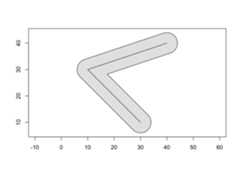
The geos package is designed to work withdplyr package, so you can work with geometry vectors as a data frame column:
library(dplyr)#>#> Attaching package: 'dplyr'#> The following objects are masked from 'package:stats':#>#> filter, lag#> The following objects are masked from 'package:base':#>#> intersect, setdiff, setequal, union# map data from the maps package via ggplot2states_df<-as_tibble(ggplot2::map_data("state"))states_df#> # A tibble: 15,537 × 6#> long lat group order region subregion#> <dbl> <dbl> <dbl> <int> <chr> <chr>#> 1 -87.5 30.4 1 1 alabama <NA>#> 2 -87.5 30.4 1 2 alabama <NA>#> 3 -87.5 30.4 1 3 alabama <NA>#> 4 -87.5 30.3 1 4 alabama <NA>#> 5 -87.6 30.3 1 5 alabama <NA>#> 6 -87.6 30.3 1 6 alabama <NA>#> 7 -87.6 30.3 1 7 alabama <NA>#> 8 -87.6 30.3 1 8 alabama <NA>#> 9 -87.7 30.3 1 9 alabama <NA>#> 10 -87.8 30.3 1 10 alabama <NA>#> # … with 15,527 more rowsstates_df%>%group_by(region,group)%>%summarise(geometry=geos_make_polygon(long,lat))%>%summarise(geometry=geos_make_collection(geometry,"multipolygon"))#> `summarise()` has grouped output by 'region'. You can override using the#> `.groups` argument.#> # A tibble: 49 × 2#> region geometry#> <chr> <geos_geom>#> 1 alabama <MULTIPOLYGON [-88.476 30.241...-84.901 35.013]>#> 2 arizona <MULTIPOLYGON [-114.809 31.347...-109.040 37.002]>#> 3 arkansas <MULTIPOLYGON [-94.624 32.997...-89.651 36.509]>#> 4 california <MULTIPOLYGON [-124.383 32.538...-114.133 42.021]>#> 5 colorado <MULTIPOLYGON [-109.063 36.984...-102.044 41.018]>#> 6 connecticut <MULTIPOLYGON [-73.722 41.012...-71.780 42.049]>#> 7 delaware <MULTIPOLYGON [-75.802 38.457...-75.052 39.849]>#> 8 district of columbia <MULTIPOLYGON [-77.137 38.806...-76.931 38.996]>#> 9 florida <MULTIPOLYGON [-87.640 25.130...-80.042 31.008]>#> 10 georgia <MULTIPOLYGON [-85.611 30.355...-80.844 34.996]>#> # … with 39 more rowsThe easiest way to get data into and out of the package is using thesf package.
library(sf)#> Linking to GEOS 3.11.0, GDAL 3.5.1, PROJ 9.0.1; sf_use_s2() is TRUEnc<-read_sf(system.file("shape/nc.shp", package="sf"))%>%st_transform(32119)# North Carolina state plane, m.nc_geos<-as_geos_geometry(nc)nc_geos%>%geos_make_collection()%>%geos_unary_union()%>%st_as_sfc(nc_state)#> Geometry set for 1 feature#> Geometry type: MULTIPOLYGON#> Dimension: XY#> Bounding box: xmin: 123829 ymin: 14744.69 xmax: 930521.8 ymax: 318259.9#> Projected CRS: NAD83 / North Carolina#> MULTIPOLYGON (((138426 177699.3, 145548.6 17783...License
- Full license
- MIT + fileLICENSE