Model context protocol (MCP)
Model context protocol(MCP)规范了应用如何向语言模型暴露工具和上下文。官方文档中指出:
MCP 是一个开放协议,用于标准化应用向 LLM 提供上下文的方式。可以将 MCP 视为 AI 应用的 USB-C 接口。就像 USB-C 提供了一种标准化的方式,将你的设备连接到各种外设和配件一样,MCP 提供了一种标准化的方式,将 AI 模型连接到不同的数据源和工具。
Agents Python SDK 支持多种 MCP 传输方式。这使你可以复用现有的 MCP 服务或自行构建,以向智能体暴露文件系统、HTTP 或由连接器支持的工具。
选择 MCP 集成方式
在将 MCP 服务接入智能体之前,请先确定工具调用应在何处执行,以及你可以使用哪些传输方式。下表总结了 Python SDK 支持的选项。
| 你的需求 | 推荐选项 |
|---|---|
| 让 OpenAI 的 Responses API 代表模型调用可公开访问的 MCP 服务 | 托管的 MCP 服务工具,通过HostedMCPTool |
| 连接你在本地或远程运行的可流式传输的 HTTP 服务 | 可流式传输的 HTTP MCP 服务,通过MCPServerStreamableHttp |
| 与实现了带 Server-Sent Events 的 HTTP 的服务通信 | 带 SSE 的 HTTP MCP 服务,通过MCPServerSse |
| 启动本地进程并通过 stdin/stdout 通信 | stdio MCP 服务,通过MCPServerStdio |
下文将逐一介绍每个选项、其配置方法,以及在何种情况下优先选择某种传输方式。
1. 托管的 MCP 服务工具
托管工具将完整的工具往返流程放在 OpenAI 的基础设施中。你的代码无需列出和调用工具,HostedMCPTool 会将服务标签(以及可选的连接器元数据)转发给 Responses API。模型会列出远程服务的工具并直接调用它们,无需回调你的 Python 进程。托管工具目前适用于支持 Responses API 托管 MCP 集成的 OpenAI 模型。
基础的托管 MCP 工具
在智能体的tools 列表中添加一个HostedMCPTool 即可创建托管工具。tool_config 字典与通过 REST API 发送的 JSON 相对应:
importasynciofromagentsimportAgent,HostedMCPTool,Runnerasyncdefmain()->None:agent=Agent(name="Assistant",tools=[HostedMCPTool(tool_config={"type":"mcp","server_label":"gitmcp","server_url":"https://gitmcp.io/openai/codex","require_approval":"never",})],)result=awaitRunner.run(agent,"Which language is this repository written in?")print(result.final_output)asyncio.run(main())托管服务会自动暴露其工具;你无需将其添加到mcp_servers。
托管 MCP 结果的流式传输
托管工具以与工具调用完全相同的方式支持流式传输。向Runner.run_streamed 传递stream=True,即可在模型仍在工作时消费增量 MCP 输出:
result=Runner.run_streamed(agent,"Summarise this repository's top languages")asyncforeventinresult.stream_events():ifevent.type=="run_item_stream_event":print(f"Received:{event.item}")print(result.final_output)可选的审批流程
如果服务可以执行敏感操作,你可以在每次工具执行前要求人工或程序化审批。在tool_config 中配置require_approval,可设置为单一策略("always"、"never")或一个将工具名称映射到策略的字典。若要在 Python 中做出决定,请提供on_approval_request 回调。
fromagentsimportMCPToolApprovalFunctionResult,MCPToolApprovalRequestSAFE_TOOLS={"read_project_metadata"}defapprove_tool(request:MCPToolApprovalRequest)->MCPToolApprovalFunctionResult:ifrequest.data.nameinSAFE_TOOLS:return{"approve":True}return{"approve":False,"reason":"Escalate to a human reviewer"}agent=Agent(name="Assistant",tools=[HostedMCPTool(tool_config={"type":"mcp","server_label":"gitmcp","server_url":"https://gitmcp.io/openai/codex","require_approval":"always",},on_approval_request=approve_tool,)],)该回调可以是同步或异步的,当模型需要审批数据以继续运行时会被调用。
由连接器支持的托管服务
托管 MCP 也支持 OpenAI 连接器。无需指定server_url,而是提供connector_id 和访问令牌。Responses API 负责身份验证,托管服务会暴露连接器的工具。
importosHostedMCPTool(tool_config={"type":"mcp","server_label":"google_calendar","connector_id":"connector_googlecalendar","authorization":os.environ["GOOGLE_CALENDAR_AUTHORIZATION"],"require_approval":"never",})完整可运行的托管工具示例(包括流式传输、审批和连接器)位于examples/hosted_mcp。
2. 可流式传输的 HTTP MCP 服务
当你希望自行管理网络连接时,请使用MCPServerStreamableHttp。当你可控传输层,或希望在自有基础设施中运行服务并保持较低延迟时,可流式传输的 HTTP 服务是理想选择。
importasyncioimportosfromagentsimportAgent,Runnerfromagents.mcpimportMCPServerStreamableHttpfromagents.model_settingsimportModelSettingsasyncdefmain()->None:token=os.environ["MCP_SERVER_TOKEN"]asyncwithMCPServerStreamableHttp(name="Streamable HTTP Python Server",params={"url":"http://localhost:8000/mcp","headers":{"Authorization":f"Bearer{token}"},"timeout":10,},cache_tools_list=True,max_retry_attempts=3,)asserver:agent=Agent(name="Assistant",instructions="Use the MCP tools to answer the questions.",mcp_servers=[server],model_settings=ModelSettings(tool_choice="required"),)result=awaitRunner.run(agent,"Add 7 and 22.")print(result.final_output)asyncio.run(main())构造函数还接受以下选项:
client_session_timeout_seconds控制 HTTP 读取超时。use_structured_content切换是否优先使用tool_result.structured_content而非文本输出。max_retry_attempts和retry_backoff_seconds_base为list_tools()和call_tool()增加自动重试。tool_filter允许你只暴露工具的子集(参见工具过滤)。
3. 带 SSE 的 HTTP MCP 服务
如果 MCP 服务实现了带 SSE 的 HTTP 传输,请实例化MCPServerSse。除传输方式不同外,其 API 与可流式传输的 HTTP 服务相同。
fromagentsimportAgent,Runnerfromagents.model_settingsimportModelSettingsfromagents.mcpimportMCPServerSseworkspace_id="demo-workspace"asyncwithMCPServerSse(name="SSE Python Server",params={"url":"http://localhost:8000/sse","headers":{"X-Workspace":workspace_id},},cache_tools_list=True,)asserver:agent=Agent(name="Assistant",mcp_servers=[server],model_settings=ModelSettings(tool_choice="required"),)result=awaitRunner.run(agent,"What's the weather in Tokyo?")print(result.final_output)4. stdio MCP 服务
对于作为本地子进程运行的 MCP 服务,请使用MCPServerStdio。SDK 会启动该进程、保持管道打开,并在上下文管理器退出时自动关闭它。这对于快速概念验证或仅暴露命令行入口的服务非常有用。
frompathlibimportPathfromagentsimportAgent,Runnerfromagents.mcpimportMCPServerStdiocurrent_dir=Path(__file__).parentsamples_dir=current_dir/"sample_files"asyncwithMCPServerStdio(name="Filesystem Server via npx",params={"command":"npx","args":["-y","@modelcontextprotocol/server-filesystem",str(samples_dir)],},)asserver:agent=Agent(name="Assistant",instructions="Use the files in the sample directory to answer questions.",mcp_servers=[server],)result=awaitRunner.run(agent,"List the files available to you.")print(result.final_output)工具过滤
每个 MCP 服务都支持工具过滤,以便你只暴露智能体所需的函数。过滤既可以在构建时进行,也可以在每次运行时动态进行。
静态工具过滤
使用create_static_tool_filter 配置简单的允许/阻止列表:
frompathlibimportPathfromagents.mcpimportMCPServerStdio,create_static_tool_filtersamples_dir=Path("/path/to/files")filesystem_server=MCPServerStdio(params={"command":"npx","args":["-y","@modelcontextprotocol/server-filesystem",str(samples_dir)],},tool_filter=create_static_tool_filter(allowed_tool_names=["read_file","write_file"]),)当同时提供allowed_tool_names 和blocked_tool_names 时,SDK 会先应用允许列表,然后从剩余集合中移除任何被阻止的工具。
动态工具过滤
对于更复杂的逻辑,传入一个可调用对象,该对象接收ToolFilterContext。该可调用对象可以是同步或异步的,并在应暴露该工具时返回True。
frompathlibimportPathfromagents.mcpimportMCPServerStdio,ToolFilterContextsamples_dir=Path("/path/to/files")asyncdefcontext_aware_filter(context:ToolFilterContext,tool)->bool:ifcontext.agent.name=="Code Reviewer"andtool.name.startswith("danger_"):returnFalsereturnTrueasyncwithMCPServerStdio(params={"command":"npx","args":["-y","@modelcontextprotocol/server-filesystem",str(samples_dir)],},tool_filter=context_aware_filter,)asserver:...过滤上下文会暴露当前的run_context、请求工具的agent,以及server_name。
提示词
MCP 服务还可以提供动态生成智能体 instructions 的提示词。支持提示词的服务会暴露两个方法:
list_prompts()枚举可用的提示模板。get_prompt(name, arguments)获取具体提示词,可选传入参数。
fromagentsimportAgentprompt_result=awaitserver.get_prompt("generate_code_review_instructions",{"focus":"security vulnerabilities","language":"python"},)instructions=prompt_result.messages[0].content.textagent=Agent(name="Code Reviewer",instructions=instructions,mcp_servers=[server],)缓存
每次智能体运行都会在每个 MCP 服务上调用list_tools()。远程服务可能引入明显的延迟,因此所有 MCP 服务类都暴露了cache_tools_list 选项。仅当你确信工具定义不经常变化时才将其设置为True。若要稍后强制刷新列表,请在服务实例上调用invalidate_tools_cache()。
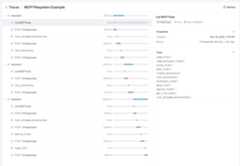
追踪
追踪会自动捕获 MCP 活动,包括:
- 调用 MCP 服务以列出工具。
- 工具调用中的 MCP 相关信息。
延伸阅读
- Model Context Protocol – 规范与设计指南。
- examples/mcp – 可运行的 stdio、SSE 与可流式传输 HTTP 的示例。
- examples/hosted_mcp – 完整的托管 MCP 演示,包括审批和连接器。