Model context protocol (MCP)
TheModel context protocol (MCP) standardises how applications expose tools andcontext to language models. From the official documentation:
MCP is an open protocol that standardizes how applications provide context to LLMs. Think of MCP like a USB-C port for AIapplications. Just as USB-C provides a standardized way to connect your devices to various peripherals and accessories, MCPprovides a standardized way to connect AI models to different data sources and tools.
The Agents Python SDK understands multiple MCP transports. This lets you reuse existing MCP servers or build your own to exposefilesystem, HTTP, or connector backed tools to an agent.
Choosing an MCP integration
Before wiring an MCP server into an agent decide where the tool calls should execute and which transports you can reach. Thematrix below summarises the options that the Python SDK supports.
| What you need | Recommended option |
|---|---|
| Let OpenAI's Responses API call a publicly reachable MCP server on the model's behalf | Hosted MCP server tools viaHostedMCPTool |
| Connect to Streamable HTTP servers that you run locally or remotely | Streamable HTTP MCP servers viaMCPServerStreamableHttp |
| Talk to servers that implement HTTP with Server-Sent Events | HTTP with SSE MCP servers viaMCPServerSse |
| Launch a local process and communicate over stdin/stdout | stdio MCP servers viaMCPServerStdio |
The sections below walk through each option, how to configure it, and when to prefer one transport over another.
Agent-level MCP configuration
In addition to choosing a transport, you can tune how MCP tools are prepared by settingAgent.mcp_config.
fromagentsimportAgentagent=Agent(name="Assistant",mcp_servers=[server],mcp_config={# Try to convert MCP tool schemas to strict JSON schema."convert_schemas_to_strict":True,# If None, MCP tool failures are raised as exceptions instead of# returning model-visible error text."failure_error_function":None,},)Notes:
convert_schemas_to_strictis best-effort. If a schema cannot be converted, the original schema is used.failure_error_functioncontrols how MCP tool call failures are surfaced to the model.- When
failure_error_functionis unset, the SDK uses the default tool error formatter. - Server-level
failure_error_functionoverridesAgent.mcp_config["failure_error_function"]for that server.
1. Hosted MCP server tools
Hosted tools push the entire tool round-trip into OpenAI's infrastructure. Instead of your code listing and calling tools, theHostedMCPTool forwards a server label (and optional connector metadata) to the Responses API. Themodel lists the remote server's tools and invokes them without an extra callback to your Python process. Hosted tools currentlywork with OpenAI models that support the Responses API's hosted MCP integration.
Basic hosted MCP tool
Create a hosted tool by adding aHostedMCPTool to the agent'stools list. Thetool_configdict mirrors the JSON you would send to the REST API:
importasynciofromagentsimportAgent,HostedMCPTool,Runnerasyncdefmain()->None:agent=Agent(name="Assistant",tools=[HostedMCPTool(tool_config={"type":"mcp","server_label":"gitmcp","server_url":"https://gitmcp.io/openai/codex","require_approval":"never",})],)result=awaitRunner.run(agent,"Which language is this repository written in?")print(result.final_output)asyncio.run(main())The hosted server exposes its tools automatically; you do not add it tomcp_servers.
Streaming hosted MCP results
Hosted tools support streaming results in exactly the same way as function tools. Passstream=True toRunner.run_streamed toconsume incremental MCP output while the model is still working:
result=Runner.run_streamed(agent,"Summarise this repository's top languages")asyncforeventinresult.stream_events():ifevent.type=="run_item_stream_event":print(f"Received:{event.item}")print(result.final_output)Optional approval flows
If a server can perform sensitive operations you can require human or programmatic approval before each tool execution. Configurerequire_approval in thetool_config with either a single policy ("always","never") or a dict mapping tool names topolicies. To make the decision inside Python, provide anon_approval_request callback.
fromagentsimportMCPToolApprovalFunctionResult,MCPToolApprovalRequestSAFE_TOOLS={"read_project_metadata"}defapprove_tool(request:MCPToolApprovalRequest)->MCPToolApprovalFunctionResult:ifrequest.data.nameinSAFE_TOOLS:return{"approve":True}return{"approve":False,"reason":"Escalate to a human reviewer"}agent=Agent(name="Assistant",tools=[HostedMCPTool(tool_config={"type":"mcp","server_label":"gitmcp","server_url":"https://gitmcp.io/openai/codex","require_approval":"always",},on_approval_request=approve_tool,)],)The callback can be synchronous or asynchronous and is invoked whenever the model needs approval data to keep running.
Connector-backed hosted servers
Hosted MCP also supports OpenAI connectors. Instead of specifying aserver_url, supply aconnector_id and an access token. TheResponses API handles authentication and the hosted server exposes the connector's tools.
importosHostedMCPTool(tool_config={"type":"mcp","server_label":"google_calendar","connector_id":"connector_googlecalendar","authorization":os.environ["GOOGLE_CALENDAR_AUTHORIZATION"],"require_approval":"never",})Fully working hosted tool samples—including streaming, approvals, and connectors—live inexamples/hosted_mcp.
2. Streamable HTTP MCP servers
When you want to manage the network connection yourself, useMCPServerStreamableHttp. Streamable HTTP servers are ideal when you control thetransport or want to run the server inside your own infrastructure while keeping latency low.
importasyncioimportosfromagentsimportAgent,Runnerfromagents.mcpimportMCPServerStreamableHttpfromagents.model_settingsimportModelSettingsasyncdefmain()->None:token=os.environ["MCP_SERVER_TOKEN"]asyncwithMCPServerStreamableHttp(name="Streamable HTTP Python Server",params={"url":"http://localhost:8000/mcp","headers":{"Authorization":f"Bearer{token}"},"timeout":10,},cache_tools_list=True,max_retry_attempts=3,)asserver:agent=Agent(name="Assistant",instructions="Use the MCP tools to answer the questions.",mcp_servers=[server],model_settings=ModelSettings(tool_choice="required"),)result=awaitRunner.run(agent,"Add 7 and 22.")print(result.final_output)asyncio.run(main())The constructor accepts additional options:
client_session_timeout_secondscontrols HTTP read timeouts.use_structured_contenttoggles whethertool_result.structured_contentis preferred over textual output.max_retry_attemptsandretry_backoff_seconds_baseadd automatic retries forlist_tools()andcall_tool().tool_filterlets you expose only a subset of tools (seeTool filtering).require_approvalenables human-in-the-loop approval policies on local MCP tools.failure_error_functioncustomizes model-visible MCP tool failure messages; set it toNoneto raise errors instead.tool_meta_resolverinjects per-call MCP_metapayloads beforecall_tool().
Approval policies for local MCP servers
MCPServerStdio,MCPServerSse, andMCPServerStreamableHttp all acceptrequire_approval.
Supported forms:
"always"or"never"for all tools.True/False(equivalent to always/never).- A per-tool map, for example
{"delete_file": "always", "read_file": "never"}. - A grouped object:
{"always": {"tool_names": [...]}, "never": {"tool_names": [...]}}.
asyncwithMCPServerStreamableHttp(name="Filesystem MCP",params={"url":"http://localhost:8000/mcp"},require_approval={"always":{"tool_names":["delete_file"]}},)asserver:...For a full pause/resume flow, seeHuman-in-the-loop andexamples/mcp/get_all_mcp_tools_example/main.py.
Per-call metadata withtool_meta_resolver
Usetool_meta_resolver when your MCP server expects request metadata in_meta (for example, tenant IDs or trace context). The example below assumes you pass adict ascontext toRunner.run(...).
fromagents.mcpimportMCPServerStreamableHttp,MCPToolMetaContextdefresolve_meta(context:MCPToolMetaContext)->dict[str,str]|None:run_context_data=context.run_context.contextor{}tenant_id=run_context_data.get("tenant_id")iftenant_idisNone:returnNonereturn{"tenant_id":str(tenant_id),"source":"agents-sdk"}server=MCPServerStreamableHttp(name="Metadata-aware MCP",params={"url":"http://localhost:8000/mcp"},tool_meta_resolver=resolve_meta,)If your run context is a Pydantic model, dataclass, or custom class, read the tenant ID with attribute access instead.
MCP tool outputs: text and images
When an MCP tool returns image content, the SDK maps it to image tool output entries automatically. Mixed text/image responses are forwarded as a list of output items, so agents can consume MCP image results the same way they consume image output from regular function tools.
3. HTTP with SSE MCP servers
Warning
The MCP project has deprecated the Server-Sent Events transport. Prefer Streamable HTTP or stdio for new integrations and keep SSE only for legacy servers.
If the MCP server implements the HTTP with SSE transport, instantiateMCPServerSse. Apart from the transport, the API is identical to the Streamable HTTP server.
fromagentsimportAgent,Runnerfromagents.model_settingsimportModelSettingsfromagents.mcpimportMCPServerSseworkspace_id="demo-workspace"asyncwithMCPServerSse(name="SSE Python Server",params={"url":"http://localhost:8000/sse","headers":{"X-Workspace":workspace_id},},cache_tools_list=True,)asserver:agent=Agent(name="Assistant",mcp_servers=[server],model_settings=ModelSettings(tool_choice="required"),)result=awaitRunner.run(agent,"What's the weather in Tokyo?")print(result.final_output)4. stdio MCP servers
For MCP servers that run as local subprocesses, useMCPServerStdio. The SDK spawns theprocess, keeps the pipes open, and closes them automatically when the context manager exits. This option is helpful for quickproofs of concept or when the server only exposes a command line entry point.
frompathlibimportPathfromagentsimportAgent,Runnerfromagents.mcpimportMCPServerStdiocurrent_dir=Path(__file__).parentsamples_dir=current_dir/"sample_files"asyncwithMCPServerStdio(name="Filesystem Server via npx",params={"command":"npx","args":["-y","@modelcontextprotocol/server-filesystem",str(samples_dir)],},)asserver:agent=Agent(name="Assistant",instructions="Use the files in the sample directory to answer questions.",mcp_servers=[server],)result=awaitRunner.run(agent,"List the files available to you.")print(result.final_output)5. MCP server manager
When you have multiple MCP servers, useMCPServerManager to connect them up front and expose the connected subset to your agents.
fromagentsimportAgent,Runnerfromagents.mcpimportMCPServerManager,MCPServerStreamableHttpservers=[MCPServerStreamableHttp(name="calendar",params={"url":"http://localhost:8000/mcp"}),MCPServerStreamableHttp(name="docs",params={"url":"http://localhost:8001/mcp"}),]asyncwithMCPServerManager(servers)asmanager:agent=Agent(name="Assistant",instructions="Use MCP tools when they help.",mcp_servers=manager.active_servers,)result=awaitRunner.run(agent,"Which MCP tools are available?")print(result.final_output)Key behaviors:
active_serversincludes only successfully connected servers whendrop_failed_servers=True(the default).- Failures are tracked in
failed_serversanderrors. - Set
strict=Trueto raise on the first connection failure. - Call
reconnect(failed_only=True)to retry failed servers, orreconnect(failed_only=False)to restart all servers. - Use
connect_timeout_seconds,cleanup_timeout_seconds, andconnect_in_parallelto tune lifecycle behavior.
Tool filtering
Each MCP server supports tool filters so that you can expose only the functions that your agent needs. Filtering can happen atconstruction time or dynamically per run.
Static tool filtering
Usecreate_static_tool_filter to configure simple allow/block lists:
frompathlibimportPathfromagents.mcpimportMCPServerStdio,create_static_tool_filtersamples_dir=Path("/path/to/files")filesystem_server=MCPServerStdio(params={"command":"npx","args":["-y","@modelcontextprotocol/server-filesystem",str(samples_dir)],},tool_filter=create_static_tool_filter(allowed_tool_names=["read_file","write_file"]),)When bothallowed_tool_names andblocked_tool_names are supplied the SDK applies the allow-list first and then removes anyblocked tools from the remaining set.
Dynamic tool filtering
For more elaborate logic pass a callable that receives aToolFilterContext. The callable can besynchronous or asynchronous and returnsTrue when the tool should be exposed.
frompathlibimportPathfromagents.mcpimportMCPServerStdio,ToolFilterContextsamples_dir=Path("/path/to/files")asyncdefcontext_aware_filter(context:ToolFilterContext,tool)->bool:ifcontext.agent.name=="Code Reviewer"andtool.name.startswith("danger_"):returnFalsereturnTrueasyncwithMCPServerStdio(params={"command":"npx","args":["-y","@modelcontextprotocol/server-filesystem",str(samples_dir)],},tool_filter=context_aware_filter,)asserver:...The filter context exposes the activerun_context, theagent requesting the tools, and theserver_name.
Prompts
MCP servers can also provide prompts that dynamically generate agent instructions. Servers that support prompts expose twomethods:
list_prompts()enumerates the available prompt templates.get_prompt(name, arguments)fetches a concrete prompt, optionally with parameters.
fromagentsimportAgentprompt_result=awaitserver.get_prompt("generate_code_review_instructions",{"focus":"security vulnerabilities","language":"python"},)instructions=prompt_result.messages[0].content.textagent=Agent(name="Code Reviewer",instructions=instructions,mcp_servers=[server],)Caching
Every agent run callslist_tools() on each MCP server. Remote servers can introduce noticeable latency, so all of the MCPserver classes expose acache_tools_list option. Set it toTrue only if you are confident that the tool definitions do notchange frequently. To force a fresh list later, callinvalidate_tools_cache() on the server instance.
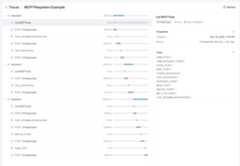
Tracing
Tracing automatically captures MCP activity, including:
- Calls to the MCP server to list tools.
- MCP-related information on tool calls.
Further reading
- Model Context Protocol – the specification and design guides.
- examples/mcp – runnable stdio, SSE, and Streamable HTTP samples.
- examples/hosted_mcp – complete hosted MCP demonstrations including approvals and connectors.