Scenes
- sionna.rt.load_scene(filename=None,merge_shapes=True,merge_shapes_exclude_regex=None,remove_duplicate_vertices=False)[source]
Loads a scene from file
- Parameters:
filename (
typing.Optional[str]) – Name of a valid scene file.Sionna uses the simple XML-based formatfromMitsuba 3.ForNone, an empty scene is created.merge_shapes (
bool) – If set toTrue, shapes that sharethe same radio material are merged.merge_shapes_exclude_regex (
typing.Optional[str]) – Optional regex to exclude shapes frommerging. Only used ifmerge_shapesis set toTrue.remove_duplicate_vertices (
bool) – If set toTrue, duplicate vertices areremoved from the scene objects.
- Return type:
- classsionna.rt.Scene(mi_scene=None,remove_duplicate_vertices=False)[source]
A scene contains everything that is needed for radio propagation simulationand rendering.
A scene is a collection of multiple instances of
SceneObjectwhich define the geometry and materials ofthe objects in the scene. It also includes transmitters(Transmitter) andreceivers (Receiver).A scene is instantiated by calling
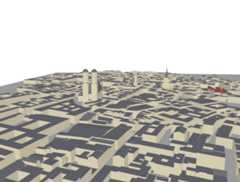
load_scene().Example scenes can be loaded as follows:
fromsionna.rtimportload_scenescene=load_scene(sionna.rt.scene.munich)scene.preview()
- Parameters:
mi_scene (
typing.Optional[mitsuba.Scene]) – A Mitsuba sceneremove_duplicate_vertices (bool)
- add(item)[source]
Adds a radio device or radio material to the scene
If a different item with the same name as
itemis part ofthe scene, an error is raised.- Parameters:
item (
sionna.rt.radio_devices.radio_device.RadioDevice|sionna.rt.radio_materials.radio_material_base.RadioMaterialBase) – Item to be added to the scene- Return type:
None
- all_set(radio_map)[source]
Raises an exception if the scene is not all set for simulations
- Parameters:
radio_map (
bool) – Set toTrue if checking for radio map computation. Set toFalse otherwise.- Return type:
None
- propertyangular_frequency
Angular frequency [rad/s]
- Type:
mi.Float
- propertybandwidth
Get/set the transmission bandwidth [Hz].Used for the computation of
thermal_noise_power.- Type:
mi.Float
- edit(add=None,remove=None)[source]
Add and/or remove a list of objects to/from the scene
To optimize performance and reduce processing time, it is recommendedto use a single call to this function with a list of objects to addand/or remove, rather than making multiple individual calls to editscene objects.
- Parameters:
add (
typing.Union[sionna.rt.scene_object.SceneObject,list[sionna.rt.scene_object.SceneObject],dict,None]) – Object, or list /dictionary of objects to be addedremove (
typing.Union[str,sionna.rt.scene_object.SceneObject,list[sionna.rt.scene_object.SceneObject|str],None]) – Name or object, or list/dictionary of objects or namesto be added
- Return type:
None
- propertyfrequency
Get/set the carrier frequency [Hz]
- Type:
mi.Float
- get(name)[source]
Returns a scene object, radio device, or radio material
- Parameters:
name (
str) – Name of the item to retrieve- Return type:
None|sionna.rt.radio_devices.radio_device.RadioDevice|sionna.rt.radio_materials.radio_material_base.RadioMaterialBase
- propertymi_scene
Mitsuba scene
- Type:
mi.Scene
- propertymi_scene_params
Mitsuba scene parameters
- Type:
mi.SceneParameters
- propertyobjects
Dictionaryof scene objects
- Type:
dict, { “name”,SceneObject}
- propertypaths_solver
Get/set the path solver
- Type:
rt.PathSolverBase
- preview(*,background='white',clip_at=None,clip_plane_orientation=(0,0,-1),fov=45.0,paths=None,radio_map=None,resolution=(655,500),rm_db_scale=True,rm_metric='path_gain',rm_tx=None,rm_vmax=None,rm_vmin=None,rm_cmap=None,show_devices=True,show_orientations=False,point_picker=True)[source]
In an interactive notebook environment, opens an interactive 3D viewer of the scene.
Default color coding:
Green: Receiver
Blue: Transmitter
Controls:
Mouse left: Rotate
Scroll wheel: Zoom
Mouse right: Move
- Parameters:
background (str) – Background color in hex format prefixed by “#”
clip_at (float | None) – If notNone, the scene preview will be clipped (cut)by a plane with normal orientation
clip_plane_orientationandoffsetclip_at.That means that everythingbehind the plane becomes invisible.This allows visualizing the interior of meshes, such as buildings.clip_plane_orientation (tuple[float, float, float]) – Normal vector of the clipping plane
fov (float) – Field of view [deg]
paths (sionna.rt.Paths | None) – Optional propagation paths to be shown
radio_map (sionna.rt.PlanarRadioMap | sionna.rt.MeshRadioMap | None) – Optional radio map to be shown
resolution (tuple[int, int]) – Size of the viewer figure
rm_db_scale (bool) – Use logarithmic scale for radio mapvisualization, i.e. the radio map values are mapped to:\(y = 10 \cdot \log_{10}(x)\).
rm_metric ("path_gain" |"rss" |"sinr") – Metric of the radio map to be displayed
rm_tx (int | str | None) – When
radio_mapis specified, controls for which ofthe transmitters the radio map is shown. Either thetransmitter’s name or index can be given. IfNone, the maximummetric over all transmitters is shown.rm_vmax (float | None) – For radio map visualization, defines the maximumvalue that the colormap covers.It should be provided in dB if
rm_db_scaleisset toTrue, or in linear scale otherwise.rm_vmin (float | None) – For radio map visualization, defines the minimumvalue that the colormap covers.It should be provided in dB if
rm_db_scaleisset toTrue, or in linear scale otherwise.rm_cmap (callable | str | None) – For coverage map visualization, defines the colormap to use.If set to None, then the default colormap is used.If a string is given, it is interpreted as a Matplotlib colormap name.If a callable is given, it is used as a custom colormap function withthe same interface as a Matplotlib colormap.Defaults toNone.
show_devices (bool) – Show radio devices
show_orientations (bool) – Show orientation of radio devices
point_picker (bool) – Enable picking a point in the scene withalt + click in order to display its coordinates.
- Return type:
None
- propertyradio_materials
dict, { “name”,RadioMaterialBase}:Dictionary of radio materials
- propertyreceivers
Dictionaryof receivers
- Type:
dict, { “name”,Receiver}
- remove(name)[source]
Removes a radio device or radio material from the scene
In the case of a radio material, it must not be used by any object ofthe scene.
- Parameters:
name (
str) – Name of the item to be removed- Return type:
None
- render(*,camera,clip_at=None,clip_plane_orientation=(0,0,-1),envmap=None,fov=None,lighting_scale=1.0,num_samples=128,paths=None,radio_map=None,resolution=(655,500),return_bitmap=False,rm_db_scale=True,rm_metric='path_gain',rm_show_color_bar=False,rm_tx=None,rm_vmax=None,rm_vmin=None,rm_cmap=None,show_devices=True,show_orientations=False)[source]
Renders the scene from the viewpoint of a camera or the interactive viewer
- Parameters:
camera (Camera | str) – Camera to be used for rendering the scene.If an interactive viewer was opened with
preview(),“preview” can be to usedto render the scene from its viewpoint.clip_at (float | None) – If notNone, the scene preview will be clipped (cut)by a plane with normal orientation
clip_plane_orientationandoffsetclip_at.That means that everythingbehind the plane becomes invisible.This allows visualizing the interior of meshes, such as buildings.clip_plane_orientation (tuple[float, float, float]) – Normal vector of the clipping plane
envmap (str | None) – Path to an environment map image file(e.g. in EXR format) to use for scene lighting
fov (float | None) – Field of view [deg]. IfNone, the field of view willdefault to 45 degrees, unlesscamera is set to“preview”, inwhich case the field of view of the preview camera is used.
lighting_scale (float) – Scale to apply to the lighting in the scene(e.g., from a constant uniform emitter or a given environment map)
num_samples (int) – Number of rays thrown per pixel
paths (sionna.rt.Paths | None) – Optional propagation paths to be shown
radio_map (sionna.rt.RadioMap | None) – Optional radio map to be shown
resolution (tuple[int, int]) – Size of the viewer figure
return_bitmap (bool) – IfTrue, directly return the rendered image
rm_db_scale (bool) – Use logarithmic scale for radio mapvisualization, i.e. the radio map values are mapped to:\(y = 10 \cdot \log_{10}(x)\).
rm_metric ("path_gain" |"rss" |"sinr") – Metric of the radio map to be displayed
rm_show_color_bar (bool) – Show color bar
rm_tx (int | str | None) – When
radio_mapis specified, controls for which ofthe transmitters the radio map is shown. Either thetransmitter’s name or index can be given. IfNone, the maximummetric over all transmitters is shown.rm_vmax (float | None) – For radio map visualization, defines the maximumvalue that the colormap covers.It should be provided in dB if
rm_db_scaleisset toTrue, or in linear scale otherwise.rm_vmin (float | None) – For radio map visualization, defines the minimumvalue that the colormap covers.It should be provided in dB if
rm_db_scaleisset toTrue, or in linear scale otherwise.rm_cmap (str | callable | None) – For coverage map visualization, defines the colormap to use.If set to None, then the default colormap is used.If a string is given, it is interpreted as a Matplotlib colormap name.If a callable is given, it is used as a custom colormap function withthe same interface as a Matplotlib colormap.Defaults toNone.
show_devices (bool) – Show radio devices
show_orientations (bool) – Show orientation of radio devices
- Return type:
plt.Figure | mi.Bitmap
- render_to_file(*,camera,filename,clip_at=None,clip_plane_orientation=(0,0,-1),envmap=None,fov=None,lighting_scale=1.0,num_samples=512,paths=None,radio_map=None,resolution=(655,500),rm_db_scale=True,rm_metric='path_gain',rm_tx=None,rm_vmin=None,rm_vmax=None,show_devices=True,show_orientations=True)[source]
Renders the scene from the viewpoint of a camera or the interactiveviewer, and saves the resulting image
- Parameters:
camera (
sionna.rt.camera.Camera|str) – Camera to be used for rendering the scene.If an interactive viewer was opened withpreview(),“preview” can be to usedto render the scene from its viewpoint.filename (
str) – Filename for saving the rendered image,e.g., “my_scene.png”clip_at (
typing.Optional[float]) – If notNone, the scene preview will be clipped (cut)by a plane with normal orientationclip_plane_orientationandoffsetclip_at.That means that everythingbehind the plane becomes invisible.This allows visualizing the interior of meshes, such as buildings.clip_plane_orientation (
tuple[float,float,float]) – Normal vector of the clipping planeenvmap (
typing.Optional[str]) – Path to an environment map image file(e.g. in EXR format) to use for scene lightingfov (
typing.Optional[float]) – Field of view [deg]. IfNone, the field of view willdefault to 45 degrees, unlesscamera is set to“preview”, inwhich case the field of view of the preview camera is used.lighting_scale (
float) – Scale to apply to the lighting in the scene(e.g., from a constant uniform emitter or a given environment map)num_samples (
int) – Number of rays thrown per pixelpaths (
typing.Optional[sionna.rt.path_solvers.paths.Paths]) – Optional propagation paths to be shownradio_map (
typing.Optional[sionna.rt.radio_map_solvers.radio_map.RadioMap]) – Optional radio map to be shownresolution (
tuple[int,int]) – Size of the viewer figurerm_db_scale (
bool) – Use logarithmic scale for radio mapvisualization, i.e. the radio map values are mapped to:\(y = 10 \cdot \log_{10}(x)\).rm_metric ("path_gain" |"rss" |"sinr") – Metric of the radio map to be displayed
rm_tx (
typing.Union[int,str,None]) – Whenradio_mapis specified, controls for which ofthe transmitters the radio map is shown. Either thetransmitter’s name or index can be given. IfNone, the maximummetric over all transmitters is shown.rm_vmax (
typing.Optional[float]) – For radio map visualization, defines the maximumvalue that the colormap covers.It should be provided in dB ifrm_db_scaleisset toTrue, or in linear scale otherwise.rm_vmin (
typing.Optional[float]) – For radio map visualization, defines the minimumvalue that the colormap covers.It should be provided in dB ifrm_db_scaleisset toTrue, or in linear scale otherwise.show_devices (
bool) – Show radio devicesshow_orientations (
bool) – Show orientation of radio devices
- Return type:
mitsuba.Bitmap
- propertyrx_array
Get/set the antenna array used byall receivers in the scene
- Type:
AntennaArray
- scene_geometry_updated()[source]
Callback to trigger when the scene geometry is updated
- Return type:
None
- sources(synthetic_array,return_velocities)[source]
Builds arrays containing the positions and orientations of thesources
If synthetic arrays are not used, then every transmit antenna is modeledas a source of paths. Otherwise, transmitters are modelled as if theyhad a single antenna located at their
position.- Return type:
tuple[mitsuba.Point3f,mitsuba.Point3f,mitsuba.Point3f|None,mitsuba.Vector3f|None]- Returns:
Positions of the sources
- Returns:
Orientations of the sources
- Returns:
Positions of the antenna elements relative to the transmitterspositions.None is returned if
synthetic_arrayisTrue.- Returns:
Velocities of the transmitters.None is returned ifreturn_velocities is set toFalse.
- Parameters:
synthetic_array (bool)
return_velocities (bool)
- targets(synthetic_array,return_velocities)[source]
Builds arrays containing the positions and orientations of the targets
If synthetic arrays are not used, then every receiver antenna is modeledas a source of paths. Otherwise, receivers are modelled as if theyhad a single antenna located at their
position.- Return type:
tuple[mitsuba.Point3f,mitsuba.Point3f,mitsuba.Point3f|None,mitsuba.Vector3f|None]- Returns:
Positions of the targets
- Returns:
Orientations of the targets
- Returns:
Positions of the antenna elements relative to the receivers.Only returned if
synthetic_arrayisTrue.- Returns:
Velocities of the transmitters.None is returned ifreturn_velocities is set toFalse.
- Parameters:
synthetic_array (bool)
return_velocities (bool)
- propertytemperature
Get/set the environment temperature [K].Used for the computation of
thermal_noise_power.- Type:
mi.Float
- propertythermal_noise_power
Thermal noise power [W]
- Type:
mi.Float
- propertytransmitters
Dictionaryof transmitters
- Type:
dict, { “name”,Transmitter}
- propertytx_array
Get/set the antenna array used byall transmitters in the scene
- Type:
AntennaArray
- propertywavelength
Wavelength [m]
- Type:
mi.Float
- propertywavenumber
Wavenumber [rad/m]
- Type:
mi.Float
Built-in scenes
Sionna has several integrated scenes that are listed below.They can be loaded and used as follows:
scene=load_scene(sionna.rt.scene.etoile)scene.preview()
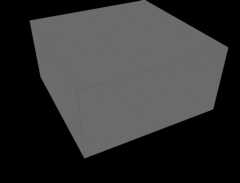
- sionna.rt.scene.box
Example scene containing a metallic box
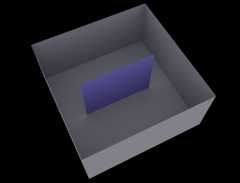
- sionna.rt.scene.box_one_screen
Example scene containing a metallic box and a screen made of glass
Note: In the figure below, the upper face of the box has been removed forvisualization purposes. In the actual scene, the box is closed on all sides.
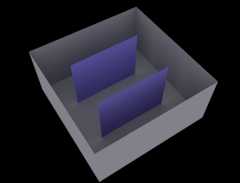
- sionna.rt.scene.box_two_screens
Example scene containing a metallic box and two screens made of glass
Note: In the figure below, the upper face of the box has been removed forvisualization purposes. In the actual scene, the box is closed on all sides.
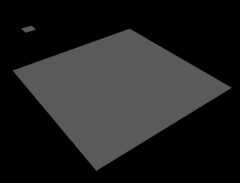
- sionna.rt.scene.double_reflector
Example scene containing two metallic squares
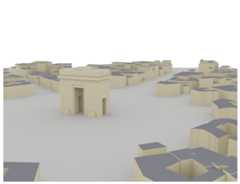
- sionna.rt.scene.etoile
Example scene containing the area around the Arc de Triomphe in ParisThe scene was created with data downloaded fromOpenStreetMap andthe help ofBlender and theBlender-OSMandMitsuba Blender add-ons.The data is licensed under theOpen Data Commons Open Database License (ODbL).
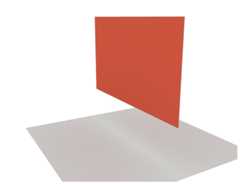
- sionna.rt.scene.floor_wall
Example scene containing a ground plane and a vertical wall
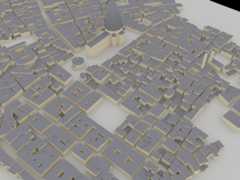
- sionna.rt.scene.florence
Example scene containing the area around the Florence Cathedral in FlorenceThe scene was created with data downloaded fromOpenStreetMap andthe help ofBlender and theBlender-OSMandMitsuba Blender add-ons.The data is licensed under theOpen Data Commons Open Database License (ODbL).
- sionna.rt.scene.munich
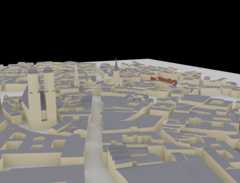
Example scene containing the area around the Frauenkirche in MunichThe scene was created with data downloaded fromOpenStreetMap andthe help ofBlender and theBlender-OSMandMitsuba Blender add-ons.The data is licensed under theOpen Data Commons Open Database License (ODbL).
- sionna.rt.scene.san_francisco
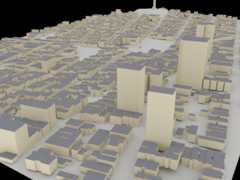
Example scene containing a portion of San Francisco.The scene was created with data downloaded fromOpenStreetMap andthe help ofBlender and theBlender-OSMandMitsuba Blender add-ons.The data is licensed under theOpen Data Commons Open Database License (ODbL).
- sionna.rt.scene.simple_reflector
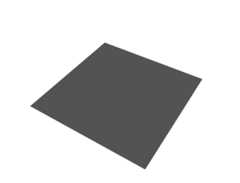
Example scene containing a metallic reflector
- sionna.rt.scene.simple_street_canyon
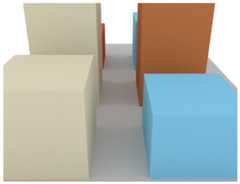
Example scene containing a few rectangular building blocks and a ground plane
- sionna.rt.scene.simple_street_canyon_with_cars
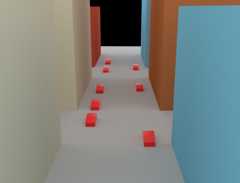
Example scene containing a few rectangular building blocks and a ground plane as well as some cars
- sionna.rt.scene.simple_wedge
Example scene containing a wedge with a\(90^{\circ}\) opening angle

- sionna.rt.scene.triple_reflector
Example scene containing three metallic rectangles

Built-in meshes
- sionna.rt.scene.low_poly_car
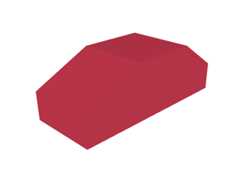
Simple mesh of a car

- sionna.rt.scene.sphere
Mesh of a sphere