RAN Intelligent Controller (RIC) & xApps
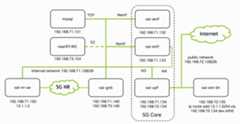
Fig. 22Overview of the deployed 5G end-to-end stack with IP addresses and interfaces of each container. Figure fromOpenAirInterface.
This tutorial demonstrates how to monitor and control your 5G network using the near-real-time RAN Intelligent Controller (RIC) and xApps as specified in the O-RAN architecture[O-RAN].
We leverage OpenAirInterface’s FlexRIC[FlexRIC] implementation, which uses the E2 interface to communicate with the gNB and is already integrated into the OpenAirInterface RAN stack.
The general concept of xApps is to extend the RIC’s functionality without modifying the RAN code itself. As a simple example, we will develop an xApp that reads MCS and BLER values from the gNB using the Python API.
System Preparation
The FlexRIC container is built automatically with themakesionna-rk command (seeQuickstart). When building the FlexRIC container manually, ensure the FlexRIC container version matches your gNB container version.
Start the RIC and gNB containers with E2 interface enabled (default config):
./scripts/start_system.shrfsim
Verify the RIC is running via
dockerps
You should see thenearRT-RIC container running.
Verify the E2 connection in the gNB logfile:
dockerlogs-foai-gnb
[E2 NODE]: mcc = 262 mnc = 99 mnc_digit = 2 nb_id = 3584[E2 NODE]: Args 192.168.73.154 /usr/local/lib/flexric/[E2 AGENT]: nearRT-RIC IP Address = 192.168.73.154, PORT = 36421, RAN type = ngran_gNB, nb_id = 3584[E2 AGENT]: Initializing ......[E2-AGENT]: E2 SETUP-REQUEST tx
This confirms the RIC is ready to receive messages. The E2 interface configuration is defined inconfig/common/docker-compose.yaml.
Example: MCS Monitor xApp
This xApp monitors the Modulation and Coding Scheme (MCS) and Block Error Rate (BLER) values from the gNB. SeeFlexRIC documentation and theOAI interface documentation for a detailed description of the Service Models and the xApp SDK.
The complete implementation can be found inplugins/ric_xapps/src/monitor_mcs.py:
Running the xApp
xApps can connect to multiple gNBs. To keep the example general, the xApp runs in a separate FlexRIC container with the xApp SDK installed (e.g., on a remote machine). One could also run the xApp in the same container as the RIC by modifying thedocker-compose.yaml file.
After starting the system, monitor the xApp logs:
dockerlogs-fmonitor_xapp
You will see a slightly different output than the simplified example above as the default xApp runs the ZeroMQ server as explained below. If you want to run the simplified example from above, you can set theXAPP_SCRIPT environment variable toXAPP_SCRIPT=../../plugins/ric_xapps/src/monitor_mcs.py before starting the system.
Note that you may need to runiperf3 to generate traffic on the network; otherwise no slots will be scheduled for transmission and zero MCS will be reported .
ZeroMQ Integration
In a more advanced example, we integrate a ZeroMQ server to stream MAC statistics to an external application such as the SionnaRT GUI.By default, we use port 5555 for the ZeroMQ server.
You can find the ZeroMQ server example inplugins/ric_xapps/src/zmq_stats_server.py and the client inplugins/ric_xapps/src/zmq_stats_client.py.
After starting the system, start the ZeroMQ client to subscribe to the MAC statistics:
python3plugins/ric_xapps/src/zmq_stats_client.py
Example output:
--- UE Stats #49 (TS: 1764678434707) ---UE 0, RNTI 64233 (0xfae9): MCS ↑28/↓13, BLER ↑0.000/↓0.000, PRBs(max) ↑106/↓10, PRBs(total) ↑106/↓10
Note that the pre-installed SionnaRT GUI automatically subscribes to the MAC statistics and displays the MCS and BLER values in the GUI. If the GUI runs on a different machine, please use port forwarding to forward the ZeroMQ server port to the GUI machine.
You can now develop your own custom xApps to implement additional monitoring and control logic for your 5G network.
References
Robert Schmidt, Mikel Irazabal, and Navid Nikaein, “FlexRIC: An SDK for next-generation SD-RANs,”Proceedings of the 17th International Conference on emerging Networking EXperiments and Technologies (CoNEXT ‘21), pp. 411-425, 2021.