
Tutorial on Radio Maps
In this notebook, you will learn how to
Compute and configure radio maps
Visualize different radio map metrics, such as path gain, received signal strength (RSS), and signal-to-interference-plus-noise ratio (SINR)
Interpret radio map-based user-to-transmitter association
Understand the effects of precoding vectors on radio maps
Sample user positions from a radio map according to various criteria
Generate channel impulse responses for sampled user positions
Imports
[ ]:
importnumpyasnpimportmitsubaasmiimportmatplotlibasmplimportmatplotlib.pyplotasplt# Import or install Sionnatry:importsionna.rtexceptImportErrorase:importosos.system("pip install sionna-rt")importsionna.rtfromsionna.rtimportload_scene,Camera,Transmitter,Receiver,PlanarArray,\PathSolver,RadioMapSolver,load_mesh,watt_to_dbm,transform_mesh,\cpx_abs_squareno_preview=True# Toggle to False to use the preview widget# instead of rendering for scene visualization
Understanding radio maps
Aradio map assigns a metric, such as path gain, received signal strength (RSS), or signal-to-interference-plus-noise ratio (SINR), for a specific transmitter to every point on a plane. In other words, for a given transmitter, it associates every point on a surface with the channel gain, RSS, or SINR, that a receiver with a specific orientation would observe at this point.
A radio map depends on the transmit and receive arrays and their respective antenna patterns, the transmitter and receiver orientations, as well as the transmit precoding and receive combining vectors. Moreover, a radio map is not continuous but discrete, as the plane must be quantized into small rectangular bins, which we refer to ascells.
As a first example, we load an empty scene, place a single transmitter in it, and compute a coverage map.
[2]:
scene=load_scene()# Load empty scene# Configure antenna arrays for all transmitters and receiversscene.tx_array=PlanarArray(num_rows=1,num_cols=1,pattern="iso",polarization="V")scene.rx_array=scene.tx_array# Define and add a first transmitter to the scenetx0=Transmitter(name='tx0',position=[150,-100,20],orientation=[np.pi*5/6,0,0],power_dbm=44)scene.add(tx0)# Compute radio maprm_solver=RadioMapSolver()rm=rm_solver(scene,max_depth=5,# Maximum number of ray scene interactionssamples_per_tx=10**7,# If you increase: less noise, but more memory requiredcell_size=(5,5),# Resolution of the radio mapcenter=[0,0,0],# Center of the radio mapsize=[400,400],# Total size of the radio maporientation=[0,0,0])# Orientation of the radio map, e.g., could be also vertical
Metrics
There are several ways to visualize a radio map. The simplest option is to call the class methodshow() for the desired metric.
[3]:
# Visualize path gainrm.show(metric="path_gain");# Visualize received signal strength (RSS)rm.show(metric="rss");# Visulaize SINRrm.show(metric="sinr");
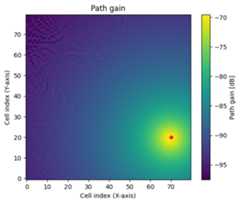
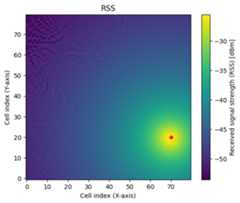
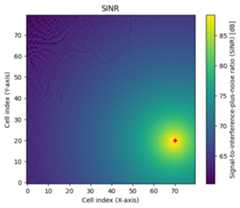
The RSS depends on the transmit power which can be modified for each transmitter as shown below.
[4]:
tx0.power_dbm=24rm=rm_solver(scene,max_depth=5,samples_per_tx=10**7,cell_size=(5,5),center=[0,0,0],size=[400,400],orientation=[0,0,0])rm.show(metric="rss");
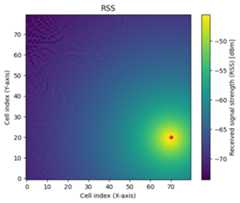
Compared to the previous cell, the RSS is now 20dB smaller.
The SINR depends not only on the RSS from other transmitters in the scene but also on the thermal noise power. The noise power is configured indirectly via the scene propertiesbandwidth andtemperature.
Note that neither parameter affects the ray tracing process; they are only used for the computation of the noise power.
[5]:
print(f"Bandwidth: ",scene.bandwidth.numpy(),"[Hz]")print(f"Temperature: ",scene.temperature.numpy(),"[K]")print(f"Thermal noise power: ",watt_to_dbm(scene.thermal_noise_power).numpy(),"[dBm]")
Bandwidth: [1000000.] [Hz]Temperature: [293.] [K]Thermal noise power: [-113.9305] [dBm]
All metrics of a radio map can be directly accessed as tensors as shown in the next cell. This can be useful to define new metrics or visualize metrics in a different form, such as CDF plots, etc.
[6]:
# Metrics have the shape# [num_tx, num_cells_y, num_cells_x]print(f'{rm.path_gain.shape=}')# Path gainprint(f'{rm.rss.shape=}')# RSSprint(f'{rm.sinr.shape=}')# SINR# The location of all cell centers in the global coordinate system of the scene# can be accessed via:# [num_cells_y, num_cells_x, 3]print(f'{rm.cell_centers.shape=}')
rm.path_gain.shape=(1, 80, 80)rm.rss.shape=(1, 80, 80)rm.sinr.shape=(1, 80, 80)rm.cell_centers.shape=(80, 80, 3)
Multiple transmitters
To make things more interesting, let us add two more transmitters to the scene and recompute the radio map.
[7]:
# Remove transmitters here so that the cell can be executed multiple timesscene.remove("tx1")scene.remove("tx2")tx1=Transmitter(name='tx1',position=[-150,-100,20],orientation=[np.pi/6,0,0],power_dbm=21)scene.add(tx1)tx2=Transmitter(name='tx2',position=np.array([0,150*np.tan(np.pi/3)-100,20]),orientation=[-np.pi/2,0,0],power_dbm=27)scene.add(tx2)rm=rm_solver(scene,max_depth=5,samples_per_tx=10**7,cell_size=(5,5),center=[0,0,0],size=[400,400],orientation=[0,0,0])
As soon as there are multiple transmitters in a scene, we can either visualize a metric for specific transmitter or visualize the maximum metric across all transmitters. The latter option is relevant if we want to inspect, e.g., the SINR across a large scene, assuming that a receiver always connects to the transmitter providing the best SINR.
[8]:
# Show SINR for tx0rm.show(metric="sinr",tx=0,vmin=-25,vmax=20);# Show maximum SINR across all transmittersrm.show(metric="sinr",tx=None,vmin=-25,vmax=20);# Experiment: Change the metric to "path_gain" or "rss"# and play around with the parameters vmin/vmax# that determine the range of the colormap
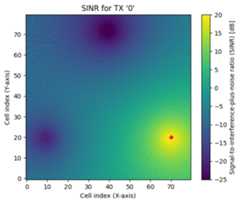

We can also visualize the cumulative distribution function (CDF) of the metric of interest:
[9]:
# CDF of the SINR for transmitter 0rm.cdf(metric="sinr",tx=0);# CDF of the SINR if always the transmitter providing the best SINR is selectedrm.cdf(metric="sinr");
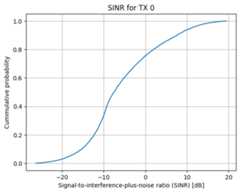
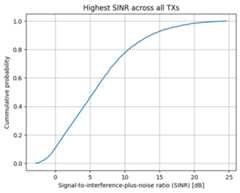
Note that, at every position, the highest SINR acrossall transmitters is always more favorable than the SINR offered by aspecific transmitter (in math terms, the formerstochastically dominates the latter). This is clearly reflected in the shape of the two distributions.
User association
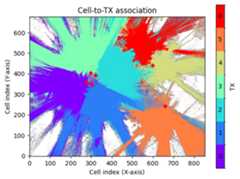
It is also interesting to investigate which regions of a radio map are “covered” by each transmitter, i.e., where a transmitter provides the strongest metric. You can obtain this information either as a tensor from the class methodtx_association() or visualize it usingshow_association().
[10]:
# Get for every cell the tx index providing the strongest value# of the chosen metric# [num_cells_y, num_cells_x]print(f'{rm.tx_association("sinr").shape=}')rm.show_association("sinr");
rm.tx_association("sinr").shape=(80, 80)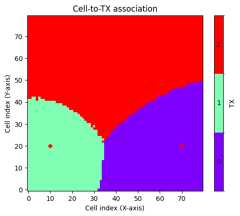
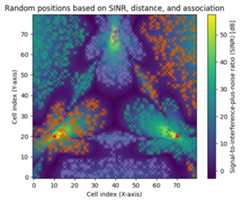
Sampling of random user positions
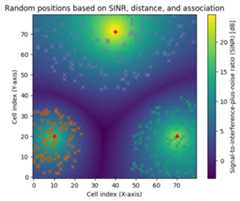
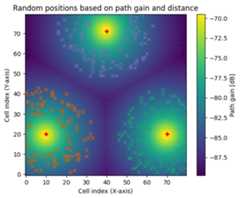
In some cases, one may want to drop receivers at random positions in a scene while ensuring that the chosen positions have sufficient signal quality (e.g., SINR) and/or or are located within a certain range of a transmitter. The class methodsample_positions() is designed for this purpose, and you will see in the next cell how it can be used.
You are encouraged to understand why the two different criteria used for sampling lead to the observed results.
[11]:
pos,cell_ids=rm.sample_positions(num_pos=100,# Number of random positions per receivermetric="sinr",# Metric on which constraints and TX association will be appliedmin_val_db=3,# Mininum value for the chosen metricmax_val_db=20,# Maximum value for the chosen metricmin_dist=10,# Minimum distance from transmittermax_dist=200,# Maximum distance from transmittertx_association=True,# If True, only positions associated with a transmitter are chosen,# i.e., positions where the chosen metric is the highest among all TXscenter_pos=False)# If True, random positions correspond to cell centers,# otherwise a random offset within each cell is appliedfig=rm.show(metric="sinr");plt.title("Random positions based on SINR, distance, and association")# Visualize sampled positionsfortx,idsinenumerate(cell_ids.numpy()):fig.axes[0].plot(ids[:,1],ids[:,0],marker='x',linestyle='',color=mpl.colormaps['Dark2'].colors[tx])pos,cell_ids=rm.sample_positions(num_pos=100,# Number of random positions per receivermetric="path_gain",# Metric on which constraints will be appliedmin_val_db=-85,# Mininum value for the chosen metricmin_dist=50,# Minimum distance from transmittermax_dist=200,# Maximum distance from transmittertx_association=False,# If False, then a user located in a sampled position# for a specific TX may perceive a higher metric from another TX!center_pos=False)# If True, random positions correspond to cell centers,# otherwise a random offset within each cell is appliedfig=rm.show(metric="path_gain");plt.title("Random positions based on path gain and distance")# Visualize sampled positionsfortx,idsinenumerate(cell_ids.numpy()):fig.axes[0].plot(ids[:,1],ids[:,0],marker='x',linestyle='',color=mpl.colormaps['Dark2'].colors[tx])
Directional antennas and precoding vectors
As mentioned above, radio maps heavily depend on the chosen antenna patterns and precoding vectors. In the next cell, we will study their impact on a radio map via several visualizations.
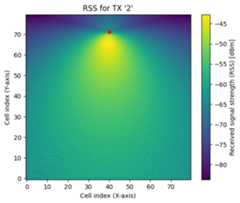
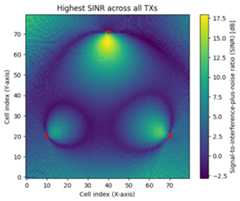
Let us start by assigning a single antenna to all transmitters and computing the corresponding radio map:
[12]:
scene.tx_array=PlanarArray(num_rows=1,num_cols=1,vertical_spacing=0.5,horizontal_spacing=0.5,pattern="tr38901",# Change to "iso" and compare the resultspolarization="V")rm=rm_solver(scene,max_depth=5,samples_per_tx=10**7,cell_size=(5,5),center=[0,0,0],size=[400,400],orientation=[0,0,0])rm.show(metric="rss",tx=2);rm.show(metric="sinr");
We now add more antennas to the antenna array of the transmitters and apply a precoding vector chosen from a Discrete Fourier Transform (DFT) beam grid.
[13]:
# Number of elements of the rectangular antenna arraynum_rows=2num_cols=4# Configure all transmitters to have equal powertx0.power_dbm=23tx1.power_dbm=23tx2.power_dbm=23# Configure tr38901 uniform rectangular antenna array for all transmittersscene.tx_array=PlanarArray(num_rows=num_rows,num_cols=num_cols,pattern="tr38901",polarization="V")# Create a common precoding vector used by all transmitters# It is also possible to assign individualprecoding_vec=[1,-1]*4/np.sqrt(8)# Convert to tuple of Mitsuba vectorsprecoding_vec=(mi.TensorXf(precoding_vec.real),mi.TensorXf(precoding_vec.imag))# Compute the radio maprm=rm_solver(scene,max_depth=5,samples_per_tx=10**7,precoding_vec=precoding_vec,cell_size=(5,5),center=[0,0,0],size=[400,400],orientation=[0,0,0])rm.show(metric="sinr");rm.show_association(metric="sinr");
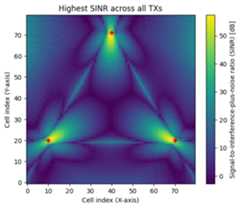
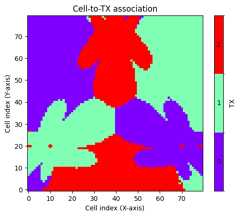
The use of antenna arrays and precoding vectors leads to complicated, even artistic looking, radio maps with sometimes counter-intuitive regions of user association. Nevertheless, we can still sample user positions for each transmitter.
[14]:
pos,cell_ids=rm.sample_positions(num_pos=500,metric="sinr",min_val_db=3,min_dist=10,tx_association=True)fig=rm.show(metric="sinr");# Visualize sampled positionsfortx,idsinenumerate(cell_ids.numpy()):fig.axes[0].plot(ids[:,1],ids[:,0],marker='x',linestyle='',color=mpl.colormaps['Dark2'].colors[tx])plt.title("Random positions based on SINR, distance, and association");
Radio map for a realistic scene
Until now, we have only looked at radio maps in an empty scene. Let’s spice things up a little bit and load a more interesting scene, place transmitters, and inspect the results.
[15]:
defconfig_scene(num_rows,num_cols):"""Load and configure a scene"""scene=load_scene(sionna.rt.scene.etoile)scene.bandwidth=100e6# Configure antenna arrays for all transmitters and receiversscene.tx_array=PlanarArray(num_rows=num_rows,num_cols=num_cols,pattern="tr38901",polarization="V")scene.rx_array=PlanarArray(num_rows=1,num_cols=1,pattern="iso",polarization="V")# Place transmitterspositions=np.array([[-150.3,21.63,42.5],[-125.1,9.58,42.5],[-104.5,54.94,42.5],[-128.6,66.73,42.5],[172.1,103.7,24],[232.8,-95.5,17],[80.1,193.8,21]])look_ats=np.array([[-216,-21,0],[-90,-80,0],[-16.5,75.8,0],[-164,153.7,0],[247,92,0],[211,-180,0],[126.3,194.7,0]])power_dbms=[23,23,23,23,23,23,23]fori,positioninenumerate(positions):scene.add(Transmitter(name=f'tx{i}',position=position,look_at=look_ats[i],power_dbm=power_dbms[i]))returnscene
[16]:
# Load and configure scenenum_rows=8num_cols=2scene_etoile=config_scene(num_rows,num_cols)# Compute the SINR maprm_etoile=rm_solver(scene_etoile,max_depth=5,samples_per_tx=10**7,cell_size=(1,1))
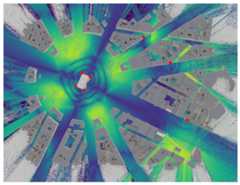
To get a global view of the coverage, let us visualize the radio map in the preview (or rendered image). These are alternatives to theshow() method we have used until now, which also visualizes the objects in a scene.
[17]:
ifno_preview:# Render an imagecam=Camera(position=[0,0,1000],orientation=np.array([0,np.pi/2,-np.pi/2]))scene_etoile.render(camera=cam,radio_map=rm_etoile,rm_metric="sinr",rm_vmin=-10,rm_vmax=60);else:# Show previewscene_etoile.preview(radio_map=rm_etoile,rm_metric="sinr",rm_vmin=-10,rm_vmax=60)
Channel impulse responses for random user locations
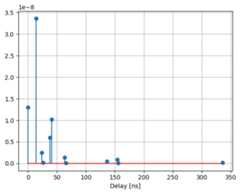
With a radio map at hand, we can now sample random positions at which we place actual receivers and then compute channel impulse responses.
[18]:
rm_etoile.show_association("sinr");pos,cell_ids=rm_etoile.sample_positions(num_pos=4,metric="sinr",min_val_db=3,min_dist=10,max_dist=200,tx_association=True)fig=rm_etoile.show(metric="sinr",vmin=-10);# Visualize sampled positionsfortx,idsinenumerate(cell_ids.numpy()):fig.axes[0].plot(ids[:,1],ids[:,0],marker='x',linestyle='',color=mpl.colormaps['Dark2'].colors[tx])

[19]:
[scene_etoile.remove(rx.name)forrxinscene_etoile.receivers.values()]foriinrange(rm_etoile.num_tx):forjinrange(pos.shape[1]):scene_etoile.add(Receiver(name=f"rx-{i}-{j}",position=pos[i,j].numpy()))p_solver=PathSolver()paths=p_solver(scene_etoile,max_depth=5)# Channel impulse responsea,tau=paths.cir()
[20]:
# Transmitter and receiver indices to plot the channel impulse responsetx_index=0rx_index=0# Compute the squared magnitude of the path coefficientsa_abs_square=cpx_abs_square(a)# # Sum over the transmit antennasa_abs_square=np.sum(a_abs_square,axis=3)# Get the selected path coefficients and delays in nsa_abs_square=np.squeeze(a_abs_square)[rx_index,tx_index]tau_ns=np.squeeze(tau)[rx_index,tx_index]*1e9# Only keep the valid pathsvalid=paths.valid.numpy()valid=valid[rx_index,tx_index]a_abs_square=a_abs_square[valid]tau_ns=tau_ns[valid]# Plot the channel impulse responseplt.figure()plt.stem(tau_ns,a_abs_square)plt.xlabel("Delay [ns]")plt.grid(True)
Radio maps on meshes
Until now, we have focused on radio maps defined by planar regular grids of cells. However, Sionna RT can also of compute radio maps for arbitrary meshes. In this case, each primitive, i.e., each triangle of the mesh, acts as a cell for the radio map computation.
To illustrate this, let’s first consider an empty scene before progressing to a more advanced setup.
[21]:
# Empty scenescene=load_scene()# Use a single antenna with directive patternscene.tx_array=PlanarArray(num_rows=1,num_cols=1,pattern="tr38901",polarization="V")# Add a transmitterscene.add(Transmitter(name="tx",position=[0,0,0],orientation=[0,0,0]))
We will now load a sphere mesh and calculate the radio map for it.
[22]:
# Load the mesh of a spheresphere=load_mesh(sionna.rt.scene.sphere)# Instantiate the radio map solverrm_solver=RadioMapSolver()# Compute radio map using the sphere as the measurement surfacerm=rm_solver(scene,measurement_surface=sphere,samples_per_tx=10**7)ifno_preview:cam=Camera(position=[4,3,4])cam.look_at(np.array([0,0,0]))scene.render(camera=cam,radio_map=rm);else:scene.preview(radio_map=rm);
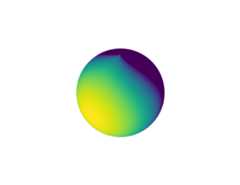
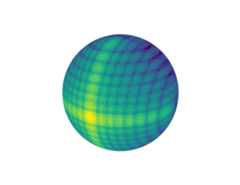
With the sphere centered at the origin and the transmitter also positioned at the origin, this configuration enables the visualization of the antenna pattern as it is projected onto the sphere. This configuration is equally effective for visualizing the beam pattern of an antenna array. In contrast to a planar radio map, the resoultion of the measurement surface is determined by the size of the primitives which cannot be configured on-the-fly. If you want a higher resolution, you must use asurface with a finer mesh.
[23]:
# Use an 16x16 antenna array with directive patternscene.tx_array=PlanarArray(num_rows=16,num_cols=16,pattern="tr38901",polarization="V")# Compute radio map using the sphere as the measurement surfacerm=rm_solver(scene,measurement_surface=sphere,samples_per_tx=10**7)ifno_preview:cam=Camera(position=[4,2,2])cam.look_at(np.array([0,0,0]))scene.render(camera=cam,radio_map=rm);else:scene.preview(radio_map=rm);
Let’s now explore a more realistic scenario.
One practical application of mesh-based radio maps is to compute them for terrains with arbitrary shapes. To demonstrate this, we’ll load a scene featuring a complex terrain.
[24]:
# Load a scene with a complex terrainscene=load_scene(sionna.rt.scene.san_francisco)# Use a single antenna with isotropic patternscene.tx_array=PlanarArray(num_rows=1,num_cols=1,pattern="iso",polarization="V")# Add a transmitter+scene.add(Transmitter(name="tx",position=[468,106,70],orientation=[0,0,0],display_radius=5))
We are now going to generate a radio map for a surface that mirrors the terrain’s shape and runs parallel to it, positioned 1.5 meters higher. To achieve this, we will clone the terrain from the scene and shift it upwards along the z-axis.
[25]:
# Clone the terrain meshmesurement_surface=scene.objects["Terrain"].clone(as_mesh=True)# Shift the terrain upwards by 1.5 meterstransform_mesh(mesurement_surface,translation=np.array([0,0,1.5]))
Next, we will calculate a radio map for the measurement surface.
[26]:
# Compute radio map using the measurement surfacerm=rm_solver(scene,measurement_surface=mesurement_surface,samples_per_tx=10**8,max_depth=5)ifno_preview:cam=Camera(position=[1400,400,575])cam.look_at(np.array([310,50,60]))scene.render(camera=cam,radio_map=rm);else:scene.preview(radio_map=rm,rm_vmin=-100);
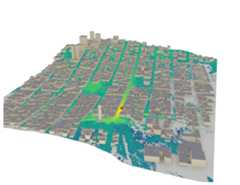
The complex terrain structure significantly affects the coverage, as illustrated here. The red sphere marks the transmitter’s position.
Conclusions
Radio maps are a highly versatile feature of Sionna RT. They are particularly useful for defining meaningful areas for random user drops that meet certain constraints on RSS or SINR, or for investigating the placement and configuration of transmitters in a scene.
However, we have barely scratched the surface of their potential. For example, observe that the metrics of a radio map are differentiable with respect to most scene parameters, such as transmitter orientations, transmit power, antenna patterns, precoding vectors, and so on. This opens up a wide range of possibilities for gradient-based optimization.
We hope you found this tutorial on radio maps in Sionna RT informative. We encourage you to get your hands on it, conduct your own experiments and deepen your understanding of ray tracing. There’s always more to learn, so be sure to explore our othertutorials as well!