
Tutorial on Mobility
This notebook explains different ways in which the effects of mobility can be simulated with Sionna’sray tracing (RT) module. You will
Use the
positionandorientationproperties to move scene objectsUnderstand the
velocityproperty of scene objects and their impact on the Doppler shiftLearn how to use the
dopplerproperty of aPathsobject to simulate time evolution of channels
Background Information
There are two ways in which we can simulate the impact of movement of scene objects on the channel impulse response. The first consists in moving the desired objects in small steps along a trajectory and recomputing the propagation paths for each step. While this approach is the most accurate, it comes at the cost of high computational complexity. As we will see later in this notebook, this approach is fortunately not necessary when the lengths of the considered trajectories are small, i.e., notmore than a few wavelengths. In this case, we can compute the time evolution of the channel impulse response using the second approach which is based on the experienced Doppler shifts of all propagation paths. It is very fast and leads to very accurate predictions in many cases.
In order to compute the Doppler shift for a specific path as shown in the figure below, Sionna RT relies on thevelocity vectors of the scene objects.
While traveling from the transmitter to the receiver, the path undergoes\(n\) scattering processes, such as reflection, refraction, diffuse scattering, or diffraction. The object on which lies the\(i\)th scattering point has the velocity vector\(\mathbf{v}_i\) and the outgoing ray direction at this point is denoted\(\hat{\mathbf{k}}_i\). The first and last point correspond to the transmitter and receiver, respectively.
The Doppler shift\(f_\Delta\) for this path can be computed as (see thedocumentation ofPaths.doppler)
\begin{align}f_\Delta = \frac{1}{\lambda}\left[\mathbf{v}_{0}^\mathsf{T}\hat{\mathbf{k}}_0 - \mathbf{v}_{n+1}^\mathsf{T}\hat{\mathbf{k}}_n + \sum_{i=1}^n \mathbf{v}_{i}^\mathsf{T}\left(\hat{\mathbf{k}}_i-\hat{\mathbf{k}}_{i-1} \right) \right] \qquad \text{[Hz]}\end{align}
where\(\lambda\) is the wavelength, and then be used to compute the time evolution of the path coefficientPaths.a as
\begin{align}a(t) = a e^{j2\pi f_\Delta t}.\end{align}
GPU Configuration and Imports
[1]:
%matplotlib inlineimportmatplotlib.pyplotaspltimportnumpyasnp# Import or install Sionnatry:importsionna.rtexceptImportErrorase:importosos.system("pip install sionna-rt")importsionna.rtno_preview=True# Toggle to False to use the preview widget# instead of rendering for scene visualizationfromsionna.rtimportload_scene,PlanarArray,Transmitter,Receiver,Camera,\RadioMapSolver,PathSolverfromsionna.rt.utilsimportr_hat,subcarrier_frequencies
Controlling Position and Orientation of Scene Objects
Every object in a scene has aposition andorientation property that can be inspected and modified. To see this, let us load a scene consisting of a simple street canyon and a few cars.
[2]:
scene=load_scene(sionna.rt.scene.simple_street_canyon_with_cars,merge_shapes=False)cam=Camera(position=[50,0,130],look_at=[10,0,0])ifno_preview:scene.render(camera=cam);else:scene.preview();
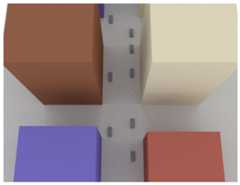
The list of all scene objects can be accessed as follows:
[3]:
scene.objects
[3]:
{'building_1': <sionna.rt.scene_object.SceneObject at 0x7f9972e71850>, 'building_6': <sionna.rt.scene_object.SceneObject at 0x7f9884972c60>, 'building_5': <sionna.rt.scene_object.SceneObject at 0x7f9884972de0>, 'building_4': <sionna.rt.scene_object.SceneObject at 0x7f9884972ed0>, 'building_3': <sionna.rt.scene_object.SceneObject at 0x7f9884973050>, 'building_2': <sionna.rt.scene_object.SceneObject at 0x7f9884973110>, 'floor': <sionna.rt.scene_object.SceneObject at 0x7f98849cb260>, 'car_3': <sionna.rt.scene_object.SceneObject at 0x7f9884973350>, 'car_4': <sionna.rt.scene_object.SceneObject at 0x7f9884973440>, 'car_5': <sionna.rt.scene_object.SceneObject at 0x7f9884973590>, 'car_2': <sionna.rt.scene_object.SceneObject at 0x7f98849736b0>, 'car_1': <sionna.rt.scene_object.SceneObject at 0x7f98849737d0>, 'car_6': <sionna.rt.scene_object.SceneObject at 0x7f98849738c0>, 'car_7': <sionna.rt.scene_object.SceneObject at 0x7f98849739e0>, 'car_8': <sionna.rt.scene_object.SceneObject at 0x7f9884973b00>}Let us now inspect the position and orientation of one of the cars:
[4]:
car_2=scene.get("car_2")print("Position: ",car_2.position.numpy()[:,0])print("Orientation: ",car_2.orientation.numpy()[:,0])
Position: [25. 5.5999994 0.7500001]Orientation: [0. 0. 0.]
The position of an object corresponds to the center of its axis-aligned bounding box. By default, the orientation of every scene object is[0,0,0]. We can now change the position and orientation of the car as follows:
[5]:
# Move the car 10m along the y-axiscar_2.position+=[0,10,0]# And rotate it by 90 degree around the z-axiscar_2.orientation=[np.pi/2,0,0]ifno_preview:scene.render(camera=cam);else:scene.preview();
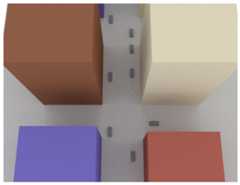
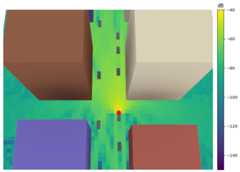
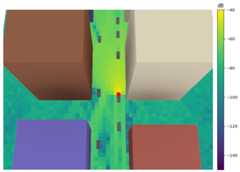
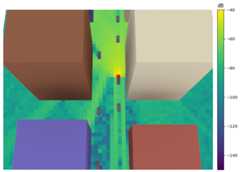
Next, we will visualize coverage maps for different positions of the cars in the scene, assuming that one of the cars is equipped with a transmit antenna:
[6]:
scene=load_scene(sionna.rt.scene.simple_street_canyon_with_cars,merge_shapes=False)cam=Camera(position=[50,0,130],look_at=[10,0,0])# Configure a transmitter that is located at the front of "car_2"scene.add(Transmitter("tx",position=[22.7,5.6,0.75],orientation=[np.pi,0,0]))scene.tx_array=PlanarArray(num_rows=1,num_cols=1,pattern="tr38901",polarization="V")scene.rx_array=scene.tx_array# Create radio map solverrm_solver=RadioMapSolver()# Move cars along straight lines for a couple of stepsdisplacement_vec=[10,0,0]num_displacements=2for_inrange(num_displacements+1):# Compute and render a coverage map at 0.5m above the groundrm=rm_solver(scene=scene,samples_per_tx=20**6,refraction=True,max_depth=10,center=[0,0,0.5],orientation=[0,0,0],size=[186,121],cell_size=[2,2])scene.render(camera=cam,radio_map=rm,num_samples=512,rm_show_color_bar=True,rm_vmax=-40,rm_vmin=-150)# Move TX to next positionscene.get("tx").position-=displacement_vec# Move cars driving in -x directionforjinrange(1,6):scene.get(f"car_{j}").position-=displacement_vec# Move cars driving in x directionforjinrange(6,9):scene.get(f"car_{j}").position+=displacement_vec
Time Evolution of Channels Via Doppler Shift
In the previous section, we have seen how the position and orientation of objects in a scene can be modified. However, if we want to model the evolution of channels over very short time horizons, this approach becomes impractical. An alternative, consists in assigning to all moving objects a velocity vector\(\mathbf{v}_i\in\mathbb{R}^3\) based on which path-wise Doppler shifts can be computed. Let us now load a simple scene with a single reflector and modify its velocity.
[7]:
# Load scene with a single reflectorscene=load_scene(sionna.rt.scene.simple_reflector,merge_shapes=False)# Inspect the velocity of this objectprint("Velocity vector: ",scene.get("reflector").velocity.numpy()[:,0])# Update velocity vectorscene.get("reflector").velocity=[0,0,-20]print("Velocity vector after update: ",scene.get("reflector").velocity.numpy()[:,0])
Velocity vector: [0. 0. 0.]Velocity vector after update: [ 0. 0. -20.]
Next, we will add a transmitter and receiver to the scene and compute the propagation paths:
[8]:
# Configure arrays for all transmitters and receivers in the scenescene.tx_array=PlanarArray(num_rows=1,num_cols=1,pattern="iso",polarization="V")scene.rx_array=scene.tx_array# Add a transmitter and a receiverscene.add(Transmitter("tx",[-25,0.1,50]))scene.add(Receiver("rx",[25,0.1,50]))# Compute pathsp_solver=PathSolver()paths=p_solver(scene=scene,max_depth=1)# Visualize the scene and propagation pathsifno_preview:cam=Camera(position=[0,100,50],look_at=[0,0,30])scene.render(camera=cam,paths=paths);else:scene.preview(paths=paths)
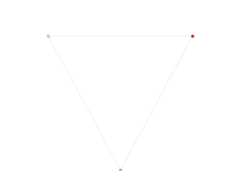
Every path has a propertyPaths.doppler that corresponds to the aggregated Doppler shift due to the movement of objects it intersects as well as the velocity of the transmitter and receiver.
[9]:
print("Path interaction (0=LoS, 1=Specular reflection): ",paths.interactions.numpy())print("Doppler shifts (Hz): ",paths.doppler.numpy())
Path interaction (0=LoS, 1=Specular reflection): [[[[0 1]]]]Doppler shifts (Hz): [[[ 0. -417.68835]]]
Example: Delay-Doppler Spectrum
We will now use the Doppler shifts to compute a time-varying channel impulse response and estimate its Delay-Doppler spectrum. To this end, we assume that 1024 subsequent symbols of an OFDM system with 1024 subcarriers can be observed, assuming a subcarrier spacing of 30kHz. This will define the following resolutions in the delay and Doppler domains:
[10]:
num_ofdm_symbols=1024num_subcarriers=1024subcarrier_spacing=30e3ofdm_symbol_duration=1/subcarrier_spacingdelay_resolution=ofdm_symbol_duration/num_subcarriersdoppler_resolution=subcarrier_spacing/num_ofdm_symbolsprint("Delay resolution (ns): ",int(delay_resolution/1e-9))print("Doppler resolution (Hz): ",int(doppler_resolution))
Delay resolution (ns): 32Doppler resolution (Hz): 29
In addition to the velocity of the reflector, we also assume that the transmitter is moving.
[11]:
# Set TX velocitytx_velocity=[30,0,0]scene.get("tx").velocity=tx_velocity# Recompute the pathspaths=p_solver(scene=scene,max_depth=1,refraction=False)# Compute channel frequency response with time evolutionfrequencies=subcarrier_frequencies(num_subcarriers,subcarrier_spacing)h=paths.cfr(frequencies=frequencies,sampling_frequency=1/ofdm_symbol_duration,num_time_steps=num_ofdm_symbols,normalize_delays=False,normalize=True,out_type="numpy")### Compute the Delay-Doppler spectrum# Squeeze useless dimensions# [num_time_steps, fft_size]h=np.squeeze(h)# Apply an FFTshift to bring subcarriers in the# correct order for an IFFTh=np.fft.fftshift(h,axes=1)# Apply IFFT to subcarrier dimension to# convert frequency to delay domainh_delay=np.fft.ifft(h,axis=1,norm="ortho")# Apply FFT to time-step dimension to# convert time to Doppler domainh_delay_doppler=np.fft.fft(h_delay,axis=0,norm="ortho")# Apply FFTShift to bring Doppler dimension in the correct# order for visualizationh_delay_doppler=np.fft.fftshift(h_delay_doppler,axes=0)# Compute meshgrid for visualization of the Delay-Doppler spectrumdoppler_bins=np.arange(-num_ofdm_symbols/2*doppler_resolution,num_ofdm_symbols/2*doppler_resolution,doppler_resolution)delay_bins=np.arange(0,num_subcarriers*delay_resolution,delay_resolution)/1e-9x,y=np.meshgrid(delay_bins,doppler_bins)# Visualize Delay-Doppler spectrumfig=plt.figure(figsize=(8,10))ax=fig.add_subplot(111,projection='3d')# We only visualize the relevant part of the spectrumoffset=20x_start=int(num_subcarriers/2)-offsetx_end=int(num_subcarriers/2)+offsety_start=0y_end=offsetx_grid=x[x_start:x_end,y_start:y_end]y_grid=y[x_start:x_end,y_start:y_end]z_grid=np.abs(h_delay_doppler[x_start:x_end,y_start:y_end])surf=ax.plot_surface(x_grid,y_grid,z_grid,cmap='viridis',edgecolor='none')ax.set_xlabel('Delay (ns)')ax.set_ylabel('Doppler (Hz)')ax.set_zlabel('Magnitude');ax.zaxis.labelpad=2ax.view_init(elev=53,azim=-32)ax.set_title("Delay-Doppler Spectrum");
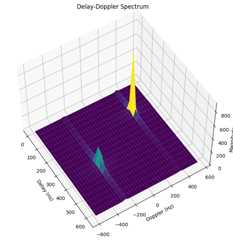
As expected, we can observe two peaks in the Delay-Doppler spectrum above. The first at a delay of around 160ns, and the second at a delay of approximately 370ns. The respective Doppler shifts are around 350Hz and -260Hz.
The exact Doppler shifts based on the equation provided in theBackground Information that should match the peaks in the Delay-Doppler spectrum:
[12]:
print("Delay - LoS Path (ns) :",paths.tau[0,0,0]/1e-9)print("Doppler - LoS Path (Hz) :",paths.doppler[0,0,0])print("Delay - Reflected Path (ns) :",paths.tau[0,0,1].numpy()/1e-9)print("Doppler - Reflected Path (Hz) :",paths.doppler[0,0,1])
Delay - LoS Path (ns) : 166.782Doppler - LoS Path (Hz) : 350.242Delay - Reflected Path (ns) : 372.93597Doppler - Reflected Path (Hz) : -261.056
Comparison of Doppler- vs Position-based Time Evolution
We will now compare a time-varying channel frequency impulse response generated by the application of Doppler shifts against another one obtained by physically moving objects in a scene and retracing the paths.
The same scene as in the first section will be used where a transmitter is placed on a moving car. However, we now also place a receiver on another car and assume that all cars in the scene are moving along a linear trajectory.
[13]:
scene=load_scene(sionna.rt.scene.simple_street_canyon_with_cars,merge_shapes=False)cam=Camera(position=[50,0,130],look_at=[10,0,0])# Parameters for ray tracingmax_depth=3refraction=False# Toggle to true to see the impact of refractiondiffraction=False# Toggle to true to see the impact of diffraction# TX and RX have directional antennasscene.tx_array=PlanarArray(num_rows=1,num_cols=1,pattern="tr38901",polarization="V")scene.rx_array=scene.tx_array# TX and RX are installed at the front of two different cars.# The directive antennas ensure that paths reaching an antenna from the back are close to zero.scene.add(Transmitter("tx",position=[22.7,5.6,0.75],orientation=[np.pi,0,0]))scene.add(Receiver("rx",position=[-27.8,-4.9,0.75]))# Configure an OFDM resource gridnum_ofdm_symbols=25num_subcarriers=1024subcarrier_spacing=30e3frequencies=subcarrier_frequencies(num_subcarriers,subcarrier_spacing)ofdm_symbol_duration=1/subcarrier_spacing# Define a velocity vector and the corresponding displacement over the duration# of one OFDM symbolvelocity_vec=np.array([10,0,0])displacement_vec=velocity_vec*ofdm_symbol_duration# Assign velocity vector to cars driving in -x directionforjinrange(1,6):scene.get(f"car_{j}").velocity=-velocity_vec# Assign velocity vector to cars driving in x directionforjinrange(6,9):scene.get(f"car_{j}").velocity=velocity_vec# Compute pathsscene.get("tx").velocity=-velocity_vecscene.get("rx").velocity=velocity_vecpaths=p_solver(scene=scene,max_depth=max_depth,refraction=refraction,diffraction=diffraction)# Compute the corresponding channel frequency responses with time evolutionh_dop=paths.cfr(frequencies=frequencies,sampling_frequency=1/ofdm_symbol_duration,num_time_steps=num_ofdm_symbols,normalize_delays=False,out_type="numpy")h_dop=np.squeeze(h_dop)# Visualize the scene and propagation pathsifno_preview:scene.render(camera=cam,paths=paths,num_samples=512);else:scene.preview(paths=paths)
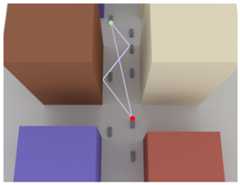
In the next cell, we compute a sequence of channel frequency responses by moving all cars as well as the transmitter and receiver in the scene. After each step, propagation paths are traced and the corresponding channel frequency response is computed.
[14]:
paths=p_solver(scene=scene,max_depth=max_depth,refraction=refraction,diffraction=diffraction)h_sim=np.squeeze(paths.cfr(frequencies=frequencies,sampling_frequency=1/ofdm_symbol_duration,normalize_delays=False,out_type="numpy"),axis=(0,1,2,3))foriinrange(num_ofdm_symbols-1):# Move TX and RX to next positionscene.get("tx").position-=displacement_vecscene.get("rx").position+=displacement_vec# Move cars driving in -x direction to the next positionforjinrange(1,6):scene.get(f"car_{j}").position-=displacement_vec# Move cars driving in +x direction to the next positionforjinrange(6,9):scene.get(f"car_{j}").position+=displacement_vec# Compute channel frequency responsepaths=p_solver(scene=scene,max_depth=max_depth,refraction=refraction,diffraction=diffraction)h=np.squeeze(paths.cfr(frequencies=frequencies,sampling_frequency=1/ofdm_symbol_duration,normalize_delays=False,out_type="numpy"),axis=(0,1,2,3))# Concatenate along the time dimensionsh_sim=np.concatenate([h_sim,h],axis=0)
Next, we visualize the the time evolution of a few subcarriers as well as some snapshots of the full channel frequency response.
[15]:
subcarriers=np.arange(0,1024,256)timesteps=[0,8,16,24]fig,axs=plt.subplots(4,4,figsize=(17,13))fori,jinenumerate(subcarriers):axs[0,i].plot(np.arange(num_ofdm_symbols),np.real(h_sim[:,j]))axs[0,i].plot(np.arange(num_ofdm_symbols),np.real(h_dop[:,j]),"--")axs[0,i].set_xlabel("Timestep")axs[0,i].set_ylabel(r"$\Re\{h(f,t)\}$")axs[0,i].set_title(f"Subcarrier{j}")axs[0,i].legend(["Movement","Doppler"])fori,jinenumerate(subcarriers):axs[1,i].plot(np.arange(num_ofdm_symbols),np.imag(h_sim[:,j]))axs[1,i].plot(np.arange(num_ofdm_symbols),np.imag(h_dop[:,j]),"--")axs[1,i].set_xlabel("Timestep")axs[1,i].set_ylabel(r"$\Im\{h(f,t)\}$")axs[1,i].set_title(f"Subcarrier{j}")axs[1,i].legend(["Movement","Doppler"])fori,jinenumerate(timesteps):axs[2,i].plot(np.arange(num_subcarriers),np.real(h_sim[j,:]))axs[2,i].plot(np.arange(num_subcarriers),np.real(h_dop[j,:]),"--")axs[2,i].set_xlabel("Subcarrier")axs[2,i].set_ylabel(r"$\Re\{h(f,t)\}$")axs[2,i].set_title(f"Timestep{j}")axs[2,i].legend(["Movement","Doppler"])fori,jinenumerate(timesteps):axs[3,i].plot(np.arange(num_subcarriers),np.imag(h_sim[j,:]))axs[3,i].plot(np.arange(num_subcarriers),np.imag(h_dop[j,:]),"--")axs[3,i].set_xlabel("Subcarrier")axs[3,i].set_ylabel(r"$\Im\{h(f,t)\}$")axs[3,i].set_title(f"Timestep{j}")axs[3,i].legend(["Movement","Doppler"])plt.tight_layout()plt.show()
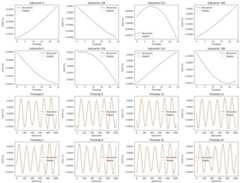
From the figures above, we can see that there is no noticeable difference between the Doppler-based channel evolution and the one based on physically moving objects. However, if refraction and diffraction are enabled or longer time-horizons are considered, the Doppler-based time-evolution becomes less accurate because some path may (dis-)appear and their path coefficients and delays change. You can investigate this yourself by running the cells of this section with different parameters.
Summary
We have discussed two different ways to simulate mobility in Sionna RT. One can either move objects in a scene and recompute paths or compute the time evolution of channels synthetically based on the Doppler shifts that are obtained from velocity vectors of the scene objects.
The former approach is computationally intensive but accurate while the latter is much faster but only accurate over short time spans during which the scene objects have moved very short distances. The accuracy also depends strongly on the scenario.
Both approaches can be combined to simulate mobility over longer periods of time.
We hope you enjoyed our dive into the simulation of mobility with Sionna RT. You may also want to explore our othertutorials.