numpy.meshgrid#
- numpy.meshgrid(*xi,copy=True,sparse=False,indexing='xy')[source]#
Return a tuple of coordinate matrices from coordinate vectors.
Make N-D coordinate arrays for vectorized evaluations ofN-D scalar/vector fields over N-D grids, givenone-dimensional coordinate arrays x1, x2,…, xn.
- Parameters:
- x1, x2,…, xnarray_like
1-D arrays representing the coordinates of a grid.
- indexing{‘xy’, ‘ij’}, optional
Cartesian (‘xy’, default) or matrix (‘ij’) indexing of output.See Notes for more details.
- sparsebool, optional
If True the shape of the returned coordinate array for dimensioniis reduced from
(N1,...,Ni,...Nn)to(1,...,1,Ni,1,...,1). These sparse coordinate grids areintended to be used withBroadcasting. When allcoordinates are used in an expression, broadcasting still leads to afully-dimensonal result array.Default is False.
- copybool, optional
If False, a view into the original arrays are returned in order toconserve memory. Default is True. Please note that
sparse=False,copy=Falsewill likely return non-contiguousarrays. Furthermore, more than one element of a broadcast arraymay refer to a single memory location. If you need to write to thearrays, make copies first.
- Returns:
- X1, X2,…, XNtuple of ndarrays
For vectorsx1,x2,…,xn with lengths
Ni=len(xi),returns(N1,N2,N3,...,Nn)shaped arrays if indexing=’ij’or(N2,N1,N3,...,Nn)shaped arrays if indexing=’xy’with the elements ofxi repeated to fill the matrix alongthe first dimension forx1, the second forx2 and so on.
See also
mgridConstruct a multi-dimensional “meshgrid” using indexing notation.
ogridConstruct an open multi-dimensional “meshgrid” using indexing notation.
- How to index ndarrays
Notes
This function supports both indexing conventions through the indexingkeyword argument. Giving the string ‘ij’ returns a meshgrid withmatrix indexing, while ‘xy’ returns a meshgrid with Cartesian indexing.In the 2-D case with inputs of length M and N, the outputs are of shape(N, M) for ‘xy’ indexing and (M, N) for ‘ij’ indexing. In the 3-D casewith inputs of length M, N and P, outputs are of shape (N, M, P) for‘xy’ indexing and (M, N, P) for ‘ij’ indexing. The difference isillustrated by the following code snippet:
xv,yv=np.meshgrid(x,y,indexing='ij')foriinrange(nx):forjinrange(ny):# treat xv[i,j], yv[i,j]xv,yv=np.meshgrid(x,y,indexing='xy')foriinrange(nx):forjinrange(ny):# treat xv[j,i], yv[j,i]
In the 1-D and 0-D case, the indexing and sparse keywords have no effect.
Examples
>>>importnumpyasnp>>>nx,ny=(3,2)>>>x=np.linspace(0,1,nx)>>>y=np.linspace(0,1,ny)>>>xv,yv=np.meshgrid(x,y)>>>xvarray([[0. , 0.5, 1. ], [0. , 0.5, 1. ]])>>>yvarray([[0., 0., 0.], [1., 1., 1.]])
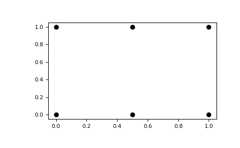
The result of
meshgridis a coordinate grid:>>>importmatplotlib.pyplotasplt>>>plt.plot(xv,yv,marker='o',color='k',linestyle='none')>>>plt.show()
You can create sparse output arrays to save memory and computation time.
>>>xv,yv=np.meshgrid(x,y,sparse=True)>>>xvarray([[0. , 0.5, 1. ]])>>>yvarray([[0.], [1.]])
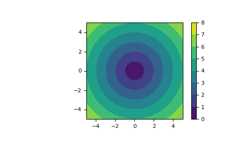
meshgridis very useful to evaluate functions on a grid. If thefunction depends on all coordinates, both dense and sparse outputs can beused.>>>x=np.linspace(-5,5,101)>>>y=np.linspace(-5,5,101)>>># full coordinate arrays>>>xx,yy=np.meshgrid(x,y)>>>zz=np.sqrt(xx**2+yy**2)>>>xx.shape,yy.shape,zz.shape((101, 101), (101, 101), (101, 101))>>># sparse coordinate arrays>>>xs,ys=np.meshgrid(x,y,sparse=True)>>>zs=np.sqrt(xs**2+ys**2)>>>xs.shape,ys.shape,zs.shape((1, 101), (101, 1), (101, 101))>>>np.array_equal(zz,zs)True
>>>h=plt.contourf(x,y,zs)>>>plt.axis('scaled')>>>plt.colorbar()>>>plt.show()