
Version 0.6.2 of nixtlar is now available on CRAN! (2024-10-28)
We are happy to announce the release ofnixtlar version 0.6.2, introducing support forTimeGEN-1,TimeGPT optimized for Azure.
Key updates include:
- Azure Integration: You can now use
TimeGEN-1, a version ofTimeGPToptimized for the Azure infrastructure, directly throughnixtlar. Simply configure your API key and Base URL to get started. For setup instructions, please check out ourAzure Quickstart vignette. - Enhanced Date Support: In response to user feedback, we’ve improved support for date objects created with the
as.Datefunction. For optimal performance,nixtlarnow requires dates in the formatYYYY-MM-DDorYYYY-MM-DD hh:mm:ss, either as characters or date-objects, and this update resolves issues with the latter format. - Business-Day Frequency Inference:
nixtlarnow supports inferring business-day frequency, which users previously had to specify directly. - Bug Fixes: This version also includes fixes for minor bugs reported by our users, ensuring overall stability and performance.
Thank you for your continued support and feedback, which help us makenixtlar better. We encourage you to update to the latest version to take advantage of these improvements.
TimeGPT-1
The first foundation model for time series forecasting and anomaly detection
TimeGPT is a production-ready, generative pretrained transformer for time series forecasting, developed by Nixtla. It is capable of accurately predicting various domains such as retail, electricity, finance, and IoT, with just a few lines of code. Additionally, it can detect anomalies in time series data.
TimeGPT was initially developed in Python but is now available to R users through thenixtlar package.
Installation
nixtlar is available on CRAN, so you can install the latest stable version usinginstall.packages.
# Install nixtlar from CRANinstall.packages("nixtlar")# Then load itlibrary(nixtlar)Alternatively, you can install the development version ofnixtlar fromGitHub withdevtools::install_github.
# install.packages("devtools")devtools::install_github("Nixtla/nixtlar")Forecast Using TimeGPT in 3 Easy Steps
- Set your API key. Get yours atdashboard.nixtla.io
nixtla_set_api_key(api_key="Your API key here")- Load sample data
df<-nixtlar::electricityhead(df)#> unique_id ds y#> 1 BE 2016-10-22 00:00:00 70.00#> 2 BE 2016-10-22 01:00:00 37.10#> 3 BE 2016-10-22 02:00:00 37.10#> 4 BE 2016-10-22 03:00:00 44.75#> 5 BE 2016-10-22 04:00:00 37.10#> 6 BE 2016-10-22 05:00:00 35.61- Forecast the next 8 steps ahead
nixtla_client_fcst<-nixtla_client_forecast(df, h=8, level=c(80,95))#> Frequency chosen: hhead(nixtla_client_fcst)#> unique_id ds TimeGPT TimeGPT-lo-95 TimeGPT-lo-80#> 1 BE 2016-12-31 00:00:00 45.19045 30.49691 35.50842#> 2 BE 2016-12-31 01:00:00 43.24445 28.96423 35.37463#> 3 BE 2016-12-31 02:00:00 41.95839 27.06667 35.34079#> 4 BE 2016-12-31 03:00:00 39.79649 27.96751 32.32625#> 5 BE 2016-12-31 04:00:00 39.20454 24.66072 30.99895#> 6 BE 2016-12-31 05:00:00 40.10878 23.05056 32.43504#> TimeGPT-hi-80 TimeGPT-hi-95#> 1 54.87248 59.88399#> 2 51.11427 57.52467#> 3 48.57599 56.85011#> 4 47.26672 51.62546#> 5 47.41012 53.74836#> 6 47.78252 57.16700Optionally, plot the results
nixtla_client_plot(df,nixtla_client_fcst, max_insample_length=200)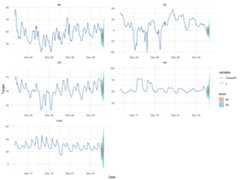
Anomaly Detection Using TimeGPT in 3 Easy Steps
Do anomaly detection withTimeGPT, also in 3 easy steps! Follow steps 1 and 2 from the previous section and then use thenixtla_client_detect_anomalies and thenixtla_client_plot functions.
nixtla_client_anomalies<-nixtlar::nixtla_client_detect_anomalies(df)#> Frequency chosen: hhead(nixtla_client_anomalies)#> unique_id ds y anomaly TimeGPT TimeGPT-lo-99#> 1 BE 2016-10-27 00:00:00 52.58 FALSE 56.07623 -28.58337#> 2 BE 2016-10-27 01:00:00 44.86 FALSE 52.41973 -32.23986#> 3 BE 2016-10-27 02:00:00 42.31 FALSE 52.81474 -31.84486#> 4 BE 2016-10-27 03:00:00 39.66 FALSE 52.59026 -32.06934#> 5 BE 2016-10-27 04:00:00 38.98 FALSE 52.67297 -31.98662#> 6 BE 2016-10-27 05:00:00 42.31 FALSE 54.10659 -30.55301#> TimeGPT-hi-99#> 1 140.7358#> 2 137.0793#> 3 137.4743#> 4 137.2499#> 5 137.3326#> 6 138.7662nixtlar::nixtla_client_plot(df,nixtla_client_anomalies, plot_anomalies=TRUE)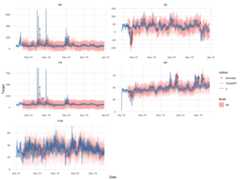
Features and Capabilities
nixtlar provides access to TimeGPT’s features and capabilities, such as:
Zero-shot Inference: TimeGPT can generate forecasts and detect anomalies straight out of the box, requiring no prior training data. This allows for immediate deployment and quick insights from any time series data.
Fine-tuning: Enhance TimeGPT’s capabilities by fine-tuning the model on your specific datasets, enabling the model to adapt to the nuances of your unique time series data and improving performance on tailored tasks.
Add Exogenous Variables: Incorporate additional variables that might influence your predictions to enhance forecast accuracy. (E.g. Special Dates, events or prices)
Multiple Series Forecasting: Simultaneously forecast multiple time series data, optimizing workflows and resources.
Custom Loss Function: Tailor the fine-tuning process with a custom loss function to meet specific performance metrics.
Cross Validation: Implement out of the box cross-validation techniques to ensure model robustness and generalizability.
Prediction Intervals: Provide intervals in your predictions to quantify uncertainty effectively.
Irregular Timestamps: Handle data with irregular timestamps, accommodating non-uniform interval series without preprocessing.
Documentation
For comprehensive documentation, please refer to our vignettes, which cover a wide range of topics to help you effectively usenixtlar. The current documentation includes guides on how to:
- Get started and set up your API key
- Do anomaly detection
- Perform time series cross-validation
- Use exogenous variables
- Generate historical forecasts
The documentation is an ongoing effort, and we are working on expanding its coverage.
API Support
Are you a Python user? If yes, then check out thePython SDK forTimeGPT. You can also refer to ourAPI reference for support in other programming languages.
How to Cite
If you find TimeGPT useful for your research, please consider citing theTimeGPT-1paper. The associated reference is shown below.
Garza, A., Challu, C., & Mergenthaler-Canseco, M. (2024). TimeGPT-1. arXiv preprint arXiv:2310.03589. Available athttps://arxiv.org/abs/2310.03589
License
TimeGPT is closed source. However, this SDK is open source and available under the Apache 2.0 License, so feel free to contribute!
Get in Touch
We welcome your input and contributions to thenixtlar package!
Report Issues: If you encounter a bug or have a suggestion to improve the package, please open anissue in GitHub.
Contribute: You can contribute by opening apull request in our repository. Whether it is fixing a bug, adding a new feature, or improving the documentation, we appreciate your help in making
nixtlarbetter.
