

mpl_toolkits.axes_grid1.axes_rgb.RGBAxes#
- classmpl_toolkits.axes_grid1.axes_rgb.RGBAxes(*args,pad=0,**kwargs)[source]#
Bases:
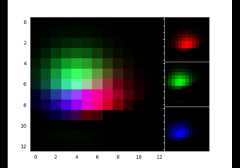
object4-panel
imshow(RGB, R, G, B).Layout:
┌───────────────┬─────┐│ │ R ││ ├─────┤│ RGB │ G ││ ├─────┤│ │ B │└───────────────┴─────┘
Subclasses can override the
_defaultAxesClassattribute.By default RGBAxes usesmpl_axes.Axes.- Attributes:
- Parameters:
- padfloat, default: 0
Fraction of the Axes height to put as padding.
- axes_class
Axes Axes class to use. If not provided,
_defaultAxesClassis used.- *args
Forwarded toaxes_class init for the RGB Axes
- **kwargs
Forwarded toaxes_class init for the RGB, R, G, and B Axes
Examples usingmpl_toolkits.axes_grid1.axes_rgb.RGBAxes#
On this page