

Note
Go to the endto download the full example code.
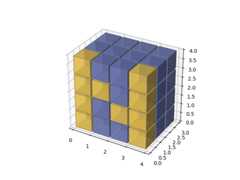
3D voxel plot of the NumPy logo#
Demonstrates usingAxes3D.voxels with uneven coordinates.
importmatplotlib.pyplotaspltimportnumpyasnpdefexplode(data):size=np.array(data.shape)*2data_e=np.zeros(size-1,dtype=data.dtype)data_e[::2,::2,::2]=datareturndata_e# build up the numpy logon_voxels=np.zeros((4,3,4),dtype=bool)n_voxels[0,0,:]=Truen_voxels[-1,0,:]=Truen_voxels[1,0,2]=Truen_voxels[2,0,1]=Truefacecolors=np.where(n_voxels,'#FFD65DC0','#7A88CCC0')edgecolors=np.where(n_voxels,'#BFAB6E','#7D84A6')filled=np.ones(n_voxels.shape)# upscale the above voxel image, leaving gapsfilled_2=explode(filled)fcolors_2=explode(facecolors)ecolors_2=explode(edgecolors)# Shrink the gapsx,y,z=np.indices(np.array(filled_2.shape)+1).astype(float)//2x[0::2,:,:]+=0.05y[:,0::2,:]+=0.05z[:,:,0::2]+=0.05x[1::2,:,:]+=0.95y[:,1::2,:]+=0.95z[:,:,1::2]+=0.95ax=plt.figure().add_subplot(projection='3d')ax.voxels(x,y,z,filled_2,facecolors=fcolors_2,edgecolors=ecolors_2)ax.set_aspect('equal')plt.show()
Tags:plot-type: 3Dlevel: beginnerpurpose: fun