

Note
Go to the endto download the full example code.
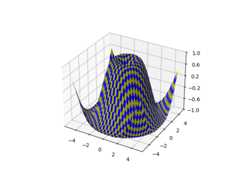
3D surface (checkerboard)#
Demonstrates plotting a 3D surface colored in a checkerboard pattern.
importmatplotlib.pyplotaspltimportnumpyasnpfrommatplotlib.tickerimportLinearLocatorax=plt.figure().add_subplot(projection='3d')# Make data.X=np.arange(-5,5,0.25)xlen=len(X)Y=np.arange(-5,5,0.25)ylen=len(Y)X,Y=np.meshgrid(X,Y)R=np.sqrt(X**2+Y**2)Z=np.sin(R)# Create an empty array of strings with the same shape as the meshgrid, and# populate it with two colors in a checkerboard pattern.colortuple=('y','b')colors=np.empty(X.shape,dtype=str)foryinrange(ylen):forxinrange(xlen):colors[y,x]=colortuple[(x+y)%len(colortuple)]# Plot the surface with face colors taken from the array we made.surf=ax.plot_surface(X,Y,Z,facecolors=colors,linewidth=0)# Customize the z axis.ax.set_zlim(-1,1)ax.zaxis.set_major_locator(LinearLocator(6))plt.show()
Tags:plot-type: 3Dstyling: colorstyling: texturelevel: intermediate