

matplotlib.figure.Figure.align_xlabels#
- Figure.align_xlabels(axs=None)[source]#
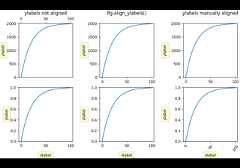
Align the xlabels of subplots in the same subplot row if labelalignment is being done automatically (i.e. the label position isnot manually set).
Alignment persists for draw events after this is called.
If a label is on the bottom, it is aligned with labels on Axes thatalso have their label on the bottom and that have the samebottom-most subplot row. If the label is on the top,it is aligned with labels on Axes with the same top-most row.
- Parameters:
See also
Notes
This assumes that all Axes in
axsare from the sameGridSpec,so that theirSubplotSpecpositions correspond to figure positions.Examples
Example with rotated xtick labels:
fig,axs=plt.subplots(1,2)axs[0].tick_params(axis='x',rotation=55)axs[0].set_xlabel('XLabel 0')axs[1].set_xlabel('XLabel 1')fig.align_xlabels()
Examples usingmatplotlib.figure.Figure.align_xlabels#
On this page