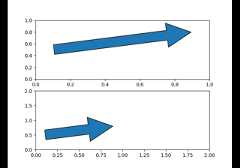
matplotlib.patches.Arrow#
- classmatplotlib.patches.Arrow(x,y,dx,dy,*,width=1.0,**kwargs)[source]#
Bases:
PatchAn arrow patch.
Draws an arrow from (x,y) to (x +dx,y +dy).The width of the arrow is scaled bywidth.
- Parameters:
- xfloat
x coordinate of the arrow tail.
- yfloat
y coordinate of the arrow tail.
- dxfloat
Arrow length in the x direction.
- dyfloat
Arrow length in the y direction.
- widthfloat, default: 1
Scale factor for the width of the arrow. With a default value of 1,the tail width is 0.2 and head width is 0.6.
- **kwargs
Keyword arguments control the
Patchproperties:Property
Description
a filter function, which takes a (m, n, 3) float array and a dpi value, and returns a (m, n, 3) array and two offsets from the bottom left corner of the image
unknown
bool
bool or None
CapStyleor {'butt', 'projecting', 'round'}BboxBaseor Nonebool
Patch or (Path, Transform) or None
color or None
color or None
color or None
bool
str
{'/', '\', '|', '-', '+', 'x', 'o', 'O', '.', '*'}
unknown
color or 'edge' or None
bool
JoinStyleor {'miter', 'round', 'bevel'}object
{'-', '--', '-.', ':', '', ...} or (offset, on-off-seq)
float or None
bool
list of
AbstractPathEffectNone or bool or float or callable
bool
(scale: float, length: float, randomness: float)
bool or None
str
bool
float
See also
FancyArrowPatch that allows independent control of the head and tail properties.
- get_patch_transform()[source]#
Return the
Transforminstance mapping patch coordinatesto data coordinates.For example, one may define a patch of a circle which represents aradius of 5 by providing coordinates for a unit circle, and atransform which scales the coordinates (the patch coordinate) by 5.
- set(*,agg_filter=<UNSET>,alpha=<UNSET>,animated=<UNSET>,antialiased=<UNSET>,capstyle=<UNSET>,clip_box=<UNSET>,clip_on=<UNSET>,clip_path=<UNSET>,color=<UNSET>,data=<UNSET>,edgecolor=<UNSET>,edgegapcolor=<UNSET>,facecolor=<UNSET>,fill=<UNSET>,gid=<UNSET>,hatch=<UNSET>,hatch_linewidth=<UNSET>,hatchcolor=<UNSET>,in_layout=<UNSET>,joinstyle=<UNSET>,label=<UNSET>,linestyle=<UNSET>,linewidth=<UNSET>,mouseover=<UNSET>,path_effects=<UNSET>,picker=<UNSET>,rasterized=<UNSET>,sketch_params=<UNSET>,snap=<UNSET>,transform=<UNSET>,url=<UNSET>,visible=<UNSET>,zorder=<UNSET>)[source]#
Set multiple properties at once.
a.set(a=A,b=B,c=C)
is equivalent to
a.set_a(A)a.set_b(B)a.set_c(C)
In addition to the full property names, aliases are also supported, e.g.
set(lw=2)is equivalent toset(linewidth=2), but it is an errorto pass both simultaneously.The order of the individual setter calls matches the order of parametersin
set(). However, most properties do not depend on each other sothat order is rarely relevant.Supported properties are
Property
Description
a filter function, which takes a (m, n, 3) float array and a dpi value, and returns a (m, n, 3) array and two offsets from the bottom left corner of the image
float or None
bool
bool or None
CapStyleor {'butt', 'projecting', 'round'}BboxBaseor Nonebool
Patch or (Path, Transform) or None
unknown
color or None
color or None
color or None
bool
str
{'/', '\', '|', '-', '+', 'x', 'o', 'O', '.', '*'}
unknown
color or 'edge' or None
bool
JoinStyleor {'miter', 'round', 'bevel'}object
{'-', '--', '-.', ':', '', ...} or (offset, on-off-seq)
float or None
bool
list of
AbstractPathEffectNone or bool or float or callable
bool
(scale: float, length: float, randomness: float)
bool or None
str
bool
float
- set_data(x=None,y=None,dx=None,dy=None,width=None)[source]#
Set
Arrowx, y, dx, dy and width.Values left as None will not be updated.- Parameters:
- x, yfloat or None, default: None
The x and y coordinates of the arrow base.
- dx, dyfloat or None, default: None
The length of the arrow along x and y direction.
- widthfloat or None, default: None
Width of full arrow tail.