Note
Go to the endto download the full example code.
Path Tutorial#
Defining paths in your Matplotlib visualization.
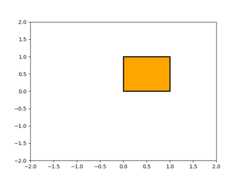
The object underlying all of thematplotlib.patches objects isthePath, which supports the standard set ofmoveto, lineto, curveto commands to draw simple and compound outlinesconsisting of line segments and splines. ThePath is instantiatedwith a (N, 2) array of (x, y) vertices, and an N-length array of pathcodes. For example to draw the unit rectangle from (0, 0) to (1, 1), wecould use this code:
importnumpyasnpimportmatplotlib.pyplotaspltimportmatplotlib.patchesaspatchesfrommatplotlib.pathimportPathverts=[(0.,0.),# left, bottom(0.,1.),# left, top(1.,1.),# right, top(1.,0.),# right, bottom(0.,0.),# ignored]codes=[Path.MOVETO,Path.LINETO,Path.LINETO,Path.LINETO,Path.CLOSEPOLY,]path=Path(verts,codes)fig,ax=plt.subplots()patch=patches.PathPatch(path,facecolor='orange',lw=2)ax.add_patch(patch)ax.set_xlim(-2,2)ax.set_ylim(-2,2)plt.show()
The following path codes are recognized
Code | Vertices | Description |
|---|---|---|
| 1 (ignored) | A marker for the end of the entirepath (currently not required andignored). |
| 1 | Pick up the pen and move to the givenvertex. |
| 1 | Draw a line from the current positionto the given vertex. |
| 2:1 control point,1 end point | Draw a quadratic Bézier curve from thecurrent position, with the givencontrol point, to the given end point. |
| 3:2 control points,1 end point | Draw a cubic Bézier curve from thecurrent position, with the givencontrol points, to the given endpoint. |
| 1 (the point is ignored) | Draw a line segment to the start pointof the current polyline. |
Bézier example#
Some of the path components require multiple vertices to specify them:for example CURVE 3 is aBézier curve with onecontrol point and one end point, and CURVE4 has three vertices for thetwo control points and the end point. The example below shows aCURVE4 Bézier spline -- the Bézier curve will be contained in theconvex hull of the start point, the two control points, and the endpoint
verts=[(0.,0.),# P0(0.2,1.),# P1(1.,0.8),# P2(0.8,0.),# P3]codes=[Path.MOVETO,Path.CURVE4,Path.CURVE4,Path.CURVE4,]path=Path(verts,codes)fig,ax=plt.subplots()patch=patches.PathPatch(path,facecolor='none',lw=2)ax.add_patch(patch)xs,ys=zip(*verts)ax.plot(xs,ys,'x--',lw=2,color='black',ms=10)ax.text(-0.05,-0.05,'P0')ax.text(0.15,1.05,'P1')ax.text(1.05,0.85,'P2')ax.text(0.85,-0.05,'P3')ax.set_xlim(-0.1,1.1)ax.set_ylim(-0.1,1.1)plt.show()

Compound paths#
All of the simple patch primitives in matplotlib, Rectangle, Circle,Polygon, etc, are implemented with simple path. Plotting functionslikehist() andbar(), which create a number ofprimitives, e.g., a bunch of Rectangles, can usually be implemented moreefficiently using a compound path. The reasonbar creates a listof rectangles and not a compound path is largely historical: thePath code is comparatively new andbarpredates it. While we could change it now, it would break old code,so here we will cover how to create compound paths, replacing thefunctionality in bar, in case you need to do so in your own code forefficiency reasons, e.g., you are creating an animated bar plot.
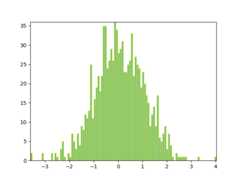
We will make the histogram chart by creating a series of rectanglesfor each histogram bar: the rectangle width is the bin width and therectangle height is the number of datapoints in that bin. First we'llcreate some random normally distributed data and compute thehistogram. Because NumPy returns the bin edges and not centers, thelength ofbins is one greater than the length ofn in theexample below:
# histogram our data with numpydata=np.random.randn(1000)n,bins=np.histogram(data,100)
We'll now extract the corners of the rectangles. Each of theleft,bottom, etc., arrays below islen(n), wheren isthe array of counts for each histogram bar:
Now we have to construct our compound path, which will consist of aseries ofMOVETO,LINETO andCLOSEPOLY for each rectangle.For each rectangle, we need five vertices: one for theMOVETO,three for theLINETO, and one for theCLOSEPOLY. As indicatedin the table above, the vertex for the closepoly is ignored, but we stillneed it to keep the codes aligned with the vertices:
All that remains is to create the path, attach it to aPathPatch, and add it to our Axes:
barpath=path.Path(verts,codes)patch=patches.PathPatch(barpath,facecolor='green',edgecolor='yellow',alpha=0.5)ax.add_patch(patch)
fig,ax=plt.subplots()# Fixing random state for reproducibilitynp.random.seed(19680801)# histogram our data with numpydata=np.random.randn(1000)n,bins=np.histogram(data,100)# get the corners of the rectangles for the histogramleft=np.array(bins[:-1])right=np.array(bins[1:])bottom=np.zeros(len(left))top=bottom+nnrects=len(left)nverts=nrects*(1+3+1)verts=np.zeros((nverts,2))codes=np.full(nverts,Path.LINETO,dtype=int)codes[0::5]=Path.MOVETOcodes[4::5]=Path.CLOSEPOLYverts[0::5,0]=leftverts[0::5,1]=bottomverts[1::5,0]=leftverts[1::5,1]=topverts[2::5,0]=rightverts[2::5,1]=topverts[3::5,0]=rightverts[3::5,1]=bottombarpath=Path(verts,codes)patch=patches.PathPatch(barpath,facecolor='green',edgecolor='yellow',alpha=0.5)ax.add_patch(patch)ax.set_xlim(left[0],right[-1])ax.set_ylim(bottom.min(),top.max())plt.show()