

Note
Go to the endto download the full example code.
Complex and semantic figure composition (subplot_mosaic)#
Laying out Axes in a Figure in a non-uniform grid can be both tediousand verbose. For dense, even grids we haveFigure.subplots but formore complex layouts, such as Axes that span multiple columns / rowsof the layout or leave some areas of the Figure blank, you can usegridspec.GridSpec (seeArranging multiple Axes in a Figure) ormanually place your Axes.Figure.subplot_mosaic aims to provide aninterface to visually lay out your Axes (as either ASCII art or nestedlists) to streamline this process.
This interface naturally supports naming your Axes.Figure.subplot_mosaic returns a dictionary keyed on thelabels used to lay out the Figure. By returning data structures withnames, it is easier to write plotting code that is independent of theFigure layout.
This is inspired by aproposed MEP and thepatchwork library for R.While we do not implement the operator overloading style, we doprovide a Pythonic API for specifying (nested) Axes layouts.
importmatplotlib.pyplotaspltimportnumpyasnp# Helper function used for visualization in the following examplesdefidentify_axes(ax_dict,fontsize=48):""" Helper to identify the Axes in the examples below. Draws the label in a large font in the center of the Axes. Parameters ---------- ax_dict : dict[str, Axes] Mapping between the title / label and the Axes. fontsize : int, optional How big the label should be. """kw=dict(ha="center",va="center",fontsize=fontsize,color="darkgrey")fork,axinax_dict.items():ax.text(0.5,0.5,k,transform=ax.transAxes,**kw)
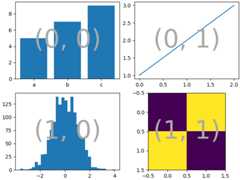
If we want a 2x2 grid we can useFigure.subplots which returns a 2D arrayofaxes.Axes which we can index into to do our plotting.
np.random.seed(19680801)hist_data=np.random.randn(1_500)fig=plt.figure(layout="constrained")ax_array=fig.subplots(2,2,squeeze=False)ax_array[0,0].bar(["a","b","c"],[5,7,9])ax_array[0,1].plot([1,2,3])ax_array[1,0].hist(hist_data,bins="auto")ax_array[1,1].imshow([[1,2],[2,1]])identify_axes({(j,k):aforj,rinenumerate(ax_array)fork,ainenumerate(r)},)
UsingFigure.subplot_mosaic we can produce the same mosaic but give theAxes semantic names
fig=plt.figure(layout="constrained")ax_dict=fig.subplot_mosaic([["bar","plot"],["hist","image"],],)ax_dict["bar"].bar(["a","b","c"],[5,7,9])ax_dict["plot"].plot([1,2,3])ax_dict["hist"].hist(hist_data)ax_dict["image"].imshow([[1,2],[2,1]])identify_axes(ax_dict)
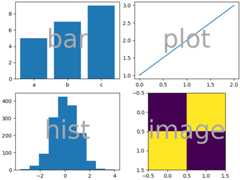
A key difference betweenFigure.subplots andFigure.subplot_mosaic is the return value. While the formerreturns an array for index access, the latter returns a dictionarymapping the labels to theaxes.Axes instances created
print(ax_dict)
{'bar': <Axes: label='bar'>, 'plot': <Axes: label='plot'>, 'hist': <Axes: label='hist'>, 'image': <Axes: label='image'>}String short-hand#
By restricting our Axes labels to single characters we can"draw" the Axes we want as "ASCII art". The following
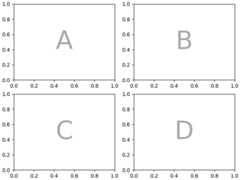
mosaic=""" AB CD """
will give us 4 Axes laid out in a 2x2 grid and generates the samefigure mosaic as above (but now labeled with{"A","B","C","D"} rather than{"bar","plot","hist","image"}).
fig=plt.figure(layout="constrained")ax_dict=fig.subplot_mosaic(mosaic)identify_axes(ax_dict)

Alternatively, you can use the more compact string notation
mosaic="AB;CD"
will give you the same composition, where the";" is usedas the row separator instead of newline.
fig=plt.figure(layout="constrained")ax_dict=fig.subplot_mosaic(mosaic)identify_axes(ax_dict)
Axes spanning multiple rows/columns#
Something we can do withFigure.subplot_mosaic, that we cannotdo withFigure.subplots, is to specify that an Axes should spanseveral rows or columns.
If we want to re-arrange our four Axes to have"C" be a horizontalspan on the bottom and"D" be a vertical span on the right we would do
axd=plt.figure(layout="constrained").subplot_mosaic(""" ABD CCD """)identify_axes(axd)

If we do not want to fill in all the spaces in the Figure with Axes,we can specify some spaces in the grid to be blank
axd=plt.figure(layout="constrained").subplot_mosaic(""" A.C BBB .D. """)identify_axes(axd)

If we prefer to use another character (rather than a period".")to mark the empty space, we can useempty_sentinel to specify thecharacter to use.
axd=plt.figure(layout="constrained").subplot_mosaic(""" aX Xb """,empty_sentinel="X",)identify_axes(axd)

Internally there is no meaning attached to the letters we use, anyUnicode code point is valid!
axd=plt.figure(layout="constrained").subplot_mosaic("""αб ℝ☢""")identify_axes(axd)

It is not recommended to use white space as either a label or anempty sentinel with the string shorthand because it may be strippedwhile processing the input.
Controlling mosaic creation#
This feature is built on top ofgridspec and you can pass thekeyword arguments through to the underlyinggridspec.GridSpec(the same asFigure.subplots).
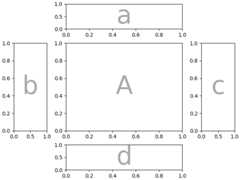
In this case we want to use the input to specify the arrangement,but set the relative widths of the rows / columns. For convenience,gridspec.GridSpec'sheight_ratios andwidth_ratios are exposed in theFigure.subplot_mosaic calling sequence.
axd=plt.figure(layout="constrained").subplot_mosaic(""" .a. bAc .d. """,# set the height ratios between the rowsheight_ratios=[1,3.5,1],# set the width ratios between the columnswidth_ratios=[1,3.5,1],)identify_axes(axd)
Othergridspec.GridSpec keywords can be passed viagridspec_kw. Forexample, use the {left,right,bottom,top} keyword arguments toposition the overall mosaic to put multiple versions of the samemosaic in a figure.
mosaic="""AA BC"""fig=plt.figure()axd=fig.subplot_mosaic(mosaic,gridspec_kw={"bottom":0.25,"top":0.95,"left":0.1,"right":0.5,"wspace":0.5,"hspace":0.5,},)identify_axes(axd)axd=fig.subplot_mosaic(mosaic,gridspec_kw={"bottom":0.05,"top":0.75,"left":0.6,"right":0.95,"wspace":0.5,"hspace":0.5,},)identify_axes(axd)

Alternatively, you can use the sub-Figure functionality:
mosaic="""AA BC"""fig=plt.figure(layout="constrained")left,right=fig.subfigures(nrows=1,ncols=2)axd=left.subplot_mosaic(mosaic)identify_axes(axd)axd=right.subplot_mosaic(mosaic)identify_axes(axd)

Controlling subplot creation#
We can also pass through arguments used to create the subplots(again, the same asFigure.subplots) which will apply to allof the Axes created.
axd=plt.figure(layout="constrained").subplot_mosaic("AB",subplot_kw={"projection":"polar"})identify_axes(axd)

Per-Axes subplot keyword arguments#
If you need to control the parameters passed to each subplot individually useper_subplot_kw to pass a mapping between the Axes identifiers (ortuples of Axes identifiers) to dictionaries of keywords to be passed.
Added in version 3.7.
fig,axd=plt.subplot_mosaic("AB;CD",per_subplot_kw={"A":{"projection":"polar"},("C","D"):{"xscale":"log"}},)identify_axes(axd)
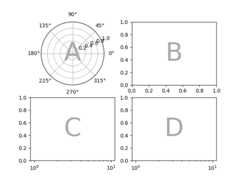
If the layout is specified with the string short-hand, then we know theAxes labels will be one character and can unambiguously interpret longerstrings inper_subplot_kw to specify a set of Axes to apply thekeywords to:
fig,axd=plt.subplot_mosaic("AB;CD",per_subplot_kw={"AD":{"projection":"polar"},"BC":{"facecolor":".9"}},)identify_axes(axd)
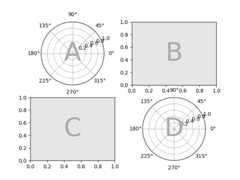
Ifsubplot_kw andper_subplot_kw are used together, then they aremerged withper_subplot_kw taking priority:
axd=plt.figure(layout="constrained").subplot_mosaic("AB;CD",subplot_kw={"facecolor":"xkcd:tangerine"},per_subplot_kw={"B":{"facecolor":"xkcd:water blue"},"D":{"projection":"polar","facecolor":"w"},})identify_axes(axd)
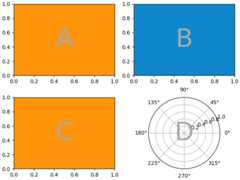
Nested list input#
Everything we can do with the string shorthand we can also do whenpassing in a list (internally we convert the string shorthand to a nestedlist), for example using spans, blanks, andgridspec_kw:
axd=plt.figure(layout="constrained").subplot_mosaic([["main","zoom"],["main","BLANK"],],empty_sentinel="BLANK",width_ratios=[2,1],)identify_axes(axd)

In addition, using the list input we can specify nested mosaics. Any elementof the inner list can be another set of nested lists:
inner=[["inner A"],["inner B"],]outer_nested_mosaic=[["main",inner],["bottom","bottom"],]axd=plt.figure(layout="constrained").subplot_mosaic(outer_nested_mosaic,empty_sentinel=None)identify_axes(axd,fontsize=36)
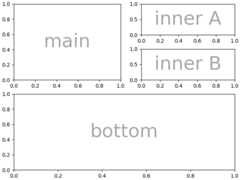
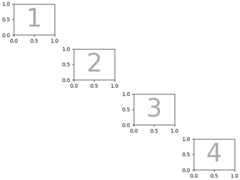
We can also pass in a 2D NumPy array to do things like
Total running time of the script: (0 minutes 12.159 seconds)