

Note
Go to the endto download the full example code.
Faster rendering by using blitting#
Blitting is astandard technique in raster graphics that,in the context of Matplotlib, can be used to (drastically) improveperformance of interactive figures. For example, theanimation andwidgets modules use blittinginternally. Here, we demonstrate how to implement your own blitting, outsideof these classes.
Blitting speeds up repetitive drawing by rendering all non-changinggraphic elements into a background image once. Then, for every draw, only thechanging elements need to be drawn onto this background. For example,if the limits of an Axes have not changed, we can render the empty Axesincluding all ticks and labels once, and only draw the changing data later.
The strategy is
Prepare the constant background:
Draw the figure, but exclude all artists that you want to animate bymarking them asanimated (see
Artist.set_animated).Save a copy of the RBGA buffer.
Render the individual images:
Restore the copy of the RGBA buffer.
Redraw the animated artists using
Axes.draw_artist/Figure.draw_artist.Show the resulting image on the screen.
One consequence of this procedure is that your animated artists are alwaysdrawn on top of the static artists.
Not all backends support blitting. You can check if a given canvas does viatheFigureCanvasBase.supports_blit property.
Warning
This code does not work with the macosx backend (but does work with otherGUI backends on Mac).
Minimal example#
We can use theFigureCanvasAgg methodscopy_from_bbox andrestore_region in conjunction with settinganimated=True on our artist to implement a minimal example thatuses blitting to accelerate rendering
importmatplotlib.pyplotaspltimportnumpyasnpx=np.linspace(0,2*np.pi,100)fig,ax=plt.subplots()# animated=True tells matplotlib to only draw the artist when we# explicitly request it(ln,)=ax.plot(x,np.sin(x),animated=True)# make sure the window is raised, but the script keeps goingplt.show(block=False)# stop to admire our empty window axes and ensure it is rendered at# least once.## We need to fully draw the figure at its final size on the screen# before we continue on so that :# a) we have the correctly sized and drawn background to grab# b) we have a cached renderer so that ``ax.draw_artist`` works# so we spin the event loop to let the backend process any pending operationsplt.pause(0.1)# get copy of entire figure (everything inside fig.bbox) sans animated artistbg=fig.canvas.copy_from_bbox(fig.bbox)# draw the animated artist, this uses a cached rendererax.draw_artist(ln)# show the result to the screen, this pushes the updated RGBA buffer from the# renderer to the GUI framework so you can see itfig.canvas.blit(fig.bbox)forjinrange(100):# reset the background back in the canvas state, screen unchangedfig.canvas.restore_region(bg)# update the artist, neither the canvas state nor the screen have changedln.set_ydata(np.sin(x+(j/100)*np.pi))# re-render the artist, updating the canvas state, but not the screenax.draw_artist(ln)# copy the image to the GUI state, but screen might not be changed yetfig.canvas.blit(fig.bbox)# flush any pending GUI events, re-painting the screen if neededfig.canvas.flush_events()# you can put a pause in if you want to slow things down# plt.pause(.1)
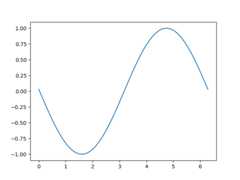
This example works and shows a simple animation, however because weare only grabbing the background once, if the size of the figure inpixels changes (due to either the size or dpi of the figurechanging) , the background will be invalid and result in incorrect(but sometimes cool looking!) images. There is also a globalvariable and a fair amount of boilerplate which suggests we shouldwrap this in a class.
Class-based example#
We can use a class to encapsulate the boilerplate logic and state ofrestoring the background, drawing the artists, and then blitting theresult to the screen. Additionally, we can use the'draw_event'callback to capture a new background whenever a full re-drawhappens to handle resizes correctly.
classBlitManager:def__init__(self,canvas,animated_artists=()):""" Parameters ---------- canvas : FigureCanvasAgg The canvas to work with, this only works for subclasses of the Agg canvas which have the `~FigureCanvasAgg.copy_from_bbox` and `~FigureCanvasAgg.restore_region` methods. animated_artists : Iterable[Artist] List of the artists to manage """self.canvas=canvasself._bg=Noneself._artists=[]forainanimated_artists:self.add_artist(a)# grab the background on every drawself.cid=canvas.mpl_connect("draw_event",self.on_draw)defon_draw(self,event):"""Callback to register with 'draw_event'."""cv=self.canvasifeventisnotNone:ifevent.canvas!=cv:raiseRuntimeErrorself._bg=cv.copy_from_bbox(cv.figure.bbox)self._draw_animated()defadd_artist(self,art):""" Add an artist to be managed. Parameters ---------- art : Artist The artist to be added. Will be set to 'animated' (just to be safe). *art* must be in the figure associated with the canvas this class is managing. """ifart.figure!=self.canvas.figure:raiseRuntimeErrorart.set_animated(True)self._artists.append(art)def_draw_animated(self):"""Draw all of the animated artists."""fig=self.canvas.figureforainself._artists:fig.draw_artist(a)defupdate(self):"""Update the screen with animated artists."""cv=self.canvasfig=cv.figure# paranoia in case we missed the draw event,ifself._bgisNone:self.on_draw(None)else:# restore the backgroundcv.restore_region(self._bg)# draw all of the animated artistsself._draw_animated()# update the GUI statecv.blit(fig.bbox)# let the GUI event loop process anything it has to docv.flush_events()
Here is how we would use our class. This is a slightly more complicatedexample than the first case as we add a text frame counter as well.
# make a new figurefig,ax=plt.subplots()# add a line(ln,)=ax.plot(x,np.sin(x),animated=True)# add a frame numberfr_number=ax.annotate("0",(0,1),xycoords="axes fraction",xytext=(10,-10),textcoords="offset points",ha="left",va="top",animated=True,)bm=BlitManager(fig.canvas,[ln,fr_number])# make sure our window is on the screen and drawnplt.show(block=False)plt.pause(.1)forjinrange(100):# update the artistsln.set_ydata(np.sin(x+(j/100)*np.pi))fr_number.set_text(f"frame:{j}")# tell the blitting manager to do its thingbm.update()
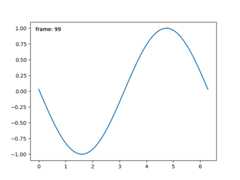
This class does not depend onpyplot and is suitable to embedinto larger GUI application.
Total running time of the script: (0 minutes 1.296 seconds)