

Note
Go to the endto download the full example code.
Date precision and epochs#
Matplotlib can handledatetime objects andnumpy.datetime64 objects usinga unit converter that recognizes these dates and converts them to floatingpoint numbers.
Before Matplotlib 3.3, the default for this conversion returns a float that wasdays since "0000-12-31T00:00:00". As of Matplotlib 3.3, the default isdays from "1970-01-01T00:00:00". This allows more resolution for moderndates. "2020-01-01" with the old epoch converted to 730120, and a 64-bitfloating point number has a resolution of 2^{-52}, or approximately14 microseconds, so microsecond precision was lost. With the new defaultepoch "2020-01-01" is 10957.0, so the achievable resolution is 0.21microseconds.
importdatetimeimportmatplotlib.pyplotaspltimportnumpyasnpimportmatplotlib.datesasmdatesdef_reset_epoch_for_tutorial():""" Users (and downstream libraries) should not use the private method of resetting the epoch. """mdates._reset_epoch_test_example()
Datetime#
Pythondatetime objects have microsecond resolution, so with theold default matplotlib dates could not round-trip full-resolution datetimeobjects.
old_epoch='0000-12-31T00:00:00'new_epoch='1970-01-01T00:00:00'_reset_epoch_for_tutorial()# Don't do this. Just for this tutorial.mdates.set_epoch(old_epoch)# old epoch (pre MPL 3.3)date1=datetime.datetime(2000,1,1,0,10,0,12,tzinfo=datetime.timezone.utc)mdate1=mdates.date2num(date1)print('Before Roundtrip: ',date1,'Matplotlib date:',mdate1)date2=mdates.num2date(mdate1)print('After Roundtrip: ',date2)
Before Roundtrip: 2000-01-01 00:10:00.000012+00:00 Matplotlib date: 730120.0069444446After Roundtrip: 2000-01-01 00:10:00.000020+00:00
Note this is only a round-off error, and there is no problem fordates closer to the old epoch:
date1=datetime.datetime(10,1,1,0,10,0,12,tzinfo=datetime.timezone.utc)mdate1=mdates.date2num(date1)print('Before Roundtrip: ',date1,'Matplotlib date:',mdate1)date2=mdates.num2date(mdate1)print('After Roundtrip: ',date2)
Before Roundtrip: 0010-01-01 00:10:00.000012+00:00 Matplotlib date: 3288.006944444583After Roundtrip: 0010-01-01 00:10:00.000012+00:00
If a user wants to use modern dates at microsecond precision, theycan change the epoch usingset_epoch. However, the epoch has to beset before any date operations to prevent confusion between differentepochs. Trying to change the epoch later will raise aRuntimeError.
try:mdates.set_epoch(new_epoch)# this is the new MPL 3.3 default.exceptRuntimeErrorase:print('RuntimeError:',str(e))
RuntimeError: set_epoch must be called before dates plotted.
For this tutorial, we reset the sentinel using a private method, but usersshould just set the epoch once, if at all.
_reset_epoch_for_tutorial()# Just being done for this tutorial.mdates.set_epoch(new_epoch)date1=datetime.datetime(2020,1,1,0,10,0,12,tzinfo=datetime.timezone.utc)mdate1=mdates.date2num(date1)print('Before Roundtrip: ',date1,'Matplotlib date:',mdate1)date2=mdates.num2date(mdate1)print('After Roundtrip: ',date2)
Before Roundtrip: 2020-01-01 00:10:00.000012+00:00 Matplotlib date: 18262.006944444583After Roundtrip: 2020-01-01 00:10:00.000012+00:00
datetime64#
numpy.datetime64 objects have microsecond precision for a much largertimespace thandatetime objects. However, currently Matplotlib time isonly converted back to datetime objects, which have microsecond resolution,and years that only span 0000 to 9999.
_reset_epoch_for_tutorial()# Don't do this. Just for this tutorial.mdates.set_epoch(new_epoch)date1=np.datetime64('2000-01-01T00:10:00.000012')mdate1=mdates.date2num(date1)print('Before Roundtrip: ',date1,'Matplotlib date:',mdate1)date2=mdates.num2date(mdate1)print('After Roundtrip: ',date2)
Before Roundtrip: 2000-01-01T00:10:00.000012 Matplotlib date: 10957.006944444583After Roundtrip: 2000-01-01 00:10:00.000012+00:00
Plotting#
This all of course has an effect on plotting. With the old default epochthe times were rounded during the internaldate2num conversion, leadingto jumps in the data:
_reset_epoch_for_tutorial()# Don't do this. Just for this tutorial.mdates.set_epoch(old_epoch)x=np.arange('2000-01-01T00:00:00.0','2000-01-01T00:00:00.000100',dtype='datetime64[us]')# simulate the plot being made using the old epochxold=np.array([mdates.num2date(mdates.date2num(d))fordinx])y=np.arange(0,len(x))# resetting the Epoch so plots are comparable_reset_epoch_for_tutorial()# Don't do this. Just for this tutorial.mdates.set_epoch(new_epoch)fig,ax=plt.subplots(layout='constrained')ax.plot(xold,y)ax.set_title('Epoch: '+mdates.get_epoch())ax.xaxis.set_tick_params(rotation=40)plt.show()
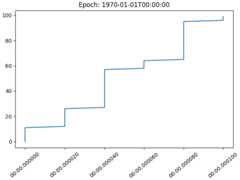
For dates plotted using the more recent epoch, the plot is smooth:
fig,ax=plt.subplots(layout='constrained')ax.plot(x,y)ax.set_title('Epoch: '+mdates.get_epoch())ax.xaxis.set_tick_params(rotation=40)plt.show()_reset_epoch_for_tutorial()# Don't do this. Just for this tutorial.

References
The use of the following functions, methods, classes and modules is shownin this example:
Total running time of the script: (0 minutes 1.047 seconds)