

Note
Go to the endto download the full example code.
Format date ticks using ConciseDateFormatter#
Finding good tick values and formatting the ticks for an axis thathas date data is often a challenge.ConciseDateFormatter ismeant to improve the strings chosen for the ticklabels, and to minimizethe strings used in those tick labels as much as possible.
Note
This formatter is a candidate to become the default date tick formatterin future versions of Matplotlib. Please report any issues orsuggestions for improvement to the GitHub repository or mailing list.
importdatetimeimportmatplotlib.pyplotaspltimportnumpyasnpimportmatplotlib.datesasmdates
First, the default formatter.
base=datetime.datetime(2005,2,1)dates=[base+datetime.timedelta(hours=(2*i))foriinrange(732)]N=len(dates)np.random.seed(19680801)y=np.cumsum(np.random.randn(N))fig,axs=plt.subplots(3,1,layout='constrained',figsize=(6,6))lims=[(np.datetime64('2005-02'),np.datetime64('2005-04')),(np.datetime64('2005-02-03'),np.datetime64('2005-02-15')),(np.datetime64('2005-02-03 11:00'),np.datetime64('2005-02-04 13:20'))]fornn,axinenumerate(axs):ax.plot(dates,y)ax.set_xlim(lims[nn])ax.tick_params(axis='x',rotation=40,rotation_mode='xtick')axs[0].set_title('Default Date Formatter')plt.show()

The default date formatter is quite verbose, so we have the option ofusingConciseDateFormatter, as shown below. Note thatfor this example the labels do not need to be rotated as they do for thedefault formatter because the labels are as small as possible.
fig,axs=plt.subplots(3,1,layout='constrained',figsize=(6,6))fornn,axinenumerate(axs):locator=mdates.AutoDateLocator(minticks=3,maxticks=7)formatter=mdates.ConciseDateFormatter(locator)ax.xaxis.set_major_locator(locator)ax.xaxis.set_major_formatter(formatter)ax.plot(dates,y)ax.set_xlim(lims[nn])axs[0].set_title('Concise Date Formatter')plt.show()
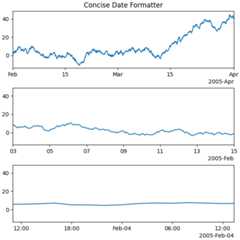
If all calls to axes that have dates are to be made using this converter,it is probably most convenient to use the units registry where you doimports:
importmatplotlib.unitsasmunitsconverter=mdates.ConciseDateConverter()munits.registry[np.datetime64]=convertermunits.registry[datetime.date]=convertermunits.registry[datetime.datetime]=converterfig,axs=plt.subplots(3,1,figsize=(6,6),layout='constrained')fornn,axinenumerate(axs):ax.plot(dates,y)ax.set_xlim(lims[nn])axs[0].set_title('Concise Date Formatter')plt.show()

Localization of date formats#
Dates formats can be localized if the default formats are not desirable bymanipulating one of three lists of strings.
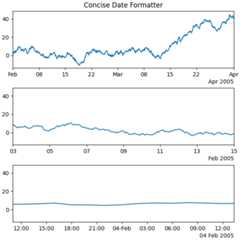
Theformatter.formats list of formats is for the normal tick labels,There are six levels: years, months, days, hours, minutes, seconds.Theformatter.offset_formats is how the "offset" string on the rightof the axis is formatted. This is usually much more verbose than the ticklabels. Finally, theformatter.zero_formats are the formats of theticks that are "zeros". These are tick values that are either the first ofthe year, month, or day of month, or the zeroth hour, minute, or second.These are usually the same as the format ofthe ticks a level above. For example if the axis limits mean the ticks aremostly days, then we label 1 Mar 2005 simply with a "Mar". If the axislimits are mostly hours, we label Feb 4 00:00 as simply "Feb-4".
Note that these format lists can also be passed toConciseDateFormatteras optional keyword arguments.
Here we modify the labels to be "day month year", instead of the ISO"year month day":
fig,axs=plt.subplots(3,1,layout='constrained',figsize=(6,6))fornn,axinenumerate(axs):locator=mdates.AutoDateLocator()formatter=mdates.ConciseDateFormatter(locator)formatter.formats=['%y',# ticks are mostly years'%b',# ticks are mostly months'%d',# ticks are mostly days'%H:%M',# hrs'%H:%M',# min'%S.%f',]# secs# these are mostly just the level above...formatter.zero_formats=['']+formatter.formats[:-1]# ...except for ticks that are mostly hours, then it is nice to have# month-day:formatter.zero_formats[3]='%d-%b'formatter.offset_formats=['','%Y','%b %Y','%d %b %Y','%d %b %Y','%d %b %Y %H:%M',]ax.xaxis.set_major_locator(locator)ax.xaxis.set_major_formatter(formatter)ax.plot(dates,y)ax.set_xlim(lims[nn])axs[0].set_title('Concise Date Formatter')plt.show()
Registering a converter with localization#
ConciseDateFormatter doesn't have rcParams entries, but localization canbe accomplished by passing keyword arguments toConciseDateConverter andregistering the datatypes you will use with the units registry:
importdatetimeformats=['%y',# ticks are mostly years'%b',# ticks are mostly months'%d',# ticks are mostly days'%H:%M',# hrs'%H:%M',# min'%S.%f',]# secs# these can be the same, except offset by one level....zero_formats=['']+formats[:-1]# ...except for ticks that are mostly hours, then it's nice to have month-dayzero_formats[3]='%d-%b'offset_formats=['','%Y','%b %Y','%d %b %Y','%d %b %Y','%d %b %Y %H:%M',]converter=mdates.ConciseDateConverter(formats=formats,zero_formats=zero_formats,offset_formats=offset_formats)munits.registry[np.datetime64]=convertermunits.registry[datetime.date]=convertermunits.registry[datetime.datetime]=converterfig,axs=plt.subplots(3,1,layout='constrained',figsize=(6,6))fornn,axinenumerate(axs):ax.plot(dates,y)ax.set_xlim(lims[nn])axs[0].set_title('Concise Date Formatter registered non-default')plt.show()

Total running time of the script: (0 minutes 4.886 seconds)