

Note
Go to the endto download the full example code.
Box plots with custom fill colors#
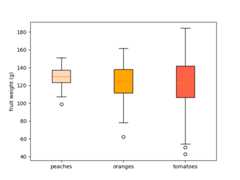
To color each box of a box plot individually:
use the keyword argument
patch_artist=Trueto create filled boxes.loop through the created boxes and adapt their color.
importmatplotlib.pyplotaspltimportnumpyasnpnp.random.seed(19680801)fruit_weights=[np.random.normal(130,10,size=100),np.random.normal(125,20,size=100),np.random.normal(120,30,size=100),]labels=['peaches','oranges','tomatoes']colors=['peachpuff','orange','tomato']fig,ax=plt.subplots()ax.set_ylabel('fruit weight (g)')bplot=ax.boxplot(fruit_weights,patch_artist=True,# fill with colortick_labels=labels)# will be used to label x-ticks# fill with colorsforpatch,colorinzip(bplot['boxes'],colors):patch.set_facecolor(color)plt.show()
Tags:styling: colordomain: statisticsplot-type: boxplot
References
The use of the following functions, methods, classes and modules is shownin this example: