

Note
Go to the endto download the full example code.
Ellipse with orientation arrow demo#
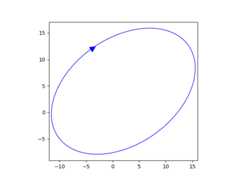
This demo shows how to draw an ellipse withan orientation arrow (clockwise or counterclockwise).Compare this to theEllipse collection example.
importmatplotlib.pyplotaspltfrommatplotlib.markersimportMarkerStylefrommatplotlib.patchesimportEllipsefrommatplotlib.transformsimportAffine2D# Create a figure and axisfig,ax=plt.subplots(subplot_kw={"aspect":"equal"})ellipse=Ellipse(xy=(2,4),width=30,height=20,angle=35,facecolor="none",edgecolor="b")ax.add_patch(ellipse)# Plot an arrow marker at the end point of minor axisvertices=ellipse.get_co_vertices()t=Affine2D().rotate_deg(ellipse.angle)ax.plot(vertices[0][0],vertices[0][1],color="b",marker=MarkerStyle(">","full",t),markersize=10)# Note: To reverse the orientation arrow, switch the marker type from > to <.plt.show()
References
The use of the following functions, methods, classes and modules is shownin this example: