

Note
Go to the endto download the full example code.
Compound path#
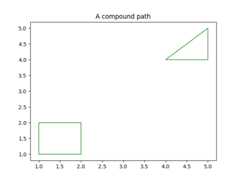
Make a compound path -- in this case two simple polygons, a rectangleand a triangle. UseCLOSEPOLY andMOVETO for the different parts ofthe compound path
importmatplotlib.pyplotaspltfrommatplotlib.patchesimportPathPatchfrommatplotlib.pathimportPathvertices=[]codes=[]codes=[Path.MOVETO]+[Path.LINETO]*3+[Path.CLOSEPOLY]vertices=[(1,1),(1,2),(2,2),(2,1),(0,0)]codes+=[Path.MOVETO]+[Path.LINETO]*2+[Path.CLOSEPOLY]vertices+=[(4,4),(5,5),(5,4),(0,0)]path=Path(vertices,codes)pathpatch=PathPatch(path,facecolor='none',edgecolor='green')fig,ax=plt.subplots()ax.add_patch(pathpatch)ax.set_title('A compound path')ax.autoscale_view()plt.show()
References
The use of the following functions, methods, classes and modules is shownin this example: