

Note
Go to the endto download the full example code.
Clip the data to the axes view limits#
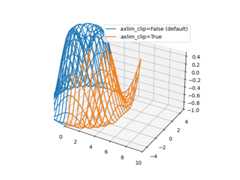
Demonstrate clipping of line and marker data to the axes view limits. Theaxlim_clip keyword argument can be used in any of the 3D plottingfunctions.
importmatplotlib.pyplotaspltimportnumpyasnpfig,ax=plt.subplots(subplot_kw={"projection":"3d"})# Make the datax=np.arange(-5,5,0.5)y=np.arange(-5,5,0.5)X,Y=np.meshgrid(x,y)R=np.sqrt(X**2+Y**2)Z=np.sin(R)# Default behavior is axlim_clip=Falseax.plot_wireframe(X,Y,Z,color='C0')# When axlim_clip=True, note that when a line segment has one vertex outside# the view limits, the entire line is hidden. The same is true for 3D patches# if one of their vertices is outside the limits (not shown).ax.plot_wireframe(X,Y,Z,color='C1',axlim_clip=True)# In this example, data where x < 0 or z > 0.5 is clippedax.set(xlim=(0,10),ylim=(-5,5),zlim=(-1,0.5))ax.legend(['axlim_clip=False (default)','axlim_clip=True'])plt.show()
Tags:plot-type: 3Dlevel: beginner