

Note
Go to the endto download the full example code.
Writing mathematical expressions#
Matplotlib implements a lightweight TeX expression parser and layout engine andMathtext is the subset of Tex markup that this engine supports. Note thatMatplotlib can also render all text directly using TeX ifrcParams["text.usetex"] (default:False) isTrue; seeText rendering with LaTeX for more details. Mathtext support is availableifrcParams["text.usetex"] (default:False) isFalse.
Any string can be processed as Mathtext by placing the string inside a pair ofdollar signs'$'. Mathtext often contains many backslashes'\'; so thatthe backslashes do not need to be escaped, Mathtext is often written using rawstrings. For example:
importmatplotlib.pyplotaspltfig=plt.figure(figsize=(3,3),linewidth=1,edgecolor='black')fig.text(.2,.7,"plain text: alpha > beta")fig.text(.2,.5,"Mathtext: $\\alpha >\\beta$")fig.text(.2,.3,r"raw string Mathtext: $\alpha > \beta$")

See also
TeX doesnot need to be installed to use Mathtext because Matplotlib shipswith the Mathtext parser and engine. The Mathtext layout engine is a fairlydirect adaptation of the layout algorithms in Donald Knuth's TeX. To rendermathematical text using a different TeX engine, seeText rendering with LaTeX.
Note
To generate html output in documentation that will exactly match the outputgenerated bymathtext, use thematplotlib.sphinxext.mathmpl Sphinxextension.
Special characters#
Mathtext must be placed between a pair of (US) dollar signs'$'. A literaldollar symbol'$' in a string containing Mathtext must be escaped using abackslash:'\$'. A string may contain multiple pairs of dollar signs,resulting in multiple Mathtext expressions. Strings with an odd number ofdollar signs are rendered solely as plain text.
fig=plt.figure(figsize=(3,3),linewidth=1,edgecolor='black')fig.suptitle("Number of unescaped $")fig.text(.1,.7,r"odd: $ \alpha $ = $1")fig.text(.1,.5,r"even: $ \beta $= $ 2 $")fig.text(.1,.3,r'odd: $ \gamma $= \$3 $')fig.text(.1,.1,r'even: $ \delta $ = $ \$4 $')

While Mathtext aims for compatibility with regular TeX, it diverges on whenspecial characters need to be escaped. In TeX the dollar sign must be escaped'\$' in non-math text, while in Matplotlib the dollar sign must beescaped when writing Mathtext.
These other special characters are also escaped in non-math TeX, while inMatplotlib their behavior is dependent on howrcParams["text.usetex"] (default:False) is set:
# $ % & ~ _ ^ \ { } \( \) \[ \]See theusetex tutorial for more information.
Subscripts and superscripts#
To make subscripts and superscripts, use the'_' and'^' symbols:
r'$\alpha_i > \beta_i$'
To display multi-letter subscripts or superscripts correctly,you should put them in curly braces{...}:
r'$\alpha^{ic} > \beta_{ic}$'
Some symbols automatically put their sub/superscripts under and over theoperator. For example, to write the sum of from
from to
to , you could do:
r'$\sum_{i=0}^\infty x_i$'
Fractions, binomials, and stacked numbers#
Fractions, binomials, and stacked numbers can be created with the\frac{}{},\binom{}{} and\genfrac{}{}{}{}{}{} commands,respectively:
r'$\frac{3}{4} \binom{3}{4} \genfrac{}{}{0}{}{3}{4}$'
produces
Fractions can be arbitrarily nested:
r'$\frac{5 - \frac{1}{x}}{4}$'
produces
Note that special care needs to be taken to place parentheses and bracketsaround fractions. Doing things the obvious way produces brackets that are toosmall:
r'$(\frac{5 - \frac{1}{x}}{4})$'
The solution is to precede the bracket with\left and\right to informthe parser that those brackets encompass the entire object.:
r'$\left(\frac{5 - \frac{1}{x}}{4}\right)$'
Radicals#
Radicals can be produced with the\sqrt[]{} command. For example:
r'$\sqrt{2}$'
Any base can (optionally) be provided inside square brackets. Note that thebase must be a simple expression, and cannot contain layout commands such asfractions or sub/superscripts:
r'$\sqrt[3]{x}$'
Fonts#
The default font isitalics for mathematical symbols.
This default can be changed usingrcParams["mathtext.default"] (default:'it'). For setting rcParams,seeCustomizing Matplotlib with style sheets and rcParams. For example, setting the default toregular allowsyou to use the same font for math text and regular non-math text.
To change fonts, e.g., to write "sin" in a Roman font, enclose the text in afont command:
r'$s(t) = \mathcal{A}\mathrm{sin}(2 \omega t)$'
More conveniently, many commonly used function names that are typeset ina Roman font have shortcuts. So the expression above could be written asfollows:
r'$s(t) = \mathcal{A}\sin(2 \omega t)$'
Here "s" and "t" are variable in italics font (default), "sin" is in Romanfont, and the amplitude "A" is in calligraphy font. Note in the example abovethe calligraphyA is squished into thesin. You can use a spacingcommand to add a little whitespace between them:
r's(t) = \mathcal{A}\/\sin(2 \omega t)'
Mathtext can use DejaVu Sans (default), DejaVu Serif, Computer Modern fontsfrom (La)TeX,STIX fonts which are designedto blend well with Times, or a Unicode font that you provide. The Mathtextfont can be selected viarcParams["mathtext.fontset"] (default:'dejavusans').
The choices available with all fonts are:
Command | Result |
|---|---|
|
|
|
|
|
|
|
|


When using theSTIX fonts, you also have thechoice of:
Command | Result |
|---|---|
|
|
|
|
|
|
|
|
|
|
|
|


There are also five global "font sets" to choose from, which areselected using themathtext.fontset parameter inmatplotlibrc.
dejavusans: DejaVu Sans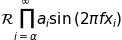
dejavuserif: DejaVu Serif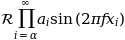
cm: Computer Modern (TeX)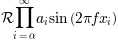
stix: STIX (designed to blend well with Times)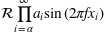
stixsans: STIX sans-serif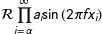
Additionally, you can use\mathdefault{...} or its alias\mathregular{...} to use the font used for regular text outside ofMathtext. There are a number of limitations to this approach, most notablythat far fewer symbols will be available, but it can be useful to make mathexpressions blend well with other text in the plot.
For compatibility with popular packages,\text{...} is available and uses the\mathrm{...} font, but otherwise retains spaces and renders - as a dash(not minus).
Custom fonts#
Mathtext also provides a way to use custom fonts for math. This method isfairly tricky to use, and should be considered an experimental feature forpatient users only. By settingrcParams["mathtext.fontset"] (default:'dejavusans') tocustom,you can then set the following parameters, which control which font file to usefor a particular set of math characters.
Parameter | Corresponds to |
|---|---|
|
|
|
|
|
|
|
|
|
|
|
|
|
|
Each parameter should be set to a fontconfig font descriptor, as defined inFonts in Matplotlib. The fonts used should have a Unicode mapping in order to findany non-Latin characters, such as Greek. If you want to use a math symbolthat is not contained in your custom fonts, you can setrcParams["mathtext.fallback"] (default:'cm') to either'cm','stix' or'stixsans'which will cause the Mathtext system to usecharacters from an alternative font whenever a particularcharacter cannot be found in the custom font.
Note that the math glyphs specified in Unicode have evolved over time, andmany fonts may not have glyphs in the correct place for Mathtext.
Accents#
An accent command may precede any symbol to add an accent above it. There arelong and short forms for some of them.
Command | Result |
|---|---|
|
|
|
|
|
|
|
|
|
|
|
|
|
|
|
|
|
|
|
|
|
|
|
|


In addition, there are two special accents that automatically adjust to thewidth of the symbols below:
Command | Result |
|---|---|
|
|
|
|


Care should be taken when putting accents on lower-case i's and j's. Notethat in the following\imath is used to avoid the extra dot over the i:
r"$\hat i\ \ \hat \imath$"
Symbols#
You can also use a large number of the TeX symbols, as in\infty,\leftarrow,\sum,\int.
Lower-case Greek
α | β | γ | δ |
ε | ε | ζ | η |
θ | ϑ | ι | κ |
ϰ | λ | μ | ν |
ξ | π | ϖ | ρ |
ϱ | σ | ς | τ |
υ | χ | ψ | ω |
ϕ | φ | ϝ |
Upper-case Greek
Γ | Δ | Θ | Λ |
Ξ | Π | Σ | Υ |
Φ | Ψ | Ω |
Hebrew
ℸ | ℷ | ℶ | ℵ |
Latin named characters
Å | Æ | Ð | Ø | Þ | ß |
å | æ | ð | ð | ø | þ |
Œ | œ |
Delimiters
( | ( | ) | ) | . |
/ | < | > | [ | [ |
\ | | | | | ] | ] |
{ | { | { | } | } |
} | ‖ | ‖ | ↑ | ↓ |
↕ | ⇑ | ⇓ | ⇕ | ⌈ |
⌉ | ⌊ | ⌋ | ⟨ | ⟩ |
⟮ | ⟯ |
Big symbols
∏ | ∐ | ∑ | ∫ | ∬ |
∭ | ∮ | ∯ | ∰ | ⋀ |
⋁ | ⋂ | ⋃ | ⨀ | ⨁ |
⨂ | ⨄ | ⨆ | ⨌ |
Standard function names
Pr | arccos | arcsin | arctan | arg |
cos | cosh | cot | coth | csc |
deg | det | dim | exp | gcd |
hom | inf | ker | lg | lim |
liminf | limsup | ln | log | max |
min | sec | sin | sinh | sup |
tan | tanh |
Binary operation symbols
* | + | - | ± |
× | ÷ | † | ‡ |
− | ∓ | ∔ | ∕ |
∖ | ∗ | ∘ | ∙ |
∧ | ∨ | ∩ | ∪ |
∸ | ∹ | ∺ | ≀ |
⊍ | ⊎ | ⊓ | ⊔ |
⊕ | ⊖ | ⊗ | ⊘ |
⊙ | ⊚ | ⊛ | ⊝ |
⊞ | ⊟ | ⊠ | ⊡ |
⊴ | ⊵ | ⊺ | ⊻ |
⊼ | ⊽ | ⋄ | ⋅ |
⋆ | ⋇ | ⋋ | ⋌ |
⋎ | ⋏ | ⋒ | ⋓ |
⌆ | ⌽ | △ | ▷ |
▷ | ▽ | ◁ | ◁ |
○ | ◫ | ⨿ | ⩕ |
Relation symbols
: | < | = | = |
> | ϶ | … | ∈ |
∉ | ∊ | ∋ | ∌ |
∍ | ∝ | ∝ | ∟ |
∣ | ∤ | ∥ | ∦ |
∴ | ∵ | ∶ | ∼ |
∽ | ≁ | ≂ | ≃ |
≄ | ≅ | ≆ | ≇ |
≈ | ≉ | ≊ | ≋ |
≌ | ≍ | ≎ | ≏ |
≐ | ≑ | ≑ | ≒ |
≓ | ≔ | ≕ | ≖ |
≗ | ≘ | ≙ | ≚ |
≛ | ≜ | ≜ | ≝ |
≞ | ≟ | ≠ | ≠ |
≡ | ≢ | ≣ | ≤ |
≥ | ≦ | ≧ | ≨ |
≩ | ≪ | ≫ | ≬ |
≮ | ≯ | ≰ | ≱ |
≲ | ≳ | ≴ | ≵ |
≶ | ≷ | ≸ | ≹ |
≺ | ≻ | ≼ | ≼ |
≽ | ≽ | ≾ | ≿ |
⊀ | ⊁ | ⊂ | ⊃ |
⊄ | ⊅ | ⊆ | ⊇ |
⊈ | ⊉ | ⊊ | ⊋ |
⊏ | ⊐ | ⊑ | ⊒ |
⊜ | ⊢ | ⊣ | ⊤ |
⊥ | ⊦ | ⊧ | ⊨ |
⊩ | ⊪ | ⊫ | ⊬ |
⊭ | ⊮ | ⊯ | ⊱ |
⊴ | ⊵ | ⊾ | ⊿ |
⋈ | ⋉ | ⋊ | ⋍ |
⋐ | ⋑ | ⋔ | ⋕ |
⋖ | ⋗ | ⋘ | ⋙ |
⋚ | ⋛ | ⋜ | ⋝ |
⋞ | ⋟ | ⋠ | ⋡ |
⋢ | ⋣ | ⋤ | ⋥ |
⋦ | ⋧ | ⋨ | ⋩ |
⋪ | ⋫ | ⋬ | ⋭ |
⋲ | ⋴ | ⋳ | ⋵ |
⋷ | ⋶ | ⋸ | ⋹ |
⋺ | ⋼ | ⋻ | ⋾ |
⋽ | ⋿ | ⌢ | ⌣ |
△ | ▶ | ▷ | ⊳ |
◀ | ◁ | ⊲ | ⟂ |
⨝ | ⩽ | ⩾ | ⪅ |
⪆ | ⪉ | ⪊ | ⪋ |
⪌ | ⪕ | ⪖ | ⪷ |
⪸ | ⪹ | ⪺ | ⫅ |
⫆ | ⫋ | ⫌ |
Arrow symbols
⃖ |
| ← | ↑ |
→ | → | ↓ | ↔ |
↕ | ↖ | ↗ | ↘ |
↙ | ↚ | ↛ | ↜ |
↝ | ↞ | ↟ | ↠ |
↡ | ↢ | ↣ | ↤ |
↥ | ↦ | ↧ | ↨ |
↩ | ↪ | ↫ | ↬ |
↭ | ↮ | ↯ | ↰ |
↱ | ↲ | ↳ | ↶ |
↷ | ↺ | ↻ | ↻ |
↼ | ↽ | ↾ | ↿ |
⇀ | ⇁ | ⇂ | ⇃ |
⇄ | ⇅ | ⇆ | ⇇ |
⇈ | ⇉ | ⇊ | ⇋ |
⇌ | ⇍ | ⇎ | ⇏ |
⇐ | ⇑ | ⇒ | ⇓ |
⇔ | ⇕ | ⇖ | ⇗ |
⇘ | ⇙ | ⇚ | ⇛ |
⇝ | ⇝ | ⇤ | ⇥ |
⊌ | ⊸ | ⟵ | ⟶ |
⟷ | ⟸ | ⟹ | ⟺ |
⟼ | ⤎ | ⤏ |
Dot symbols
… | ∴ | ∵ | ∷ |
⋮ | ⋯ | ⋰ | ⋱ |
Black-board characters
ℂ | ℕ | ℙ | ℚ | ℝ | ℤ |
Script characters
ℊ | ℋ | ℐ | ℒ | ℛ | ℬ |
ℯ | ℰ | ℱ | ℳ | ℴ |
Fraktur characters
ℨ | ℭ |
Miscellaneous symbols
$ | ¢ | £ | ¥ |
§ | © | ¬ | ® |
° | ¶ | ħ | ı |
ı | Ł | ł | ƛ |
ȷ | † | ‡ | ‰ |
′ | ‵ | ℏ | ℑ |
ℓ | ℘ | ℜ | ℧ |
Ⅎ | ⅁ | ∀ | ∁ |
∂ | ∃ | ∄ | ∅ |
∅ | ∆ | ∇ | ∎ |
∞ | ∠ | ∡ | ∢ |
∾ | ∿ | ⊹ | Ⓢ |
■ | △ | ▵ | ▴ |
▾ | ▿ | ★ | ☡ |
♠ | ♡ | ♢ | ♣ |
♧ | ♭ | ♮ | ♯ |
✓ | ✠ |
If a particular symbol does not have a name (as is true of many of the moreobscure symbols in the STIX fonts), Unicode characters can also be used:
'$\u23ce$'