

Note
Go to the endto download the full example code.
Placing colorbars#
Colorbars indicate the quantitative extent of image data. Placing ina figure is non-trivial because room needs to be made for them.
Automatic placement of colorbars#
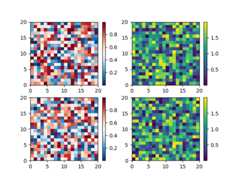
The simplest case is just attaching a colorbar to each Axes. Note in thisexample that the colorbars steal some space from the parent Axes.
importmatplotlib.pyplotaspltimportnumpyasnp# Fixing random state for reproducibilitynp.random.seed(19680801)fig,axs=plt.subplots(2,2)cmaps=['RdBu_r','viridis']forcolinrange(2):forrowinrange(2):ax=axs[row,col]pcm=ax.pcolormesh(np.random.random((20,20))*(col+1),cmap=cmaps[col])fig.colorbar(pcm,ax=ax)
The first column has the same type of data in both rows, so it may bedesirable to have just one colorbar. We do this by passingFigure.colorbara list of Axes with theax kwarg.
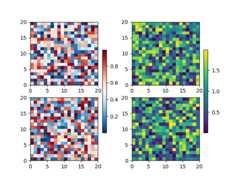
The stolen space can lead to Axes in the same subplot layoutbeing different sizes, which is often undesired if the thex-axis on each plot is meant to be comparable as in the following:
fig,axs=plt.subplots(2,1,figsize=(4,5),sharex=True)X=np.random.randn(20,20)axs[0].plot(np.sum(X,axis=0))pcm=axs[1].pcolormesh(X)fig.colorbar(pcm,ax=axs[1],shrink=0.6)

This is usually undesired, and can be worked around in various ways, e.g.adding a colorbar to the other Axes and then removing it. However, the moststraightforward is to useconstrained layout:

Relatively complicated colorbar layouts are possible using thisparadigm. Note that this example works far better withlayout='constrained'
fig,axs=plt.subplots(3,3,layout='constrained')foraxinaxs.flat:pcm=ax.pcolormesh(np.random.random((20,20)))fig.colorbar(pcm,ax=axs[0,:2],shrink=0.6,location='bottom')fig.colorbar(pcm,ax=[axs[0,2]],location='bottom')fig.colorbar(pcm,ax=axs[1:,:],location='right',shrink=0.6)fig.colorbar(pcm,ax=[axs[2,1]],location='left')

Adjusting the spacing between colorbars and parent Axes#
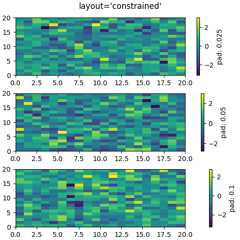
The distance a colorbar is from the parent Axes can be adjusted with thepad keyword argument. This is in units of fraction of the parent Axeswidth, and the default for a vertical Axes is 0.05 (or 0.15 for a horizontalAxes).
fig,axs=plt.subplots(3,1,layout='constrained',figsize=(5,5))forax,padinzip(axs,[0.025,0.05,0.1]):pcm=ax.pcolormesh(np.random.randn(20,20),cmap='viridis')fig.colorbar(pcm,ax=ax,pad=pad,label=f'pad:{pad}')fig.suptitle("layout='constrained'")
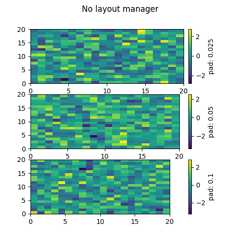
Note that if you do not use constrained layout, the pad command makes theparent Axes shrink:
fig,axs=plt.subplots(3,1,figsize=(5,5))forax,padinzip(axs,[0.025,0.05,0.1]):pcm=ax.pcolormesh(np.random.randn(20,20),cmap='viridis')fig.colorbar(pcm,ax=ax,pad=pad,label=f'pad:{pad}')fig.suptitle("No layout manager")
Manual placement of colorbars#
Sometimes the automatic placement provided bycolorbar does notgive the desired effect. We can manually create an Axes and tellcolorbar to use that Axes by passing the Axes to thecax keywordargument.
Usinginset_axes#
We can manually create any type of Axes for the colorbar to use, but anAxes.inset_axes is useful because it is a child of the parent Axes and canbe positioned relative to the parent. Here we add a colorbar centered nearthe bottom of the parent Axes.
fig,ax=plt.subplots(layout='constrained',figsize=(4,4))pcm=ax.pcolormesh(np.random.randn(20,20),cmap='viridis')ax.set_ylim([-4,20])cax=ax.inset_axes([0.3,0.07,0.4,0.04])fig.colorbar(pcm,cax=cax,orientation='horizontal')
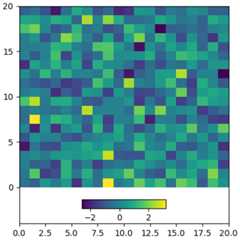
Axes.inset_axes can also specify its position in data coordinatesusing thetransform keyword argument if you want your Axes at acertain data position on the graph:
fig,ax=plt.subplots(layout='constrained',figsize=(4,4))pcm=ax.pcolormesh(np.random.randn(20,20),cmap='viridis')ax.set_ylim([-4,20])cax=ax.inset_axes([7.5,-1.7,5,1.2],transform=ax.transData)fig.colorbar(pcm,cax=cax,orientation='horizontal')

Colorbars attached to fixed-aspect-ratio Axes#
Axes with a fixed aspect ratio may shrink in height to preserve the aspectratio of the underlying data. This can result in the colorbar becoming tallerthan the associated Axes, as demonstrated in the following example.
fig,ax=plt.subplots(layout='constrained',figsize=(4,4))pcm=ax.imshow(np.random.randn(10,10),cmap='viridis')fig.colorbar(pcm,ax=ax)

To automatically adjust the colorbar size to match the parent Axes, we canuselayout='compressed'. This ensures that as the figure is resized orthe fixed-aspect-ratio Axes is zoomed in or out, the colorbar dynamicallyresizes to align with the parent Axes.
fig,ax=plt.subplots(layout='compressed',figsize=(4,4))pcm=ax.imshow(np.random.randn(10,10),cmap='viridis')ax.set_title("Colorbar with layout='compressed'",fontsize='medium')fig.colorbar(pcm,ax=ax)

Alternatively, we can manually position the colorbar usingAxes.inset_axeswith axes-relative coordinates. This approach provides precise control overthe colorbar's placement. However, without a layout engine, the colorbarmight be clipped if it extends beyond the figure boundaries.
fig,ax=plt.subplots(layout='constrained',figsize=(4,4))pcm=ax.imshow(np.random.randn(10,10),cmap='viridis')cax=ax.inset_axes([1.04,0.0,0.05,1.0])# Positioning the colorbarax.set_title('Colorbar with inset_axes',fontsize='medium')fig.colorbar(pcm,cax=cax)

We can also do this manually using anAxes.inset_axes using axes-relativecoordinates (seeTransformations Tutorial). Note that if we do not use alayout engine, the colorbar will be clipped off the right side of the figure.
fig,ax=plt.subplots(layout='constrained',figsize=(4,4))pcm=ax.imshow(np.random.randn(10,10),cmap='viridis')cax=ax.inset_axes([1.04,0.0,0.05,1.0])ax.set_title('Colorbar with inset_axes',fontsize='medium')fig.colorbar(pcm,cax=cax)

See also
The axes_grid1 toolkit has methods for manually creating colorbar Axes as well:
Total running time of the script: (0 minutes 8.004 seconds)