

Note
Go to the endto download the full example code.
Plotting dates and strings#
The most basic way to use Matplotlib plotting methods is to pass coordinates inas numerical numpy arrays. For example,plot(x,y) will work ifx andy are numpy arrays of floats (or integers). Plotting methods will alsowork ifnumpy.asarray will convertx andy to an array of floatingpoint numbers; e.g.x could be a python list.
Matplotlib also has the ability to convert other data types if a "unitconverter" exists for the data type. Matplotlib has two built-in converters,one for dates and the other for lists of strings. Other downstream librarieshave their own converters to handle their data types.
The method to add converters to Matplotlib is described inmatplotlib.units.Here we briefly overview the built-in date and string converters.
Date conversion#
Ifx and/ory are a list ofdatetime or an array ofnumpy.datetime64, Matplotlib has a built-in converter that will convert thedatetime to a float, and add tick locators and formatters to the axis that areappropriate for dates. Seematplotlib.dates.
In the following example, the x-axis gains a converter that converts fromnumpy.datetime64 to float, and a locator that put ticks at the beginning ofthe month, and a formatter that label the ticks appropriately:

Note that if we try to plot a float on the x-axis, it will be plotted inunits of days since the "epoch" for the converter, in this case 1970-01-01(seeMatplotlib date format). So when we plot the value 0, the ticks start at1970-01-01. (The locator also now chooses every two years for a tick insteadof every month):
We can customize the locator and the formatter; seeDate tick locators andDate formatters for a complete list, andDate tick locators and formatters for examples of them in use. Here we locateby every second month, and format just with the month's 3-letter name using"%b" (seestrftime for format codes):
fig,ax=plt.subplots(figsize=(5.4,2),layout='constrained')time=np.arange('1980-01-01','1980-06-25',dtype='datetime64[D]')x=np.arange(len(time))ax.plot(time,x)ax.xaxis.set_major_locator(mdates.MonthLocator(bymonth=np.arange(1,13,2)))ax.xaxis.set_major_formatter(mdates.DateFormatter('%b'))ax.set_xlabel('1980')

The default locator is theAutoDateLocator, and the defaultFormatterAutoDateFormatter. There are also "concise" formatterand locators that give a more compact labelling, and can be set via rcParams.Note how instead of the redundant "Jan" label at the start of the year,"1980" is used instead. SeeFormat date ticks using ConciseDateFormatter for more examples.

We can set the limits on the axis either by passing the appropriate dates aslimits, or by passing a floating-point value in the proper units of dayssince the epoch. If we need it, we can get this value fromdate2num.
fig,axs=plt.subplots(2,1,figsize=(5.4,3),layout='constrained')foraxinaxs.flat:time=np.arange('1980-01-01','1980-06-25',dtype='datetime64[D]')x=np.arange(len(time))ax.plot(time,x)# set xlim using datetime64:axs[0].set_xlim(np.datetime64('1980-02-01'),np.datetime64('1980-04-01'))# set xlim using floats:# Note can get from mdates.date2num(np.datetime64('1980-02-01'))axs[1].set_xlim(3683,3683+60)

String conversion: categorical plots#
Sometimes we want to label categories on an axis rather than numbers.Matplotlib allows this using a "categorical" converter (seecategory).
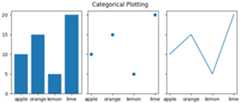
Note that the "categories" are plotted in the order that they are firstspecified and that subsequent plotting in a different order will not affectthe original order. Further, new additions will be added on the end (see"pear" below):
fig,ax=plt.subplots(figsize=(5,3),layout='constrained')ax.bar(names,values)# plot in a different order:ax.scatter(['lemon','apple'],[7,12])# add a new category, "pear", and put the other categories in a different order:ax.plot(['pear','orange','apple','lemon'],[13,10,7,12],color='C1')
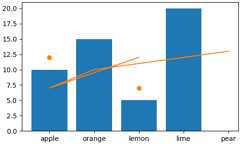
Note that when usingplot like in the above, the order of the plotting ismapped onto the original order of the data, so the new line goes in the orderspecified.
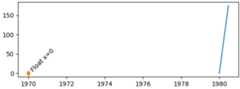
The category converter maps from categories to integers, starting at zero. Sodata can also be manually added to the axis using a float. Note that if afloat is passed in that does not have a "category" associated with it, thedata point can still be plotted, but a tick will not be created. In thefollowing, we plot data at 4.0 and 2.5, but no tick is added there becausethose are not categories.
fig,ax=plt.subplots(figsize=(5,3),layout='constrained')ax.bar(names,values)# arguments for styling the labels below:args={'rotation':70,'color':'C1','bbox':{'color':'white','alpha':.7,'boxstyle':'round'}}# 0 gets labeled as "apple"ax.plot(0,2,'d',color='C1')ax.text(0,3,'Float x=0',**args)# 2 gets labeled as "lemon"ax.plot(2,2,'d',color='C1')ax.text(2,3,'Float x=2',**args)# 4 doesn't get a labelax.plot(4,2,'d',color='C1')ax.text(4,3,'Float x=4',**args)# 2.5 doesn't get a labelax.plot(2.5,2,'d',color='C1')ax.text(2.5,3,'Float x=2.5',**args)

Setting the limits for a category axis can be done by specifying thecategories, or by specifying floating point numbers:
fig,axs=plt.subplots(2,1,figsize=(5,5),layout='constrained')ax=axs[0]ax.bar(names,values)ax.set_xlim('orange','lemon')ax.set_xlabel('limits set with categories')ax=axs[1]ax.bar(names,values)ax.set_xlim(0.5,2.5)ax.set_xlabel('limits set with floats')

The category axes are helpful for some plot types, but can lead to confusionif data is read in as a list of strings, even if it is meant to be a list offloats or dates. This sometimes happens when reading comma-separated value(CSV) files. The categorical locator and formatter will put a tick at everystring value and label each one as well:
fig,ax=plt.subplots(figsize=(5.4,2.5),layout='constrained')x=[str(xx)forxxinnp.arange(100)]# list of stringsax.plot(x,np.arange(100))ax.set_xlabel('x is list of strings')

If this is not desired, then simply convert the data to floats before plotting:
fig,ax=plt.subplots(figsize=(5.4,2.5),layout='constrained')x=np.asarray(x,dtype='float')# array of float.ax.plot(x,np.arange(100))ax.set_xlabel('x is array of floats')

Determine converter, formatter, and locator on an axis#
Sometimes it is helpful to be able to debug what Matplotlib is using toconvert the incoming data. We can do that by querying theconverterproperty on the axis. We can also query the formatters and locators usingget_major_locator andget_major_formatter.
Note that by default the converter isNone.
fig,axs=plt.subplots(3,1,figsize=(6.4,7),layout='constrained')x=np.arange(100)ax=axs[0]ax.plot(x,x)label=f'Converter:{ax.xaxis.get_converter()}\n 'label+=f'Locator:{ax.xaxis.get_major_locator()}\n'label+=f'Formatter:{ax.xaxis.get_major_formatter()}\n'ax.set_xlabel(label)ax=axs[1]time=np.arange('1980-01-01','1980-06-25',dtype='datetime64[D]')x=np.arange(len(time))ax.plot(time,x)label=f'Converter:{ax.xaxis.get_converter()}\n 'label+=f'Locator:{ax.xaxis.get_major_locator()}\n'label+=f'Formatter:{ax.xaxis.get_major_formatter()}\n'ax.set_xlabel(label)ax=axs[2]data={'apple':10,'orange':15,'lemon':5,'lime':20}names=list(data.keys())values=list(data.values())ax.plot(names,values)label=f'Converter:{ax.xaxis.get_converter()}\n 'label+=f'Locator:{ax.xaxis.get_major_locator()}\n'label+=f'Formatter:{ax.xaxis.get_major_formatter()}\n'ax.set_xlabel(label)

More about "unit" support#
The support for dates and categories is part of "units" support that is builtinto Matplotlib. This is described atmatplotlib.units and in theBasic units example.
Unit support works by querying the type of data passed to the plottingfunction and dispatching to the first converter in a list that accepts thattype of data. So below, ifx hasdatetime objects in it, theconverter will be_SwitchableDateConverter; if it has has strings in it,it will be sent to theStrCategoryConverter.
type: <class 'decimal.Decimal'>; converter: <class 'matplotlib.units.DecimalConverter'>type: <class 'numpy.datetime64'>; converter: <class 'matplotlib.dates._SwitchableDateConverter'>type: <class 'datetime.date'>; converter: <class 'matplotlib.dates._SwitchableDateConverter'>type: <class 'datetime.datetime'>; converter: <class 'matplotlib.dates._SwitchableDateConverter'>type: <class 'str'>; converter: <class 'matplotlib.category.StrCategoryConverter'>type: <class 'numpy.str_'>; converter: <class 'matplotlib.category.StrCategoryConverter'>type: <class 'bytes'>; converter: <class 'matplotlib.category.StrCategoryConverter'>type: <class 'numpy.bytes_'>; converter: <class 'matplotlib.category.StrCategoryConverter'>
There are a number of downstream libraries that provide their own converterswith locators and formatters. Physical unit support is provided byastropy,pint, andunyt, among others.
High level libraries likepandas andnc-time-axis (and thusxarray) provide their own datetime support.This support can sometimes be incompatible with Matplotlib native datetimesupport, so care should be taken when using Matplotlib locators andformatters if these libraries are being used.
Total running time of the script: (0 minutes 5.296 seconds)