

Note
Go to the endto download the full example code.
Mouse Cursor#
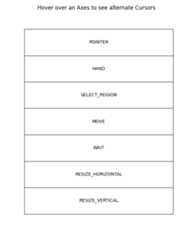
This example sets an alternative cursor on a figure canvas.
Note, this is an interactive example, and must be run to see the effect.
importmatplotlib.pyplotaspltfrommatplotlib.backend_toolsimportCursorsfig,axs=plt.subplots(len(Cursors),figsize=(6,len(Cursors)+0.5),gridspec_kw={'hspace':0})fig.suptitle('Hover over an Axes to see alternate Cursors')forcursor,axinzip(Cursors,axs):ax.cursor_to_use=cursorax.text(0.5,0.5,cursor.name,horizontalalignment='center',verticalalignment='center')ax.set(xticks=[],yticks=[])defhover(event):iffig.canvas.widgetlock.locked():# Don't do anything if the zoom/pan tools have been enabled.returnfig.canvas.set_cursor(event.inaxes.cursor_to_useifevent.inaxeselseCursors.POINTER)fig.canvas.mpl_connect('motion_notify_event',hover)plt.show()
References
The use of the following functions, methods, classes and modules is shownin this example: