

Note
Go to the endto download the full example code.
Multilevel (nested) ticks#
Sometimes we want another level of tick labels on an axis, perhaps to indicatea grouping of the ticks.
Matplotlib does not provide an automated way to do this, but it is relativelystraightforward to annotate below the main axis.
These examples useAxes.secondary_xaxis, which is one approach. It has theadvantage that we can use Matplotlib Locators and Formatters on the axis thatdoes the grouping if we want.
This first example creates a secondary xaxis and manually adds the ticks andlabels usingAxes.set_xticks. Note that the tick labels have a newline(e.g."Oughts") at the beginning of them to put the second-level ticklabels below the main tick labels.
importmatplotlib.pyplotaspltimportnumpyasnpimportmatplotlib.datesasmdatesrng=np.random.default_rng(19680801)fig,ax=plt.subplots(layout='constrained',figsize=(4,4))ax.plot(np.arange(30))sec=ax.secondary_xaxis(location=0)sec.set_xticks([5,15,25],labels=['\nOughts','\nTeens','\nTwenties'])

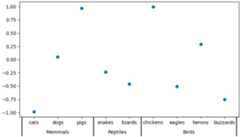
This second example adds a second level of annotation to a categorical axis.Here we need to note that each animal (category) is assigned an integer, socats is at x=0,dogs at x=1 etc. Then we place the ticks on thesecond level on an x that is at the middle of the animal class we are tryingto delineate.
This example also adds tick marks between the classes by adding a secondsecondary xaxis, and placing long, wide ticks at the boundaries between theanimal classes.
fig,ax=plt.subplots(layout='constrained',figsize=(7,4))ax.plot(['cats','dogs','pigs','snakes','lizards','chickens','eagles','herons','buzzards'],rng.normal(size=9),'o')# label the classes:sec=ax.secondary_xaxis(location=0)sec.set_xticks([1,3.5,6.5],labels=['\n\nMammals','\n\nReptiles','\n\nBirds'])sec.tick_params('x',length=0)# lines between the classes:sec2=ax.secondary_xaxis(location=0)sec2.set_xticks([-0.5,2.5,4.5,8.5],labels=[])sec2.tick_params('x',length=40,width=1.5)ax.set_xlim(-0.6,8.6)
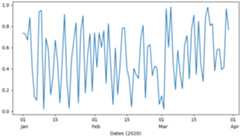
Dates are another common place where we may want to have a second level oftick labels. In this last example, we take advantage of the ability to addan automatic locator and formatter to the secondary xaxis, which means we donot need to set the ticks manually.
This example also differs from the above, in that we placed it at a locationbelow the main axeslocation=-0.075 and then we hide the spine by settingthe line width to zero. That means that our formatter no longer needs thecarriage returns of the previous two examples.
fig,ax=plt.subplots(layout='constrained',figsize=(7,4))time=np.arange(np.datetime64('2020-01-01'),np.datetime64('2020-03-31'),np.timedelta64(1,'D'))ax.plot(time,rng.random(size=len(time)))# just format the days:ax.xaxis.set_major_formatter(mdates.DateFormatter('%d'))# label the months:sec=ax.secondary_xaxis(location=-0.075)sec.xaxis.set_major_locator(mdates.MonthLocator(bymonthday=1))# note the extra spaces in the label to align the month label inside the month.# Note that this could have been done by changing ``bymonthday`` above as well:sec.xaxis.set_major_formatter(mdates.DateFormatter(' %b'))sec.tick_params('x',length=0)sec.spines['bottom'].set_linewidth(0)# label the xaxis, but note for this to look good, it needs to be on the# secondary xaxis.sec.set_xlabel('Dates (2020)')plt.show()
Total running time of the script: (0 minutes 1.673 seconds)