

Note
Go to the endto download the full example code.
Pan/zoom events of overlapping axes#
Example to illustrate how pan/zoom events of overlapping axes are treated.
The default is the following:
Axes with a visible patch capture pan/zoom events
Axes with an invisible patch forward pan/zoom events to axes below
Shared axes always trigger with their parent axes(irrespective of the patch visibility)
Note: The visibility of the patch hereby refers to the value ofax.patch.get_visible(). The color and transparency of apatch have no effect on the treatment of pan/zoom events!
ax.set_forward_navigation_events(val) can be used to override thedefault behaviour:
True: Forward navigation events to axes below.False: Execute navigation events only on this axes."auto": Use the default behaviour.
To disable pan/zoom events completely, useax.set_navigate(False)
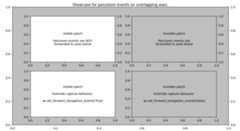
importmatplotlib.pyplotaspltfig=plt.figure(figsize=(11,6))fig.suptitle("Showcase for pan/zoom events on overlapping axes.")ax=fig.add_axes((.05,.05,.9,.9))ax.patch.set_color(".75")ax_twin=ax.twinx()ax1=fig.add_subplot(221)ax1_twin=ax1.twinx()ax1.text(.5,.5,"Visible patch\n\n""Pan/zoom events are NOT\n""forwarded to axes below",ha="center",va="center",transform=ax1.transAxes)ax11=fig.add_subplot(223,sharex=ax1,sharey=ax1)ax11.set_forward_navigation_events(True)ax11.text(.5,.5,"Visible patch\n\n""Override capture behavior:\n\n""ax.set_forward_navigation_events(True)",ha="center",va="center",transform=ax11.transAxes)ax2=fig.add_subplot(222)ax2_twin=ax2.twinx()ax2.patch.set_visible(False)ax2.text(.5,.5,"Invisible patch\n\n""Pan/zoom events are\n""forwarded to axes below",ha="center",va="center",transform=ax2.transAxes)ax22=fig.add_subplot(224,sharex=ax2,sharey=ax2)ax22.patch.set_visible(False)ax22.set_forward_navigation_events(False)ax22.text(.5,.5,"Invisible patch\n\n""Override capture behavior:\n\n""ax.set_forward_navigation_events(False)",ha="center",va="center",transform=ax22.transAxes)