

Note
Go to the endto download the full example code.
TickedStroke patheffect#
Matplotlib'spatheffects can be used to alter the way pathsare drawn at a low enough level that they can affect almost anything.
Thepatheffects guidedetails the use of patheffects.
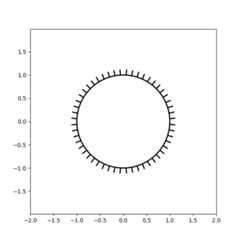
TheTickedStroke patheffect illustrated heredraws a path with a ticked style. The spacing, length, and angle ofticks can be controlled.
See also theLines with a ticked patheffect example.
See also theContouring the solution space of optimizationsexample.
importmatplotlib.pyplotaspltimportnumpyasnp
Applying TickedStroke to paths#
importmatplotlib.patchesaspatchesfrommatplotlib.pathimportPathimportmatplotlib.patheffectsaspatheffectsfig,ax=plt.subplots(figsize=(6,6))path=Path.unit_circle()patch=patches.PathPatch(path,facecolor='none',lw=2,path_effects=[patheffects.withTickedStroke(angle=-90,spacing=10,length=1)])ax.add_patch(patch)ax.axis('equal')ax.set_xlim(-2,2)ax.set_ylim(-2,2)plt.show()
Applying TickedStroke to lines#
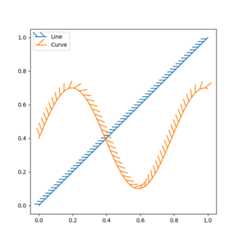
fig,ax=plt.subplots(figsize=(6,6))ax.plot([0,1],[0,1],label="Line",path_effects=[patheffects.withTickedStroke(spacing=7,angle=135)])nx=101x=np.linspace(0.0,1.0,nx)y=0.3*np.sin(x*8)+0.4ax.plot(x,y,label="Curve",path_effects=[patheffects.withTickedStroke()])ax.legend()plt.show()
Applying TickedStroke to contour plots#
Contour plot with objective and constraints.Curves generated by contour to represent a typical constraint in anoptimization problem should be plotted with angles between zero and180 degrees.
fig,ax=plt.subplots(figsize=(6,6))nx=101ny=105# Set up survey vectorsxvec=np.linspace(0.001,4.0,nx)yvec=np.linspace(0.001,4.0,ny)# Set up survey matrices. Design disk loading and gear ratio.x1,x2=np.meshgrid(xvec,yvec)# Evaluate some stuff to plotobj=x1**2+x2**2-2*x1-2*x2+2g1=-(3*x1+x2-5.5)g2=-(x1+2*x2-4.5)g3=0.8+x1**-3-x2cntr=ax.contour(x1,x2,obj,[0.01,0.1,0.5,1,2,4,8,16],colors='black')ax.clabel(cntr,fmt="%2.1f",use_clabeltext=True)cg1=ax.contour(x1,x2,g1,[0],colors='sandybrown')cg1.set(path_effects=[patheffects.withTickedStroke(angle=135)])cg2=ax.contour(x1,x2,g2,[0],colors='orangered')cg2.set(path_effects=[patheffects.withTickedStroke(angle=60,length=2)])cg3=ax.contour(x1,x2,g3,[0],colors='mediumblue')cg3.set(path_effects=[patheffects.withTickedStroke(spacing=7)])ax.set_xlim(0,4)ax.set_ylim(0,4)plt.show()

Direction/side of the ticks#
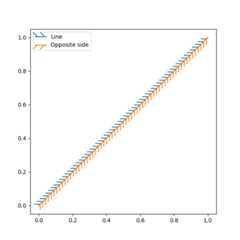
To change which side of the line the ticks are drawn, change the sign of the angle.
fig,ax=plt.subplots(figsize=(6,6))line_x=line_y=[0,1]ax.plot(line_x,line_y,label="Line",path_effects=[patheffects.withTickedStroke(spacing=7,angle=135)])ax.plot(line_x,line_y,label="Opposite side",path_effects=[patheffects.withTickedStroke(spacing=7,angle=-135)])ax.legend()plt.show()
Total running time of the script: (0 minutes 2.164 seconds)