

Note
Go to the endto download the full example code.
Histograms#
How to plot histograms with Matplotlib.
importmatplotlib.pyplotaspltimportnumpyasnpfrommatplotlibimportcolorsfrommatplotlib.tickerimportPercentFormatter# Create a random number generator with a fixed seed for reproducibilityrng=np.random.default_rng(19680801)
Generate data and plot a simple histogram#
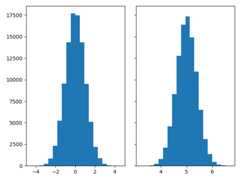
To generate a 1D histogram we only need a single vector of numbers. For a 2Dhistogram we'll need a second vector. We'll generate both below, and showthe histogram for each vector.
N_points=100000n_bins=20# Generate two normal distributionsdist1=rng.standard_normal(N_points)dist2=0.4*rng.standard_normal(N_points)+5fig,axs=plt.subplots(1,2,sharey=True,tight_layout=True)# We can set the number of bins with the *bins* keyword argument.axs[0].hist(dist1,bins=n_bins)axs[1].hist(dist2,bins=n_bins)plt.show()
Updating histogram colors#
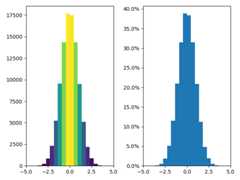
The histogram method returns (among other things) apatches object. Thisgives us access to the properties of the objects drawn. Using this, we canedit the histogram to our liking. Let's change the color of each barbased on its y value.
fig,axs=plt.subplots(1,2,tight_layout=True)# N is the count in each bin, bins is the lower-limit of the binN,bins,patches=axs[0].hist(dist1,bins=n_bins)# We'll color code by height, but you could use any scalarfracs=N/N.max()# we need to normalize the data to 0..1 for the full range of the colormapnorm=colors.Normalize(fracs.min(),fracs.max())# Now, we'll loop through our objects and set the color of each accordinglyforthisfrac,thispatchinzip(fracs,patches):color=plt.colormaps["viridis"](norm(thisfrac))thispatch.set_facecolor(color)# We can also normalize our inputs by the total number of countsaxs[1].hist(dist1,bins=n_bins,density=True)# Now we format the y-axis to display percentageaxs[1].yaxis.set_major_formatter(PercentFormatter(xmax=1))
Plot a 2D histogram#
To plot a 2D histogram, one only needs two vectors of the same length,corresponding to each axis of the histogram.

Customizing your histogram#
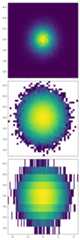
Customizing a 2D histogram is similar to the 1D case, you can controlvisual components such as the bin size or color normalization.
fig,axs=plt.subplots(3,1,figsize=(5,15),sharex=True,sharey=True,tight_layout=True)# We can increase the number of bins on each axisaxs[0].hist2d(dist1,dist2,bins=40)# As well as define normalization of the colorsaxs[1].hist2d(dist1,dist2,bins=40,norm=colors.LogNorm())# We can also define custom numbers of bins for each axisaxs[2].hist2d(dist1,dist2,bins=(80,10),norm=colors.LogNorm())
Tags:plot-type: histogramplot-type: histogram2ddomain: statisticsstyling: colorcomponent: normalizationcomponent: patch
References
The use of the following functions, methods, classes and modules is shownin this example:
Total running time of the script: (0 minutes 2.460 seconds)