

Note
Go to the endto download the full example code.
The Sankey class#
Demonstrate the Sankey class by producing three basic diagrams.
importmatplotlib.pyplotaspltfrommatplotlib.sankeyimportSankey
Example 1 -- Mostly defaults
This demonstrates how to create a simple diagram by implicitly calling theSankey.add() method and by appending finish() to the call to the class.

Notice:
Axes weren't provided when Sankey() was instantiated, so they werecreated automatically.
The scale argument wasn't necessary since the data was alreadynormalized.
By default, the lengths of the paths are justified.
Example 2
This demonstrates:
Setting one path longer than the others
Placing a label in the middle of the diagram
Using the scale argument to normalize the flows
Implicitly passing keyword arguments to PathPatch()
Changing the angle of the arrow heads
Changing the offset between the tips of the paths and their labels
Formatting the numbers in the path labels and the associated unit
Changing the appearance of the patch and the labels after the figure iscreated
fig=plt.figure()ax=fig.add_subplot(1,1,1,xticks=[],yticks=[],title="Flow Diagram of a Widget")sankey=Sankey(ax=ax,scale=0.01,offset=0.2,head_angle=180,format='%.0f',unit='%')sankey.add(flows=[25,0,60,-10,-20,-5,-15,-10,-40],labels=['','','','First','Second','Third','Fourth','Fifth','Hurray!'],orientations=[-1,1,0,1,1,1,-1,-1,0],pathlengths=[0.25,0.25,0.25,0.25,0.25,0.6,0.25,0.25,0.25],patchlabel="Widget\nA")# Arguments to matplotlib.patches.PathPatchdiagrams=sankey.finish()diagrams[0].texts[-1].set_color('r')diagrams[0].text.set_fontweight('bold')
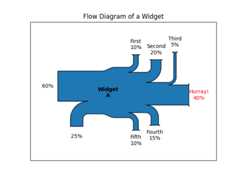
Notice:
Since the sum of the flows is nonzero, the width of the trunk isn'tuniform. The matplotlib logging system logs this at the DEBUG level.
The second flow doesn't appear because its value is zero. Again, this islogged at the DEBUG level.
Example 3
This demonstrates:
Connecting two systems
Turning off the labels of the quantities
Adding a legend
fig=plt.figure()ax=fig.add_subplot(1,1,1,xticks=[],yticks=[],title="Two Systems")flows=[0.25,0.15,0.60,-0.10,-0.05,-0.25,-0.15,-0.10,-0.35]sankey=Sankey(ax=ax,unit=None)sankey.add(flows=flows,label='one',orientations=[-1,1,0,1,1,1,-1,-1,0])sankey.add(flows=[-0.25,0.15,0.1],label='two',orientations=[-1,-1,-1],prior=0,connect=(0,0))diagrams=sankey.finish()diagrams[-1].patch.set_hatch('/')plt.legend()

Notice that only one connection is specified, but the systems form acircuit since: (1) the lengths of the paths are justified and (2) theorientation and ordering of the flows is mirrored.
plt.show()
References
The use of the following functions, methods, classes and modules is shownin this example:
Total running time of the script: (0 minutes 1.127 seconds)