

Note
Go to the endto download the full example code.
Labeling pie charts#
This example illustrates some features of thepie_labelmethod, which adds labels to an existing pie chart created withpie.
The simplest option is to provide a list of strings to label each slice of the pie.
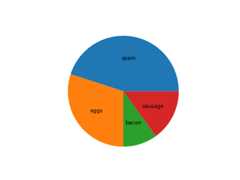
If you want the labels outside the pie, set adistance greater than 1.This is the distance from the center of the pie as a fraction of its radius.
fig,ax=plt.subplots()pie=ax.pie(data)ax.pie_label(pie,labels,distance=1.1)

You can also rotate the labels so they are oriented away from the pie center.
fig,ax=plt.subplots()pie=ax.pie(data)ax.pie_label(pie,labels,rotate=True)

Instead of explicit labels, pass a format string to label slices with their values...
fig,ax=plt.subplots()pie=ax.pie(data)ax.pie_label(pie,'{absval:.1f}')

...or with their percentages...
fig,ax=plt.subplots()pie=ax.pie(data)ax.pie_label(pie,'{frac:.1%}')

...or both.
fig,ax=plt.subplots()pie=ax.pie(data)ax.pie_label(pie,'{absval:d}\n{frac:.1%}')

Font styling can be configured by passing a dictionary to thetextprops parameter.
fig,ax=plt.subplots()pie=ax.pie(data)ax.pie_label(pie,labels,textprops={'fontsize':'large','color':'white'})

pie_label can be called repeatedly to add multiple setsof labels.
fig,ax=plt.subplots()pie=ax.pie(data)ax.pie_label(pie,labels,distance=1.1)ax.pie_label(pie,'{frac:.1%}',distance=0.7)ax.pie_label(pie,'{absval:d}',distance=0.4)plt.show()

References
The use of the following functions, methods, classes and modules is shownin this example:
Tags:plot-type: pielevel: beginner
Total running time of the script: (0 minutes 2.507 seconds)