

Note
Go to the endto download the full example code.
Nested pie charts#
The following examples show two ways to build a nested pie chartin Matplotlib. Such charts are often referred to as donut charts.
See also theLeft ventricle bullseye example.
importmatplotlib.pyplotaspltimportnumpyasnp
The most straightforward way to build a pie chart is to use thepie method.
In this case, pie takes values corresponding to counts in a group.We'll first generate some fake data, corresponding to three groups.In the inner circle, we'll treat each number as belonging to itsown group. In the outer circle, we'll plot them as members of theiroriginal 3 groups.
The effect of the donut shape is achieved by setting awidth tothe pie's wedges through thewedgeprops argument.
fig,ax=plt.subplots()size=0.3vals=np.array([[60.,32.],[37.,40.],[29.,10.]])tab20c=plt.color_sequences["tab20c"]outer_colors=[tab20c[i]foriin[0,4,8]]inner_colors=[tab20c[i]foriin[1,2,5,6,9,10]]ax.pie(vals.sum(axis=1),radius=1,colors=outer_colors,wedgeprops=dict(width=size,edgecolor='w'))ax.pie(vals.flatten(),radius=1-size,colors=inner_colors,wedgeprops=dict(width=size,edgecolor='w'))ax.set(aspect="equal",title='Pie plot with `ax.pie`')plt.show()
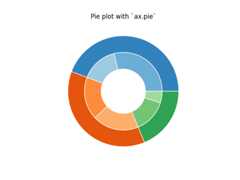
However, you can accomplish the same output by using a bar plot onAxes with a polar coordinate system. This may give more flexibility onthe exact design of the plot.
In this case, we need to map x-values of the bar chart onto radians ofa circle. The cumulative sum of the values are used as the edgesof the bars.
fig,ax=plt.subplots(subplot_kw=dict(projection="polar"))size=0.3vals=np.array([[60.,32.],[37.,40.],[29.,10.]])# Normalize vals to 2 pivalsnorm=vals/np.sum(vals)*2*np.pi# Obtain the ordinates of the bar edgesvalsleft=np.cumsum(np.append(0,valsnorm.flatten()[:-1])).reshape(vals.shape)cmap=plt.colormaps["tab20c"]outer_colors=cmap(np.arange(3)*4)inner_colors=cmap([1,2,5,6,9,10])ax.bar(x=valsleft[:,0],width=valsnorm.sum(axis=1),bottom=1-size,height=size,color=outer_colors,edgecolor='w',linewidth=1,align="edge")ax.bar(x=valsleft.flatten(),width=valsnorm.flatten(),bottom=1-2*size,height=size,color=inner_colors,edgecolor='w',linewidth=1,align="edge")ax.set(title="Pie plot with `ax.bar` and polar coordinates")ax.set_axis_off()plt.show()

References
The use of the following functions, methods, classes and modules is shownin this example:
Tags:plot-type: pielevel: beginnerpurpose: showcase