

Note
Go to the endto download the full example code.
Building histograms using Rectangles and PolyCollections#
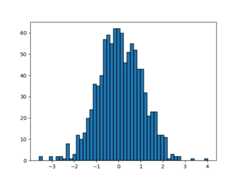
Using a path patch to draw rectangles.
The technique of using lots ofRectangle instances, or the faster method ofusingPolyCollection, were implemented before we had proper paths withmoveto, lineto, closepoly, etc. in Matplotlib. Now that we have them, we candraw collections of regularly shaped objects with homogeneous properties moreefficiently with a PathCollection. This example makes a histogram -- it's morework to set up the vertex arrays at the outset, but it should be much fasterfor large numbers of objects.
importmatplotlib.pyplotaspltimportnumpyasnpimportmatplotlib.patchesaspatchesimportmatplotlib.pathaspathnp.random.seed(19680801)# Fixing random state for reproducibility# histogram our data with numpydata=np.random.randn(1000)n,bins=np.histogram(data,50)# get the corners of the rectangles for the histogramleft=bins[:-1]right=bins[1:]bottom=np.zeros(len(left))top=bottom+n# we need a (numrects x numsides x 2) numpy array for the path helper# function to build a compound pathXY=np.array([[left,left,right,right],[bottom,top,top,bottom]]).T# get the Path objectbarpath=path.Path.make_compound_path_from_polys(XY)# make a patch out of it, don't add a margin at y=0patch=patches.PathPatch(barpath)patch.sticky_edges.y[:]=[0]fig,ax=plt.subplots()ax.add_patch(patch)ax.autoscale_view()plt.show()
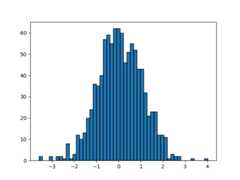
Instead of creating a three-dimensional array and usingmake_compound_path_from_polys, we could as well create thecompound path directly using vertices and codes as shown below
nrects=len(left)nverts=nrects*(1+3+1)verts=np.zeros((nverts,2))codes=np.ones(nverts,int)*path.Path.LINETOcodes[0::5]=path.Path.MOVETOcodes[4::5]=path.Path.CLOSEPOLYverts[0::5,0]=leftverts[0::5,1]=bottomverts[1::5,0]=leftverts[1::5,1]=topverts[2::5,0]=rightverts[2::5,1]=topverts[3::5,0]=rightverts[3::5,1]=bottombarpath=path.Path(verts,codes)# make a patch out of it, don't add a margin at y=0patch=patches.PathPatch(barpath)patch.sticky_edges.y[:]=[0]fig,ax=plt.subplots()ax.add_patch(patch)ax.autoscale_view()plt.show()
References
The use of the following functions, methods, classes and modules is shownin this example:
This example shows an alternative to