

Note
Go to the endto download the full example code.
Ways to set a color's alpha value#
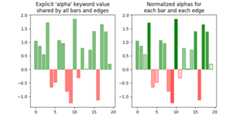
Compare setting alpha by thealpha keyword argument and by one of the Matplotlib colorformats. Often, thealpha keyword is the only tool needed to add transparency to acolor. In some cases, the(matplotlib_color, alpha) color format provides an easy wayto fine-tune the appearance of a Figure.
importmatplotlib.pyplotaspltimportnumpyasnp# Fixing random state for reproducibility.np.random.seed(19680801)fig,(ax1,ax2)=plt.subplots(ncols=2,figsize=(8,4))x_values=[nforninrange(20)]y_values=np.random.randn(20)facecolors=['green'ify>0else'red'foryiny_values]edgecolors=facecolorsax1.bar(x_values,y_values,color=facecolors,edgecolor=edgecolors,alpha=0.5)ax1.set_title("Explicit 'alpha' keyword value\nshared by all bars and edges")# Normalize y values to get distinct face alpha values.abs_y=[abs(y)foryiny_values]face_alphas=[n/max(abs_y)forninabs_y]edge_alphas=[1-alphaforalphainface_alphas]colors_with_alphas=list(zip(facecolors,face_alphas))edgecolors_with_alphas=list(zip(edgecolors,edge_alphas))ax2.bar(x_values,y_values,color=colors_with_alphas,edgecolor=edgecolors_with_alphas)ax2.set_title('Normalized alphas for\neach bar and each edge')plt.show()
References
The use of the following functions, methods, classes and modules is shownin this example:
Tags:styling: colorplot-type: barlevel: beginner