Note
Go to the endto download the full example code.
Spine placement#
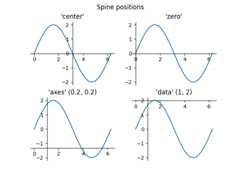
The position of the axis spines can be influenced usingset_position.
Note: If you want to obtain arrow heads at the ends of the axes, also checkout theCentered spines with arrows example.
importmatplotlib.pyplotaspltimportnumpyasnp
x=np.linspace(0,2*np.pi,100)y=2*np.sin(x)fig,ax_dict=plt.subplot_mosaic([['center','zero'],['axes','data']])fig.suptitle('Spine positions')ax=ax_dict['center']ax.set_title("'center'")ax.plot(x,y)ax.spines[['left','bottom']].set_position('center')ax.spines[['top','right']].set_visible(False)ax=ax_dict['zero']ax.set_title("'zero'")ax.plot(x,y)ax.spines[['left','bottom']].set_position('zero')ax.spines[['top','right']].set_visible(False)ax=ax_dict['axes']ax.set_title("'axes' (0.2, 0.2)")ax.plot(x,y)ax.spines.left.set_position(('axes',0.2))ax.spines.bottom.set_position(('axes',0.2))ax.spines[['top','right']].set_visible(False)ax=ax_dict['data']ax.set_title("'data' (1, 2)")ax.plot(x,y)ax.spines.left.set_position(('data',1))ax.spines.bottom.set_position(('data',2))ax.spines[['top','right']].set_visible(False)plt.show()