

Note
Go to the endto download the full example code.
Simple ImageGrid#
Align multiple images usingImageGrid.
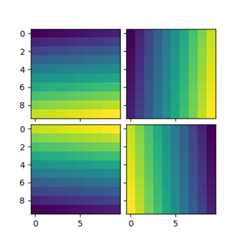
importmatplotlib.pyplotaspltimportnumpyasnpfrommpl_toolkits.axes_grid1importImageGridim1=np.arange(100).reshape((10,10))im2=im1.Tim3=np.flipud(im1)im4=np.fliplr(im2)fig=plt.figure(figsize=(4.,4.))grid=ImageGrid(fig,111,# similar to subplot(111)nrows_ncols=(2,2),# creates 2x2 grid of Axesaxes_pad=0.1,# pad between Axes in inch.)forax,iminzip(grid,[im1,im2,im3,im4]):# Iterating over the grid returns the Axes.ax.imshow(im)plt.show()