

Note
Go to the endto download the full example code.
Step Demo#
This example demonstrates the use ofpyplot.step for piece-wise constantcurves. In particular, it illustrates the effect of the parameterwhereon the step position.
Note
For the common case that you know the edge positions, usepyplot.stairsinstead.
The circular markers created withpyplot.plot show the actual datapositions so that it's easier to see the effect ofwhere.
importmatplotlib.pyplotaspltimportnumpyasnpx=np.arange(14)y=np.sin(x/2)plt.step(x,y+2,label='pre (default)')plt.plot(x,y+2,'o--',color='grey',alpha=0.3)plt.step(x,y+1,where='mid',label='mid')plt.plot(x,y+1,'o--',color='grey',alpha=0.3)plt.step(x,y,where='post',label='post')plt.plot(x,y,'o--',color='grey',alpha=0.3)plt.grid(axis='x',color='0.95')plt.legend(title='Parameter where:')plt.title('plt.step(where=...)')plt.show()
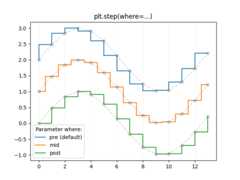
The same behavior can be achieved by using thedrawstyle parameter ofpyplot.plot.
plt.plot(x,y+2,drawstyle='steps',label='steps (=steps-pre)')plt.plot(x,y+2,'o--',color='grey',alpha=0.3)plt.plot(x,y+1,drawstyle='steps-mid',label='steps-mid')plt.plot(x,y+1,'o--',color='grey',alpha=0.3)plt.plot(x,y,drawstyle='steps-post',label='steps-post')plt.plot(x,y,'o--',color='grey',alpha=0.3)plt.grid(axis='x',color='0.95')plt.legend(title='Parameter drawstyle:')plt.title('plt.plot(drawstyle=...)')plt.show()

References
The use of the following functions, methods, classes and modules is shownin this example:
Tags:plot-type: stepplot-type: linelevel: beginner
Total running time of the script: (0 minutes 1.100 seconds)