

Note
Go to the endto download the full example code.
Selecting individual colors from a colormap#
Sometimes we want to use more colors or a different set of colors than the default colorcycle provides. Selecting individual colors from one of the provided colormaps can be aconvenient way to do this.
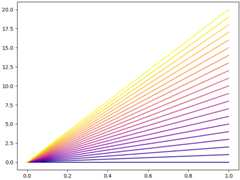
We can retrieve colors from anyColormap by calling it with a float or a list offloats in the range [0, 1]; e.g.cmap(0.5) will give the middle color. See alsoColormap.__call__.
Extracting colors from a continuous colormap#
importmatplotlib.pyplotaspltimportnumpyasnpimportmatplotlibasmpln_lines=21cmap=mpl.colormaps['plasma']# Take colors at regular intervals spanning the colormap.colors=cmap(np.linspace(0,1,n_lines))fig,ax=plt.subplots(layout='constrained')fori,colorinenumerate(colors):ax.plot([0,i],color=color)plt.show()
Extracting colors from a discrete colormap#
The list of all colors in aListedColormap is available as thecolorsattribute. Note that all the colors from Matplotlib's qualitative color mapsare also available as color sequences, so may be accessed more directly fromthe color sequence registry. SeeNamed color sequences.

See Also#
For more details about manipulating colormaps, seeCreating Colormaps in Matplotlib. Tochange the default color cycle, seeStyling with cycler.
References
The use of the following functions, methods, classes and modules is shownin this example:
Tags:styling: colormapstyling: colorplot-type: linelevel: intermediate
Total running time of the script: (0 minutes 1.357 seconds)