

Note
Go to the endto download the full example code.
Legend Demo#
There are many ways to create and customize legends in Matplotlib. Belowwe'll show a few examples for how to do so.
First we'll show off how to make a legend for specific lines.
importmatplotlib.pyplotaspltimportnumpyasnpimportmatplotlib.collectionsasmcolfrommatplotlib.legend_handlerimportHandlerLineCollection,HandlerTuplefrommatplotlib.linesimportLine2Dt1=np.arange(0.0,2.0,0.1)t2=np.arange(0.0,2.0,0.01)fig,ax=plt.subplots()# note that plot returns a list of lines. The "l1, = plot" usage# extracts the first element of the list into l1 using tuple# unpacking. So l1 is a Line2D instance, not a sequence of linesl1,=ax.plot(t2,np.exp(-t2))l2,l3=ax.plot(t2,np.sin(2*np.pi*t2),'--o',t1,np.log(1+t1),'.')l4,=ax.plot(t2,np.exp(-t2)*np.sin(2*np.pi*t2),'s-.')ax.legend((l2,l4),('oscillatory','damped'),loc='upper right',shadow=True)ax.set_xlabel('time')ax.set_ylabel('volts')ax.set_title('Damped oscillation')plt.show()

Next we'll demonstrate plotting more complex labels.
x=np.linspace(0,1)fig,(ax0,ax1)=plt.subplots(2,1)# Plot the lines y=x**n for n=1..4.forninrange(1,5):ax0.plot(x,x**n,label=f"{n=}")leg=ax0.legend(loc="upper left",bbox_to_anchor=[0,1],ncols=2,shadow=True,title="Legend",fancybox=True)leg.get_title().set_color("red")# Demonstrate some more complex labels.ax1.plot(x,x**2,label="multi\nline")half_pi=np.linspace(0,np.pi/2)ax1.plot(np.sin(half_pi),np.cos(half_pi),label=r"$\frac{1}{2}\pi$")ax1.plot(x,2**(x**2),label="$2^{x^2}$")ax1.legend(shadow=True,fancybox=True)plt.show()

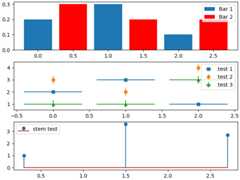
Here we attach legends to more complex plots.
fig,axs=plt.subplots(3,1,layout="constrained")top_ax,middle_ax,bottom_ax=axstop_ax.bar([0,1,2],[0.2,0.3,0.1],width=0.4,label="Bar 1",align="center")top_ax.bar([0.5,1.5,2.5],[0.3,0.2,0.2],color="red",width=0.4,label="Bar 2",align="center")top_ax.legend()middle_ax.errorbar([0,1,2],[2,3,1],xerr=0.4,fmt="s",label="test 1")middle_ax.errorbar([0,1,2],[3,2,4],yerr=0.3,fmt="o",label="test 2")middle_ax.errorbar([0,1,2],[1,1,3],xerr=0.4,yerr=0.3,fmt="^",label="test 3")middle_ax.legend()bottom_ax.stem([0.3,1.5,2.7],[1,3.6,2.7],label="stem test")bottom_ax.legend()plt.show()
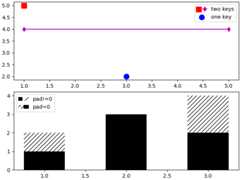
Now we'll showcase legend entries with more than one legend key.
fig,(ax1,ax2)=plt.subplots(2,1,layout='constrained')# First plot: two legend keys for a single entryp1=ax1.scatter([1],[5],c='r',marker='s',s=100)p2=ax1.scatter([3],[2],c='b',marker='o',s=100)# `plot` returns a list, but we want the handle - thus the comma on the leftp3,=ax1.plot([1,5],[4,4],'m-d')# Assign two of the handles to the same legend entry by putting them in a tuple# and using a generic handler map (which would be used for any additional# tuples of handles like (p1, p3)).l=ax1.legend([(p1,p3),p2],['two keys','one key'],scatterpoints=1,numpoints=1,handler_map={tuple:HandlerTuple(ndivide=None)})# Second plot: plot two bar charts on top of each other and change the padding# between the legend keysx_left=[1,2,3]y_pos=[1,3,2]y_neg=[2,1,4]rneg=ax2.bar(x_left,y_neg,width=0.5,color='w',hatch='///',label='-1')rpos=ax2.bar(x_left,y_pos,width=0.5,color='k',label='+1')# Treat each legend entry differently by using specific `HandlerTuple`sl=ax2.legend([(rpos,rneg),(rneg,rpos)],['pad!=0','pad=0'],handler_map={(rpos,rneg):HandlerTuple(ndivide=None),(rneg,rpos):HandlerTuple(ndivide=None,pad=0.)})plt.show()
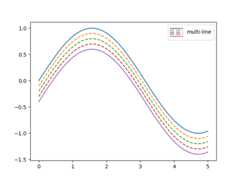
Finally, it is also possible to write custom classes that definehow to stylize legends.
classHandlerDashedLines(HandlerLineCollection):""" Custom Handler for LineCollection instances. """defcreate_artists(self,legend,orig_handle,xdescent,ydescent,width,height,fontsize,trans):# figure out how many lines there arenumlines=len(orig_handle.get_segments())xdata,xdata_marker=self.get_xdata(legend,xdescent,ydescent,width,height,fontsize)leglines=[]# divide the vertical space where the lines will go# into equal parts based on the number of linesydata=np.full_like(xdata,height/(numlines+1))# for each line, create the line at the proper location# and set the dash patternforiinrange(numlines):legline=Line2D(xdata,ydata*(numlines-i)-ydescent)self.update_prop(legline,orig_handle,legend)# set color, dash pattern, and linewidth to that# of the lines in linecollectiontry:color=orig_handle.get_colors()[i]exceptIndexError:color=orig_handle.get_colors()[0]try:dashes=orig_handle.get_dashes()[i]exceptIndexError:dashes=orig_handle.get_dashes()[0]try:lw=orig_handle.get_linewidths()[i]exceptIndexError:lw=orig_handle.get_linewidths()[0]ifdashes[1]isnotNone:legline.set_dashes(dashes[1])legline.set_color(color)legline.set_transform(trans)legline.set_linewidth(lw)leglines.append(legline)returnleglinesx=np.linspace(0,5,100)fig,ax=plt.subplots()colors=plt.rcParams['axes.prop_cycle'].by_key()['color'][:5]styles=['solid','dashed','dashed','dashed','solid']fori,color,styleinzip(range(5),colors,styles):ax.plot(x,np.sin(x)-.1*i,c=color,ls=style)# make proxy artists# make list of one line -- doesn't matter what the coordinates areline=[[(0,0)]]# set up the proxy artistlc=mcol.LineCollection(5*line,linestyles=styles,colors=colors)# create the legendax.legend([lc],['multi-line'],handler_map={type(lc):HandlerDashedLines()},handlelength=2.5,handleheight=3)plt.show()
See also
TheLegend guide contains an in depth discussion on the configurationoptions for legends.
Total running time of the script: (0 minutes 3.298 seconds)