
Table of Contents
📢 🎓 ⭐Learn Common Lisp efficiently in videos, by the Cookbook's main contributor.Learn more.
So you want to easily test the code you’re writing? The followingrecipe covers how to write automated tests and see their codecoverage. We also give pointers to plug those in modern continuousintegration services like GitHub Actions, Gitlab CI, Travis CI or Coveralls.
We will be using a mature testing framework calledFiveAM. It supports test suites,random testing, test fixtures (to a certain extent) and, of course,interactive development.
Previously on the Cookbook, the recipe was cooked withProve. It used to be a widely liked testing framework but, because of some shortcomings, its repository was later archived. Its successorRove is not stable enough and lacks some features, so we didn’t pick it. There are also someother testing frameworks to explore if you feel like it.
FiveAM has anAPI documentation. You may inspect it or simply read the docstrings in code. Most of the time, they would provide sufficient information that answers your questions… if you didn’t find them here. Let’s get started.
FiveAM has 3 levels of abstraction: check, test and suite. As you may have guessed:
is. For example,(is (= 2 (+ 1 1))).A simple code sample containing the 3 basic blocks mentioned above can be shown as follows:
(def-suite* my-suite)(test my-test (is (= 2 (+ 1 1))))It is totally up to the user to decide the hierarchy of tests and suites. Here we mainly focus on the usage of FiveAM.
Suppose we have built a rather complex system and the following functions are part of it:
;; We have a custom "file doesn't exist" condition.(define-condition file-not-existing-error (error) ((filename :type string :initarg :filename :reader filename)));; We have a function that tries to read a file and signals the above condition;; if the file doesn't exist.(defun read-file-as-string (filename &key (error-if-not-exists t)) "Read file content as string. FILENAME specifies the path of file.Keyword ERROR-IF-NOT-EXISTS specifies the operation to perform when the fileis not found. T (by default) means an error will be signaled. When given NIL,the function will return NIL in that case." (cond ((uiop:file-exists-p filename) (uiop:read-file-string filename)) (error-if-not-exists (error 'file-not-existing-error :filename filename)) (t nil)))We will write tests for that code. In particular, we must ensure:
FiveAM is in Quicklisp and can be loaded with the following command:
(ql:quickload "fiveam")The package is namedfiveam with a nickname5am. For the sake of simplicity, we will ignore the package prefix in the following code samples.
It is like we:used fiveam in our test package definition. Youcan also follow along in the REPL with(use-package :fiveam).
Here is a package definition you can use:
(in-package :cl-user)(defpackage my-fiveam-test (:use :cl :fiveam))(in-package :my-fiveam-test)def-suite,def-suite*)Testing in FiveAM usually starts by defining a suite. A suite helps separating tests to smaller collections that makes them more organized. It is highly recommended to define a singleroot suite for the sake of ASDF integration. We will talk about it later, now let’s focus on the testing itself.
The code below defines a suite namedmy-system. We will use it as the root suite for the whole system.
(def-suite my-system :description "Test my system")Then let’s define another suite for testing theread-file-as-string function.
;; Define a suite and set it as the default for the following tests.(def-suite read-file-as-string :description "Test the read-file-as-string function." :in my-system)(in-suite read-file-as-string);; Alternatively, the following line is a combination of the 2 lines above.(def-suite* read-file-as-string :in my-system)Here a new suite namedread-file-as-string has been defined. It is declared to be a child suite ofmy-system as specified by the:in keyword. The macroin-suite sets it as the default suite for the tests defined later.
Before diving into tests, here is a brief introduction of the available checks you may use inside tests:
is macro is likely the most used check. It simply checks if the given expression returns a true value and generates atest-passed ortest-failure result accordingly.skip macro takes a reason and generates atest-skipped result.signals macro checks if the given condition was signaled during execution.There is also:
finishes: passes if the assertion body executes to normal completion. In other words, if the body signals an error or makes a non-local jump, then this test fails.pass: marks the test as passed.is-true: likeis, but unlike it this check does not inspect the assertion body to determine how to report the failure. Similarly, there isis-false.Please note that all the checks accept an optional reason, as string, that can be formatted with format directives (see more below). When omitted, FiveAM generates a report that explains the failure according to the arguments passed to the function.
Thetest macro provides a simple way to define a test with a name.
Note that below, we expect two files to exist:/tmp/hello.txt should contain “hello” and/tmp/empty.txt should be empty.
;; Our first "base" case: we read a file that contains "hello".(test read-file-as-string-normal-file (let ((result (read-file-as-string "/tmp/hello.txt"))) ;; Tip: put the expected value as the first argument of = or equal, string= etc. ;; FiveAM generates a more readable report following this convention. (is (string= "hello" result))));; We read an empty file.(test read-file-as-string-empty-file (let ((result (read-file-as-string "/tmp/empty.txt"))) (is (not (null result))) ;; The reason can be used to provide formatted text. (is (= 0 (length result))) "Empty string expected but got ~a" result));; Now we test that reading a non-existing file signals our condition.(test read-file-as-string-non-existing-file (let ((result (read-file-as-string "/tmp/non-existing-file.txt" :error-if-not-exists nil))) (is (null result) "Reading a file should return NIL when :ERROR-IF-NOT-EXISTS is set to NIL")) ;; SIGNALS accepts the unquoted name of a condition and a body to evaluate. ;; Here it checks if FILE-NOT-EXISTING-ERROR is signaled. (signals file-not-existing-error (read-file-as-string "/tmp/non-existing-file.txt" :error-if-not-exists t)))In the above code, three tests were defined with 5 checks in total. Some checks were actually redundant for the sake of demonstration. You may put all the checks in one big test, or in multiple scenarios. It is up to you.
The macrotest is a convenience fordef-test to define simple tests. You may read its docstring for a more complete introduction, for example to read about:depends-on.
FiveAm provides multiple ways to run tests. The macrorun! is a good start point during development. It accepts a name of suite or test and run it, then prints testing report in standard output. Let’s run the tests now!
(run! 'my-system); Running test suite MY-SYSTEM; Running test READ-FILE-AS-STRING-EMPTY-FILE ..; Running test READ-FILE-AS-STRING-NON-EXISTING-FILE ..; Running test READ-FILE-AS-STRING-NORMAL-FILE .; Did 5 checks.; Pass: 5 (100%); Skip: 0 ( 0%); Fail: 0 ( 0%); => T, NIL, NILIf we messread-file-as-string-non-existing-file up by replacing/tmp/non-existing-file.txt with/tmp/hello.txt, the test would fail (sure!) as expected:
(run! 'read-file-as-string-non-existing-file); Running test READ-FILE-AS-STRING-NON-EXISTING-FILE ff; Did 2 checks.; Pass: 0 ( 0%); Skip: 0 ( 0%); Fail: 2 (100%); Failure Details:; --------------------------------; READ-FILE-AS-STRING-NON-EXISTING-FILE []:; Should return NIL when :ERROR-IF-NOT-EXISTS is set to NIL.; --------------------------------; --------------------------------; READ-FILE-AS-STRING-NON-EXISTING-FILE []:; Failed to signal a FILE-NOT-EXISTING-ERROR.; --------------------------------; => NIL; (#<IT.BESE.FIVEAM::TEST-FAILURE {10064485F3}>; #<IT.BESE.FIVEAM::TEST-FAILURE {1006438663}>); NILThe behavior of the suite/test runner can be customized by the*on-failure* variable, which controls what to do when a check failure happens. It can be set to one of the following values:
:debug to drop to the debugger.:backtrace to print a backtrace and continue.NIL (default) to simply continue and print the report.There is also*on-error*.
Under normal circumstances, a test is written and compiled (with theusualC-c C-c in Slime) separately from the moment it is run. If youwant to run the test when it is defined (withC-c C-c), set this:
(setf fiveam:*run-test-when-defined* t)We said earlier that a check accepts an optional custom reason that can be formatted withformat directives. Here’s a simple example.
We are testing a math function:
(fiveam:test simple-maths (is (= 3 (+ 1 1))))When werun! it, we see this somewhat lengthy but informative output (and that’s very important):
Running test suite NIL Running test SIMPLE-MATHS f Did 1 check. Pass: 0 ( 0%) Skip: 0 ( 0%) Fail: 1 (100%) Failure Details: -------------------------------- SIMPLE-MATHS []:(+ 1 1) evaluated to2 which is not= to3 --------------------------------Now, we can give it a custom reason:
(fiveam:test simple-maths (is (= 3 (+ 1 1)) "Maths should work, right? ~a. Another parameter is: ~S" t :foo))And we will see:
Running test suite NIL Running test SIMPLE-MATHS f Did 1 check. Pass: 0 ( 0%) Skip: 0 ( 0%) Fail: 1 (100%) Failure Details: -------------------------------- SIMPLE-MATHS []: Maths should work, right? T. Another parameter is: :FOO --------------------------------FiveAM also provides a feature calledfixtures for setting uptesting context. The goal is to ensure that some functions are notcalled and always return the same result. Think functions hitting thenetwork: you want to isolate the network call in a small function andwrite a fixture so that in your tests, this function always returnsthe same, known result. (But if you do so, you might also need an “endto end” test that tests with real data and all your code…)
However, FiveAM’s fixture system is nothing more than a macro, it isnot fully-featured compared to other libraries such asMockingbird, and evenFiveAM’s maintainer encourages to “just use a macro” instead.
Mockingbird (and maybe other libraries), in addition to the basicfeature descibed above, also allows to count the number of times afunction was called, with what arguments, and so on.
The goal of random testing is to assist the developer in generatingtest cases, and thus, to find cases that the developer would not havethought about.
We have a few data generators at our disposal, for example:
(gen-float)#<CLOSURE (LAMBDA () :IN GEN-FLOAT) {1005A906AB}>(funcall (gen-float))9.220082e37(funcall (gen-integer :max 27 :min -16))26or again,gen-string,gen-list,gen-tree,gen-buffer,gen-character.
And we have a function to run 100 checks, taking each turn a new value from the given generators:for-all:
(test randomtest (for-all ((a (gen-integer :min 1 :max 10)) (b (gen-integer :min 1 :max 10))) "Test random tests." (is (<= a b))))When yourun! 'randomtest this, I expect you will hit an error. You can’tpossibly always geta lower thanb, can you?
For more, seeFiveAM’s documentation.
See alsocl-quickcheck andCheck-it, inspired by Haskell’sQuickCheck test framework.
So it would be nice to provide a one-line trigger to test ourmy-system system. Recall that we said it is better to provide a root suite? Here is the reason:
(asdf:defsystem my-system ;; Parts omitted. :in-order-to ((test-op (test-op :my-system/test))))(asdf:defsystem mitogrator/test ;; Parts omitted. :perform (test-op (op c) (symbol-call :fiveam :run! (find-symbol* :my-system :my-system/test))))The last line tells ASDF to load symbol:my-system frommy-system/test package and callfiveam:run!. It fact, it is equivalent to(run! 'my-system) as mentioned above.
Until now, we ran our tests from our editor’s REPL. How can we run them from a terminal window?
As always, the required steps are as follow:
You could put them in a newrun-tests.lisp file:
(load "mysystem.lisp")(load "mysystem-tests.lisp") ;; <-- where all the FiveAM tests are written.(in-package :mysystem-tests)(run!) ;; <-- run all the tests and print the report.and you could invoke it like so, from a source file or from a Makefile:
rlwrap sbcl --non-interactive --load mysystem.asd --eval '(ql:quickload :mysystem)' --load run-tests.lisp;; we assume Quicklisp is installed and loaded. This can be done in the Lisp startup file like .sbclrc.Before going that route however, have a look at theCI-Utils toolthat we use in the Continuous Integration section below. It provides arun-fiveam command that can do all that for you.
But let us highlight something you’ll have to take care of if you ranyour tests like this: theexit code. Indeed,(run!) prints areport, but it doesn’t say to your Lisp wether the tests weresuccessful or not, and wether to exit with an exit code of 0 (forsuccess) or more (for errors). So, if your testst were run on a CIsystem, the CI status would be always green, even if tests failed. Toremedy that, replacerun! by:
(let ((result (run!))) (cond ((null result) (log:info "Tests failed!") ;; FiveAM printed the report already. (uiop:quit 1)) (t (log:info "All pass.") (uiop:quit))))Check withecho $? on your shell that the exit code is correct.
It is possible to generate our own testing report. The macrorun! is nothing more than a composition ofexplain! andrun.
Instead of generating a testing report like its cousinrun!, the functionrun runs suite or test passed in and returns a list oftest-result instance, usually instances oftest-failure ortest-passed sub-classes.
A classtext-explainer is defined as a basic class for testing report generator. A generic functionexplain is defined to take atext-plainer instance and atest-result instance (returned byrun) and generate testing report. The following 2 code snippets are equivalent:
(run! 'read-file-as-string-non-existing-file)(explain (make-instance '5am::detailed-text-explainer) (run 'read-file-as-string-non-existing-file))By creating a new sub-class oftext-explainer and a methodexplain for it, it is possible to define a new test reporting system.
The following code just provides a proof-of-concept implementation. You may need to read the source code of5am::detailed-text-explainer to fully understand it.
(defclass my-explainer (5am::text-explainer) ())(defmethod 5am:explain ((explainer my-explainer) results &optional (stream *standard-output*) recursive-deps) (loop for result in results do (case (type-of result) ('5am::test-passed (format stream "~%Test ~a passed" (5am::name (5am::test-case result)))) ('5am::test-failure (format stream "~%Test ~a failed" (5am::name (5am::test-case result)))))))(explain (make-instace 'my-explainer) (run 'read-file-as-string-non-existing-file)); Test READ-FILE-AS-STRING-NON-EXISTING-FILE failed; Test READ-FILE-AS-STRING-NON-EXISTING-FILE passed => NILCommon Lisp is interactive by nature (or so are most implementations),and testing frameworks make use of it. It is possible to ask theframework to open the debugger on a failing test, so that we caninspect the stack trace and go to the erroneous line instantly, fix itand re-run the test from where it left off, by choosing the suggestedrestart.
With FiveAM, setfiveam:*on-failure* to:debug:
(setf fiveam:*on-failure* :debug)You will be dropped into the interactive debugger if an error occurs.
Use:backtrace to print a backtrace, continue to run the following tests and print FiveAM’s report.
The default isnil: carry on the tests execution and print the report.
Below is a short screencast showing all this in action:
Note that in the debugger:
<enter> on a backtrace shows more of itv on a backtrace goes to the corresponding line or function.A code coverage tool produces a visual output that allows to see whatparts of our code were tested or not:
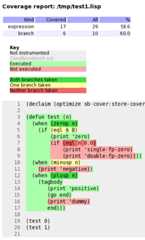
Such capabilities are included into Lisp implementations. For example, SBCL has thesb-cover moduleand the feature is also built-in inCCLorLispWorks.
Let’s do it with SBCL’ssb-cover.
Coverage reports are only generated for code compiled usingcompile-file with the value of thesb-cover:store-coverage-dataoptimization quality set to 3.
;;; Load SB-COVER(require :sb-cover);;; Turn on generation of code coverage instrumentation;;; in the compiler(declaim (optimize sb-cover:store-coverage-data));;; Load some code, ensuring that it's recompiled;;; with the new optimization policy.(asdf:oos 'asdf:load-op :cl-ppcre-test :force t);;; Run the test suite.(fiveam:run! yoursystem-test)Produce a coverage report, set the output directory:
(sb-cover:report "coverage/")Finally, turn off instrumentation:
(declaim (optimize (sb-cover:store-coverage-data 0)))You can open your browser at../yourproject/t/coverage/cover-index.html to see the report likethe capture above or likethis code coverage of cl-ppcre.
Continuous Integration is important to run automatic tests after acommit or before a pull request, to run code quality checks, to buildand distribute your software… well, to automate everything about software.
We want our programs to be portable across Lisp implementations, sowe’ll set up our CI pipeline to run our tests against several of them (itcould be SBCL and CCL of course, but while we’re at it ABCL, ECL andpossibly more).
We have a choice of Continuous Integration services: Travis CI, Circle, Gitlab CI, now also GitHub Actions, etc (many existed before GitHub Actions, if you wonder). We’ll have a look at how to configure a CI pipeline for Common Lisp, and we’ll focus a little more on Gitlab CI on the last part.
We’ll also quickly show how to publish coverage reports to theCoveralls service.cl-coveralls helps to post our coverage to the service.
We’ll useCI-Utils, a set of utilities that comes with many examples. It also explains more precisely what is a CI system and compares a dozen of services.
It relies onRoswell to install the Lisp implementations and to run the tests. They all are installed with a bash one-liner:
curl -L https://raw.githubusercontent.com/roswell/roswell/release/scripts/install-for-ci.sh | bash(note that on the Gitlab CI example, we use a ready-to-use Docker image that contains them all)
It also ships with a test runner for FiveAM, which eases some rough parts (like returning the right error code to the terminal). We install ci-utils with Roswell, and we get therun-fiveam executable.
Then we can run our tests:
run-fiveam -e t -l foo/test :foo-tests # foo is our projectFollowing is the complete.travis.yml file.
The first part should be self-explanatory:
### Example configuration for Travis CI ###language: genericaddons: homebrew: update: true packages: - roswell apt: packages: - libc6-i386 # needed for a couple implementations - default-jre # needed for abcl# Runs each lisp implementation on each of the listed OSos: - linux# - osx # OSX has a long setup on travis, so it's likely easier# to just run select implementations on OSX.This is how we configure the implementations matrix, to run our tests on several Lisp implementations. We also send the test coverage made with SBCL to Coveralls.
env: global: - PATH=~/.roswell/bin:$PATH - ROSWELL_INSTALL_DIR=$HOME/.roswell# - COVERAGE_EXCLUDE=t # for rove jobs: # The implementation and whether coverage # is sent to coveralls are controlled # with these environmental variables - LISP=sbcl-bin COVERALLS=true - LISP=ccl-bin - LISP=abcl - LISP=ecl # warn: in our experience, # compilations times can be long on ECL.# Additional OS/Lisp combinations can be added# to those generated abovejobs: include: - os: osx env: LISP=sbcl-bin - os: osx env: LISP=ccl-binSome jobs can be marked as allowed to fail:
# Note that this should only be used if there is no interest# for the library to work on that system# allow_failures:# - env: LISP=abcl# - env: LISP=ecl# - env: LISP=cmucl# - env: LISP=alisp# os: osx fast_finish: trueWe finally install Roswell, the implementations, and we run our tests.
cache: directories: - $HOME/.roswell - $HOME/.config/common-lispinstall: - curl -L https://raw.githubusercontent.com/roswell/roswell/release/scripts/install-for-ci.sh | sh - ros install ci-utils #for run-fiveam# - ros install rove #for [run-] rove # If asdf 3.16 or higher is needed, uncomment the following lines #- mkdir -p ~/common-lisp #- if [ "$LISP" == "ccl-bin" ]; then git clone https://gitlab.common-lisp.net/asdf/asdf.git ~/common-lisp; fiscript: - run-fiveam -e t -l foo/test :foo-tests #- rove foo.asdBelow with Gitlab CI, we’ll use a Docker image that already contains the Lisp binaries and every Debian package required to build Quicklisp libraries.
Gitlab CI is part ofGitlab and is available onGitlab.com, forpublic and private repositories. Let’s see straight away a simple.gitlab-ci.yml:
variables: QUICKLISP_ADD_TO_INIT_FILE: "true"image: clfoundation/sbcl:latestbefore_script: - install-quicklisp - git clone https://github.com/foo/bar ~/quicklisp/local-projects/test: script: - make testGitlab CI is based on Docker. Withimage we tell it to use thelatest tagof theclfoundation/sbclimage. This includes the latest version of SBCL, many OS packages useful for CIpurposes, and a script to install Quicklisp. Gitlab will load the image, cloneour project and put us at the project root with administrative rights to runthe rest of the commands.
test is a “job” we define,script is arecognized keywords that takes a list of commands to run.
Suppose we must install dependencies before running our tests:before_scriptwill run before each job. Here we install Quicklisp (adding it to SBCL’s initfile), and clone a library where Quicklisp can find it.
We can try locally ourselves. If we already installedDocker andstarted its daemon (sudo service docker start), we can do:
docker run --rm -it -v /path/to/local/code:/usr/local/share/common-lisp/source clfoundation/sbcl:latest bashThis will download the lisp image (±300MB compressed), mount some local code inthe image where indicated, and drop us in bash. Now we can try amake test.
Here is a more complete example that tests against several CL implementationsin parallel:
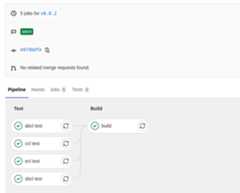
variables: IMAGE_TAG: latest QUICKLISP_ADD_TO_INIT_FILE: "true" QUICKLISP_DIST_VERSION: latestimage: clfoundation/$LISP:$IMAGE_TAGstages: - test - buildbefore_script: - install-quicklisp - git clone https://github.com/foo/bar ~/quicklisp/local-projects/.test: stage: test script: - make testabcl test: extends: .test variables: LISP: abclccl test: extends: .test variables: LISP: cclecl test: extends: .test variables: LISP: eclsbcl test: extends: .test variables: LISP: sbclbuild: stage: build variables: LISP: sbcl only: - tags script: - make build artifacts: paths: - some-file-nameHere we defined twostages (seeenvironments),“test” and “build”, defined to run one after another. A “build” stagewill start only if the “test” one succeeds.
“build” is asked to runonly when anew tag is pushed, not at every commit. When it succeeds, it will makethe files listed inartifacts’spaths available for download. We candownload them from Gitlab’s Pipelines UI, or with an url. This one will downloadthe file “some-file-name” from the latest “build” job:
https://gitlab.com/username/project-name/-/jobs/artifacts/master/raw/some-file-name?job=buildWhen the pipelines pass, you will see:
You now have a ready to use Gitlab CI.
It’s very easy to set upSourceHut’s CI system for CommonLisp. Here is a minimal.build.yml file that you can test via thebuildmanifest tester:
image: archlinuxpackages:- sbcl- quicklispsources:- https://git.sr.ht/~fosskers/cl-transducerstasks:# If our project isn't in the special `common-lisp` directory, quicklisp won't# be able to find it for loading.- move: | mkdir common-lisp mv cl-transducers ~/common-lisp- quicklisp: | sbcl --non-interactive --load /usr/share/quicklisp/quicklisp.lisp --eval "(quicklisp-quickstart:install)"- test: | cd common-lisp/cl-transducers sbcl --non-interactive --load ~/quicklisp/setup.lisp --load run-tests.lispSince the Docker image we’re given is nearly empty, we need to installsbclandquicklisp manually. Notice also that we’re running arun-tests.lisp fileto drive the tests. Here’s what it could look like:
(ql:quickload :transducers/tests)(in-package :transducers/tests)(let ((status (parachute:status (parachute:test 'transducers/tests)))) (cond ((eq :PASSED status) (uiop:quit)) (t (uiop:quit 1))))Here, examples of theParachute testinglibrary are shown. As shown elsewhere, in order for the CI job to fail when anytest fails, we manually check the test result status and return1 when there’sa problem.
Slite stands for SLIme TEst runner. It allows you to see the summary of test failures, jump to test definitions, rerun tests with the debugger… all from inside Emacs. We get a dashboard-like buffer with green and red badges, from where we can act on tests. It makes the testing processeven more integrated and interactive.
It consists of an ASDF system and an Emacs package. It is a new project (it appeared mid 2021) so, as of September 2021, neither can be installed via Quicklisp or MELPA yet. Please refer to itsrepository for instructions.
Page source:testing.md