
Table of Contents
📢 🎓 ⭐Learn Common Lisp efficiently in videos, by the Cookbook's main contributor.Learn more.
The most important thing to know about strings in Common Lisp is probably thatthey are arrays and thus also sequences. This implies that all concepts that areapplicable to arrays and sequences also apply to strings. If you can’t find aparticular string function, make sure you’ve also searched for the more generalarray or sequence functions.We’ll only cover a fraction of what can be done with and to strings here.
ASDF3, which is included with almost all Common Lisp implementations,includesUtilities for Implementation- and OS- Portability (UIOP),which defines functions to work on strings (strcat,string-prefix-p,string-enclosed-p,first-char,last-char,split-string,stripln).
Some external libraries available on Quicklisp bring some morefunctionality or some shorter ways to do.
trim,words,unwords,lines,unlines,concat,split,shorten,repeat,replace-all,starts-with?,ends-with?,blankp,emptyp, …str.cl-ppcre can come in handy, for exampleppcre:replace-regexp-all. See theregexp section.Last but not least, when you’ll need to tackle theformat construct,don’t miss the following resources:
C-c C-d ~ plus a letter of a format directive to open up its documentation. Use TAB-completion to list them all. Again more useful withivy-mode orhelm-mode.A string is created with double quotes, all right, but we can recallthese other ways:
format nil doesn’tprint but returns a new string (seemore examples offormat below):(defparameter *person* "you")(format nil "hello ~a" *person*) ;; => "hello you"make-string count creates a string of the given length. The:initial-element character is repeatedcount times:(make-string 3 :initial-element #\♥) ;; => "♥♥♥"As a string is a sequence, you can access substrings with the SUBSEQfunction. The index into the string is, as always, zero-based. The third,optional, argument is the index of the first character which is not a part ofthe substring, it is not the length of the substring.
CL-USER> (defparameter *my-string* (string "Groucho Marx"))*MY-STRING*CL-USER> (subseq *my-string* 8)"Marx"CL-USER> (subseq *my-string* 0 7)"Groucho"CL-USER> (subseq *my-string* 1 5)"rouc"You can also manipulate the substring if you use SUBSEQ together with SETF.
CL-USER> (defparameter *my-string* (string "Harpo Marx"))*MY-STRING*CL-USER> (subseq *my-string* 0 5)"Harpo"CL-USER> (setf (subseq *my-string* 0 5) "Chico")"Chico"CL-USER> *my-string*"Chico Marx"But note that the string isn’t “stretchable”. To cite from the HyperSpec: “Ifthe subsequence and the new sequence are not of equal length, the shorter lengthdetermines the number of elements that are replaced.” For example:
CL-USER> (defparameter *my-string* (string "Karl Marx"))*MY-STRING*CL-USER> (subseq *my-string* 0 4)"Karl"CL-USER> (setf (subseq *my-string* 0 4) "Harpo")"Harpo"CL-USER> *my-string*"Harp Marx"CL-USER> (subseq *my-string* 4)" Marx"CL-USER> (setf (subseq *my-string* 4) "o Marx")"o Marx"CL-USER> *my-string*"Harpo Mar"You can use the function CHAR to access individual characters of a string. CHARcan also be used in conjunction with SETF.
CL-USER> (defparameter *my-string* (string "Groucho Marx"))*MY-STRING*CL-USER> (char *my-string* 11)#\xCL-USER> (char *my-string* 7)#\SpaceCL-USER> (char *my-string* 6)#\oCL-USER> (setf (char *my-string* 6) #\y)#\yCL-USER> *my-string*"Grouchy Marx"Note that there’s also SCHAR. If efficiency is important, SCHAR can be a bitfaster where appropriate.
Because strings are arrays and thus sequences, you can also use the more genericfunctionsaref andelt (which are more general while CHAR might be implementedmore efficiently).
CL-USER> (defparameter *my-string* (string "Groucho Marx"))*MY-STRING*CL-USER> (aref *my-string* 3)#\uCL-USER> (elt *my-string* 8)#\MEach character in a string has an integer code. The range of recognized codesand Lisp’s ability to print them is directed related to your implementation’scharacter set support, e.g. ISO-8859-1, or Unicode. Here are some examples inSBCL of UTF-8 which encodes characters as 1 to 4 8 bit bytes. The first exampleshows a character outside the first 128 chars, or what is considered the normalLatin character set. The second example shows a multibyte encoding (beyond thevalue 255). Notice the Lisp reader can round-trip characters by name.
CL-USER> (stream-external-format *standard-output*):UTF-8CL-USER> (code-char 200)#\LATIN_CAPITAL_LETTER_E_WITH_GRAVECL-USER> (char-code #\LATIN_CAPITAL_LETTER_E_WITH_GRAVE)200CL-USER> (code-char 2048)#\SAMARITAN_LETTER_ALAFCL-USER> (char-code #\SAMARITAN_LETTER_ALAF)2048Check out the UTF-8 Wikipedia article for the range of supported characters andtheir encodings.
There’s a slew of (sequence) functions that can be used to manipulate a stringand we’ll only provide some examples here. See the sequences dictionary in theHyperSpec for more.
remove one character from a string:
CL-USER> (remove #\o "Harpo Marx")"Harp Marx"CL-USER> (remove #\a "Harpo Marx")"Hrpo Mrx"CL-USER> (remove #\a "Harpo Marx" :start 2)"Harpo Mrx"CL-USER> (remove-if #'upper-case-p "Harpo Marx")"arpo arx"Replace one character withsubstitute (non destructive) orreplace (destructive):
CL-USER> (substitute #\u #\o "Groucho Marx")"Gruuchu Marx"CL-USER> (substitute-if #\_ #'upper-case-p "Groucho Marx")"_roucho _arx"CL-USER> (defparameter *my-string* (string "Zeppo Marx"))*MY-STRING*CL-USER> (replace *my-string* "Harpo" :end1 5)"Harpo Marx"CL-USER> *my-string*"Harpo Marx"The name says it all:concatenate is your friend. Note that this is a genericsequence function and you have to provide the result type as the first argument.
CL-USER> (concatenate 'string "Karl" " " "Marx")"Karl Marx"CL-USER> (concatenate 'list "Karl" " " "Marx")(#\K #\a #\r #\l #\Space #\M #\a #\r #\x)With UIOP, usestrcat:
CL-USER> (uiop:strcat "karl" " " "marx")or with the librarystr, useconcat:
CL-USER> (str:concat "foo" "bar")If you have to construct a string out of many parts, all of these calls toconcatenate seem wasteful, though. There are at least three other good ways toconstruct a string piecemeal, depending on what exactly your data is. If youbuild your string one character at a time, make it an adjustable vector (aone-dimensional array) of type character with a fill-pointer of zero, then usevector-push-extend on it. That way, you can also give hints to the system if youcan estimate how long the string will be. (See the optional third argument tovector-push-extend.)
CL-USER> (defparameter *my-string* (make-array 0 :element-type 'character :fill-pointer 0 :adjustable t))*MY-STRING*CL-USER> *my-string*""CL-USER> (dolist (char '(#\Z #\a #\p #\p #\a)) (vector-push-extend char *my-string*))NILCL-USER> *my-string*"Zappa"If the string will be constructed out of (the printed representations of)arbitrary objects, (symbols, numbers, characters, strings, …), you can useformat with an output stream argument ofnil. This directsformat to return theindicated output as a string.
CL-USER> (format nil "This is a string with a list ~A in it" '(1 2 3))"This is a string with a list (1 2 3) in it"We can use the looping constructs of theformat mini language to emulateconcatenate.
CL-USER> (format nil "The Marx brothers are:~{ ~A~}." '("Groucho" "Harpo" "Chico" "Zeppo" "Karl"))"The Marx brothers are: Groucho Harpo Chico Zeppo Karl."format can do a lot more processing but it has a relatively arcane syntax. Afterthis last example, you can find the details in the CLHS section about formattedoutput.
CL-USER> (format nil "The Marx brothers are:~{ ~A~^,~}." '("Groucho" "Harpo" "Chico" "Zeppo" "Karl"))"The Marx brothers are: Groucho, Harpo, Chico, Zeppo, Karl."Another way to create a string out of the printed representation of variousobject is usingwith-output-to-string. The value of this handy macro is a stringcontaining everything that was output to the string stream within the body tothe macro. This means you also have the full power offormat at your disposal,should you need it.
CL-USER> (with-output-to-string (stream) (dolist (char '(#\Z #\a #\p #\p #\a #\, #\Space)) (princ char stream)) (format stream "~S - ~S" 1940 1993))"Zappa, 1940 - 1993"Use the MAP function to process a string one character at a time.
CL-USER> (defparameter *my-string* (string "Groucho Marx"))*MY-STRING*CL-USER> (map 'string (lambda (c) (print c)) *my-string*)#\G#\r#\o#\u#\c#\h#\o#\Space#\M#\a#\r#\x"Groucho Marx"Or do it with LOOP.
CL-USER> (loop for char across "Zeppo" collect char)(#\Z #\e #\p #\p #\o)Reversing a string by character is easy using the built-inreverse function (orits destructive counterpartnreverse).
CL-USER> (defparameter *my-string* (string "DSL"))*MY-STRING*CL-USER> (reverse *my-string*)"LSD"There’s no one-liner in CL to reverse a string by word (like you would do it inPerl with split and join). You either have to use functions from an externallibrary like SPLIT-SEQUENCE or you have to roll your own solution.
Here’s an attempt with thestr library:
CL-USER> (defparameter *singing* "singing in the rain")*SINGING*CL-USER> (str:words *SINGING*)("singing" "in" "the" "rain")CL-USER> (reverse *)("rain" "the" "in" "singing")CL-USER> (str:unwords *)"rain the in singing"And here’s another one with no external dependencies:
CL-USER> (defun split-by-one-space (string) "Returns a list of substrings of string divided by ONE space each. Note: Two consecutive spaces will be seen as if there were an empty string between them." (loop for i = 0 then (1+ j) as j = (position #\Space string :start i) collect (subseq string i j) while j))SPLIT-BY-ONE-SPACECL-USER> (split-by-one-space "Singing in the rain")("Singing" "in" "the" "rain")CL-USER> (split-by-one-space "Singing in the rain")("Singing" "in" "the" "" "rain")CL-USER> (split-by-one-space "Cool")("Cool")CL-USER> (split-by-one-space " Cool ")("" "Cool" "")CL-USER> (defun join-string-list (string-list) "Concatenates a list of stringsand puts spaces between the elements." (format nil "~{~A~^ ~}" string-list))JOIN-STRING-LISTCL-USER> (join-string-list '("We" "want" "better" "examples"))"We want better examples"CL-USER> (join-string-list '("Really"))"Really"CL-USER> (join-string-list '())""CL-USER> (join-string-list (nreverse (split-by-one-space "Reverse this sentence by word")))"word by sentence this Reverse"We’ll use hereSBCL’s string operations. More generally, seeSBCL’s unicode support.
Sorting unicode strings withstring-lessp as the comparison functionisn’t satisfying:
CL-USER> (sort '("Aaa" "Ééé" "Zzz") #'string-lessp)("Aaa" "Zzz" "Ééé")WithSBCL, usesb-unicode:unicode<:
CL-USER> (sort '("Aaa" "Ééé" "Zzz") #'sb-unicode:unicode<)("Aaa" "Ééé" "Zzz")These functions use SBCL’ssb-unicode: they are SBCL specific.
Usesb-unicode:sentences to break a string into sentences accordingto the default sentence breaking rules.
Usesb-unicode:lines to break a string into lines that are no widerthan the:margin keyword argument. Combining marks will always be kept together with their base characters, and spaces (but not other types of whitespace) will be removed from the end of lines. If:margin is unspecified, it defaults to 80 characters
CL-USER> (sb-unicode:lines "A first sentence. A second somewhat long one." :margin 10)("A first" "sentence." "A second" "somewhat" "long one.")See alsosb-unicode:words andsb-unicode:graphemes.
Tip: you can ensure these functions are run only in SBCL with a feature flag:
#+sbcl(runs on sbcl)#-sbcl(runs on other implementations)Common Lisp has a couple of functions to control the case of a string.
CL-USER> (string-upcase "cool")"COOL"CL-USER> (string-upcase "Cool")"COOL"CL-USER> (string-downcase "COOL")"cool"CL-USER> (string-downcase "Cool")"cool"CL-USER> (string-capitalize "cool")"Cool"CL-USER> (string-capitalize "cool example")"Cool Example"These functions take the:start and:end keyword arguments so you can optionallyonly manipulate a part of the string. They also have destructive counterpartswhose names starts with “N”.
CL-USER> (string-capitalize "cool example" :start 5)"cool Example"CL-USER> (string-capitalize "cool example" :end 5)"Cool example"CL-USER> (defparameter *my-string* (string "BIG"))*MY-STRING*CL-USER> (defparameter *my-downcase-string* (nstring-downcase *my-string*))*MY-DOWNCASE-STRING*CL-USER> *my-downcase-string*"big"CL-USER> *my-string*"big"Note this potential caveat: according to the HyperSpec,
for STRING-UPCASE, STRING-DOWNCASE, and STRING-CAPITALIZE, string is not modified. However, if no characters in string require conversion, the result may be either string or a copy of it, at the implementation’s discretion.
This implies that the last result inthe following example is implementation-dependent - it may either be “BIG” or“BUG”. If you want to be sure, usecopy-seq.
CL-USER> (defparameter *my-string* (string "BIG"))*MY-STRING*CL-USER> (defparameter *my-upcase-string* (string-upcase *my-string*))*MY-UPCASE-STRING*CL-USER> (setf (char *my-string* 1) #\U)#\UCL-USER> *my-string*"BUG"CL-USER> *my-upcase-string*"BIG"The format function has directives to change the case of words:
CL-USER> (format t "~(~a~)" "HELLO WORLD")hello worldCL-USER> (format t "~:(~a~)" "HELLO WORLD")Hello WorldNILCL-USER> (format t "~@(~a~)" "hello world")Hello worldNILWhere we re-use the colon and the @:
CL-USER> (format t "~@:(~a~)" "hello world")HELLO WORLDNILNot only can you trim blanks, but you can get rid of arbitrary characters. Thefunctionsstring-trim,string-left-trim andstring-right-trim return a substringof their second argument where all characters that are in the first argument areremoved off the beginning and/or the end. The first argument can be any sequenceof characters.
CL-USER> (string-trim " " " trim me ")"trim me"CL-USER> (string-trim " et" " trim me ")"rim m"CL-USER> (string-left-trim " et" " trim me ")"rim me "CL-USER> (string-right-trim " et" " trim me ")" trim m"CL-USER> (string-right-trim '(#\Space #\e #\t) " trim me ")" trim m"CL-USER> (string-right-trim '(#\Space #\e #\t #\m) " trim me ")Note: The caveat mentioned in the section about Controlling Case also applieshere.
The functionintern will “convert” a string to a symbol. Actually, it will checkwhether the symbol denoted by the string (its first argument) is alreadyaccessible in the package (its second, optional, argument which defaults to thecurrent package) and enter it, if necessary, into this package. It is beyond thescope of this chapter to explain all the concepts involved and to address thesecond return value of this function. See the CLHS chapter about packages fordetails.
Note that the case of the string is relevant.
CL-USER> (in-package "COMMON-LISP-USER")#<The COMMON-LISP-USER package, 35/44 internal, 0/9 external>CL-USER> (intern "MY-SYMBOL")MY-SYMBOLNILCL-USER> (intern "MY-SYMBOL")MY-SYMBOL:INTERNALCL-USER> (export 'MY-SYMBOL)TCL-USER> (intern "MY-SYMBOL")MY-SYMBOL:EXTERNALCL-USER> (intern "My-Symbol")|My-Symbol|NILCL-USER> (intern "MY-SYMBOL" "KEYWORD"):MY-SYMBOLNILCL-USER> (intern "MY-SYMBOL" "KEYWORD"):MY-SYMBOL:EXTERNALTo do the opposite, convert from a symbol to a string, usesymbol-name orstring.
CL-USER> (symbol-name 'MY-SYMBOL)"MY-SYMBOL"CL-USER> (symbol-name 'my-symbol)"MY-SYMBOL"CL-USER> (symbol-name '|my-symbol|)"my-symbol"CL-USER> (string 'howdy)"HOWDY"You can usecoerce to convert a string of length 1 to a character. You can alsousecoerce to convert any sequence of characters into a string. You can not usecoerce to convert a character to a string, though - you’ll have to usestringinstead.
CL-USER> (coerce "a" 'character)#\aCL-USER> (coerce (subseq "cool" 2 3) 'character)#\oCL-USER> (coerce "cool" 'list)(#\c #\o #\o #\l)CL-USER> (coerce '(#\h #\e #\y) 'string)"hey"CL-USER> (coerce (nth 2 '(#\h #\e #\y)) 'character)#\yCL-USER> (defparameter *my-array* (make-array 5 :initial-element #\x))*MY-ARRAY*CL-USER> *my-array*#(#\x #\x #\x #\x #\x)CL-USER> (coerce *my-array* 'string)"xxxxx"CL-USER> (string 'howdy)"HOWDY"CL-USER> (string #\y)"y"CL-USER> (coerce #\y 'string)#\y can't be converted to type STRING. [Condition of type SIMPLE-TYPE-ERROR]Usefind,position, and their…-if counterparts to find characters in a string, with the appropriate:test parameter:
CL-USER> (find #\t "Tea time." :test #'equal)#\tCL-USER> (find #\t "Tea time." :test #'equalp)#\TCL-USER> (find #\z "Tea time." :test #'equalp)NILCL-USER> (find-if #'digit-char-p "Tea time.")#\1CL-USER> (find-if #'digit-char-p "Tea time." :from-end t)#\0CL-USER> (position #\t "Tea time." :test #'equal)4 ;; <= the first lowercase tCL-USER> (position #\t "Tea time." :test #'equalp)0 ;; <= the first capital TCL-USER> (position-if #'digit-char-p "Tea time is at 5'00.")15CL-USER> (position-if #'digit-char-p "Tea time is at 5'00." :from-end t)18Or usecount and friends to count characters in a string:
CL-USER> (count #\t "Tea time." :test #'equal)1 ;; <= equal ignores the capital TCL-USER> (count #\t "Tea time." :test #'equalp)2 ;; <= equalp counts the capital TCL-USER> (count-if #'digit-char-p "Tea time is at 5'00.")3CL-USER> (count-if #'digit-char-p "Tea time is at 5'00." :start 18)1The functionsearch can find substrings of a string.
CL-USER> (search "we" "If we can't be free we can at least be cheap")3CL-USER> (search "we" "If we can't be free we can at least be cheap" :from-end t)20CL-USER> (search "we" "If we can't be free we can at least be cheap" :start2 4)20CL-USER> (search "we" "If we can't be free we can at least be cheap" :end2 5 :from-end t)3CL-USER> (search "FREE" "If we can't be free we can at least be cheap")NILCL-USER> (search "FREE" "If we can't be free we can at least be cheap" :test #'char-equal)15CL provides theparse-integer function to convert a string representation of an integerto the corresponding numeric value. The second return value is the index intothe string where the parsing stopped.
CL-USER> (parse-integer "42")422CL-USER> (parse-integer "42" :start 1)22CL-USER> (parse-integer "42" :end 1)41CL-USER> (parse-integer "42" :radix 8)342CL-USER> (parse-integer " 42 ")423CL-USER> (parse-integer " 42 is forty-two" :junk-allowed t)423CL-USER> (parse-integer " 42 is forty-two")Error in function PARSE-INTEGER: There's junk in this string: " 42 is forty-two".parse-integer doesn’t understand radix specifiers like#X, nor is there abuilt-in function to parse other numeric types. You could useread-from-stringin this case.
ppcre:all-matches-as-stringsWe show this in the Regular Expressions chapter but while we are on this topic, you can find it super useful:
CL-USER> (ppcre:all-matches-as-strings "-?\\d+" "42 is 41 plus 1");; ("42" "41" "1")CL-USER> (mapcar #'parse-integer *);; (42 41 1)read-from-stringBe aware that the full reader is in effect if you’re using thisfunction. This can lead to vulnerability issues. You should use alibrary likeparse-number orparse-float instead.
CL-USER> (read-from-string "#X23")354CL-USER> (read-from-string "4.5")4.53CL-USER> (read-from-string "6/8")3/43CL-USER> (read-from-string "#C(6/8 1)")#C(3/4 1)9CL-USER> (read-from-string "1.2e2")120.000015CL-USER> (read-from-string "symbol")SYMBOL6CL-USER> (defparameter *foo* 42)*FOO*CL-USER> (read-from-string "#.(setq *foo* \"gotcha\")")"gotcha"23CL-USER> *foo*"gotcha"read-from-stringAt the very least, if you are reading data coming from the outside, use this:
(let ((cl:*read-eval* nil)) (read-from-string "…"))This prevents code to be evaluated at read-time. That way our last example, using the#. reader macro, would not work. You’ll get the error “can’t read #. while *READ-EVAL* is NIL”.
And better yet, for more protection from a possibly custom readtable that would introduce another reader macro:
(with-standard-io-syntax (let ((cl:*read-eval* nil)) (read-from-string "…")))There is no built-in function similar toparse-integer to parseother number types. The external libraryparse-float does exactlythat. It doesn’t useread-from-string so it is safe to use.
CL-USER> (ql:quickload "parse-float")CL-USER> (parse-float:parse-float "1.2e2")120.000015LispWorks also has aparse-float function.
See alsoparse-number.
The general functionwrite-to-string or one of its simpler variantsprin1-to-string orprinc-to-string may be used to convert a number to astring. Withwrite-to-string, the:base keyword argument may be used to changethe output base for a single call. To change the output base globally, setprint-base which defaults to 10. Remember in Lisp, rational numbers arerepresented as quotients of two integers even when converted to strings.
CL-USER> (write-to-string 250)"250"CL-USER> (write-to-string 250.02)"250.02"CL-USER> (write-to-string 250 :base 5)"2000"CL-USER> (write-to-string (/ 1 3))"1/3"The general functionsequal andequalp can be used to test whether two stringsare equal. The strings are compared element-by-element, either in acase-sensitive manner (equal) or not (equalp). There’s also a bunch ofstring-specific comparison functions. You’ll want to use these if you’redeploying implementation-defined attributes of characters. Check your vendor’sdocumentation in this case.
Here are a few examples. Note that all functions that test for inequality return the position of the first mismatch as a generalized boolean. You can also use the generic sequence functionmismatch if you need more versatility.
CL-USER> (string= "Marx" "Marx")TCL-USER> (string= "Marx" "marx")NILCL-USER> (string-equal "Marx" "marx")TCL-USER> (string< "Groucho" "Zeppo")0CL-USER> (string< "groucho" "Zeppo")NILCL-USER> (string-lessp "groucho" "Zeppo")0CL-USER> (mismatch "Harpo Marx" "Zeppo Marx" :from-end t :test #'char=)3and alsostring/=,string-not-equal,string-not-lessp,string-not-greaterp.
formatTheformat function has a lot of directives to print strings,numbers, lists, going recursively, even calling Lisp functions,etc. We’ll focus here on a few things to print and format strings.
For our examples below, we’ll work with a list of movies:
(defparameter *movies* '( (1 "Matrix" 5) (10 "Matrix Trilogy swe sub" 3.3)))Format directives start with~. A final character likeA ora(they are case insensitive) defines the directive. In between, it canaccept coma-separated options and parameters. Further, some directivescan take colon and at-sign modifiers, which change the behavior of thedirective in some way. For example, with theD directive, the colonadds commas every three digits, and the at-sign adds a plus sign whenthe number is positive:
(format nil "~d" 2025);; => "2025"(format nil "~:d" 2025);; => "2,025"(format nil "~@d" 2025);; => "+2025"(format nil "~@:d" 2025);; => "+2,025"With the at-sign modifier, theR directive outputs Roman numeralsrather than an English cardinal number:
(format nil "~r" 2025);; => "two thousand twenty-five"(format nil "~@r" 2025);; => "MMXXV"If there isn’t a sensible interpretation for both modifiers usedtogether, the result is either undefined or some additional meaning.
Print a tilde with~~, or 10 tildes with~10~.
Other directives include:
R: Roman (e.g., prints in English):(format t "~R" 20) => “twenty”.$: monetary:(format t "~$" 21982) => 21982.00D,B,O,X: Decimal, Binary, Octal, Hexadecimal.F: fixed-format Floating point.P: plural:(format nil "~D famil~:@P/~D famil~:@P" 7 1) => “7 families/1 family”(format t "~a" *movies*) is the most basic primitive.
t prints to*standard-output*.
(format nil "~a" *movies*);; => "((1 Matrix 5) (10 Matrix Trilogy swe sub 3.3))"Here,nil tellsformat to return a new string.
t ornilAs seen above,(format t …) prints to*standard-output* whereas(format nil …) returns a new string.
Now observe:
(format t "~a" *movies*);; =>((1 Matrix 5) (10 Matrix Trilogy swe sub 3.3))NILformatprints to stdout andreturns NIL.
But now:
(format nil "~a" *movies*);; =>"((1 Matrix 5) (10 Matrix Trilogy swe sub 3.3))"format returned a string.
~% is the newline character.~10% prints 10 newlines.
~& does not print a newline if the output stream is already at one.
with~T. Also~10T works.
Alsoi for indentation.
Use a number as parameter, like~2a:
(format nil "~20a" "yo");; "yo "(mapcar (lambda (it) (format t "~2a ~a ~a~%" (first it) (second it) (third it))) *movies*)1 Matrix 510 Matrix Trilogy swe sub 3.3So, expanding:
(mapcar (lambda (it) (format t "~2a ~25a ~2a~%" (first it) (second it) (third it))) *movies*)1 Matrix 510 Matrix Trilogy swe sub 3.3text is justified on the right (this would be with option:).
Use a@ as in~2@A:
(format nil "~20@a" "yo");; " yo"(mapcar (lambda (it) (format nil "~2@a ~25@a ~2a~%" (first it) (second it) (third it))) *movies*) 1 Matrix 510 Matrix Trilogy swe sub 3.3In~,2F, 2 is the number of decimals and F the floats directive:(format t "~,2F" 20.1) => “20.10”.
With~2,2f:
(mapcar (lambda (it) (format t "~2@a ~25a ~2,2f~%" (first it) (second it) (third it))) *movies*) 1 Matrix 5.0010 Matrix Trilogy swe sub 3.30And we’re happy with this result.
Create a string from a list with iteration construct~{str~}:
(format nil "~{~A, ~}" '(a b c));; "A, B, C, "using~^ to avoid printing the comma and space after the last element:
(format nil "~{~A~^, ~}" '(a b c));; "A, B, C"~:{str~} is similar but for a list of sublists:
(format nil "~:{~S are ~S. ~}" '((pigeons birds) (dogs mammals)));; "PIGEONS are BIRDS. DOGS are MAMMALS. "~@{str~} is similar to~{str~}, but instead of using one argument that is a list, all the remaining arguments are used as the list of arguments for the iteration:
(format nil "~@{~S are ~S. ~}" 'pigeons 'birds 'dogs 'mammals);; "PIGEONS are BIRDS. DOGS are MAMMALS. "~v,~?)Sometimes you want to justify a string, but the length is a variableitself. You can’t hardcode its value as in(format nil "~30a""foo"). Enters thev directive. We can use it in place of thecomma-separated prefix parameters:
(let ((padding 30)) (format nil "~va" padding "foo"));; "foo "Other times, you would like to insert a complete format directiveat run time. Enters the? directive.
(format nil "~?" "~30a" '("foo"));; ^ a listor, using~@?:
(format nil "~@?" "~30a" "foo" );; ^ not a listOf course, it is always possible to format a format string beforehand:
(let* ((length 30) (directive (format nil "~~~aa" length))) (format nil directive "foo"))Choose one value out of many options by specifying a number:
(format nil "~[dog~;cat~;bird~:;default~]" 0);; "dog"(format nil "~[dog~;cat~;bird~:;default~]" 1);; "cat"If the number is out of range, the default option (after~:;) is returned:
(format nil "~[dog~;cat~;bird~:;default~]" 9);; "default"Combine it with~:* to implement irregular plural:
(format nil "I saw ~r el~:*~[ves~;f~:;ves~]." 0);; => "I saw zero elves."(format nil "I saw ~r el~:*~[ves~;f~:;ves~]." 1);; => "I saw one elf."(format nil "I saw ~r el~:*~[ves~;f~:;ves~]." 2);; => "I saw two elves."Inside(with-output-to-string (mystream) …), everything that isprinted into the streammystream is captured and returned as astring:
(defun greet (name &key (stream t)) ;; by default, print to standard output. (format stream "hello ~a" name))(let ((output (with-output-to-string (stream) (greet "you" :stream stream)))) (format t "Output is: '~a'. It is indeed a ~a, aka a string.~&" output (type-of output)));; Output is: 'hello you'. It is indeed a (SIMPLE-ARRAY CHARACTER (9)), aka a string.;; NILThe following examples use thecl-slug library which,internally, iterates over the characters of the string and usesppcre:regex-replace-all.
(ql:quickload "cl-slug")Then it can be used with theslug prefix.
Its main function is to transform a string to a slug, suitable for a website’s url:
(slug:slugify "My new cool article, for the blog (V. 2).");; "my-new-cool-article-for-the-blog-v-2"Useslug:asciify to replace accentuated letters by their ascii equivalent:
(slug:asciify "ñ é ß ğ ö");; => "n e ss g o"This function supports many (western) languages:
slug:*available-languages*((:TR . "Türkçe (Turkish)") (:SV . "Svenska (Swedish)") (:FI . "Suomi (Finnish)") (:UK . "українська (Ukrainian)") (:RU . "Ру́сский (Russian)") (:RO . "Română (Romanian)") (:RM . "Rumàntsch (Romansh)") (:PT . "Português (Portuguese)") (:PL . "Polski (Polish)") (:NO . "Norsk (Norwegian)") (:LT . "Lietuvių (Lithuanian)") (:LV . "Latviešu (Latvian)") (:LA . "Lingua Latīna (Latin)") (:IT . "Italiano (Italian)") (:EL . "ελληνικά (Greek)") (:FR . "Français (French)") (:EO . "Esperanto") (:ES . "Español (Spanish)") (:EN . "English") (:DE . "Deutsch (German)") (:DA . "Dansk (Danish)") (:CS . "Čeština (Czech)") (:CURRENCY . "Currency"))Use(str:remove-punctuation s) or(str:no-case s) (same as(cl-change-case:no-case s)):
(str:remove-punctuation "HEY! What's up ??");; "HEY What s up"(str:no-case "HEY! What's up ??");; "hey what s up"They strip the punctuation with one ppcre unicode regexp((ppcre:regex-replace-all "[^\\p{L}\\p{N}]+" wherep{L} is the“letter” category andp{N} any kind of numeric character).
All directives are case-insensivite:~A is the same as~a.
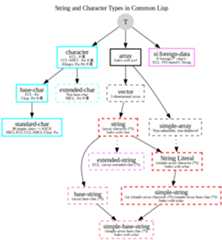
$ - Monetary Floating-Point% - Newline& - Fresh-line( - Case Conversion) - End of Case Conversion* - Go-To/ - Call Function; - Clause Separator< - Justification< - Logical Block> - End of Justification? - Recursive ProcessingA - AestheticB - BinaryC - CharacterD - DecimalE - Exponential Floating-PointF - Fixed-Format Floating-PointG - General Floating-PointI - IndentMissing and Additional FORMAT ArgumentsNesting of FORMAT OperationsNewline: Ignored NewlineO - OctalP - PluralR - RadixS - StandardT - TabulateW - WriteX - Hexadecimal[ - Conditional Expression] - End of Conditional Expression^ - Escape Upward_ - Conditional Newline{ - Iteration| - Page} - End of Iteration~ - Tildeformat directive, such as~A, useM-x common-lisp-hyperspec-format, bound toC-c C-d ~, and use TAB-completion.Solid nodes are concrete types, while dashed ones are type aliases. For example,'string is an alias for an array of characters of any size,(array character (*)).
*print-length*,*print-right-margin*,pprint-tabular etc.Page source:strings.md