cpam(changepointadditivemodels)
An R package for omics time series analysis.
Read the methods paperhere
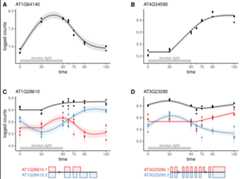
Application ofcpam to RNA-seq time series ofArabidopsis plants treated with excess-light.
Key features
- Changepoint detection: Identify sharp transitions in expression.
- smooth trends: Model expression as a smooth function of time.
- Shape-constrained trends: Cluster targets into biologically meaningful temporal shape classes.
- Quantification uncertainty: Account for uncertainty in expression estimates.
- Transcript-level analysis
- Perform gene- or transcript-level inferences.
- Aggregate-values at the gene level for improved power.
- Case-only or case-control time series: Analyse time series data with or without controls.
- User-friendly: Sensible defaults and an interactiveshiny interface.
Our new packagecpam provides a comprehensive framework for analysing time series omics data. The method uses modern statistical approaches while remaining user-friendly, through sensible defaults and an interactive interface. Researchers can directly address key questions in time series analysis—when changes occur, what patterns they follow, and how responses are related. While we have focused on transcriptomics, the framework is applicable to other high-dimensional time series measurements.
If you encounter issues or have suggestions for improvements, please open anissue. We welcome questions and discussion about usingcpam for your research throughDiscussions. Our goal is to work with users to makecpam a robust and valuable tool for time series omics analysis. We can also be contacted via the email addresses listed in our paperhere.
Installation
The package is available on CRAN and can be installed using the following command:
install.packages("cpam")For the development version, you can install it from GitHub using theremotes package:
remotes::install_github("l-a-yates/cpam")Usage
Step 2: Create a tibble for the experimental design.
In thisArabidopsis thaliana time series example, we used the softwarekallisto to generate counts from RNA-seq data. To load the counts, we provide the file path for each kallisto output file (alternatively you can provide the counts directly as count matrix, or use other quantification software)
# load example dataload(system.file("extdata","exp_design_path.rda", package="cpam"))head(exp_design_path)#> sample time path condition#> 1 JHSS01 0 output/kallisto/JHSS01/abundance.h5 treatment#> 2 JHSS02 0 output/kallisto/JHSS02/abundance.h5 treatment#> 3 JHSS03 0 output/kallisto/JHSS03/abundance.h5 treatment#> 4 JHSS04 0 output/kallisto/JHSS04/abundance.h5 treatment#> 5 JHSS05 0 output/kallisto/JHSS05/abundance.h5 treatment#> 6 JHSS06 5 output/kallisto/JHSS06/abundance.h5 treatmentStep 3: Obtain a table with the transcript-to-gene mapping
N.B. This is not needed if your counts are aggregated at the gene level, but transcript-level analysis with aggregation of-values to the gene level is recommended. E.g., forArabidopsis thaliana:
# load example dataload(system.file("extdata","t2g_arabidopsis.rda", package="cpam"))head(t2g_arabidopsis)#> target_id gene_id#> 1 AT1G01010.1 AT1G01010#> 2 AT1G01020.2 AT1G01020#> 3 AT1G01020.6 AT1G01020#> 4 AT1G01020.1 AT1G01020#> 5 AT1G01020.4 AT1G01020#> 6 AT1G01020.5 AT1G01020Step 4: Runcpam
cpo<-prepare_cpam(exp_design=exp_design_path, count_matrix=NULL, t2g=t2g_arabidopsis, model="case-only", import_type="kallisto", num_cores=5)cpo<-compute_p_values(cpo)cpo<-estimate_changepoint(cpo)cpo<-select_shape(cpo)Step 5: Visualise the results
Load the shiny app for an interactive visualisation of the results:
visualise(cpo)# not shown in vignetteOr plot one gene at a time:
plot_cpam(cpo, gene_id="AT3G23280")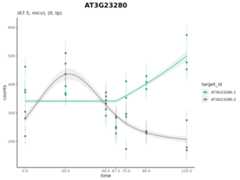
Isoform 1 (AT3G23280.1) has a changepoint at 67.5 min and has a monotonic increasing concave (micv) shape. Isoform 2 (AT3G23280.2) has no changepoint and has an unconstrained thin-plate (tp) shape.
We can generate a results table which has-values, shapes, log-fold changes and counts with many optimal filters (see tutorials):
results(cpo)#> # A tibble: 15,279 × 25#> target_id gene_id p cp shape lfc.0 lfc.5 lfc.10 lfc.20 lfc.30 lfc.45#> <chr> <chr> <dbl> <dbl> <chr> <dbl> <dbl> <dbl> <dbl> <dbl> <dbl>#> 1 AT1G01910.1 AT1G01… 0 0 micv 0 1.01 1.70 2.38 2.60 2.73#> 2 AT1G01910.2 AT1G01… 0 10 cv 0 0 0 0.553 0.775 0.790#> 3 AT1G01910.5 AT1G01… 0 10 cx 0 0 0 -3.20 -4.57 -4.82#> 4 AT1G02610.1 AT1G02… 0 45 mdcx 0 0 0 0 0 0#> 5 AT1G02610.2 AT1G02… 0 10 cx 0 0 0 -0.645 -1.16 -1.71#> 6 AT1G02610.3 AT1G02… 0 10 mdcx 0 0 0 -1.48 -2.11 -2.25#> 7 AT1G04080.1 AT1G04… 0 10 cv 0 0 0 2.75 3.85 3.97#> 8 AT1G04080.2 AT1G04… 0 45 micv 0 0 0 0 0 0#> 9 AT1G04080.3 AT1G04… 0 0 micv 0 0.268 0.445 0.603 0.638 0.656#> 10 AT1G04080.5 AT1G04… 0 10 cx 0 0 0 -2.17 -3.04 -3.10#> # ℹ 15,269 more rows#> # ℹ 14 more variables: lfc.60 <dbl>, lfc.90 <dbl>, lfc.180 <dbl>,#> # lfc.240 <dbl>, counts.0 <dbl>, counts.5 <dbl>, counts.10 <dbl>,#> # counts.20 <dbl>, counts.30 <dbl>, counts.45 <dbl>, counts.60 <dbl>,#> # counts.90 <dbl>, counts.180 <dbl>, counts.240 <dbl>Tutorials
For a quick-to-run introductory example, we have provided a small simulated data set as part of the package.
The following two tutorials use real-world data to demonstrate the capabilities of thecpam package. In addition, they provide code to reproduce the results for the case studies presented in themanuscript accompanying thecpam package.