[PR]


実用的でユニークなチェックボックスのまとめ・「Beautiful CSS checkboxes examples」
Ads
Result
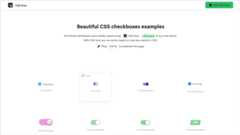
CSS ScanでCSSでスタイリングされた実用的でユニークなチェックボックスが沢山紹介されています。
どれもクリックだけでコピー可能で、CSSとHTMLがセットになったコードを発行しているのでペーストするだけで実装できるようになっています。
全てJavaScript不要で実装可能です。
css
.checkbox-wrapper-11 { --text: #414856; --check: #4F29F0; --disabled: #C3C8DE; --border-radius: 10px; border-radius: var(--border-radius); position: relative; padding: 5px; display: grid; grid-template-columns: 30px auto; align-items: center; } .checkbox-wrapper-11 label { color: var(--text); position: relative; cursor: pointer; display: grid; align-items: center; width: -webkit-fit-content; width: -moz-fit-content; width: fit-content; transition: color 0.3s ease; } .checkbox-wrapper-11 label::before, .checkbox-wrapper-11 label::after { content: ""; position: absolute; } .checkbox-wrapper-11 label::before { height: 2px; width: 8px; left: -27px; background: var(--check); border-radius: 2px; transition: background 0.3s ease; } .checkbox-wrapper-11 label:after { height: 4px; width: 4px; top: 8px; left: -25px; border-radius: 50%; } .checkbox-wrapper-11 input[type=checkbox] { -webkit-appearance: none; -moz-appearance: none; position: relative; height: 15px; width: 15px; outline: none; border: 0; margin: 0 15px 0 0; cursor: pointer; background: var(--background); display: grid; align-items: center; } .checkbox-wrapper-11 input[type=checkbox]::before, .checkbox-wrapper-11 input[type=checkbox]::after { content: ""; position: absolute; height: 2px; top: auto; background: var(--check); border-radius: 2px; } .checkbox-wrapper-11 input[type=checkbox]::before { width: 0px; right: 60%; transform-origin: right bottom; } .checkbox-wrapper-11 input[type=checkbox]::after { width: 0px; left: 40%; transform-origin: left bottom; } .checkbox-wrapper-11 input[type=checkbox]:checked::before { -webkit-animation: check-01-11 0.4s ease forwards; animation: check-01-11 0.4s ease forwards; } .checkbox-wrapper-11 input[type=checkbox]:checked::after { -webkit-animation: check-02-11 0.4s ease forwards; animation: check-02-11 0.4s ease forwards; } .checkbox-wrapper-11 input[type=checkbox]:checked + label { color: var(--disabled); -webkit-animation: move-11 0.3s ease 0.1s forwards; animation: move-11 0.3s ease 0.1s forwards; } .checkbox-wrapper-11 input[type=checkbox]:checked + label::before { background: var(--disabled); -webkit-animation: slice-11 0.4s ease forwards; animation: slice-11 0.4s ease forwards; } .checkbox-wrapper-11 input[type=checkbox]:checked + label::after { -webkit-animation: firework-11 0.5s ease forwards 0.1s; animation: firework-11 0.5s ease forwards 0.1s; } @-webkit-keyframes move-11 { 50% { padding-left: 8px; padding-right: 0px; } 100% { padding-right: 4px; } } @keyframes move-11 { 50% { padding-left: 8px; padding-right: 0px; } 100% { padding-right: 4px; } } @-webkit-keyframes slice-11 { 60% { width: 100%; left: 4px; } 100% { width: 100%; left: -2px; padding-left: 0; } } @keyframes slice-11 { 60% { width: 100%; left: 4px; } 100% { width: 100%; left: -2px; padding-left: 0; } } @-webkit-keyframes check-01-11 { 0% { width: 4px; top: auto; transform: rotate(0); } 50% { width: 0px; top: auto; transform: rotate(0); } 51% { width: 0px; top: 8px; transform: rotate(45deg); } 100% { width: 5px; top: 8px; transform: rotate(45deg); } } @keyframes check-01-11 { 0% { width: 4px; top: auto; transform: rotate(0); } 50% { width: 0px; top: auto; transform: rotate(0); } 51% { width: 0px; top: 8px; transform: rotate(45deg); } 100% { width: 5px; top: 8px; transform: rotate(45deg); } } @-webkit-keyframes check-02-11 { 0% { width: 4px; top: auto; transform: rotate(0); } 50% { width: 0px; top: auto; transform: rotate(0); } 51% { width: 0px; top: 8px; transform: rotate(-45deg); } 100% { width: 10px; top: 8px; transform: rotate(-45deg); } } @keyframes check-02-11 { 0% { width: 4px; top: auto; transform: rotate(0); } 50% { width: 0px; top: auto; transform: rotate(0); } 51% { width: 0px; top: 8px; transform: rotate(-45deg); } 100% { width: 10px; top: 8px; transform: rotate(-45deg); } } @-webkit-keyframes firework-11 { 0% { opacity: 1; box-shadow: 0 0 0 -2px #4F29F0, 0 0 0 -2px #4F29F0, 0 0 0 -2px #4F29F0, 0 0 0 -2px #4F29F0, 0 0 0 -2px #4F29F0, 0 0 0 -2px #4F29F0; } 30% { opacity: 1; } 100% { opacity: 0; box-shadow: 0 -15px 0 0px #4F29F0, 14px -8px 0 0px #4F29F0, 14px 8px 0 0px #4F29F0, 0 15px 0 0px #4F29F0, -14px 8px 0 0px #4F29F0, -14px -8px 0 0px #4F29F0; } } @keyframes firework-11 { 0% { opacity: 1; box-shadow: 0 0 0 -2px #4F29F0, 0 0 0 -2px #4F29F0, 0 0 0 -2px #4F29F0, 0 0 0 -2px #4F29F0, 0 0 0 -2px #4F29F0, 0 0 0 -2px #4F29F0; } 30% { opacity: 1; } 100% { opacity: 0; box-shadow: 0 -15px 0 0px #4F29F0, 14px -8px 0 0px #4F29F0, 14px 8px 0 0px #4F29F0, 0 15px 0 0px #4F29F0, -14px 8px 0 0px #4F29F0, -14px -8px 0 0px #4F29F0; } }1つの例です。Todoに使えるチェックボックス。チェックを入れると同時に線を入れてくれます。
html
<div class="checkbox-wrapper-11"> <input id="02-11" type="checkbox" name="r" value="2"> <label for="02-11">To-do</label></div>
via
Beautiful CSS checkboxes examples
ブックマークして使ってねとの事です。
[PR]